經 Infragistics - 產品類型: Add-In
Infragistics NetAdvantage for SharePoint by Infragistics
URLs: infragistics-netadvantage-for-sharepoint, infragistics netadvantage for sharepoint, infragisticsnetadvantageforsharepoint, infragistics
Extend your SharePoint Experience with easily configurable and scalable Web parts. Infragistics NetAdvantage for SharePoint allows business users to visualize their data quickly and easily with a rewarding design experience. It includes a set of Web parts that you can deploy on your SharePoint servers for your team. These include interactive charts and gauges, maps that provide the right level of detail at the right zoom level, a content rotator that animates multimedia content, and a visually compelling version timeline with which you can quickly see relationships between documents and the people who manage them. Infragistics NetAdvantage for SharePoint allows business users to visualize their key business metrics in charts and gauges. Its rich user interface allows them to quickly bind data to the charts and gauges, whether from a SharePoint list, an Excel Services spreadsheet, or an external data source exposed through BCS. Infragistics NetAdvantage for SharePoint extends Microsoft SharePoint functionality with customizable Web parts that make it even easier to share information with others, manage documents from start to finish, and publish reports to help everyone make better decisions.

Infragistics NetAdvantage for SharePoint includes:
Version Timeline - Review Your Document History Over Time - Totally manage your document library. Follow files created at specific times and apply author filters. You can even Un-publish major versions if required with the Version Timeline Web part. Ensure that your users have the most up to date information with the Version Timeline Web part. This Web part provides a graphic view of different versions of a document across a horizontal timeline so that your team has access to the latest revision of any document. You can track individuals’ contributions so that when people collaborate on a document, you can quickly track each person’s changes. Views and Features include:
Minor and Major Version View
Time Spans definitions, e.g., last week, last month, etc.
Filter by user
Ability to compare item versions
Content Rotator - Promote everything from company activities, announcements, news, products launches and more using the Content Rotator Web part. Point to banners and videos from multiple sources and create content with captivating animations, titles, and descriptions. Key features include:
Image preview
Content preview (rich text content)
Playback controls / End-user navigation
Description
Title
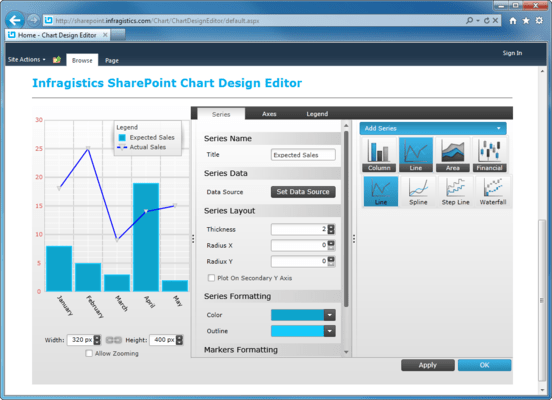
Data Chart - Enjoy a seamless design experience that allows you to spend your time interpreting your data rather than figuring out how to see it and present it. If your data is in a SharePoint list, or exposed through Microsoft BCS (Business Connectivity Services) you can point to your data and quickly define the axes of your chart. Customizing the look and feel of the chart is simple, as is overlaying multiple data sets onto the same chart. Data Chart types include:
Area Series
Column Series
Line Series
Spline Area Series
Spline Series
Step Area Series
Step Line Series
Waterfall Series
Range Area Series
Range Column Series
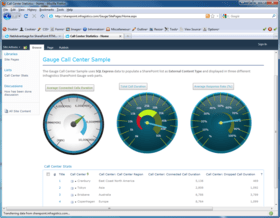
Gauge - Create dashboards of Key Performance Indicators by binding your data to the Gauge Web part. You can customize both radial and linear gauges to demonstrate where trouble begins and ends, so that you can quickly spot business areas that require your attention. Use single display value radial or linear gauges to provide sales forecasts based on information regularly processed from your data warehouse. Engineering organizations can create sophisticated radial or linear gauges with multi-value displays to expose insights such as quality control information with near real-time defect rates.
Radial Gauge: Use the multi-scale, round or semi-round Radial Gauge dials and create key performance indicators with the look and feel of an automotive console or aircraft cockpit.
Linear Gauge: Use the Linear Gauge in the same way you would use a classic thermometer. Display values as one or more straight line measurements that you can orient vertically or horizontally.
Map - Using open data sources like Microsoft Bing, Open Street Map and Geographic Information Systems you can build interactive multi-layered maps in no time. It’s straightforward to apply a data source with appropriate geographical information to a map and format the result to provide a visual representation of the data. For example, you could show population density by country and drill down to state, county and even deeper as needed. Energy companies could show the distribution of oil wells and other assets. Sales managers can display sales results by region and drill down to show local offices. The Map Web part includes the following key features:
Map Layers
Map Tile Source
Elements (points / pins) layer
Path layer
Navigational panes
Color Swatch panes
Color map elements and paths
Scale panes
Key Features
Multi layered Maps-Create rich mapping applications that allow you to overlay your own value-added map elements. Get an instant view and show anything including seating charts, floor plans, warehouse contents, and yes—geographic maps, too.
Geo-Imagery Support – Enable users to deep zoom into satellite, aerial, remote sensing, street map, or other kinds of tiled imagery from several popular service providers.
Customizable Layout - Design the layout of legends, the navigation pane and all other aspects of map layers, map elements to fit the application you are building.
Geospatial Data Integration - Associate your own data sources (e.g., a .dbf file or Microsoft SQL Server 2008) with map elements. Geometry and geography data types are supported.
Color Model - Comprehensive coloring ability and choropleth shading enables you to fulfill many common mapping scenarios such as mapping states or county populations, color-coding regions by rainfall amount or any other business data and scaling colors to the data value range.
Extend your SharePoint Experience with easily configurable and scalable Web parts.
Pricing: Infragistics NetAdvantage for SharePoint 2011 1 Server Subscription License - Includes updates, upgrades and new components for 1 year, Infragistics NetAdvantage for SharePoint 2011 1 Server Subscription License - 90-Day Early Bird Subscription Renewal - (can be purchased up to the end of the 10th month of your existing subscription), Infragistics NetAdvantage for SharePoint 2011 1 Server Subscription License - 60-Day Early Bird Subscription Renewal - (can be purchased between the first and last day of the 11th month of your existing subscription), Infragistics NetAdvantage for SharePoint 2011 1 Server Subscription License - Subscription Renewal - (can be purchased until the last day of the 12th month of your existing subscription), Infragistics NetAdvantage for SharePoint 2011 with Priority Support 1 Server Subscription License with Priority Support - Includes updates, upgrades and new components for 1 year, Infragistics NetAdvantage for SharePoint 2011 with Priority Support 1 Server Subscription License with Priority Support - 90-Day Early Bird Renewal - (can be purchased up to the end of the 10th month of your existing subscription), Infragistics NetAdvantage for SharePoint 2011 with Priority Support 1 Server Subscription License with Priority Support - 60-Day Early Bird Renewal - (can be purchased between the first and last day of the 11th month of your existing subscription), Infragistics NetAdvantage for SharePoint 2011 with Priority Support 1 Server Subscription License with Priority Support - Subscription Renewal - (can be purchased until the last day of the 12th month of your existing subscription)
Evals & Downloads: Read the Infragistics NetAdvantage for SharePoint help file, Read the Infragistics NetAdvantage for SharePoint license agreement, Download the Infragistics NetAdvantage for SharePoint 2011 evaluation on to your computer - Displays Evaluation Messages
Operating System for Deployment: Windows Server 2008
Architecture of Product: 32Bit, 64Bit
Product Type: Add-In
Compatible Containers: Microsoft Visual Studio 2010, Microsoft Visual Basic 2010, Microsoft Visual C# 2010, Microsoft SharePoint 2010, .NET Framework 4.0, Silverlight 4
Keywords: Infragistics NetAdvantage for SharePoint
infragistics, netadvantage, infragistic, ultra suite, calendar widgets, data widgets, netadvantage net, netadvantage 2009, infragistics 2009, infragistics controls, netadvantage for net, infragistics asp.net, activethreed, protoview, sheridan software
Product Suites Suite bundles bundle
Chart Charting Charts Graph Graphing Graphs
Instrumentation instrument instruments
Mapping Maps Map GIS geographic geography
User Interface UI
Part numbers: PC-542451-412972 542451-412972 PC-542451-412973 542451-412973 PC-542451-412974 542451-412974 PC-542451-412975 542451-412975 PC-542451-412976 542451-412976 PC-542451-412977 542451-412977 PC-542451-412978 542451-412978 PC-542451-412979 542451-412979
Mfr. Part No: 699900 69990P 699960 69996P 699990 69999P 69Y0C 69Y0CP
」技術提供發佈者
首要類別
相關產品
相關類別