Infragistics NetAdvantage for .NET + WPF - 개요

by Infragistics - 상품타입: Component / ASP.NET WebForms / ASP.NET AJAX (ATLAS) / .NET WinForms / .NET Class / .NET WPF / 100% Managed Code / AJAX

주의: NetAdvantage for .NET + WPF의 제품명은 현재 NetAdvantage for .NET 로 변경되었습니다

요약

Infragistics NetAdvantage for .NET + WPF by Infragistics

WPF(Windows Presentation Foundation) 및 .NET 사용자 인터페이스 기능을 어플리케이션에 추가. NetAdvantage for .NET + WPF는 Windows Presentation Foundation(WPF) 플랫폼을 위해 특별하게 설계하고 개발한 컨트롤 + Windows Forms, ASP.NET, Tablet PC용 상업적 클래스 사용자 인터페이스를 설계하는 광범위한 프레젠테이션 레이어 툴셋인 NetAdvantage for .NET을 포함합니다. Infragistics NetAdvantage for .NET는 그리드, 일정 관리(scheduling), 차트 작성, 도구 모음, 메뉴, 리스트 바, 트리, 탭, 탐색 바, UI, 편집기를 포함합니다. NetAdvantage for WPF는 Windows Vista Aero와 Office 2007의 시각적 테마가 내장된 데이터그리드, 카루젤(carousel), 편집기와 같은 WPF용 비즈니스 등급 개발자 컴포넌트를 포함합니다. 개발자는 이제 WPF 툴셋으로 구축을 시작하고 고해상도 그래픽, 풍부한 스타일링과 애니메이션 기능, 통합한 UI 시각화 기술을 포함해 WPF 플랫폼의 장점을 활용할 수 있습니다.


NetAdvantage for .WPF 컴포넌트에 도입한 항목은 다음과 같습니다.

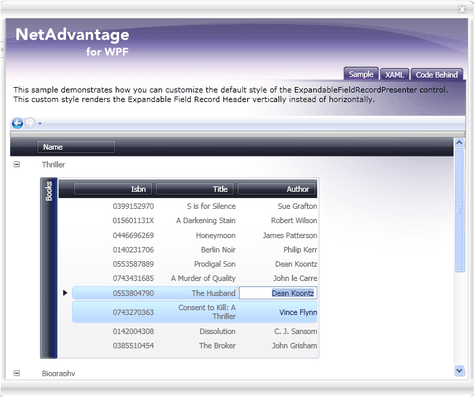
xamDataGrid - 유연한 WPF 데이터 그리드인 xamDataGrid는 표 스타일 데이터 표현의 전통적인 유형을 사용하고 WPF에 통합 합니다.

데이터 바인딩 - XmlDataProvider와 ObjectDataProvider를 포함하는 다양한 데이터 소스 및 DataSets, Arrays, Collections와 같은 전통적인 객체를 지원하는 단일 데이터 바인딩 속성을 통해 개발을 간소화합니다.

사실적 계층적 데이터 표현 - 복잡한 계층적 데이터 구조를 자동으로 감지하고 표시합니다.

필드 정렬, 그룹화, 크기 조절 - 사용자가 기대하는 모든 기본적 데이터 조직 기능

연속 데이터 편집 경험 - 쉬운 새 레코드 생성, 인라인 데이터 편집, 편리한 데이터 편집 컨트롤

성능 - xamDataGrid는 Infragistics Lazy Loading 기술과 WPF의 고유 UI 시각화 기술을 조합해 수천 개의 데이터 레코드를 처리하므로, 사용자는 방대한 정보를 처리할 수 있습니다.

표현 - 디자이너는 xamDataGrid의 스타일링과 배치 기능을 이용해 고급 스타일의 몰입형 사용자 인터페이스를 갖춘 어플리케이션을 설계할 수 있습니다.

xamCarouselPanel - 검색과 같은 간단한 객체 배치에 최적으로 사용할 수 있는 높은 유연성의 배치 컨트롤입니다. xamCarouselPanel은 개발자와 디자이너에게 독특한 대화식 몰입형 어플리케이션을 생성하는 툴을 제공합니다.

경로 기반 배치 - xamCarouselPanel는 WPF 경로 객체에 기초해 배치 유연성을 제공합니다.

경로 효과 - 5가지 유형의 경로 효과를 이용해 사용자 인터페이스에 섬광을 추가합니다.

xamCarouselListBox - ListBox 컨트롤의 친숙성은 xamCarouselPanel의 혁신적인 배치 기능을 만족합니다.

기본적인 데이터 바인딩 기능을 포함하는 표준 ListBox 컨트롤의 간단하고 친숙한 객체 모델

필요한 유연성을 제공하도록 배치에서 xamCarouselPanel을 사용합니다.

xamDataCarousel - xamDataCarousel은 유연한 데이터 배치 컨트롤입니다.

xamDataGrid와 동일한 데이터 아키텍처에 기초하며 계층적 데이터 배치를 포함해 데이터 바인딩 기능을 제공합니다. 또한 그룹화 및 정렬 기능을 포함합니다.

현대적인 데이터 중심 사용자 인터페이스를 생성할 수 있도록 xamCarouselPanel의 배치 기능을 이용합니다.

xamDataPresenter - xamDataPresenter는 유연한 사용자 정의 가능 사용자 인터페이스를 제공할 수 있도록 단일 컨트롤에서 xamDataGrid와 xamDataCarousel을 조합합니다.

xamDataGrid와 xamDataCarousel를 이용해 필요한 모든 데이터 관리와 배치 기능을 제공합니다.

단일 속성을 설정해 데이터 보기를 선택할 수 있습니다. 전통적인 표 보기를 카루젤(carousel) 보기로 변경하기 쉽습니다.

xamEditors - xamTextEditor 및 xamMaskedEditor 데이터 편집 컨트롤을 포함합니다. 독립형 편집기로 사용하거나 xamDataGrid에 통합하기 쉬운 xamEditor 컨트롤은 사용자 입력 데이터의 유효성을 보장하는 데 도움을 줍니다.

템플릿 기반 아키텍처는 컨트롤의 사용자 인터페이스에 대한 완벽한 제어를 제공합니다.

어플리케이션을 통해 데이터 편집 경험을 확장하도록 xamDataGrid에 통합하기 쉽습니다.

테마팩 - NetAdvantage for WPF는 Infragistics Visual Design Group으로 설계한 15가지 테마 팩을 포함해 단일 속성의 설정으로 컨트롤에 깔끔하고 현대적인 모양을 제공하기 쉽습니다.

Windows 테마는 Luna(Windows XP), Aero(Windows Vista), Royale(Windows Media Center Edition)을 포함합니다.

Office 2007 테마는 Office 2007 Black, Office 2007 Blue, Office 2007 Silver를 포함합니다.

Infragistics 디자인 테마는 Hulk, Leaf, Fall, Lipstick, Wind, Water, Onyx를 포함합니다.

Windows Presentation Foundation(WPF) 플랫폼을 지원하는 NetAdvantage for WPF 컨트롤은 시각 디자이너와 소프트웨어 개발자 팀의 자연스러운 협력이 가능하도록 어플리케이션의 거동으로부터 모양과 느낌을 깨끗하게 분리할 수 있습니다. 시각 디자이너는 XAML과 Microsoft Expression Blend를 이용해 NetAdvantage for WPF 컨트롤의 모양과 느낌을 디자인하고, 소프트웨어 개발자는 관리형 C# 또는 Visual Studio의 VB.NET 코드를 이용해 컨트롤 움직임을 정의할 수 있습니다.

Infragistics NetAdvantage for .NET에 포함되는 항목

Windows Forms의 풍부한 클라이언트 컴포넌트

WinGrid

WinCalcManager

WinChart

WinCombo

WinDataSource

WinDockManager

WinExtras

WinAnimation

WinButton

WinCalculator

WinDropdownButton

WinPopupContainer

WinLabel

WinFormattedLinkLabel

WinFormattedTextEditor

WinProgressBar

WinScrollBar

WinStatusBar

WinTooltipManager

WinEditors

WinCalculator

WinCalculatorDropdown

WinCheckEditor

WinColorPicker

WinComboEditor

WinCurrencyEditor

WinDateTimeEditor

WinFontNameEditor

WinFormattedLinkLabel

WinMaskedEdit

WinNumericEditor

WinOptionSet

WinProgressBar

WinTextEditor

WinExplorerBar

WinGridExcelExporter

WinGroupBox

WinInkProvider

WinLayoutManagers

WinListbar

WinListView

WinPrinting

WinPrintDocument

WinPrintPreviewControl

WinPrintPreviewThumbnail

WinGridPrintDocument

WinSchedulePrintDocument

WinSchedule

WinDayView

WinWeekView

WinMonthViewSingle

WinMonthViewMulti

WinCalendarCombo

WinCalendarInfo

WinCalendarLook

WinSpellChecker

WinTabbedMdi

WinTabs

WinToolbars

WinTree

Web Forms 컴포넌트

WebAsyncRefreshPanel

WebGrid

WebCalcManager

WebChart

WebCombo

WebDateChooser

WebEditors

WebCurrencyEdit

WebDateTimeEdit

WebMaskEdit

WebNumericEdit

WebPercentEdit

WebTextEdit

WebGridExcelExporter

WebGroupBox

WebHtmlEditor

WebImageButton

WebListbar

WebMenu

WebNavBar

WebPanel

WebSpellChecker

WebTab

WebToolbar

WebTree

WebResizingExtender

WebSchedule

WebCalendar

WebCalendarView

WebDayView

WebMonthView

WebScheduleInfo

WebScheduleSqlClientProvider

WebScheduleOleDbProvider

WebWeekView

또한 NetAdvantge는 NetAdvantage AppStylist를 포함합니다.

What's new in Infragistics NetAdvantage for .NET 2007 Volume 3?

Windows Forms:

Infragistics WinNavigationBar™ - The new WinNavigationBar breadcrumb control drives users through any hierarchical navigation model your application uses, without the need for multiple wizard dialogs

Navigation Toolbar - WinToolbars™ enhancement - delivers ready-made forward, back, and recent history navigation

Vista Look without Vista OS - Get the look of Vista without WPF due to Vista-style enhancements to the WinEditors™ and WinScrollbar™ controls

WinChart™ - Export your charts to PDF or XLS, now with NEW Histogram chart type. Plus many more enhancements

ASP.NET:

WebChart™ - Export your charts to PDF or XLS, now with NEW Histogram chart type. Plus many more enhancements

WebHTMLEditor - New features in the WYSIWYG (What You See Is What You Get) HTML editor enhance the user experience, and give you greater control over the text and action event handlers you can write in JavaScript on the client

Document Sharing

The document export engine delivers XPS and PDF export capabilities that enable new document sharing and reporting

The new WebGridDocumentExporter™ component can quickly and easily export your WebGrid™ data into workbooks

This release enhanced the Infragistics Excel class library to handle formulas, images, and the import of Excel workbooks on the Web

NetAdvantage 2007 Volume 2의 새로운 기능

Windows Forms:

Infragistics 문서 내보내기 엔진 - 신규

PDF와 XPS 문서를 생성할 수 있는 Infragistics 문서 내보내기 엔진

새롭운 엑셀 내보내기 기능 - 개선

그리드에서 엑셀로 내보내기 기능을 통해 향상된 워크플로우

데스크탑 경보 컨트롤 - 신규

통지 - 새로운 Infragistics WinDesktopAlert는 어플리케이션에서 주변 통지가 가능합니다.

Gridbag 배치 패널 - 개선

개발자는 GridBagLayoutPanel를 이용해 크기 변경의 걱정 없이 만든 폼을 자유롭게 배치할 수 있습니다.

게이지 - 신규

KPI 시각화 - 게이지는 주요 성능 수치를 이해하는 명확하고 빠른 수단을 제공합니다. WinGauge는 개별 시각적 컴포넌트와 그래픽을 조합해 3가지 주요 시각적 표시인 방사, 선, 디지털 유형을 위한 다면 게이지를 생성합니다.

ASP.NET

게이지 - 신규!

KPI 시각화 - 게이지는 주요 성능 수치를 이해하는 명확하고 빠른 수단을 제공합니다. WinGauge는 개별 시각적 컴포넌트와 그래픽을 조합해 3가지 주요 시각적 표시인 방사, 선, 디지털 유형을 위한 다면 게이지를 생성합니다.

검색 엔진 크롤러(Crawler) 개선 - 신규

검색 엔진의 친숙한 출력 - 검색 엔진 성능을 높여 웹사이트 가시성을 향상

PartNumbers:

PurchaseOptions:

Resources: Read the Infragistics NetAdvantage End User License Agreement, Read the NetAdvantage for WPF License Agreement, Download the NetAdvantage Select 2008 Volume 2 evaluation on to your computer - Expires After 15 Days, Download the Infragistics NetAdvantage for WPF 2008 Volume 1 evaluation on to your computer - Expires After 20 Days

OS: Windows Vista, Windows XP

제품 아키텍쳐: 32Bit, 64Bit

툴 타입: Component

콤포넌트 타입: ASP.NET WebForms, ASP.NET AJAX (ATLAS), .NET WinForms, .NET Class, .NET WPF, 100% Managed Code, AJAX

호환성있는 플랫드폼: Microsoft Visual Studio 2008, Microsoft Visual Studio 2005, Microsoft Visual Basic 2008, Microsoft Visual Basic 2005, Microsoft Visual C++ 2008, Microsoft Visual C++ 2005, Microsoft Visual C# 2008, Microsoft Visual C# 2005, Microsoft Windows SharePoint Services, .NET Framework 3.0, .NET Framework 2.0

제품 클래스: 유저인터페이스 콤포넌트

Search Items: New Version Mar 03, New Version Jun 03, New Version Oct 03, New Version Feb 04, New Product June 04, New Product Oct 04, New Product Feb 05, New Product Mar 05, New Product June 05, New Product Oct 05

Keywords: Enterprise Partner

상품검색

검색어를 입력해주세요:

화면 바로가기 갤러리

Award Award