by Infragistics - Product Type: Component / .NET WPF
Infragistics NetAdvantage for WPF by Infragistics
NetAdvantage controls, designed and developed specifically for the Windows Presentation Foundation (WPF) platform. Infragistics NetAdvantage for WPF includes business-grade developer components for WPF, including datagrids, carousels and editors, with built-in visual themes including Windows Vista Aero and Office 2007. Developers can start building with WPF toolset now and can take advantage of the pure WPF platform features including: high resolution graphics, rich styling and animation capabilities and integrated UI virtualization technology.
Below is an introduction to the WPF components:
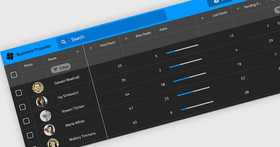
xamDataGrid – a flexible WPF data grid, the xamDataGrid brings the time honored familiarity of tabular style data presentation and infuses it into WPF.
Data binding - simplify development with a single data binding property that supports a wide variety of data sources, including the XmlDataProvider and ObjectDataProvider, and more traditional objects such as DataSets, Arrays or Collections
True hierarchical data rendering - automatically detect and display complex, hierarchical data structures
Field sorting, grouping and resizing - all of the basic data organization features your users expect
Seamless data editing experience - easy new record creation, inline data editing, and convenient data editing controls
Performance - utilizing WPF’s native UI Virtualization technology, combined with Infragistics Lazy Loading technology, the xamDataGrid can handle thousands of data records, letting your users consume volumes of information
Presentation - designers can leverage the styling and layout capabilities of the xamDataGrid to design applications with highly stylized, immersive user interfaces
xamCarouselPanel - highly flexible layout control, which can best be used for simplified object layouts such as for navigation. The xamCarouselPanel gives developers and designers alike a tool with which to create unique, interactive and immersive applications.
Path-based layout - based on the WPF Path object, the xamCarouselPanel gives you layout flexibility
Path Effects - utilize five types of Path Effects to add flair to your user interface
xamCarouselListBox - the familiarity of the ListBox control meets the innovative layout capabilities of the xamCarouselPanel.
Simple and familiar object model of the standard ListBox control, including basic data binding capabilities
Leverages the xamCarouselPanel for layout, giving you the flexibility you need
xamDataCarousel - the xamDataCarousel is a flexible data layout control.
Based on the same data architecture as the xamDataGrid, giving you databinding capabilities, including hierarchical data layout. Also includes Grouping and Sorting capabilities
Leverages the layout capabilities of the xamCarouselPanel allowing you to create modern data-driven user interfaces
xamDataPresenter - the xamDataPresenter combines the xamDataGrid and the xamDataCarousel into a single control, allowing you to provide a flexible and customizable user interface to your users.
Utilizing the xamDataGrid and xamDataCarousel to give you all the data management and layout features you need
Allow your users to choose their data View with a single property setting. Easily change from traditional tabular view to carousel view
xamEditors - included in this release are the xamTextEditor and xamMaskedEditor data editing controls. Use as stand-alone editors, or easily integrate into the xamDataGrid, the xamEditor controls help you ensure the validity of your user-entered data.
Template based architecture gives you maximum control over the control's user interface
Easily integrated into the xamDataGrid to extend the data editing experience through your application
Theme Packs - NetAdvantage for WPF includes 15 Theme Packs, designed by the Infragistics Visual Design Group, making it easy for you to give the controls a clean and modern look with a single property setting.
Windows Themes including Luna (Windows XP), Aero (Windows Vista) and Royale (Windows Media Center Edition)
Office 2007 Themes including Office 2007 Black, Office 2007 Blue and Office 2007 Silver
Infragistics designed Themes include: Hulk, Leaf, Fall, Lipstick, Wind, Water, and Onyx
Fully supporting the Windows Presentation Foundation (WPF) platform, NetAdvantage for WPF controls enable a clear separation of application look & feel from behaviour, allowing teams of visual designers and software developers to collaborate more naturally. Visual Designers can style NetAdvantage for WPF control’s look and feel using XAML and Microsoft Expression Blend and software developers can define control behaviour using managed C# or VB.NET code with Visual Studio.
What’s new in NetAdvantage for WPF 2008 Volume 1?
xamDockManager - NEW!
Enable end users to reconfigure their work environment in ways that make the most effective layout of screen real estate by docking, un-docking and repositioning panels.
Easily deliver rich and usable UIs with an easy-to-use docking manager control that handles all of the layout mechanics for you.
xamDataGrid adds Summary Fields
The xamDataGrid and xamDataPresenter GridView feature new row aggregation features that allow your data-intensive grids to summarize values calculated with any of several mathematical calculations such as min, max and average.
Summary fields have been designed with the extensibility to allow developers to plug-in their own calculation logic, enabling summary calculations of arbitrary complexity.
What’s new in NetAdvantage for WPF 2007 Volume 2?
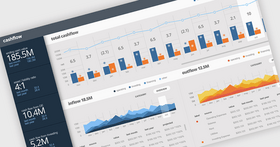
xamChart - The xamChart is a new visual WPF control that presents your heavy-duty data using graphics to enable users to more quickly analyze and understand its relevance. This WPF chart control displays values using columns, pie wedges, cylinders and more using the advanced graphics rendering capabilities inherent in the WPF platform.
Chart Types - The xamChart control supports 25 different chart types, which will allow you to select the perfect look to accent the data in your application.
xamChart includes all of the following chart types:
Area chart
Bar chart
Bubble chart
Candle chart
Column chart
Cylinder bar chart
Cylinder chart
Doughnut chart
Line chart
Pie chart
Point chart
Scatter chart
Scatter line chart
Spline chart
Stacked 100% area chart
Stacked 100% bar chart
Stacked 100% column chart
Stacked 100% cylinder bar chart
Stacked 100% cylinder chart
Stacked area chart
Stacked bar chart
Stacked column chart
Stacked cylinder bar chart
Stock chart (OHLC bar)
3D Rendering - 3D graphics rendering can be turned on for many chart types. Control the perspective, texture and lighting to make an affective display that impresses while it also informs.
Composite Charts - Simply add a couple series to the xamChart control and bind them to your data. By making each series render using a different chart type you can create complex composite charts that combine all the points of view that you need to best describe the data's importance.
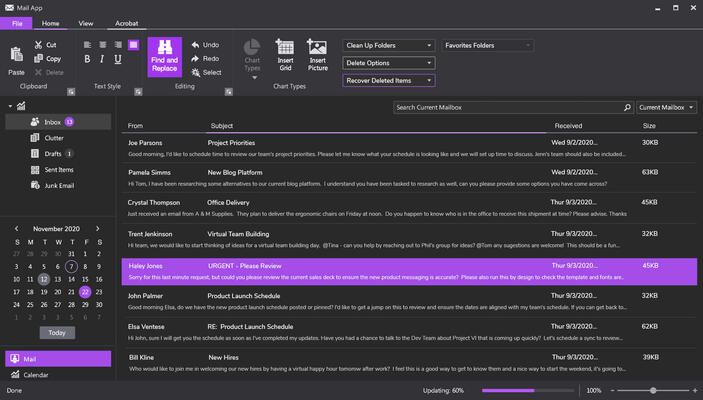
xamRibbon - The xamRibbon™ control is a menu control that replicates the Microsoft Office 2007 Ribbon functionality in a Microsoft Windows Presentation Foundation (WPF) application. Instead of using the plain, default, drop-down menu of decades past, you can use xamRibbon to give your application a stylish look and feel. Not only can you improve your application's look and feel, you can also improve usability by using xamRibbon's many features.
Application Menu - The application menu is the main menu of the application. The application menu is divided into three separate areas:
The left area displays buttons intended for file operations
The right area displays buttons similarly to the left area. Another use for the right area might be a most recently used list
The bottom area displays buttons such as application options or an exit button
Quick Access Toolbar - The Quick Access Toolbar (QAT) is a small, user-configurable toolbar that is always visible either above (default) or below the Ribbon control. The QAT's versatility is shown when adding any of the Ribbon tools to it; in fact, you can add an entire Ribbon group to the QAT with ease.
Tabs and Tab Groups - If you have ever used a Tab in an application, xamRibbon's object model will quickly become familiar to you. The xamRibbon control includes a collection of tabs, each with a collection of groups, each group with a collection of tools. This structure allows you to organize tools into functionally-related application tasks that your end users can easily discover.
xamComboEditor - The xamComboEditor is an editor control that provides a drop-down list from which your users can select an item. As with the other xamEditors, the xamComboEditor can be plugged in to the xamDataGrid for use as an in-line data editor with drop-down list capabilities. Now it's easy for your users to edit the value of a data grid or data presenter cell from an enumerable collection. This can help make your WPF data-driven applications more user friendly, and decrease the risk of typographic errors during data entry.
PartNumbers: PC-517694-160293 517694-160293 PC-517694-160294 517694-160294 PC-517694-160295 517694-160295 PC-517694-160296 517694-160296 PC-517694-160297 517694-160297 PC-517694-160298 517694-160298 PC-517694-160299 517694-160299 PC-517694-160300 517694-160300 PC-517694-160301 517694-160301 PC-517694-160302 517694-160302 PC-517694-160304 517694-160304 PC-517694-160305 517694-160305
Publisher PartNumbers: 9681C 9681CP 9681CU 9681PU 9681V 9681VP 969900 96990P 969960 96996P 969990 96999P
PurchaseOptions: Infragistics NetAdvantage for WPF 2008 Volume 1 (includes annual subscription) 1 Developer Subscription License - Includes updates, upgrades and new components for 1 year , Infragistics NetAdvantage for WPF 2008 Volume 1 (includes annual subscription) 1 Developer Subscription License - Upgrade from any previous Infragistics NetAdvantage, Protoview or Sheridan product , Infragistics NetAdvantage for WPF 2008 Volume 1 (includes annual subscription) 1 Developer Subscription License - 90-Day Early Bird Subscription Renewal - (can be purchased up to the end of the 10th month of your existing subscription*) , Infragistics NetAdvantage for WPF 2008 Volume 1 (includes annual subscription) 1 Developer Subscription License - 60-Day Early Bird Subscription Renewal - (can be purchased between the first and last day of the 11th month of your existing subscription*) , Infragistics NetAdvantage for WPF 2008 Volume 1 (includes annual subscription) 1 Developer Subscription License - Subscription Renewal - (can be purchased until the last day of the 12th month of your existing subscription) , Infragistics NetAdvantage for WPF 2008 Volume 1 with Priority Support (includes annual subscription) 1 Developer Subscription License with Priority Support - Includes updates, upgrades and new components for 1 year , Infragistics NetAdvantage for WPF 2008 Volume 1 with Priority Support (includes annual subscription) 1 Developer Subscription License with Priority Support - Upgrade from any previous Infragistics NetAdvantage, Protoview or Sheridan product , Infragistics NetAdvantage for WPF 2008 Volume 1 with Priority Support (includes annual subscription) 1 Developer Subscription License with Priority Support - 90-Day Early Bird Subscription Renewal - (can be purchased up to the end of the 10th month of your existing subscription*) , Infragistics NetAdvantage for WPF 2008 Volume 1 with Priority Support (includes annual subscription) 1 Developer Subscription License with Priority Support - 60-Day Early Bird Subscription Renewal - (can be purchased between the first and last day of the 11th month of your existing subscription*) , Infragistics NetAdvantage for WPF 2008 Volume 1 with Priority Support (includes annual subscription) 1 Developer Subscription License with Priority Support - Subscription Renewal - (can be purchased until the last day of the 12th month of your existing subscription) , Infragistics NetAdvantage for WPF Corporate 2008 Volume 1 (A Corporate license gives you the convenience of one key for multiple (minimum 10) licenses) 1 Developer Subscription License - Includes updates, upgrades and new components for 1 year (minimum quantity 10) , Infragistics NetAdvantage for WPF Corporate 2008 Volume 1 (A Corporate license gives you the convenience of one key for multiple (minimum 10) licenses) 1 Developer Subscription License with Priority Support - Includes updates, upgrades and new components for 1 year (minimum quantity 10)
Resources: Read the NetAdvantage for WPF License Agreement, Download the Infragistics NetAdvantage for WPF 2008 Volume 1 evaluation on to your computer - Expires After 20 Days
Operating System for Deployment: Windows Vista, Windows XP
Architecture of Product: 32Bit, 64Bit
Product Type: Component
Component Type: .NET WPF
Compatible Containers: Microsoft Visual Studio 2008, Microsoft Visual Studio 2005, Microsoft Visual Basic 2008, Microsoft Visual Basic 2005, Microsoft Visual C++ 2008, Microsoft Visual C++ 2005, Microsoft Visual C# 2008, Microsoft Visual C# 2005, .NET Framework 3.5, .NET Framework 3.0
Product Class: User Interface Components
Search Items: New Version Mar 03, New Version Jun 03, New Version Oct 03, New Version Feb 04, New Product June 04, New Product Oct 04, New Product Feb 05, New Product Mar 05, New Product June 05, New Product Oct 05
Keywords: User Interface Collections UI User Interface UI Toolbar tool bar tool-bar Toolbars Menu Menus Product Suites Suite bundles bundle Infragistics Sheridan Protoview Grid Grids Table Tables DataGrid DataGrids Entry data-entry Enterprise Partner
Publisher
Primary Category
Related Products
Related Categories