Infragistics TestAdvantage for Windows Forms (for HP QuickTest Professional software) - Application - Volume 2 - Récapitulatif

par Infragistics - Type de produit : Produit complémentaire

Récapitulatif

Infragistics TestAdvantage for Windows Forms (for HP QuickTest Professional software) by Infragistics

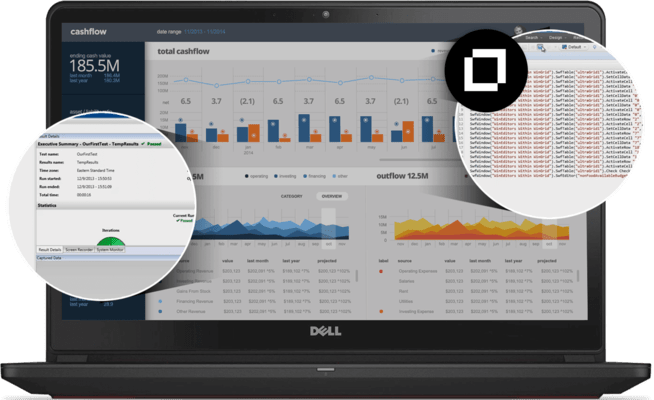
Enable automated testing of the presentation layer. Infragistics TestAdvantage for Windows Forms (for HP QuickTest Professional) is a collection of Custom Libraries built using HP QuickTest Professional .NET addin extensibility. Infragistics TestAdvantage for Windows Forms (for HP QuickTest Professional) enables automated testing of the presentation layer, allowing developers to fully regression test Windows Forms applications with user interfaces developed using Infragistics NetAdvantage. It allows development teams to effortlessly extend the regression testing process to the presentation layer. You can quickly record and replay script commands for Windows Forms applications built using NetAdvantage instead of using generic mouse coordinates.

Infragistics TestAdvantage for Windows Forms (for HP QuickTest Professional) allows developers to automate the testing of the presentation layer in Windows Forms applications by extending HP QuickTest Professional to support Infragistics NetAdvantage. With the absolute knowledge of the NetAdvantage Windows Forms object model, it allows development teams to effortlessly extend the regression testing process to the presentation layer.

Three Top Benefits

Extend HP QuickTest Pro test suite with minimal training

Quickly record and replay script commands for Windows Forms applications built using NetAdvantage instead of using generic mouse coordinates

Fast playback enables more test coverage of applications and ultimately higher quality software

Infragistics Windows Forms Elements That Have Corresponding Custom Libraries Include*

WinScrollBar

WinChart

WinEditors - WinCalculator, WinCalculatorDropdown, WinCheckEditor, WinColorPicker, WinComboEditor, WinCurrencyEditor, WinDateTimeEditor, WinFontNameEditor, WinMaskedEdit, WinNumericEditor, WinOptionSet, WinText Editor, WinTimeZoneEditor

WinExplorerBar

WinGrid - WinCombo, WinDropdown, WinGrid

WinListBar

WinMisc - WinButton, WinDropDownButton

WinSchedule - WinCalendarCombo, WinDayView, WinMonthViewMulti, WinMonthViewSingle, WinWeekView

WinToolbars - WinDock, WinStatusBar, WinTabbedMdiManager, WinTabControl, WinTabStripControl,WinToolbarsManager

WinTree

*Other Infragistics Windows Forms elements do not have libraries since they are either non-visual elements or require no user interaction.

Infragistics TestAdvantage for Windows Forms (for HP QuickTest Professional) is licensed on a per computer basis. Subscription and Priority support includes full source code for all custom libraries, all new products, updates and upgrades added to Infragistics TestAdvantage for Windows Forms (for HP QuickTest Professional) for one year plus Priority Phone and Rapid Response online support.

What's New in TestAdvantage for Windows Forms (for HP QuickTest Professional Software) 2008 Volume 2?

WinGrid - Enhanced - Complete automated UI testing support for the row edit template and grid cell proxy. Controls used on custom Forms for the row edit template record and replay the same way, whether or not they are on a row edit template custom Form.

WinChart - Enhanced - Support for capturing mouse actions such as mouse over, mouse out and mouse click on the data items displayed hierarchically by the new treemap chart type. Test scripts receive data row and data column indexes corresponding to the data item underlying any region displayed by the treemap.

What’s new in Infragistics TestAdvantage for Windows Forms (for HP QuickTest Professional) 2008 Volume 1?

Support for New and Enhanced NetAdvantage for Windows Forms Controls Released in NetAdvantage for Windows Forms 2008 Volume 1, including:

WinTrackBar - NEW - The TrackBar enables users to select an item in scale by sliding a tickmark across a line. Its value can be used for setting colors or other items that may be on a numeric line.

WinTree – Enhanced - The TreeView in Vista took on an animation as the user scrolls to deeper levels. This negates the need for a horizontal scrollbar and allows the end user to focus purely on the node they have selected. This enhancement increases the usability of the tree.

WinListView – Enhanced - An additional setting has been added to WinListView that enables auto resizing of columns which is consistent with functionality found in the Microsoft ListView.

Support for New and Enhanced NetAdvantage for Windows Forms Controls Released in TestAdvantage HP Edition 2007 Volume 3, including:

The new WinNavigationBar breadcrumb control

New Navigation Toolbar (forward, back, and recent history navigation)

WinEditors, WinScrollbar and WinChart enhancements

What's new in Infragistics TestAdvantage HP Edition 2007 Volume 2

Support for New and Enhanced NetAdvantage for Windows Forms Controls Released in NetAdvantage for Windows Forms 2007 Volume 2

PartNumbers: PC-515651-161518 515651-161518 PC-515651-161517 515651-161517

Publisher PartNumbers: 85822 8599T

PurchaseOptions: Infragistics TestAdvantage for Windows Forms (for HP QuickTest Professional software) 2008 Volume 2 1 Seat License - with Subscription, Priority support and source , Infragistics TestAdvantage for Windows Forms (for HP QuickTest Professional software) 2008 Volume 2 1 Seat License Subscription Renewal

Resources: Read the Infragistics TestAdvantage for Windows Forms (for HP QuickTest Professional) help file, Browse the Infragistics TestAdvantage for Windows Forms (for HP QuickTest Professional) Quick Start Guide, Download the Infragistics TestAdvantage for Windows Forms (for HP QuickTest Professional) 2008 Volume 2 evaluation on to your computer - Expires After 30 Days

Operating System for Deployment: Windows Vista, Windows XP, Windows Server 2003, Windows 2000

Architecture of Product: 32Bit

Product Type: Add-In

Search Items: New Product Jan 05, New Product Feb 05, New Product May 05, New Product July 05

Keywords: Debugging debug debugs Testing Test Tests Infragistics Sheridan Protoview Enterprise Partner Infragistics test advantage Infragistics TestAdvantage Suite Infrag Inf Infragistix Infragisticks Product Suites Sheridan Protoview IG testing tests Mercury Interactive HP QuickTest Professional Quick Test Pro

Recherche produit

Entrez vos critères de recherche :

Galerie de copies d'écran

Award