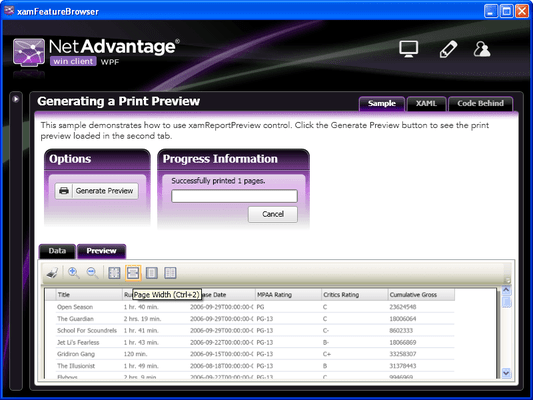
Screenshot Preview

Infragistics WPF Reporting - Summary

by Infragistics - Product Type: Component / .NET WPF / 100% Managed Code / Managed/Unmanaged Code - without COM

Infragistics WPF Reporting is available as part of Infragistics NetAdvantage for .NET and Infragistics NetAdvantage Win Client

If you require information, please visit the pages above or Contact Us for pricing and availability.

Summary

Infragistics WPF Reporting by Infragistics

URLs: infragistics-wpf-reporting, infragistics wpf reporting, infragisticswpfreporting, infragistics

An engine for driving Windows Presentation Foundation printing and exporting. See how easy it is to print and export the visual elements on your screen with the WPF Reporting engine included with the NetAdvantage WPF controls. It streamlines printing of the xamDataGrid control with auto-pagination and high-fidelity to the records your users have expanded or collapsed, presents your reports in its rich print preview window before printing or exporting to the XPS file format, and makes it easier to automatically center your elements on the printed page, relieving you of much of the computation and layout often necessary when programming print jobs.


WPF Reporting key features at a glance:

With Infragistics WPF Reporting your applications can take advantage of these enhanced capabilities:

Print Preview - Display rich previews of your reports having zoom and layout to your end users using the xamReportPreview control.

Report Object Model - Section-based Report object model enables you to create sophisticated multi-page reports.

Pagination - Built-in support for pagination with automatic pagination of xamDataGrid, xamDataPresenter and xamDataCarousel controls.

Layout Elements - Use all variety of templated headers, footers, page numbers, margin and alignment in laying out your reports.

Print Progress - Show users a steady progress bar that tracks the fulfillment of their print requests.

XPS Export - Publish information to the XML Paper Specification (XPS) file format used in Office 2007 and other applications with one call to an Export method.

Add printing functionality to your WPF applications.

Evals & Downloads: Read the Using NetAdvantage elements in Windows Sharepoint Services White Paper - Requires Acrobat Reader, Read the Infragistics NetAdvantage End User License Agreement

Operating System for Deployment: Windows 7, Windows Vista, Windows XP, Windows Server 2003, Windows 2000

Architecture of Product: 32Bit, 64Bit

Product Type: Component

Component Type: .NET WPF, 100% Managed Code, Managed/Unmanaged Code - without COM

Compatible Containers: Microsoft Visual Studio 2010, Microsoft Visual Studio 2008, Microsoft Visual Studio 2005, Microsoft Visual Basic 2010, Microsoft Visual Basic 2008, Microsoft Visual Basic 2005, Microsoft Visual C++ 2010, Microsoft Visual C++ 2008, Microsoft Visual C++ 2005, Microsoft Visual C# 2010, Microsoft Visual C# 2008, Microsoft Visual C# 2005, .NET Framework 4.0, .NET Framework 3.5, .NET Framework 3.0, .NET Framework 2.0

Product Class: User Interface Components

Keywords: infragistics wpf reporting, netadvantage wpf reporting, xamreportpreview, infragisticswpf4.reporting, wpf reporting control, buy infragistics wpf reporting, renew infragistics wpf reporting, infragistics wpf reporting 2010, infragistics wpf reports, netadvantage wpf reports

infragistics, netadvantage, infragistic, ultra suite, calendar widgets, data widgets, netadvantage net, netadvantage 2009, infragistics 2009, infragistics controls, netadvantage for net, infragistics asp.net, activethreed, protoview, sheridan software

Print Preview Printing previews prints

Product Search

Enter search words:

Why buy from ComponentSource?

ComponentSource offers a unique global service, used by over 1,000,000 software developers worldwide.

More Info | About Us

Screenshot Gallery

Click for full screen preview

Screenshot of Infragistics WPF Reporting - .NET WPF - 2010 Vol 1 Screenshot of Infragistics WPF Reporting - .NET WPF - 2010 Vol 1 Screenshot of Infragistics WPF Reporting - .NET WPF - 2010 Vol 1 Screenshot of Infragistics WPF Reporting - .NET WPF - 2010 Vol 1
Award