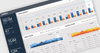
Screenshot Preview

Infragistics xamBulletGraph - Summary

by Infragistics - Product Type: Component / Silverlight

Summary

Infragistics xamBulletGraph by Infragistics

URLs: infragistics-xambulletgraph, infragistics xambulletgraph, infragisticsxambulletgraph, infragistics

Deliver a simple and concise view of key performance indicators (KPIs) to your users in your Silverlight dashboards. Infragistics xamBulletGraph improves on an everyday bar graph because your users can judge at one glance: progress towards goals, ranges and compare multiple measurements. Infragistics xamBulletGraph will find uses in data visualizations where you might ordinarily use a linear gauge, but want the bullet graph's unique ability to display qualitative ranges and multiple metrics. It's also much more compact in size compared to a comparably informative bar graph. You can enliven its look and feel with visually impressive animations, template and style its look and feel, and data bind it to a value.

Infragistics xamBulletGraph Key Features at a Glance

Infragistics xamBulletGraph Uses Space Effectively – xamBulletGraph is one of the most effective Silverlight controls available for presenting meaningful information in little space.

Infragistics xamBulletGraph Featured Measures – xamBulletGraph can track one or more featured measures towards your goals with its characteristic crossbar target.

Infragistics xamBulletGraph Qualitative Ranges – xamBulletGraph lets you show any number of qualitative ranges (determine good, better, best, or other milestones of progress), each with its own style so users can quickly cue in to its meaning.

Infragistics xamBulletGraph Tickmarks – xamBulletGraph lets you control the frequency of its tick marks.

Infragistics xamBulletGraph Custom Labels – xamBulletGraph lets you use percentage or numeric labels with a custom format string.

Infragistics xamBulletGraph Orientation – xamBulletGraph can be oriented horizontally or vertically.

Deliver a simple and concise view of key performance indicators (KPIs) to your users in your Silverlight dashboards.

Evals & Downloads: Read the Using NetAdvantage elements in Windows Sharepoint Services White Paper - Requires Acrobat Reader, Read the Infragistics NetAdvantage End User License Agreement

Operating System for Deployment: Windows 7, Windows Vista, Windows XP

Architecture of Product: 32Bit, 64Bit

Product Type: Component

Component Type: Silverlight

Compatible Containers: Microsoft Visual Studio 2010, Microsoft Visual Studio 2008, Microsoft Visual Studio 2005, Microsoft Visual Basic 2010, Microsoft Visual Basic 2008, Microsoft Visual Basic 2005, Microsoft Visual C++ 2010, Microsoft Visual C++ 2008, Microsoft Visual C++ 2005, Microsoft Visual C# 2010, Microsoft Visual C# 2008, Microsoft Visual C# 2005, .NET Framework 4.0, .NET Framework 3.5, .NET Framework 3.0, .NET Framework 2.0, Silverlight 4

Product Class: User Interface Components

Keywords: infragistics xambulletgraph, xambulletgraph,

infragistics, netadvantage, infragistic, ultra suite, calendar widgets, data widgets, netadvantage net, netadvantage 2009, infragistics 2009, infragistics controls, netadvantage for net, infragistics asp.net, activethreed, protoview, sheridan software

Chart Charting Charts Graph Graphing Graphs

Instrumentation instrument instruments

Product Search

Enter search words:

Why buy from ComponentSource?

ComponentSource offers a unique global service, used by over 1,000,000 software developers worldwide.

More Info | About Us

Award