*What’s new in InstallShield Premier 2009?
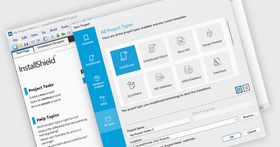
- Microsoft Visual Studio® 2008 Support - InstallShield is now integrated with Visual Studio 2008, enabling development of installations and products within the same Visual Studio interface
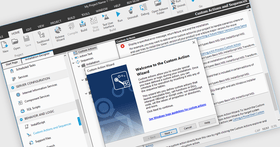
- Support for Managed-Code Custom Actions - InstallShield lets you add managed-code custom actions to Basic MSI, InstallScript MSI, Merge Module, and Web projects. This type of custom action calls a public method in a .NET assembly that is written in managed code such as Visual Basic .NET or C#.
- Support for Installing Multiple Instances of a Product - Support for creating an installation that allows an .msi package to be used to install multiple instances of a product in the same context on the same machine. Use the new Multiple Instances tab for a product configuration in the Releases view to define different instances of your product and configure the properties that are associated with each instance.
- Ability to Associate Setup Prerequisites with Features for Chaining Installations - Associate setup prerequisites with features so that the prerequisites that are associated with features are installed if an end user chooses to install the corresponding features and if the setup prerequisites are not already installed on the system. Including setup prerequisites in a project enables the chaining of multiple .msi files together into a single installation, bypassing the Windows Installer limitation that enables only one Execute sequence of an .msi package to be run at a time.
- Introduction of Value Added Services with Yahoo!® Toolbar availability - A new overall initiative for InstallShield, Value Added Services, such as the opportunity to include the Yahoo! Toolbar in an ISV’s end user installation experience, provides the opportunity for customers to leverage new revenue-generating features in InstallShield
- Hebrew and Arabic (Saudi Arabia) Language Support - InstallShield includes support for Hebrew and Arabic (Saudi Arabia) languages. All of the end-user dialog strings are now available in these languages.
- New InstallShield MSI troubleshooting Tools: InstallShield MSI Diff, InstallShield MSI Query, InstallShield MSI Sleuth, InstallShield MSI Grep - Designed to smooth the experience of the setup author, four new MSI tools introduce time and effort saving opportunities.
Exclusive to the InstallShield Premier Edition:
- Multi-lingual runtime support - Choose from 33 runtime languages to customize your installation experience for customers around the globe
- Includes InstallShield Collaboration - This Visual Studio plug-in enables your application developers to capture installation requirements and collaborate with your installation developers
- Repackager - Speeds the migration from legacy setups and InstallScript projects to MSI projects
- Standalone Build - Allows setup of a separate build machine for compilation of your installations
- InstallShield Best Practices Validation Suite - InstallShield 2008 adds new validators for Basic MSI and InstallScript MSI projects which enable you to easily avoid common installation issues
What’s new in InstallShield 2008?
- Ability to Target Windows Vista Systems – InstallShield 2008 creates installations that are optimized for Windows Vista.
- Quality Validation Testing - Certified for Windows Vista Logo Validation – Scans your MSI installation to see if it meets Windows Vista installation requirements.
- InstallShield Best Practices Validation - In addition to verifying against Microsoft guidelines, InstallShield 2008 adds a new InstallShield Best Practices Validation Suite that provides additional validators for Basic MSI and InstallScript MSI projects.
- User Account Control Support – Control how your installation manages administrative rights under Windows Vista. Preserve the security benefits of UAC while creating a user-friendly optimized UAC prompts installation experience. Support for adding the UAC shield logo to your dialogs.
- New Dialog Themes for Basic MSI Projects - Easily change the themes for the dialogs in your projects to provide a new look and feel. You can preview of each dialog from within the Dialogs view
- SaaS Support (IIS 7 and SSL Support) - Support for IIS 7 and SSL technologies makes it easy for you to deploy Windows-based Web applications
- Latest Windows Mobile Platform Support - With support for Windows Embedded CE 6.x, you can easily create installations for mobile devices and expand your deployment to all Window CE platforms—including PocketPC and Smartphone, as well as all Palm handheld devices
- Enhanced! Support for Digital Signatures - With enhanced support for digital signing, you can now save time by digitally signing all your files at build time
- .NET 3.0 Support
What’s new in V12 SP2?
- A .NET Framework 3.0 setup prerequisite that you can add to Basic MSI and InstallScript MSI projects
- Ability to minimize the number of UAC prompts by advertising as part of prerequisite installation
- Enhanced validation for the Windows Vista quality program
What’s new in V12 SP1?
Service Pack 1 (SP1) for InstallShield 12 Professional and Premier - fully supporting the RTM version of Microsoft’s new operating system.
New features in SP1 include:
- A .NET Framework 3.0 setup prerequisite that you can add to Basic MSI and InstallScript MSI projects
- Ability to minimize the number of UAC prompts by advertising as part of prerequisite installation
- Enhanced validation for the Windows Vista quality program
What’s new in V12 Professional Edition?
- Support for Pocket PC Windows Mobile 5.0, Windows CE .NET 5.0, .NET Compact Framework 2.0, and DIFx 2.01
- Support for SQL Server 2005 Express Edition
- Visual C++ 8.0 Merge Modules
- InstallScript enhancements
What’s new in V12 Premier Edition?
- Includes all of the features of the Professional Edition
- The Repackager project conversion tool
- InstallShield Collaboration 5-pack license
- “Stand-Alone Build” licenses
The Premier Edition builds on the power and flexibility of the Professional Edition, while adding support for 33 languages and providing developers with a centralized repository that multiple installation authors can access and reuse.
Key Benefits
- Support for the latest technologies, including Microsoft® Visual Studio® 2005, .NET 2.0 and SQL Server 2005
- Author reliable, professional-grade installations every time with intuitive wizards
Top NEW Features
- Visual Studio 2005 Support
- .NET 2.0 Framework Support (MSI)
- Microsoft SQL Server 2005 Support
- InstallShield Collaboration Module
- EXCLUSIVE! ClickOnce to MSI Converter
- ClickOnce Support
- Microsoft Build Engine (MSBuild) Support
- MSI Log Analyzer
- DIFx 2.0 Support (Basic MSI and InstallScript MSI)
*According to IBM Autonomic Computing research, 28% of all application failures are related to installation and configuration errors. Yet many software publishers rely on installers or home-grown tools that are optimized for yesterday's technology, resulting in installation failures that cause application downtime, increased support calls, and decreased productivity.
The new InstallShield keeps software publishers up-to-date with support for the latest technologies and industry standards to avoid installation failures. Using InstallShield lets publishers create reliable setups that translate into successful installations.
InstallShield also enables software publishers to author installations across all platforms, operating systems, and devices. Using one tool, they can create Windows Installer, InstallScript, and cross-platform installations and extend them to configure database servers, Web services and mobile devices.
Support for the Latest Technologies
InstallShield is constantly innovating to keep publishers current with ever-changing technology. With support for Microsoft's recent MSI 3.1 release, IIS 6.0, DIFx 1.1, and third-party objects, including DirectX, Crystal Reports, and WMI, InstallShield makes it extremely easy for publishers to add support for popular technologies to their projects.
Support for Today's Industry Standards
InstallShield provides all the functionality publishers need to connect to Oracle database servers and create installations for the Linux platform with full RPM support. InstallShield is fully integrated into the Visual Studio .NET design environment, giving publishers the option to create installations within the Visual Studio interface. Also, over 20 InstallScript enhancements have been added, including the ability for installations to install and register 64-bit files.
Complete Flexibility
With InstallShield's Try and Buy functionality, potential customers can use the latest version of a product-with all of its features fully available-on a trial basis. Once they decide to buy, they can immediately activate the product with the fully integrated InstallShield Activation Service. In addition, this new service helps to increase a product's revenue through greater presence in the marketplace.
Industry-Standard Solution
For almost 20 years, successful software publishers around the world have relied on InstallShield as the industry's most trusted installation-authoring tool. The new InstallShield continues this tradition with support for the latest technologies and industry standards to reduce development time and greatly increase the quality of setup projects.