by Flexera Software (formerly Acresso) - Product Type: Application
InstallShield is published by Flexera Software, previously known as Acresso Software or Macrovision.
InstallShield 2010 Premier with Virtualization Pack by Flexera Software (formerly Acresso)
Create strong, reliable Windows Installers. InstallShield 2010 Premier with Virtualization Pack allows you to create flexible installations quickly and easily across all Windows operating systems. InstallShield 2010 Premier with Virtualization Pack includes Microsoft App-V Support for Virtual Packages. Now when you build an MSI, InstallShield 2010 Premier with Virtualization Pack can simultaneously build it as an App-V virtual package. It can also convert your legacy MSIs to App-V packages in minutes. The new App-V support is ideal for creating conflict-free product evals and for companies adopting application virtualization in their own environments. InstallShield 2010 Premier with Virtualization Pack supports the latest technologies, including Windows 7, Windows Vista and Windows Installer 5 (MSI 5). InstallShield 2010 Premier also supports Microsoft's latest products, including Visual Studio 2008, .NET Framework 3.5 SP1, MSBuild, and DirectX 9.0c. With InstallShield 2010 Premier you can expand installations to servers and Web services, including IIS 7.0, Oracle, MySQL, SQL Server 2008 SP1, and Windows Server 2008 R2. InstallShield 2010 Premier also lets you target mobile devices with support for Windows Mobile 6.x, Windows Embedded CE 6.x, SQL Server Compact Edition 3.5 SP1, and PalmOS 3.5 and later. InstallShield 2010 Premier includes trialware functionality and you can also easily localize your installation using InstallShield 2010 Premier's multilingual support - create installations for 35 runtime languages from one installation project.

InstallShield 2010 Premier keeps software publishers up-to-date with support for the latest technologies and industry standards to avoid installation failures. Using InstallShield lets publishers create reliable setups that translate into successful installations.
InstallShield 2010 Premier also enables software publishers to author installations across all platforms, operating systems, and devices. Using one tool, they can create Windows Installer, InstallScript, and cross-platform installations and extend them to configure database servers, Web services and mobile devices.
Support for the Latest Technologies
InstallShield 2010 Premier is constantly innovating to keep publishers current with ever-changing technology.
Support for Today's Industry Standards
InstallShield 2010 Premier provides all the functionality publishers need to connect to Oracle database servers and create installations for the Linux platform with full RPM support. InstallShield is fully integrated into the Visual Studio .NET design environment, giving publishers the option to create installations within the Visual Studio interface. Also, over 20 InstallScript enhancements have been added, including the ability for installations to install and register 64-bit files.
Complete Flexibility
With InstallShield 2010 Premier's Try and Buy functionality, potential customers can use the latest version of a product-with all of its features fully available-on a trial basis. Once they decide to buy, they can immediately activate the product with the fully integrated InstallShield Activation Service. In addition, this new service helps to increase a product's revenue through greater presence in the marketplace.
Industry-Standard Solution
For almost 20 years, successful software publishers around the world have relied on InstallShield as the industry's most trusted installation-authoring tool. The new InstallShield continues this tradition with support for the latest technologies and industry standards to reduce development time and greatly increase the quality of setup projects.
Product Benefits
Strong and Reliable - InstallShield provides full control over Windows Installer, InstallScript™, cross-platform, server, and mobile device installations, enabling unlimited customization
Easy To Use - The Project Assistant and many intuitive wizards make even the most complex installation projects simple
Technology Leadership - With support for MSI, MySQL database server, J2EE application servers, and Visual Studio .NET, keeping current is easy
End User Communication - Deliver updates, patches and messages to end users after the application has been installed
Features for all developers:
Project Assistant – The exclusive Project Assistant seamlessly guides you through the installation-authoring process, significantly reducing the time required for new users to complete an installation project and enabling veteran software developers to more efficiently jumpstart a new project
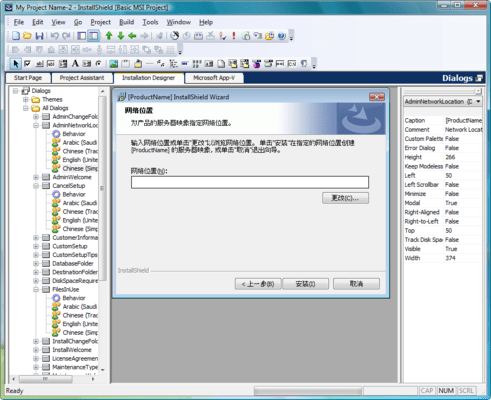
Visual Dialog Editor – Master one interface from Windows to Linux to easily modify existing dialogs or create new ones from scratch. Select the dialog you need, modify it, and then insert the dialog into the installation sequence. Dialogs can be exported and imported for sharing across projects, making project collaboration more efficient
Intuitive Design Environment – The advanced InstallShield 2010 Premier design environment makes setup creation more efficient by outlining the major steps involved in the creation of an installation. InstallShield provides separate views for common tasks within each step, and enables drag-and-drop support for files, registry entries, and other project elements. More than 20 task-based wizards simplify your development tasks, from starting VB projects to building custom releases
Timesaving Automation Tools – The InstallShield 2010 Premier automation interface makes it simple to edit virtually any element of an installation project programmatically. You can also automate your build process by building your project from the command line with InstallShield’s powerful command-line tools
Support for the Latest Mobile Devices – Extend your installations to the latest mobile devices including Palm OS® devices, Windows Mobile™ PocketPCs, and Windows Mobile™ Smartphones
Features for Windows Installation Developers:
MSI Support – InstallShield supports all projects built with the Microsoft Windows Installer (MSI) MSI simplifies your patch development, allowing you to set patch metadata in patch packages, configure un-installable patches, and use patch sequencing features
XML Changes View – Drastically reduce development time by creating installations that will easily edit XML files on the target machine. Modify XML files that store product settings and standard configuration files without ever having to create a custom action
Trialware Functionality – Exclusive to the Premier Edition. InstallShield enables you to create a fully functional trial version of your product with a few simple configuration changes without the need to modify your product’s source code. With trialware capabilities, you can quickly get your evaluations into the marketplace to let customers and prospects “try it out”, by setting it to run for a specific number of days before expiring
MySQL Support – InstallShield extends SQL Scripts view to support MySQL database servers. Configure all aspects of the MySQL database server – run MySQL scripts as part of your installation – and add, delete, or edit existing version requirements associated with the MySQL database server
Compact Engine – Create simple installations and rapidly deploy them with one of the industry’s smallest overheads for a commercial installer, enabling you to have the leanest possible download
Always Overwrite – Speed setup creation by marking files that will always need to be overwritten at installation time, regardless of version or modification date. This is new functionality in InstallShield for MSI projects; it has been available in the past for InstallScript™ projects
Local Repositories – Build a repository of common elements on your local machine to quickly rollout new setups and ensure consistency across your projects. Common elements can be shared and reused in multiple projects, saving you from having to duplicate work
Network Repositories – Exclusive to the Premier Edition. Build a network repository of common elements to quickly rollout new setups and ensure consistency across projects. Common elements can be shared and reused in multiple projects, saving developers from having to duplicate work
Users & Groups – Add and manage Windows users during installation. Select an existing Windows user account or create a new one at installation time
ENHANCED! Help Library – The Windows Help Library has been reorganized from a referenced-based system to a task-based system help you to quickly find the latest solutions to your problem. In addition, the information about application upgrades and patching has been expanded
EXCLUSIVE! Industry-Standard InstallScript™ – InstallShield lets you leverage the powerful and easy-to-use InstallScript language for end-to-end installation development. With over 445 predefined setup-related functions, InstallScript gives you flexibility in every part of the installation
Windows Installer Support – If developing installations for Windows Installer, use InstallShield’s powerful wizards, task-based views, and a full Direct Table Editor to easily enable your setups to leverage Windows Installer service benefits (such as install-on-demand, auto-repair, and installation rollback). With InstallShield, you can easily create or edit an MSI file directly using rich views and create or edit a transform based on an existing MSI file
Live Redistributable Technology Gallery – Get a higher-quality project to market quicker by knowing what new redistributable technologies are available. The redistributables view tells you where to get these objects and merge modules, and allows for direct downloads. Over 70 redistributables are included already, such as Access, DirectX, MDAC, and MSDE
Windows Device Driver Wizard – Easily create installations for both hardware and software device drivers in a matter of minutes. Simply load the wizard
EXCLUSIVE! QuickPatch™ Technology – Reduce support and maintenance costs by using InstallShield’s exclusive QuickPatch technology to create a simple patch file in seconds. The QuickPatch technology is now easier to manage with the addition of a history view that allows you to quickly analyze previous QuickPatch’s made to a particular project
.NET Support and Visual Studio .NET Integration – InstallShield 2010 Premier gives you the option of creating installations within the Visual Studio interface or using the intuitive InstallShield 2010 Premier design environment. You can also link the primary outputs of your .NET projects to your setups, scan .NET projects for file dependencies, configure .NET custom actions, distribute the .NET or .NET Compact Framework, and much more
SQL Server Support – Use InstallShield 2010 Premier's SQL Servers view to easily connect to SQL Servers, import database schema, and import data into your project. Edit SQL Scripts in the design environment and analyze using Microsoft Query Analyzer. Configure all aspects of SQL Server and run SQL scripts as part of your installation
IIS Web Services Support – Easily create a new installation project to deploy a Web service, or add a Web service to an existing project. Use InstallShield 2010 Premier's dedicated Internet Information Services (IIS) view to configure all aspects of IIS, including creating new Web sites and configuring virtual roots
One-Click Install Technology – Create software images that your customers can install from a Web site with a simple mouse click. InstallShield’s One-Click Install technology makes software downloads a breeze by eliminating every unnecessary installation step and saving your customers valuable bandwidth by installing only the files that aren’t already present on their PCs
What’s new in InstallShield 2010 Premier?
Microsoft App-V Support - Now when developers build a traditional MSI project, InstallShield 2010 Premier can simultaneously build it as a virtual App-V package. It can also automatically convert a company’s legacy MSIs to App-V packages. InstallShield 2010 Premier handles all the conversion work, so there’s no learning curve for developers new to virtualization. To an end user, virtual applications appear and function just like physically installed software. But virtual applications never get installed on the client. Instead they run in their own isolated virtual containers – which include registry entries, libraries, executables, and anything else the application needs to run – completely separate from the operating system. Because there’s no physical installation, there are no installation or retirement problems and no application compatibility issues – and that means fewer customer support calls and happier end users.
InstallShield 2010’s new App-V support is ideal for companies adopting application virtualization for their own environments. Now their software developers can use InstallShield 2010 to create their own applications in both traditional MSI and App-V formats in a single project, saving time by eliminating the need for conversion and repackaging.
Virtual formats like App-V are also ideal for software vendors offering evaluation versions of their products. Many end users are hesitant to install evaluations because of the potential risk to their machines. With InstallShield 2010, developers can offer evals as virtual packages, eliminating those fears and increasing evaluations.
Windows 7 Support - InstallShield 2010 has the tools developers need to get a head start on supporting Windows 7. It makes it easy to create applications that meet Microsoft’s requirements for the “Compatible with Windows 7” logo. If software vendors haven’t certified their applications for Vista, the move to Windows 7 can be especially difficult. InstallShield 2010 has the technology to make it easy.
Windows Installer 5 Beta Support - Windows Installer 5 will be available with the future releases of Windows 7 and Windows Server 2008 R2. But developers can take advantage of the new features now with InstallShield 2010’s support for the beta of Windows Installer 5. Now software running on Vista or XP can leverage the new MSI 5 features, including:
Creating per-user applications
Setting access permissions on objects
Placing the new hyperlink control on dialogs
Quicker installations for large packages
Windows Server 2008 R2 Support - InstallShield 2010 makes it easy to install applications on Windows Server 2008 R2. You can now specify that your installation requires Windows Server 2008 R2 and build conditions for features and components.
Displaying Installation Progress on the Taskbar - Installations that are run on Windows 7 and Windows Server 2008 R2 now show a progress bar on the Windows taskbar during file transfer. This applies to InstallScript and InstallScript MSI installations. In addition, it applies to Basic MSI installations that display billboards that were configured in the Billboards view. Note that a progress bar is not displayed on the taskbar during setup initialization or while InstallShield prerequisites are being installed.
SQL Server 2008 SP1 Support - InstallShield 2010 now enables you to run SQL scripts on SQL Server SP1.
SQL Server Compact Edition 3.5 SP1 Support - InstallShield 2010 now includes support for SQL Server Compact Edition 3.5 SP1 for mobile device installations.
Improved IIS Tools for Web Application InstallationsInternet Information Services (IIS) is a Web server developed by Microsoft. It provides a secure platform for building and deploying Web-based applications, managing Web sites, and publishing information to the Internet or an intranet. InstallShield 2010 has significantly improved IIS-related functionality that makes it even easier to create and manage new IIS Web sites, Web applications, virtual directories, application pools, and Web service extensions. InstallShield 2010 has enhanced its Internet Information Services view to look similar to IIS 7. The settings are now displayed in grids, instead of on tabs. And the grids have buttons that let you sort the grid settings by category or alphabetically. Longtime users of InstallShield will notice and appreciate the difference right away.
InstallShield 2010 now gives developers the ability to add IIS Web applications to IIS Web sites and configure as needed. Plus, you can now create an IIS virtual directory without an application. Both enhancements were popular requests by the InstallShield community.
InstallShield 2010 has a new IIS Scanner that analyzes and records IIS data about a Web site’s settings – including its virtual directories, applications, and application pools – and imports it into the Internet Information Services view. So instead of having to waste time manually entering data, InstallShield 2010 finds it and adds it for you. Developers can then use that view to make any changes to the IIS settings.
In addition, InstallShield 2010 has new IIS settings that users have specifically requested, including:
Managed Pipeline Mode: Specify the appropriate request-processing pipeline mode—either integrated or classic—for an application pool.
Enable 32-Bit Applications: Specify whether you want to allow 32-bit applications in the selected application pool to be run on 64-bit systems.
.NET Framework Version: Specify the version of the .NET Framework that an application pool should load.
ASP.NET Platform: For installations that may run on a 64-bit version of Windows with the .NET Framework, specify which ASP.NET platform should be used to map a Web site, application, or virtual directory to the ASP.NET version.
(IIS Scanner available in the Premier Edition only)
Virtual Machine Detection and Blocking - Virtual machines have been a licensing and compliance nightmare for software vendors. If you don’t want your products to run on virtual machines, InstallShield 2010 has the answer. It can now build installations that detect when they are being run on virtual machines like Microsoft Hyper-V and Virtual PC or VMware and optionally block the installation.
Support for 64-Bit COM Extraction - InstallShield 2010 now supports 64-bit COM extraction. If you are using InstallShield on a 64-bit system, it can extract COM data from a 64-bit COM server. In order to install the data to the correct locations, the component must be marked as 64 bit.
Setting Permissions for Files, Folders, and Registry Keys - For applications that run in locked-down environments, InstallShield 2010 has new functionality that significantly improved the way installations set files, folders, and registry keys at run time. Developers frustrated with the traditional Windows Installer LockPermissions option will appreciate the improvements, none of which are supported by the old option, including:
Support for many well-known security identifiers (SIDs) such as guest, everyone, and administrator
Support for localized user names, which could cause the installation to fail in the traditional option
Denying a user or group from having the permissions you are specifying
Adding permissions to a file, folder, or registry key that already exists on the target system, without deleting any existing permissions for that object
Indicating whether you want permissions to be applied to all of a folder's subfolders and files
Configuring permissions for a new user that is being created during the installation
Adding Prerequisites to InstallScript Projects - InstallShield 2010 now enables you to add InstallShield prerequisites to your InstallScript projects. InstallShield prerequisites are redistributables that usually install a product or technology framework required by your application. If you work on a mix of different project types, InstallShield 2010 lets you simplify your testing matrix by enabling you to reuse this type of redistributable in all of your Basic MSI, InstallScript, and InstallScript MSI projects.
New InstallShield Prerequisites
InstallShield includes a number of new InstallShield prerequisites that you can add to your projects, including:
Windows Installer 4.5 (with Microsoft fix), 3.1, 3.0, and 2.0
.NET Framework 3.0 SP1 and 2.0 SP2
Internet Explorer 8
Microsoft SQL Server 2008 SP1 and 2005 Express SP3
Microsoft Visual C++ 2005 SP1
Oracle 11g Instant Client 11.1.0.7
CrystalReports Basic for Visual Studio 2008
Significantly Improved User Interface - Simply put, InstallShield 2010 gives developers the IDE they’ve been asking for. From new toolbars and views to customizable grids to dynamic search tools, this is by far the best user interface InstallShield has ever offered, saving developers a ton of time.
Some of the highlights include:
Text File Changes view: This new view lets you configure search-and-replace behavior for content in text files (such as .txt, .htm, .xml, .config, .ini, and .sql files) that you want to modify at run time on the target system. The text files can be part of your installation, or they can be files that are already present on target systems.
String Editor view: This new view contains a spreadsheet-like table that shows the collection of language-independent identifiers and corresponding language-specific values for your project. Get complete and centralized control over the localizable text strings that are displayed at run time during the installation process. Some highlights include a toolbar for adding and editing string entries and a group box area for sorting string entries by categories such as language and by modified date.
Direct Editor view: When you select a table in this view, a new toolbar is displayed for adding, finding, and editing data in the table.
Property Manager view:This view contains a new toolbar that has buttons for performing tasks such as adding and deleting properties. You can also drag and drop column headings onto a new group box area to organize the rows in the view in a hierarchical format.
Redistributables view:The new toolbar and the new group box area in this view provide robust search and organizational functionality.
Internet Information Services view: This view has been redesigned to look similar to IIS 7, making it much easier to use.
General Information view:All of the settings in this view are displayed in one grid, instead of as separate grids associated with nodes. The settings are grouped into several categories to make them easier to find.
Path Variables view:This view contains a new toolbar that has buttons for performing tasks such as adding and deleting path variables. It also has support for dynamic searches and a new group box area for organizing rows in a hierarchical format.
Unicode Support - InstallShield 2010 takes a three-pronged approach to fully supporting modern multi-language installations: Windows Installer databases can now be built in a Unicode format, InstallShield projects are now stored in a Unicode format, and the InstallShield interface now supports entering and viewing Unicode characters from multiple character sets at the same time.
New Billboard Support for MSIs - MSIs created with InstallShield 2010 can now display billboards to your end users during the installation process. Billboards are an ideal way to educate end users in new features and advertise other related products. Each billboard is a file that you or your company's graphics department creates for complete control over the look and feel of the file transfer. InstallShield 2010 supports the use of Adobe Flash application file (.swf), .bmp, .gif, .jpg, and more as billboards.
Expanded Billboard Support in InstallScript Projects - InstallScript and InstallScript MSI projects now let you use .gif, .jpg, and .jpeg files as billboards. Previously, only .bmp files were supported. InstallShield 2010 now also includes support for playing an Adobe Flash application file (.swf) on a background window during InstallScript and InstallScript MSI installations. Flash application files can consist of videos, movies, sounds, interactive interfaces, games, text, and more—anything that is supported by the .swf type of file.
Support for HTML Controls on InstallScript Dialogs - InstallShield 2010 includes support for HTML controls on dialogs in InstallScript and InstallScript MSI projects. HTML controls enable you to use HTML markup for dialog controls. You can include on dialogs links to Web pages, installed HTML files, and HTML support files. If an end user clicks the hyperlink on the runtime dialog, you can have the HTML page open in an Internet browser, or you can trigger other behavior that you have defined through your InstallScript code. The HTML control lets you use any valid HTML markup, including styles to control their appearance.
Service Pack 2 Release
SP2 contains support for Microsoft .NET Framework 3.5 SP1 and Microsoft SQL Server 2008.
What’s new in InstallShield Premier 2009?
Microsoft Visual Studio® 2008 Support - InstallShield is now integrated with Visual Studio 2008, enabling development of installations and products within the same Visual Studio interface
Support for Managed-Code Custom Actions - InstallShield lets you add managed-code custom actions to Basic MSI, InstallScript MSI, Merge Module, and Web projects. This type of custom action calls a public method in a .NET assembly that is written in managed code such as Visual Basic .NET or C#.
Support for Installing Multiple Instances of a Product - Support for creating an installation that allows an .msi package to be used to install multiple instances of a product in the same context on the same machine. Use the new Multiple Instances tab for a product configuration in the Releases view to define different instances of your product and configure the properties that are associated with each instance.
Ability to Associate Setup Prerequisites with Features for Chaining Installations - Associate setup prerequisites with features so that the prerequisites that are associated with features are installed if an end user chooses to install the corresponding features and if the setup prerequisites are not already installed on the system. Including setup prerequisites in a project enables the chaining of multiple .msi files together into a single installation, bypassing the Windows Installer limitation that enables only one Execute sequence of an .msi package to be run at a time.
Introduction of Value Added Services with Yahoo!® Toolbar availability - A new overall initiative for InstallShield, Value Added Services, such as the opportunity to include the Yahoo! Toolbar in an ISV’s end user installation experience, provides the opportunity for customers to leverage new revenue-generating features in InstallShield
Hebrew and Arabic (Saudi Arabia) Language Support - InstallShield includes support for Hebrew and Arabic (Saudi Arabia) languages. All of the end-user dialog strings are now available in these languages.
New InstallShield MSI troubleshooting Tools: InstallShield MSI Diff, InstallShield MSI Query, InstallShield MSI Sleuth, InstallShield MSI Grep - Designed to smooth the experience of the setup author, four new MSI tools introduce time and effort saving opportunities.
Exclusive to the InstallShield Premier Edition:
Multi-lingual runtime support - Choose from 35 runtime languages to customize your installation experience for customers around the globe
Includes InstallShield Collaboration - This Visual Studio plug-in enables your application developers to capture installation requirements and collaborate with your installation developers
Repackager - Speeds the migration from legacy setups and InstallScript projects to MSI projects
Standalone Build - Allows setup of a separate build machine for compilation of your installations
InstallShield Best Practices Validation Suite - InstallShield 2008 adds new validators for Basic MSI and InstallScript MSI projects which enable you to easily avoid common installation issues
What’s new in InstallShield 2008?
Ability to Target Windows Vista Systems – InstallShield 2008 creates installations that are optimized for Windows Vista.
Quality Validation Testing - Certified for Windows Vista Logo Validation – Scans your MSI installation to see if it meets Windows Vista installation requirements.
InstallShield Best Practices Validation - In addition to verifying against Microsoft guidelines, InstallShield 2008 adds a new InstallShield Best Practices Validation Suite that provides additional validators for Basic MSI and InstallScript MSI projects.
User Account Control Support – Control how your installation manages administrative rights under Windows Vista. Preserve the security benefits of UAC while creating a user-friendly optimized UAC prompts installation experience. Support for adding the UAC shield logo to your dialogs.
New Dialog Themes for Basic MSI Projects - Easily change the themes for the dialogs in your projects to provide a new look and feel. You can preview of each dialog from within the Dialogs view
SaaS Support (IIS 7 and SSL Support) - Support for IIS 7 and SSL technologies makes it easy for you to deploy Windows-based Web applications
Latest Windows Mobile Platform Support - With support for Windows Embedded CE 6.x, you can easily create installations for mobile devices and expand your deployment to all Window CE platforms—including PocketPC and Smartphone, as well as all Palm handheld devices
Enhanced! Support for Digital Signatures - With enhanced support for digital signing, you can now save time by digitally signing all your files at build time
.NET 3.0 Support
What’s new in V12 SP2?
A .NET Framework 3.0 setup prerequisite that you can add to Basic MSI and InstallScript MSI projects
Ability to minimize the number of UAC prompts by advertising as part of prerequisite installation
Enhanced validation for the Windows Vista quality program
What’s new in V12 SP1?
Service Pack 1 (SP1) for InstallShield 12 Professional and Premier - fully supporting the RTM version of Microsoft’s new operating system.
New features in SP1 include:
A .NET Framework 3.0 setup prerequisite that you can add to Basic MSI and InstallScript MSI projects
Ability to minimize the number of UAC prompts by advertising as part of prerequisite installation
Enhanced validation for the Windows Vista quality program
What’s new in V12 Professional Edition?
Support for Pocket PC Windows Mobile 5.0, Windows CE .NET 5.0, .NET Compact Framework 2.0, and DIFx 2.01
Support for SQL Server 2005 Express Edition
Visual C++ 8.0 Merge Modules
InstallScript enhancements
What’s new in V12 Premier Edition?
Includes all of the features of the Professional Edition
The Repackager project conversion tool
InstallShield Collaboration 5-pack license
“Stand-Alone Build” licenses
The Premier Edition builds on the power and flexibility of the Professional Edition, while adding support for 35 languages and providing developers with a centralized repository that multiple installation authors can access and reuse.
Key Benefits
Support for the latest technologies, including Microsoft® Visual Studio® 2005, .NET 2.0 and SQL Server 2005
Author reliable, professional-grade installations every time with intuitive wizards
Top NEW Features
Visual Studio 2005 Support
.NET 2.0 Framework Support (MSI)
Microsoft SQL Server 2005 Support
InstallShield Collaboration Module
EXCLUSIVE! ClickOnce to MSI Converter
ClickOnce Support
Microsoft Build Engine (MSBuild) Support
MSI Log Analyzer
DIFx 2.0 Support (Basic MSI and InstallScript MSI)
One software license is required per user, per machine.
For example if you have 2 users each with 2 machines you will require 4 User Licenses.
The Yearly Maintenance Plans include:
Bronze
Automatic notification of and access to all product updates (free) and upgrades (chargeable for non-Maintenance-Plan-holders) for 12 months
A Maintenance Plan Card detailing all benefits and plan specifics
24 x 7 access to Knowledge Base
24 x 7 access to product Web Communities
Sample Code, Sample Projects, and White Papers
Technical Webinars / Online Product Demonstrations
Unlimited Web-based requests using eService
Silver
Unlimited telephone support requests
Automatic notification of and access to all product updates (free) and upgrades (chargeable for non-Maintenance-Plan-holders) for 12 months
A Maintenance Plan Card detailing all benefits and plan specifics
24 x 7 access to Knowledge Base
24 x 7 access to product Web Communities
Sample Code, Sample Projects, and White Papers
Technical Webinars / Online Product Demonstrations
Unlimited Web-based requests using eService
Gold
Unlimited telephone support requests
Access to priority support channels for quickest service
Priority involvement in Beta Programs
Automatic notification of and access to all product updates (free) and upgrades (chargeable for non-Maintenance-Plan-holders) for 12 months
A Maintenance Plan Card detailing all benefits and plan specifics
24 x 7 access to Knowledge Base
24 x 7 access to product Web Communities
Sample Code, Sample Projects, and White Papers
Technical Webinars / Online Product Demonstrations
Unlimited Web-based requests using eService
Older versions of InstallShield, InstallShield MultiPlatform, InstallShield DevStudio, InstallShield Developer, InstallShield Professional, and InstallShield Express products have been retired and are no longer active:
InstallShield Professional/Premier versions 5.x - 12.x
InstallShield Developer version 7.x and 8.x
InstallShield Express versions 2.x - 12.x
InstallShield 1.x - 3 .x
InstallShield for Windows Installer versions 1.x - 2.x
NetInstall
InstallShield MultiPlatform version 4.x and 5.x
InstallShield Java Edition
DevStudio 9
AdminStudio 1.x - 7.x
InstallAnywhere 1.x - 8.x
Important - Please note that before you can use this software you have to Activate it online during the installation process.
Currently there is a conflict with the Activation process and TabletPC's, you will need to install this on a non TabletPC.
Create strong, reliable Windows Installers.
PartNumbers: PC-532534-265718 532534-265718 PC-532534-265726 532534-265726 PC-532534-265722 532534-265722 PC-532534-265734 532534-265734 PC-532534-265792 532534-265792 PC-532534-265730 532534-265730 PC-532534-265808 532534-265808 PC-532534-265804 532534-265804 PC-532534-265738 532534-265738 PC-532534-265765 532534-265765 PC-532534-265759 532534-265759 PC-532534-265756 532534-265756 PC-532534-265795 532534-265795 PC-532534-265762 532534-265762 PC-532534-265809 532534-265809 PC-532534-265805 532534-265805 PC-532534-265741 532534-265741 PC-532534-265777 532534-265777 PC-532534-265771 532534-265771 PC-532534-265768 532534-265768 PC-532534-265798 532534-265798 PC-532534-265774 532534-265774 PC-532534-265810 532534-265810 PC-532534-265806 532534-265806 PC-532534-265744 532534-265744 PC-532534-265789 532534-265789 PC-532534-265783 532534-265783 PC-532534-265780 532534-265780 PC-532534-265801 532534-265801 PC-532534-265786 532534-265786 PC-532534-265811 532534-265811 PC-532534-265807 532534-265807 PC-532534-265747 532534-265747 PC-532534-265750 532534-265750 PC-532534-265753 532534-265753
Publisher PartNumbers: BQJHD BQJHDUE BQJHDUP BQJHDUPA BQJHDUR BQJJDUE BQJJDUP BQJJDUPA BQJJDUR BQJUDUPA BQJUDURA BQJVD BQJVDUPA BQJVDURA BQJWDUPA BQJWDURA BQK5D BQK5DUE BQK5DUP BQK5DUPA BQK5DUR IS1600SUA IS1600SUB IS1600SUE IS1600SUE1 IS1600SUP IS1600SUR IS1600SURA IXS1160ZD KBQHDK1 KGQHDK1 KSQHDK1
PurchaseOptions: InstallShield 2010 Premier with Virtualization Pack 1 User License (per User, per Machine), InstallShield 2010 Premier with Virtualization Pack 1 User Upgrade License (per User, per Machine) from any active InstallShield Express, InstallShield 2010 Premier with Virtualization Pack 1 User Upgrade License (per User, per Machine) from any active InstallShield Professional, InstallShield 2010 Premier with Virtualization Pack 1 User Upgrade License (per User, per Machine) from any active InstallShield Premier, InstallShield 2010 Premier with Virtualization Pack 1 User Upgrade License (per User, per Machine) from InstallShield 2010 Express, InstallShield 2010 Premier with Virtualization Pack 1 User Upgrade License (per User, per Machine) from InstallShield 2010 Professional, InstallShield 2010 Premier with Virtualization Pack 1 User Upgrade License (per User, per Machine) from InstallShield 2010 Professional with Virtualization Pack, InstallShield 2010 Premier with Virtualization Pack 1 User Upgrade License (per User, per Machine) from InstallShield 2010 Premier, InstallShield 2010 Premier with Virtualization Pack with Bronze Maintenance 1 User License (per User, per Machine) with Bronze Annual Maintenance, InstallShield 2010 Premier with Virtualization Pack with Bronze Maintenance 1 User License (per User, per Machine) with Bronze Annual Maintenance Upgrade from any active InstallShield Express, InstallShield 2010 Premier with Virtualization Pack with Bronze Maintenance 1 User License (per User, per Machine) with Bronze Annual Maintenance Upgrade from any active InstallShield Professional, InstallShield 2010 Premier with Virtualization Pack with Bronze Maintenance 1 User License (per User, per Machine) with Bronze Annual Maintenance Upgrade from any active InstallShield Premier, InstallShield 2010 Premier with Virtualization Pack with Bronze Maintenance 1 User License (per User, per Machine) with Bronze Annual Maintenance Upgrade from InstallShield 2010 Express, InstallShield 2010 Premier with Virtualization Pack with Bronze Maintenance 1 User License (per User, per Machine) with Bronze Annual Maintenance Upgrade from InstallShield 2010 Professional, InstallShield 2010 Premier with Virtualization Pack with Bronze Maintenance 1 User License (per User, per Machine) with Bronze Annual Maintenance Upgrade from InstallShield 2010 Professional with Virtualization Pack, InstallShield 2010 Premier with Virtualization Pack with Bronze Maintenance 1 User License (per User, per Machine) with Bronze Annual Maintenance Upgrade from InstallShield 2010 Premier, InstallShield 2010 Premier with Virtualization Pack with Silver Maintenance 1 User License (per User, per Machine) with Silver Annual Maintenance, InstallShield 2010 Premier with Virtualization Pack with Silver Maintenance 1 User License (per User, per Machine) with Silver Annual Maintenance Upgrade from any active InstallShield Express, InstallShield 2010 Premier with Virtualization Pack with Silver Maintenance 1 User License (per User, per Machine) with Silver Annual Maintenance Upgrade from any active InstallShield Professional, InstallShield 2010 Premier with Virtualization Pack with Silver Maintenance 1 User License (per User, per Machine) with Silver Annual Maintenance Upgrade from any active InstallShield Premier, InstallShield 2010 Premier with Virtualization Pack with Silver Maintenance 1 User License (per User, per Machine) with Silver Annual Maintenance Upgrade from InstallShield 2010 Express, InstallShield 2010 Premier with Virtualization Pack with Silver Maintenance 1 User License (per User, per Machine) with Silver Annual Maintenance Upgrade from InstallShield 2010 Professional, InstallShield 2010 Premier with Virtualization Pack with Silver Maintenance
Resources: Read the InstallShield Professional/Premier help file, Browse the InstallShield Premier, Professional and Express Features Comparison, Read the Validating MSI Updates and Patches White Paper - Requires Acrobat Reader, Read the Using Chained MSI Packages to Componentize Your Windows Installer Setup White Paper - Requires Acrobat Reader, Read the Installing Oracle 10g Client Silently with Custom Actions and Custom Response Files White Paper - Requires Acrobat Reader, Download the InstallShield Premier Edition 2010 evaluation on to your computer - Expires after 21 days
Operating System for Deployment: Windows Server 2008, Windows Vista, Windows XP, Windows Server 2003
Architecture of Product: 32Bit, 64Bit
Product Type: Application
Compatible Containers: Microsoft Visual Studio 2008, Microsoft Visual Studio 2005, Microsoft Visual Studio .NET 2003, Microsoft Visual Studio .NET, Microsoft Visual Basic 2008, Microsoft Visual Basic 2005, Microsoft Visual Basic .NET 2003, Microsoft Visual Basic .NET, Microsoft Visual C++ 2008, Microsoft Visual C++ 2005, Microsoft Visual C++ .NET 2003, Microsoft Visual C++ .NET, Microsoft Visual C# 2008, Microsoft Visual C# 2005, Microsoft Visual C# .NET 2003, Microsoft Visual C# .NET, Microsoft SQL Server 2008, Microsoft Internet Explorer 6.0, Microsoft Internet Explorer 5.5, Microsoft Internet Explorer 5.0, Microsoft Internet Explorer 4.0, Netscape Navigator, Delphi 8.0, C#Builder, .NET Framework 3.5, .NET Framework 3.0, .NET Framework 2.0, .NET Framework 1.1, .NET Framework 1.0, MySQL 4.0
Product Class: Component Development Tools, .NET Development Tool
Keywords: Macrovision Corporation macro vision install shield acresso Licensing license licenses trialware Installation Installing install installs uninstalling uninstall uninstalls setup MSI msi scripts Enterprise Partner acresso installshield installshieldpremier installshieldprem prem virt virtualization pack
Publisher
Primary Category
Related Products
Related Categories