de Acresso Software (formerly Macrovision) - Tipo de producto: Aplicación
InstallShield 2009 Premier by Acresso Software (formerly Macrovision)
Create strong, reliable Windows Installers. InstallShield allows you to create flexible installations quickly and easily across all Windows operating systems. First-time developers find it easy to create installations, while power users find its depth and flexibility perfect for developing complex software installations. It supports the latest technologies, including Visual Studio 2005/2008, .NET 2.0, .NET 3.0/3.5, SQL Server 2005 and Windows Vista. InstallShield also includes MSI 3.0 support, automatic updating of XML file settings and Trialware functionality which allows developers to add more power and flexibility into their setup projects (InstallShield Premier Edition Only).
InstallShield keeps software publishers up-to-date with support for the latest technologies and industry standards to avoid installation failures. Using InstallShield lets publishers create reliable setups that translate into successful installations.
InstallShield also enables software publishers to author installations across all platforms, operating systems, and devices. Using one tool, they can create Windows Installer, InstallScript, and cross-platform installations and extend them to configure database servers, Web services and mobile devices.
Support for the Latest Technologies
InstallShield is constantly innovating to keep publishers current with ever-changing technology. With support for Microsoft's MSI 3.1 release, IIS 6.0, DIFx 1.1, and third-party objects, including DirectX, Crystal Reports, and WMI, InstallShield makes it extremely easy for publishers to add support for popular technologies to their projects.
Support for Today's Industry Standards
InstallShield provides all the functionality publishers need to connect to Oracle database servers and create installations for the Linux platform with full RPM support. InstallShield is fully integrated into the Visual Studio .NET design environment, giving publishers the option to create installations within the Visual Studio interface. Also, over 20 InstallScript enhancements have been added, including the ability for installations to install and register 64-bit files.
Complete Flexibility
With InstallShield's Try and Buy functionality, potential customers can use the latest version of a product-with all of its features fully available-on a trial basis. Once they decide to buy, they can immediately activate the product with the fully integrated InstallShield Activation Service. In addition, this new service helps to increase a product's revenue through greater presence in the marketplace.
Industry-Standard Solution
For almost 20 years, successful software publishers around the world have relied on InstallShield as the industry's most trusted installation-authoring tool. The new InstallShield continues this tradition with support for the latest technologies and industry standards to reduce development time and greatly increase the quality of setup projects.
Product Benefits
Strong and Reliable - InstallShield provides full control over Windows Installer, InstallScript™, cross-platform, server, and mobile device installations, enabling unlimited customization
Easy To Use - The Project Assistant and many intuitive wizards make even the most complex installation projects simple
Technology Leadership - With support for MSI 3.0, MySQL database server, J2EE application servers, and Visual Studio .NET, keeping current is easy
End User Communication - Deliver updates, patches and messages to end users after the application has been installed
Features for all developers:
Update Service Starter Edition – InstallShield allows you to communicate directly with your end users after they’ve installed your application. Deliver updates, patches, and marketing messages to keep users current on the latest release of your product. Adding the Update Service to your application requires zero coding. All it takes is a few clicks.
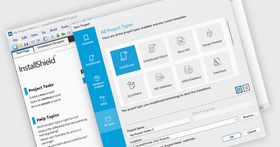
Project Assistant – The exclusive Project Assistant seamlessly guides you through the installation-authoring process, significantly reducing the time required for new users to complete an installation project and enabling veteran software developers to more efficiently jumpstart a new project
Visual Dialog Editor – Master one interface from Windows to Linux to easily modify existing dialogs or create new ones from scratch. Select the dialog you need, modify it, and then insert the dialog into the installation sequence. Dialogs can be exported and imported for sharing across projects, making project collaboration more efficient
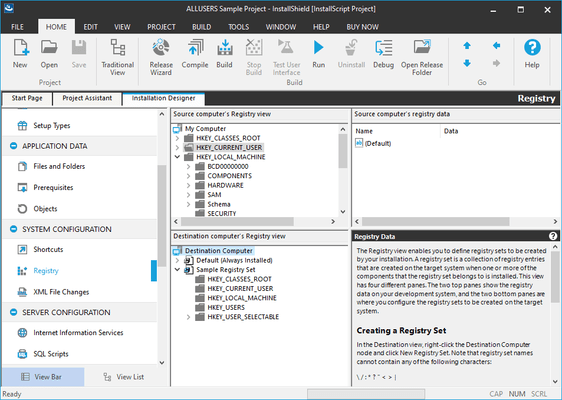
Intuitive Design Environment – The advanced InstallShield 10.5 design environment makes setup creation more efficient by outlining the major steps involved in the creation of an installation. InstallShield provides separate views for common tasks within each step, and enables drag-and-drop support for files, registry entries, and other project elements. More than 20 task-based wizards simplify your development tasks, from starting VB projects to building custom releases
Timesaving Automation Tools – The InstallShield automation interface makes it simple to edit virtually any element of an installation project programmatically. You can also automate your build process by building your project from the command line with InstallShield’s powerful command-line tools
Support for the Latest Mobile Devices – Extend your installations to the latest mobile devices including Palm OS® devices, Windows Mobile™ PocketPCs, and Windows Mobile™ Smartphones
Features for Windows Installation Developers:
NEW! MSI 3.0 Support – InstallShield supports all projects built with the new Microsoft Windows Installer (MSI) 3.0. MSI 3.0 simplifies your patch development, allowing you to set patch metadata in patch packages, configure un-installable patches, and use patch sequencing features
NEW! XML Changes View – Drastically reduce development time by creating installations that will easily edit XML files on the target machine. Modify XML files that store product settings and standard configuration files without ever having to create a custom action
NEW! Trialware Functionality – Exclusive to the Premier Edition. InstallShield enables you to create a fully functional trial version of your product with a few simple configuration changes without the need to modify your product’s source code. With trialware capabilities, you can quickly get your evaluations into the marketplace to let customers and prospects “try it out”, by setting it to run for a specific number of days before expiring
NEW! MySQL Support – InstallShield extends SQL Scripts view to support MySQL database servers. Configure all aspects of the MySQL database server – run MySQL scripts as part of your installation – and add, delete, or edit existing version requirements associated with the MySQL database server
NEW! Compact Engine – Create simple installations and rapidly deploy them with one of the industry’s smallest overheads for a commercial installer, enabling you to have the leanest possible download
NEW! Always Overwrite – Speed setup creation by marking files that will always need to be overwritten at installation time, regardless of version or modification date. This is new functionality in InstallShield for MSI projects; it has been available in the past for InstallScript™ projects
NEW! Local Repositories – Build a repository of common elements on your local machine to quickly rollout new setups and ensure consistency across your projects. Common elements can be shared and reused in multiple projects, saving you from having to duplicate work
NEW! Network Repositories – Exclusive to the Premier Edition. Build a network repository of common elements to quickly rollout new setups and ensure consistency across projects. Common elements can be shared and reused in multiple projects, saving developers from having to duplicate work
NEW! Users & Groups – Add and manage Windows users during installation. Select an existing Windows user account or create a new one at installation time
ENHANCED! Help Library – The Windows Help Library has been reorganized from a referenced-based system to a task-based system help you to quickly find the latest solutions to your problem. In addition, the information about application upgrades and patching has been expanded
EXCLUSIVE! Industry-Standard InstallScript™ – InstallShield lets you leverage the powerful and easy-to-use InstallScript language for end-to-end installation development. With over 445 predefined setup-related functions, InstallScript gives you flexibility in every part of the installation
Unparalleled Windows Installer Support – If developing installations for Windows Installer, use InstallShield’s powerful wizards, task-based views, and a full Direct Table Editor to easily enable your setups to leverage Windows Installer service benefits (such as install-on-demand, auto-repair, and installation rollback). With InstallShield, you can easily create or edit an MSI file directly using rich views and create or edit a transform based on an existing MSI file
Live Redistributable Technology Gallery – Get a higher-quality project to market quicker by knowing what new redistributable technologies are available. The redistributables view tells you where to get these objects and merge modules, and allows for direct downloads. Over 70 redistributables are included already, such as Access, DirectX, MDAC, and MSDE
Windows Device Driver Wizard – Easily create installations for both hardware and software device drivers in a matter of minutes. Simply load the wizard
EXCLUSIVE! QuickPatch™ Technology – Reduce support and maintenance costs by using InstallShield’s exclusive QuickPatch technology to create a simple patch file in seconds. The QuickPatch technology is now easier to manage with the addition of a history view that allows you to quickly analyze previous QuickPatch’s made to a particular project
.NET Support and Visual Studio .NET Integration – InstallShield gives you the option of creating installations within the Visual Studio interface or using the intuitive InstallShield 10.5 design environment. You can also link the primary outputs of your .NET projects to your setups, scan .NET projects for file dependencies, configure .NET custom actions, distribute the .NET or .NET Compact Framework, and much more
SQL Server Support – Use InstallShield’s SQL Servers view to easily connect to SQL Servers, import database schema, and import data into your project. Edit SQL Scripts in the design environment and analyze using Microsoft Query Analyzer. Configure all aspects of SQL Server and run SQL scripts as part of your installation
IIS Web Services Support – Easily create a new installation project to deploy a Web service, or add a Web service to an existing project. Use InstallShield 10.5’s dedicated Internet Information Services (IIS) view to configure all aspects of IIS, including creating new Web sites and configuring virtual roots
EXCLUSIVE! One-Click Install™ Technology – Create software images that your customers can install from a Web site with a simple mouse click. InstallShield’s One-Click Install technology makes software downloads a breeze by eliminating every unnecessary installation step and saving your customers valuable bandwidth by installing only the files that aren’t already present on their PCs
What’s new in InstallShield Premier 2009?
Microsoft Visual Studio® 2008 Support - InstallShield is now integrated with Visual Studio 2008, enabling development of installations and products within the same Visual Studio interface
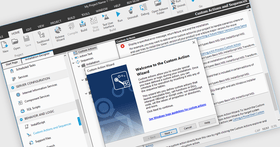
Support for Managed-Code Custom Actions - InstallShield lets you add managed-code custom actions to Basic MSI, InstallScript MSI, Merge Module, and Web projects. This type of custom action calls a public method in a .NET assembly that is written in managed code such as Visual Basic .NET or C#.
Support for Installing Multiple Instances of a Product - Support for creating an installation that allows an .msi package to be used to install multiple instances of a product in the same context on the same machine. Use the new Multiple Instances tab for a product configuration in the Releases view to define different instances of your product and configure the properties that are associated with each instance.
Ability to Associate Setup Prerequisites with Features for Chaining Installations - Associate setup prerequisites with features so that the prerequisites that are associated with features are installed if an end user chooses to install the corresponding features and if the setup prerequisites are not already installed on the system. Including setup prerequisites in a project enables the chaining of multiple .msi files together into a single installation, bypassing the Windows Installer limitation that enables only one Execute sequence of an .msi package to be run at a time.
Introduction of Value Added Services with Yahoo!® Toolbar availability - A new overall initiative for InstallShield, Value Added Services, such as the opportunity to include the Yahoo! Toolbar in an ISV’s end user installation experience, provides the opportunity for customers to leverage new revenue-generating features in InstallShield
Hebrew and Arabic (Saudi Arabia) Language Support - InstallShield includes support for Hebrew and Arabic (Saudi Arabia) languages. All of the end-user dialog strings are now available in these languages.
New InstallShield MSI troubleshooting Tools: InstallShield MSI Diff, InstallShield MSI Query, InstallShield MSI Sleuth, InstallShield MSI Grep - Designed to smooth the experience of the setup author, four new MSI tools introduce time and effort saving opportunities.
Exclusive to the InstallShield Premier Edition:
Multi-lingual runtime support - Choose from 33 runtime languages to customize your installation experience for customers around the globe
Includes InstallShield Collaboration - This Visual Studio plug-in enables your application developers to capture installation requirements and collaborate with your installation developers
Repackager - Speeds the migration from legacy setups and InstallScript projects to MSI projects
Standalone Build - Allows setup of a separate build machine for compilation of your installations
InstallShield Best Practices Validation Suite - InstallShield 2008 adds new validators for Basic MSI and InstallScript MSI projects which enable you to easily avoid common installation issues
What’s new in InstallShield 2008?
Ability to Target Windows Vista Systems – InstallShield 2008 creates installations that are optimized for Windows Vista.
Quality Validation Testing - Certified for Windows Vista Logo Validation – Scans your MSI installation to see if it meets Windows Vista installation requirements.
InstallShield Best Practices Validation - In addition to verifying against Microsoft guidelines, InstallShield 2008 adds a new InstallShield Best Practices Validation Suite that provides additional validators for Basic MSI and InstallScript MSI projects.
User Account Control Support – Control how your installation manages administrative rights under Windows Vista. Preserve the security benefits of UAC while creating a user-friendly optimized UAC prompts installation experience. Support for adding the UAC shield logo to your dialogs.
New Dialog Themes for Basic MSI Projects - Easily change the themes for the dialogs in your projects to provide a new look and feel. You can preview of each dialog from within the Dialogs view
SaaS Support (IIS 7 and SSL Support) - Support for IIS 7 and SSL technologies makes it easy for you to deploy Windows-based Web applications
Latest Windows Mobile Platform Support - With support for Windows Embedded CE 6.x, you can easily create installations for mobile devices and expand your deployment to all Window CE platforms—including PocketPC and Smartphone, as well as all Palm handheld devices
Enhanced! Support for Digital Signatures - With enhanced support for digital signing, you can now save time by digitally signing all your files at build time
.NET 3.0 Support
What’s new in V12 SP2?
A .NET Framework 3.0 setup prerequisite that you can add to Basic MSI and InstallScript MSI projects
Ability to minimize the number of UAC prompts by advertising as part of prerequisite installation
Enhanced validation for the Windows Vista quality program
What’s new in V12 SP1?
Service Pack 1 (SP1) for InstallShield 12 Professional and Premier - fully supporting the RTM version of Microsoft’s new operating system.
New features in SP1 include:
A .NET Framework 3.0 setup prerequisite that you can add to Basic MSI and InstallScript MSI projects
Ability to minimize the number of UAC prompts by advertising as part of prerequisite installation
Enhanced validation for the Windows Vista quality program
What’s new in V12 Professional Edition?
Support for Pocket PC Windows Mobile 5.0, Windows CE .NET 5.0, .NET Compact Framework 2.0, and DIFx 2.01
Support for SQL Server 2005 Express Edition
Visual C++ 8.0 Merge Modules
InstallScript enhancements
What’s new in V12 Premier Edition?
Includes all of the features of the Professional Edition
The Repackager project conversion tool
InstallShield Collaboration 5-pack license
“Stand-Alone Build” licenses
The Premier Edition builds on the power and flexibility of the Professional Edition, while adding support for 33 languages and providing developers with a centralized repository that multiple installation authors can access and reuse.
Key Benefits
Support for the latest technologies, including Microsoft® Visual Studio® 2005, .NET 2.0 and SQL Server 2005
Author reliable, professional-grade installations every time with intuitive wizards
Top NEW Features
Visual Studio 2005 Support
.NET 2.0 Framework Support (MSI)
Microsoft SQL Server 2005 Support
InstallShield Collaboration Module
EXCLUSIVE! ClickOnce to MSI Converter
ClickOnce Support
Microsoft Build Engine (MSBuild) Support
MSI Log Analyzer
DIFx 2.0 Support (Basic MSI and InstallScript MSI)
InstallShield Activation Module
One software license is required per machine.
Run-time royalty free.
Maintenance Plans are only available for current products and can only be purchased as part of a bundle with a current product.
Please note: you can no longer upgrade from the following products and versions as they are no longer supported
InstallShield Professional versions 5.0 - 10.5
InstallShield Developer version 7.0, 8.0, 9.0, X, 10.5
InstallShield MultiPlatform version 4.0
InstallShield Express versions 2.0 - X
Install From the Web
InstallShield 3
InstallShield Java Edition
InstallShield for Windows Installer versions 1.0 - 2.x
NetInstall
Important - Please note that before you can use this software you have to Activate it online during the installation process.
Currently there is a conflict with the Activation process and TabletPC's, you will need to install this on a non TabletPC.
PartNumbers: PC-514873-156496 514873-156496 PC-514873-166965 514873-166965 PC-514873-166967 514873-166967 PC-514873-166966 514873-166966 PC-514873-156512 514873-156512 PC-514873-156498 514873-156498 PC-514873-156510 514873-156510 PC-514873-156500 514873-156500 PC-514873-156502 514873-156502 PC-514873-156504 514873-156504 PC-514873-156506 514873-156506
Publisher PartNumbers: IS1500HUA IS1500HUE IS1500HUP IS1500HUR IXH1150ZD KBQHDK KGQHDK KSQHDK Promo Code 4S2E9X Promo Code 6J8U2X
PurchaseOptions: InstallShield 2009 Premier 1 Developer License , InstallShield 2009 Premier 1 Developer Upgrade License from InstallShield Premier V11 or V11.5 Special Offer Price - Ends 30th September 2008 , InstallShield 2009 Premier 1 Developer Upgrade License from InstallShield Professional V11 or V11.5 Special Offer Price - Ends 30th September 2008 , InstallShield 2009 Premier 1 Developer Upgrade License from InstallShield Premier or Professional V10.5 or older Special Offer Price - Ends 30th September 2008 , InstallShield 2009 Premier 1 Developer Upgrade License from any InstallShield Premier or active Multi-Platform , InstallShield 2009 Premier 1 Developer Upgrade License from any active InstallShield Professional or DevStudio , InstallShield 2009 Premier 1 Developer Upgrade License from InstallShield Professional 2009 , InstallShield 2009 Premier 1 Developer Upgrade License from any active Express , InstallShield Premier Subscription/Support Renewal 1 Developer Bronze Maintenance License (includes Subscription and Support) , InstallShield Premier Subscription/Support Renewal 1 Developer Silver Maintenance License (includes Subscription and Support) , InstallShield Premier Subscription/Support Renewal 1 Developer Gold Maintenance License (includes Subscription and Support)
Resources: Browse the InstallShield Premier and Professional Features Comparison, Download the InstallShield Premier Edition 2009 evaluation on to your computer - Expires after 30 days
Operating System for Deployment: Windows Vista, Windows XP, Windows Server 2003, Windows ME, Windows 2000, Windows NT 4.0
Architecture of Product: 32Bit, 64Bit
Product Type: Application
Compatible Containers: Microsoft Visual Studio 2008, Microsoft Visual Studio 2005, Microsoft Visual Studio .NET 2003, Microsoft Visual Studio .NET, Microsoft Visual Basic 2008, Microsoft Visual Basic 2005, Microsoft Visual Basic .NET 2003, Microsoft Visual Basic .NET, Microsoft Visual C++ 2008, Microsoft Visual C++ 2005, Microsoft Visual C++ .NET 2003, Microsoft Visual C++ .NET, Microsoft Visual C# 2008, Microsoft Visual C# 2005, Microsoft Visual C# .NET 2003, Microsoft Visual C# .NET, Microsoft Internet Explorer 6.0, Microsoft Internet Explorer 5.5, Microsoft Internet Explorer 5.0, Microsoft Internet Explorer 4.0, Netscape Navigator, Delphi 8.0, C#Builder, .NET Framework 3.5, .NET Framework 3.0, .NET Framework 2.0, .NET Framework 1.1, .NET Framework 1.0, MySQL 4.0
Product Class: Component Development Tools, .NET Development Tool
Search Items: Special Offer, New Product May 04, New Product June 04, New Product July 04, New Product Aug 04, New Product Nov 04, New Product Dec 04, New Product May 05
Keywords: Macrovision Corporation macro vision install shield Licensing license licenses trialware Installation Installing install installs uninstalling uninstall uninstalls setup MSI msi scripts Corporate Partner
Autor
Categoría principal
Productos relacionados
Categorias relacionadas