IntelliJ IDEA - Summary

by JetBrains - Product Type: Application

Summary

IntelliJ IDEA by JetBrains

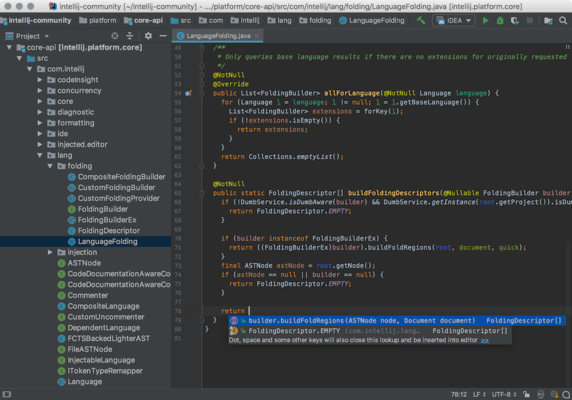
Comprehensive Java development environment. IntelliJ IDEA is an intelligent Java IDE that provides a robust combination of development tools. Key features include: intelligent coding assistance, smart navigation and search, numerous refactorings, code analysis, Web and enterprise development support, Unit testing and code coverage and team work facilitation. IntelliJ IDEA’s functionality is continuously extended by users and third parties via plugins.

Intelligent Coding Assistance – A smart editor that recognizes Java, HTML/XHTML, XML/XSL, CSS, Ruby and JavaScript, supports frameworks like Rails and GWT provides you an environment for creating cutting edge code. Whatever language you are using, the advanced code completion, validation, formatting and styling are always at hand. Plus, smart error and syntax highlighting combined with intelligent quick-fixes let effectively produce error free, clear code and focus on the logic of your project instead of routine dry work.

Smart Navigation & Search – An advanced project navigation view that is aware of Java, JSP, XML/XSL, HTML, Ruby and Rails code structure lets you quickly analyze even largest files at a glance, providing convenient way to browse through them. Active gutter icons let you instantly jump between symbol declaration and usages. The smart search recognizes language elements displays results in an interactive navigation panel to help you analyze all the files where the search item is found. Plus, the structural search feature is especially designed for building intelligent search templates for operating with complex files.

Numerous Refactorings - IntelliJ IDEA features a rich set of refactorings (50+) that cover virtually every aspect of code transformation and lets you effectively maintain and upgrade your projects. All refactorings are aware of supported languages and technologies like Java, XML, JSP, EJB, Javascript and Ruby and provide an effective way to flexibly manage your code.

Code Analysis - Built-in high performance dynamic code analyzer with more than 600 inspections performs on-the-fly code analysis and detects all common syntax errors, plus all other errors that would be detected during compilation. You never need to compile your code to verify that it's error-free. IntelliJ IDEA provides analysis for most of the supported technologies, including JavaScript, XML, HTML and CSS, EJB, JSP, JSF, Struts, JavaDoc, properties files, Ant scripts, and more. Static code analysis detects performance bottlenecks, dead code, malformed dependencies and other problems with your code. IntelliJ IDEA provides you with automatic solutions for all detected errors.

Web & Enterprise Development Support - Rapid development of Java EE and Web applications with the full support for EJB, JSP, JSF, XML/XSL, HTML/XHTML/CSS technologies and languages, JBoss, WebSphere, Glassfish, Geronimo, Tomcat and Weblogic servers, Rails, Struts and other frameworks. Plus enhanced Javascript, AJAX and GWT support for building industry standard Web interfaces. Automated deployment and remote debugging included for maintaining optimum productivity levels through all development process stages.

Compiling, Running, Debugging - IntelliJ IDEA includes support for multiple Java compilers (javac, jikes, eclipse). You can compile your projects using your favourite compiler without having to leave your favourite IDE. IntelliJ IDEA also includes the dependency-based make feature available for all supported compilers. The compilation results view lets you navigate to the source of any compilation message (error, warning or anything else) with a single key stroke or mouse click. IntelliJ IDEA includes the best of the breed JPDA-based debugger with a simple, easy to use user interface and leverages all its productivity-aimed features through every debugging step. The unique HotSwap technology lets you modify and recompile parts of the code during debugging without the need to restart the whole process. Plus, the intellectual breakpoints that enhance your debugging experience.

Unit Testing & Code Coverage - IntelliJ IDEA features the smart code coverage tool that measures the code coverage for your unit tests or tests written as simple application with the main() method, improves the efficiency of code testing and ensures that you are always aware of how effectively your code is tested. Built-in test runner is fully JUnit 4 compatible. In addition, IntelliJ IDEA provides the flexible Inspection API which lets you easily create different plugins to extend the project-wide code analysis functionality and provide the means for meeting all project needs.

Team Work Facilitation - IntelliJ IDEA natively integrates with the most popular version control systems like Perforce, StarTeam, Subversion, CVS and Visual SourceSafe. Smart commits, advanced changelist management and unified VCS interface, plus integration with TeamCity — the innovative solution for continuous application development — all this boosts the productivity of your entire team. Additionally, a unique built-in instant messaging system lets developers stay in touch with each other by exchanging live code pointers and stack traces.

Open API & Plugins - There are over 300 plugins for IntelliJ IDEA which extend its functionality and add various features to code inspections and refactorings, editors and tool windows, language support and application server and profiler integrations, Version Control System integrations, and so on and so forth. You can always improve an existing feature or add a missing one by using Open API — the flexible interface for building IntelliJ IDEA extensions. With Open API, you can access IntelliJ IDEA core and utilize all its power to extend the functionality as you please.

What's new in IntelliJ IDEA V9.0? - This release delivers many major updates to IntelliJ IDEA including better performance, support for Java EE 6 and other new frameworks, lots of productivity improvements in the editor, a more streamlined user interface and much more.

Faster Environment

Improved Code Understanding

Cleaner, More Productive Coding

More Efficient User Interface

More Flexible Project Structure

Preliminary Java 7 Features Support

Java EE 6 Support

Improved Groovy support

Extended Polyglot Arsenal

New Web Frameworks Support

OSGi Application Development

Enhanced Maven Support

Android Development

Better JavaScript and HTML

Flex Development

Context Management

UML Support

Version Control Integration

What's new in IntelliJ IDEA V8.1x?

Major performance improvements - Reworked indexing engine speeds up processing of external changes (e.g. updates from VCS). New compiler caches provide significantly faster compilation.

IntelliJ IDEA Server - Now you can store your personal settings like keymap, fonts and colors, inspection profiles, etc. on a dedicated JetBrains server. All you need is a JetBrains Account and your settings will be shareable and accessible from anywhere you run IntelliJ IDEA.

Team Foundation Server integration - Perform all common VCS functions (commit, update, revert, show differences and history, automatic check out of modified files, etc.) Create and merge branches, lock and unlock files and view the history of committed and incoming changes. Link the existing work items to your changelist. Create and manage TFS workspaces

Git integration - With the bundled Git integration plugin, IntelliJ IDEA enables you to:

Carry out common VCS operations

Clone remote repositories

Pushing and pulling local repositories

Perform rebasing, including interactive mode and multiple Git roots

Flexibly apply various merge strategies

Perforce jobs support - IntelliJ IDEA Perforce integration now lets you list Perforce jobs, view their details and link them to arbitrary changelists. Jobs can be selected and linked directly from the Commit Changes dialog. You can search for jobs using a variety of criterias, with complete Perforce widcards support.

Oracle SQL dialect support - SQL editor supports Oracle SQL dialect, with completion, validation and highlighting.

Resin integration - Resin application server is supported via the dedicated run configuration, with application deployment and debugging (both local and remote) support.

Copyright plugin bundled - Now you can automatically generate copyright headers for any type of source code and let IntelliJ IDEA automatically keep them up-to-date. All it takes is creating a template for the copyright text and specifying the scope to which it should be applied.

What’s new in IntelliJ IDEA V8?

Greater Performance - IntelliJ IDEA is based on an all-new platform that provides better performance by accelerating the file system operations via the intellectual caching engine, and boosts overall IDE speed with optimized memory management and the new, extensible and efficient data indexing engine. Plus, IntelliJ IDEA's performance on multiprocessor and multicore systems is better than ever.

JBoss Seam - IntelliJ IDEA 8 provides dedicated support for JBoss Seam out-of-the-box, with comprehensive facilities for full-cycle development of Seam applications. Seam support includes:

Coding assistance with smart completion

Syntax and annotation highlighting

Wide range of Seam-aware code inspections, plus quick-fixes

Visual editors for page flow and page navigation rules, including Seam components dependencies graph

Advanced navigation with dedicated structure views

Seam-specific nodes in Project View

Support for Seam elements (annotations, conversations, EL, observers, etc)

Seam-aware Find Usages and project navigation actions

All of the IntelliJ IDEA automatic refactorings are Seam-aware

Debuggers for JavaScript and Flex - IntelliJ IDEA's debugger now supports JavaScript and Flex debugging with a complete range of features — watches, conditional breakpoints, dependent breakpoints, expression evaluation and more.

Breakpoints in HTML, JavaScript/ActionScript and JSP/MXML files

Customizable breakpoint properties: suspend mode, conditions, pass count and more

Frames, variables and watches views

Runtime evaluation of JavaScript expressions

Flex Code Editing - IntelliJ IDEA ActionScript and MXML editor is beefed up with new features like implement/override methods, generate accessors and constructors, auto-import and optimize imports, etc. IntelliJ IDEA 8 also supports Flash 10 ActionScript generics.

Struts 2 - Version 8 offers better Struts support, extended to fully support Struts 2 via the full range of productivity-boosting features:

Configuration via dedicated Struts 2 facet

Struts 2 facet includes the fileset manager, library validator and is capable of automatically detecting the configuration settings

Dedicated Struts 2 structure tool windows

Multiple code inspections that spot Struts 2-specific code issues

Support for inplace Javascript and CSS code

Coding assistance with smart completion

Struts 2-aware project navigation across Java, JSP and XML files

Struts 2-ready refactorings

Spring 2.5 - Spring support has been upgraded with version 2.5 and a set of new and improved features.

Spring WebFlow support, including visual designer and coding assistance in both XML configuration files and Java annotations

Support for Spring 2.5 stereotypes with qualifiers (@Component, @Service, @Repository, @Controller, @Qualifier)

Support for Spring 2.5 autowiring

More Spring model code inspections, with automatic quick-fixes

Optimized dependencies diagram

Support for SQL-92 and MySQL - IntelliJ IDEA now fully supports SQL scripts with the complete range of its coding assistance features: smart completion for keywords, table and column names, syntax and error highlighting and more. Plus, Rename refactoring also recognizes and updates table and column names. As of yet, IntelliJ IDEA supports generic SQL (SQL-92) and MySQL, more dialects will be available in the final release.

FreeMarker and Velocity - IntelliJ IDEA now completely supports FreeMarker and Velocity through all of its productivity-boosting features: code completion, syntax and error highlighting, implicit variable declarations in comments, parameter info and quick documentation, and the others. Moreover, the complete support is provided for HTML and CSS code embedded in the templates.

GWT 1.5 - GWT support has been extended to GWT 1.5, with new code inspections, annotations, quick-fixes and improved coding assistance, including smart completion which now recognizes the @Key annotation. GWT projects navigation has been improved: you can jump between corresponding synchronous and asynchronous methods.

REST WebServices - IntelliJ IDEA support for WebServices has been extended with Representational State Transfer (REST) WebServices, integrated through a set of its productivity-boosting features to let you easily and effectively write, debug and deploy REST WebServices applications. IntelliJ IDEA supports version 0.8 of the JSR-311 specification and its reference implementation, Jersey. Dedicated tool window for live debugging of the service with GET, POST, DELETE, PUT and HEAD requests. It allows you to customize requests with parametes, support proxies and is capable of generating URL patterns from Java code.

Core Java Development - The new code coverage engine lets you track specific tests covering each line of the code. Per-branch coverage information is collected and analyzed, letting you see how many times each condition branch was executed.

Per-file encoding support - Configure file encoding individually for a file, set of files, or an entire project.

Unwrap/Remove action - Quickly extract or remove statements from for, foreach, if..elseif...else, try...catch...finally, while...do, do...while, and lone braces.

Revert Committed Changes action - Revert any arbitrary code change, commited by you or your colleagues, by applying a reverse patch to the current source code

Use existing implementation quick-fix - Invoke it on an abstract method to copy an existing implementation to places where implementation is missing.

The grouping by usage type in the Find Usages tool window has been improved and now detects recursive and delegating method calls, allowing you to quicker find the usages you are looking for.

Google Guice dependency injection framework is now supported, with a number of specific inspections and code generation actions.

Unit testing support has been improved, with a new action for automatically creating tests for a class, and another action for navigating between a class and its tests.

The project configuration now allows you to view all facets of your multi-module project in a single convenient view. You can also turn off facet autodetection for specific modules or facet types.

Thread dump analyzer

Analyze largest thread dumps in a very convenient way. Extract Method Object refactoring, a more powerful alternative to Extract Method, can be used when you have, multiple return values in an extracted method, or too many parameters passed to it.

Type Migration refactoring allows you to automatically propagate changes across your codebase when you want to change a filed type from one to another (e.g. from integer to string). It also lets automatically convert variable or method return type between arrays and collections.

The smart code completion becomes even smarter. Pressing Ctrl-Shift-Space twice allows you to find values of the expected types which are "two steps away" (can be retrieved through a chained method call). It can also automatically insert conversions from collections to arrays and back.

HTML/JSP - Improved Show Applied Styles tool window. Displays all the styles that apply to an arbitrary tag in HTML/XHTML or JSP/JSPX. Automatic namespace import for XML, JSP and JSPX. Type a tag with an unbound namespace prefix, and IntelliJ IDEA offers a set of namespace choices that you can import.

Comprehensive Java development environment.

PartNumbers: PC-517699-258296 517699-258296 PC-517699-258298 517699-258298 PC-517699-258300 517699-258300 PC-517699-258294 517699-258294 PC-517699-262332 517699-262332 PC-517699-258304 517699-258304 PC-517699-258306 517699-258306 PC-517699-258308 517699-258308 PC-517699-258302 517699-258302 PC-517699-262333 517699-262333 PC-517699-258314 517699-258314 PC-517699-258316 517699-258316 PC-517699-258318 517699-258318 PC-517699-258312 517699-258312 PC-517699-258322 517699-258322 PC-517699-258324 517699-258324 PC-517699-258326 517699-258326 PC-517699-258320 517699-258320 PC-517699-258310 517699-258310

Publisher PartNumbers: II2UPS II80CL II80CUP II80PL II80PUP

PurchaseOptions: IntelliJ IDEA Ultimate Edition V9.0.1 - (for downloading onto Windows platforms - includes installation kits for Windows, Linux and Mac) 1 Commercial User License for 1-9 Licenses (price per license), IntelliJ IDEA Ultimate Edition V9.0.1 - (for downloading onto Windows platforms - includes installation kits for Windows, Linux and Mac) 1 Commercial User License for 10-49 Licenses (price per license), IntelliJ IDEA Ultimate Edition V9.0.1 - (for downloading onto Windows platforms - includes installation kits for Windows, Linux and Mac) 1 Commercial User License for 50+ Licenses (price per license), IntelliJ IDEA Ultimate Edition V9.0.1 - (for downloading onto Windows platforms - includes installation kits for Windows, Linux and Mac) 1 Personal User License (for individual developers purchasing the license with their own funds and for their personal use), IntelliJ IDEA Ultimate Edition V9.0.1 - (for downloading onto Windows platforms - includes installation kits for Windows, Linux and Mac) 1 Academic User License, IntelliJ IDEA Ultimate Edition V9.0.1 - (for downloading onto Linux/Mac platforms - includes installation kits for Windows, Linux and Mac) 1 Commercial User License for 1-9 Licenses (price per license), IntelliJ IDEA Ultimate Edition V9.0.1 - (for downloading onto Linux/Mac platforms - includes installation kits for Windows, Linux and Mac) 1 Commercial User License for 10-49 Licenses (price per license), IntelliJ IDEA Ultimate Edition V9.0.1 - (for downloading onto Linux/Mac platforms - includes installation kits for Windows, Linux and Mac) 1 Commercial User License for 50+ Licenses (price per license), IntelliJ IDEA Ultimate Edition V9.0.1 - (for downloading onto Linux/Mac platforms - includes installation kits for Windows, Linux and Mac) 1 Personal User License (for individual developers purchasing the license with their own funds and for their personal use), IntelliJ IDEA Ultimate Edition V9.0.1 - (for downloading onto Linux/Mac platforms - includes installation kits for Windows, Linux and Mac) 1 Academic User License, IntelliJ IDEA Ultimate Edition V9.0.1 Upgrade - (for downloading onto Windows platforms - includes installation kits for Windows, Linux and Mac) 1 Commercial User Upgrade License for 1-9 Licenses from IntelliJ IDEA Ultimate Edition Commercial License V8.x, V7.x, V6.x, V5.X, 4.X, 3.X or 2.X (price per license), IntelliJ IDEA Ultimate Edition V9.0.1 Upgrade - (for downloading onto Windows platforms - includes installation kits for Windows, Linux and Mac) 1 Commercial User Upgrade License for 10-49 Licenses from IntelliJ IDEA Ultimate Edition Commercial License V8.x, V7.x, V6.x, V5.X, 4.X, 3.X or 2.X (price per license), IntelliJ IDEA Ultimate Edition V9.0.1 Upgrade - (for downloading onto Windows platforms - includes installation kits for Windows, Linux and Mac) 1 Commercial User Upgrade License for 50+ Licenses from IntelliJ IDEA Ultimate Edition Commercial License V8.x, V7.x, V6.x, V5.X, 4.X, 3.X or 2.X (price per license), IntelliJ IDEA Ultimate Edition V9.0.1 Upgrade - (for downloading onto Windows platforms - includes installation kits for Windows, Linux and Mac) 1 Personal User Upgrade License from IntelliJ IDEA Ultimate Edition Personal License V8.x, V7.x, V8.x, V7.x, V6.x, V5.X, 4.X, 3.X or 2.X (for individual developers purchasing the license with their own funds and for their personal use), IntelliJ IDEA Ultimate Edition V9.0.1 Upgrade - (for downloading onto Linux/Mac platforms - includes installation kits for Windows, Linux and Mac) 1 Commercial User Upgrade License for 1-9 Licenses from IntelliJ IDEA Ultimate Edition Commercial License V8.x, V7.x, V6.x, V5.X, 4.X, 3.X or 2.X (price per license), IntelliJ IDEA Ultimate Edition V9.0.1 Upgrade - (for downloading onto Linux/Mac platforms - includes installation kits for Windows, Linux and Mac) 1 Commercial User Upgrade License for 10-49 Licenses from IntelliJ IDEA Ultimate Edition Commercial License V8.x, V7.x, V6.x, V5.X, 4.X, 3.X or 2.X (pr

Resources: Download the IntelliJ IDEA Windows V9.0.1 evaluation on to your computer - Expires After 30 Days, Download the IntelliJ IDEA Linux V9.0.1 evaluation on to your computer - Expires After 30 Days, Download the IntelliJ IDEA Mac V9.0.1 evaluation on to your computer - Expires After 30 Days, Read the IntelliJ IDEA Commercial License Agreement - Requires Acrobat Reader, Read the IntelliJ IDEA Personal License Agreement - Requires Acrobat Reader, View the Web Services with IntelliJ IDEA document - Requires Acrobat Reader, View the The Basics of Plugin Development for IntelliJ IDEA document - Requires Acrobat Reader, View the Structural Search and Replace What, Why, and How-to document - Requires Acrobat Reader, View the Nullable How-To document - Requires Acrobat Reader, View the Keymap for Windows and Linux users - Requires Acrobat Reader, View the Keymap for Mac users - Requires Acrobat Reader, View the IntelliJ IDEA Datasheet - Requires Acrobat Reader, View the How to configure remote JSP debugging under WebSphere Application Servers document - Requires Acrobat Reader, View the Creating Java EE Applications and Servlets with IntelliJ IDEA document - Requires Acrobat Reader, View the Creating Flex Applications with IntelliJ IDEA document - Requires Acrobat Reader

Operating System for Deployment: Windows 7, Windows Vista, Windows XP, Windows Server 2003, Windows 2000, Windows NT 4.0, RedHat Linux 9.x, RedHat Linux 8.x, RedHat Linux 7.x, Mac OS X

Architecture of Product: 32Bit, MAC

Product Type: Application

Compatible Containers: Eclipse V3.3, Eclipse V3.1.2, Eclipse V3.0

Keywords: JetBrains Jet Brains Jet Brain JetBrain Development Professional Partner Intellij idea, Intellijidea, jetbrains intellij

Product Search

Enter search words:

Quick Links

Publisher

Primary Category

Related Products

Why buy from ComponentSource?

ComponentSource offers a unique global service, used by over 1,000,000 software developers worldwide.

More Info | About Us

Screenshot Gallery

Award Award