Janus GridEX for .NET - .NET Component - V3.5 - Resumen

de Janus Systems - Tipo de producto: Componente / .NET WinForms / .NET Class / 100% Managed Code

Resumen

Janus GridEX for .NET by Janus Systems

Develop data manipulation tools within the Visual Studio (Windows forms) environment. Janus GridEX for .NET is a data-aware, fully editable Outlook style grid component that hooks directly into databases. The grid implements its own data binding mechanism in order to perform sophisticated data manipulation. Janus' grid for .NET also has an unbound mode for managing data in any format without sacrificing any group or sort capabilities. Janus GridEX for .NET also offers an innovative "card view," which provides an easy means of browsing through data.

OVERVIEW

The Janus GridEX Control for .NET is a 100% C# managed grid control that has been totally revamped to better take advantage of Microsofts .NET framework capabilities. Also available as part of the Janus Systems Controls Suite – the Outlook style Suite.

Main Janus GridEX for .NET Features include:

Binding: Janus GridEX for .NET is a data-aware, fully editable grid component that can be bound to any table in a dataset or to any other data source that supports IList, ITypedList or IBindingList interfaces. The grid does not sacrifice any group, sort or filter capabilities, when it is bound to any of the previously mentioned interfaces

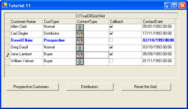
Editing: The grid has several built-in editors like: MaskEdit, CheckBox, UpDown, Calendar DropDown, Combo* and DropDown Controls. Janus' grid for .NET also permits you to define a custom EditType" for a column. *The Combo EditType can have several columns and also has Type ahead functionality

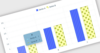
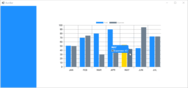
Appearance: Janus’ Outlook style grid control offers many advanced formatting features that will give the programmer total control over how data is displayed. New in the .NET version are enhancements to FormatStyles like support for Gradients, Blend colors and Transparency (Alpha Blending). Custom Drawing, Watermarks and Support for Windows XP Visual Styles were also added to provide a rich UI appearance to applications

CardView: The practical CardView is enhanced with support for multicolumn layouts and the ability to easily expand or collapse cards. Showing a single record in CardView is also supported in this new version of the .NET grid control

Master-Detail: Janus GridEX for .NET grid component now adds support for binding to hierarchical DataSets and present master-detail information within the same window

Grouping and Sorting: Janus' grid for .NET includes automatic Outlook style Grouping and Sorting by an unlimited number of columns

Preview Rows and ColumnSets: Preview Rows provide a robust interface element, using them you can "preview" one of your data columns below each row, much like Microsoft Outlook does but now with the use of Janus' grid ColumnSets you can also present one record in more than one row and even have columns spanning across several rows. ColumnSets can also be used while the control is in CardView

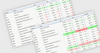
Filtering: The .NET grid is now more functional than ever with the addition of FilterConditions, where you can define simple or complex conditions that can be used to filter, format, summarize or find rows in grids which conform to the criteria. The new filter capabilities of the GridEX control are so that you could filter rows in a parent table depending on criteria met in a child table. The Control also presents a new Microsoft Access like Filter Row, which permits users to easily filter the data presented in the control

Formatting: Cell, and Row Level conditional formatting can be done effortlessly using FormatConditions, Now you can specify a simple condition for a format or use the new FilterCondition property to have compound conditions which greatly reduces the code you would have to write for complex formatting calculations, also new in this version is the ability to merge 2 or more Formats in a single row for cells meeting specific criteria

Summarize Data: Sometimes grouping is not enough and there are situations where you need an easy way to see a sum, average or count for certain columns within a group, this can be easily achieved using GroupFooters, In the new GridEX for .NET control you can even see those footers when groups are collapsed, or present a total for certain columns in the group headers or even present totals using only those records which meet the criteria specified in a FilterCondition. The grid can also present a total row per each table, which is a very handy feature when working with master-detail relationships

Printing: GridEX Control for .NET library also includes a GridEXPrintDocument component to easily achieve WYSIWYG (What-You-See-Is-What-You-Get) printing of the data presented by the control. With the GridEXPrintDocument component you can define page headers and footers for your documents. To be able to print a range of pages you can define the FromPage, ToPage properties in the printer settings. When it is necessary to know ahead how many pages a document will have, the GridEXPrintDocument includes a PrepareDocument method which paginates the document before starting the print job. GridEXPrintDocument component can be used with the PrintPreviewDialog or PrintPreviewControl to easily provide your apps with a customizable Preview Window

Standalone Input Controls: MaskEdit, MultiColumn Combo, Integer UpDow and ValueList UpDown standalone controls are included with Janus's .NET grid control

What's New in Janus GridEX Control for .NET V3.x?

MultipleValues Columns: A column can be bound to a list of values. MultipleValues columns are especially useful when dealing with many-to-many relations. For example, if there is a many-to-many relation between tables “Products” and “Categories” you can bind a grid to the table “Products” and add a MultipleValues column bound to the relation showing (in a single cell) all the categories a product belongs. To edit these cells, you can use a checked combo box where the user can check/uncheck the list of available categories.The GridEX Control is also capable to group columns with more than one value. When grouping by a MultipleValues Column a record in the table could belong to more than one groups and the control will present a copy for those repeated records in each of the corresponding groups. When an edition in those copied record is made, the control will automatically reflect the changes in each copy

SelfReferencing Tables: A table with a self-referencing relation can be displayed as a tree. For example, you can bind a GridEX control to a “Messages” table. If a message can contain other message as a child, you can use HierarchicalMode.SelfReferencing in the GridEXTable and show the control as tree with multiple columns

Custom Grouping: A new GridEXCustomGroup class is provided to let you specify custom group definition. There are two types of custom groups:

Composite Columns: Rows in the GridEX control are grouped based on the values of two or more columns in the same group row. For example: You can specify columns: “Country” and “City” and the control will create a group row for each different combination of the values of these columns

Conditional Group Rows: You can specify each of the group rows a Group contains and specify the condition that rows must meet in order to be part of the group row

Hierarchical Grouping: Rows in a table can be grouped based on the values of a column that belongs to a child table. For example, in a hierarchical grid showing Customers-Orders-Order_Details, you can group Customers table by the “Product” column in Order_Details table. Showing you a grouped view of customers based on the products ordered

Hierarchical Filters: Rows in a table can be filtered based on the values of a column that belong to a child table

Improved Performance on Hierarchical Mode: Janus data manipulation classes were completely redesigned to decrease the time used to load child lists to a fraction of the time needed in previous versions

Nested Properties Binding: A column can now be bound to a property of a sub-object in the original DataRow. For example, if a control is bound to a list of “Contact” objects and the Contact class has a property that returns a “ContactName” object where “ContactName” is a class with two properties: “FirstName” and “LastName”, you can bind a column to Contact.ContactName.FirstName setting its DataMember property equal to “ContactName.FirstName”

Unbound Mode: New Unbound mode in GridEX control allows you to populate rows using AddItem method.

Unbound Columns:You can add an unbound column to a bound grid. There are two types of unbound columns:

UnboundFetch: The value of the cells in these columns is set in the LoadingRow event. This mode is useful when you want to have a calculated cell where the value is based on the values of other cells in the same row

UnboundKeep: The value of the cell can be set by the user and the control will keep that value

KeepRowSettings Property: When this property is set to true, the control retains the row and cell properties even when the rows are scrolled out of view. By default, GridEX control fires the FormattingRow event to let you specify cell properties of rows that are displayed in the grid.These settings are cleared once a row is no longer visible and they must be set again when the FormattingRow event is fired for the row. In cases where you need to set cell properties (like its FormatStyle outside) the FormattingRow, you can use this property to true and the control will keep the property you set even when the row is scrolled out of view

UseGroupRowSelector Property: This property allows you to display a checkbox in group rows that checks/unchecks all the rows inside a group with one click

TotalRowPosition property: When using a TotalRow in the grid, you can now specify whether you want to show the total row as a scrollable row at the end of the list or fixed at the bottom of the display area in the control

GridEXGroupHeaderTotal.ColumnAlign Property: This property allows you specify a column to which align a defined group header total

CardView Appearance: CardViewGridLines and CardInnerSpacing properties were added to let you change the appearance of a card in GridEX control. Now, it is possible to show a card with grid lines between its fields and the space specified in CardInnerSpacing between those fields

Export to Excel: A new GridEXExporter component is provided to let you export the data displayed in a GridEX control as an Excel XML document

FieldChooser Control: In addition to the ShowFieldChooser method, you can use the new GridEXFieldChooserControl to use the control inside a panel of your form instead of showing it as a floating window outside your application

CheckedComboBox Control: This new control acts as combo box that can be bound to a list of values where the user can check/uncheck multiple items in the dropdown to add/remove items from the list specified as value of the control

PartNumbers: PC-512926-124790 512926-124790 PC-512926-124794 512926-124794 PC-512926-124798 512926-124798 PC-512926-124802 512926-124802 PC-512926-124806 512926-124806 PC-512926-124810 512926-124810 PC-512926-124822 512926-124822 PC-512926-124814 512926-124814

PurchaseOptions: Janus GridEX for .NET V3.5 1 Developer License , Janus GridEX for .NET V3.5 4 Developer Team License , Janus GridEX for .NET V3.5 8 Developer Team License , Janus GridEX for .NET V3.5 1 Site Wide License (Allows Unlimited Developers at a Single Physical Address) , Janus GridEX for .NET V3.5 - Upgrades 1 Developer Upgrade License (Upgrade from Janus GridEX for .NET V2.0 1 Developer License) , Janus GridEX for .NET V3.5 - Upgrades 4 Developer Upgrade License (Upgrade from Janus GridEX for .NET V2.0 4 Developer Team License) , Janus GridEX for .NET V3.5 - Upgrades 8 Developer Upgrade License (Upgrade from Janus GridEX for .NET V2.0 8 Developer Team License) , Janus GridEX for .NET V3.5 - Upgrades 1 Site Wide Upgrade License (Upgrade from Janus GridEX for .NET V2.0 1 Site Wide License)

Resources: What's New in Janus GridEX Control for .NET V3.0?, Read the Janus WinForms Controls Suite License Agreement, Download the Janus WinForms Controls Suite V3.5 evaluation on to your computer - Expires after 30 days

Operating System for Deployment: Windows Vista, Windows XP, Windows Server 2003, Windows ME, Windows 2000, Windows 98, Windows NT 4.0

Architecture of Product: 32Bit

Product Type: Component

Component Type: .NET WinForms, .NET Class, 100% Managed Code

Compatible Containers: Microsoft Visual Studio 2008, Microsoft Visual Studio 2005, Microsoft Visual Basic 2008, Microsoft Visual Basic 2005, Microsoft Visual C++ 2008, Microsoft Visual C++ 2005, Microsoft Visual C# 2008, Microsoft Visual C# 2005, .NET Framework 3.5, .NET Framework 3.0, .NET Framework 2.0

Product Class: User Interface Components

Search Items: New Product July 04

Keywords: Janus Systems janusys Grid Grids Table Tables DataGrid DataGrids Corporate Partner Grid Grids GridEX EX Janus Systems SA de CV GridX Spreadsheet Excel Table BOUND UNBOUND CELLS COLUMN GRIDLINES outlook dotnet c# .NET net

Búsqueda de productos

Escriba palabras de búsqueda:

Galería de capturas de pantalla

Award Award