de Lassalle Technologies - Tipo de producto: Componente / .NET WinForms / .NET Class / 100% Managed Code
Por favor note que la información sobre este producto no está disponible en español.
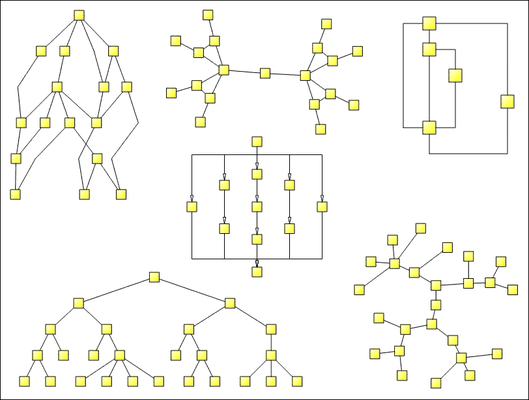
A set of graph drawing algorithms. LayoutFlow for .NET is a collection of 5 layout components to enable you to automatically display graphs or flow charts following some aesthetic rules. Includes: HFlow (hierarchical), SFlow (symmetric), SPFlow (Series Parallel), TFlow (tree) and OFlow (orthogonal). These controls are AddFlow extensions. Each of these controls allows performing a graph layout automatically, positioning its vertices (also called nodes) and edges (also called links) on a form containing an AddFlow control.

Nuestros precios Standard están indicados abajo. Inicia una sesión para ver sus precios con descuento.
| Añadir a la Cesta | $ 293.02 | 1 Developer License | Verificar | Descarga (5.3 MB) |
| Añadir a la Cesta | $ 97.02 | 1 Developer License Upgrade from LayoutFlow ActiveX Single Developer License | Verificar | Descarga (5.3 MB) |
| Añadir a la Cesta | $ 146.02 | 1 Developer License Upgrade from HFlow, SFlow, TFlow (.NET or ActiveX versions) | Verificar | Descarga (5.3 MB) |
| Añadir a la Cesta | $ 587.02 | 4 Developer Team License | Verificar | Descarga (5.3 MB) |
| Añadir a la Cesta | $ 195.02 | 4 Developer Team License Upgrade from LayoutFlow ActiveX Team License | Verificar | Descarga (5.3 MB) |
| Añadir a la Cesta | $ 293.02 | 4 Developer Team License Upgrade from HFlow, SFlow, TFlow (.NET or ActiveX versions) Team License | Verificar | Descarga (5.3 MB) |
| Añadir a la Cesta | $ 1,763.02 | 1 Site Wide License (Allows Unlimited Developers at a Single Physical Address) | Verificar | Descarga (5.3 MB) |
| Añadir a la Cesta | $ 587.02 | 1 Site Wide License Upgrade from LayoutFlow ActiveX Site License | Verificar | Descarga (5.3 MB) |
| Añadir a la Cesta | $ 881.02 | 1 Site Wide License Upgrade from HFlow, SFlow, TFlow (.NET or ActiveX versions) Site License | Verificar | Descarga (5.3 MB) |
| Añadir a la Cesta | $ 147.00 | 1 Developer License | Verificar | Descarga (5.3 MB) |
Nuestros precios incluyen servicio técnico de ComponentSource y, para la mayoría de los productos disponibles para descarga, una copia de seguridad en línea y una actualización GRATUITA a la nueva versión si ésta se publica en un período de 30 días después de la compra. Todas las ventas están sujetas a nuestros Términos y condiciones standard y a nuestra Política de devolución. Por favor, póngase en contacto con nosotros si necesita alguna opción de licencia no incluida en la lista anterior, incluida la compra por volumen de licencias y versiones anteriores.
Nuestros precios Standard están indicados arriba. Inicia una sesión para ver sus precios con descuento.
LayoutFlow for .NET is a set of five graph layout .NET components:
A demonstration of each of these products is available in the DemoLayout sample provided with AddFlow for .NET.
HFlow, OFlow, SFlow, SPFlow and TFlow are AddFlow extensions and you cannot use them without AddFlow. Typically, you can first create your nodes and links inside AddFlow, using the AddFlow API, giving each node a random or a (0,0) position. Then you call the layout method of the graph layout control of your choice. This method will position the nodes and the links in a reasonable manner in the AddFlow control, following some aesthetic rules that depend on the chosen control (hierarchical with HFlow, symmetric with SFlow, orthogonal with OFlow...)
Only the logical vertices and edges of the AddFlow control are involved in this layout. This will allow you to apply the layout only to important vertices. For instance, you will be able to exclude a node just used to display a label by setting its Logical property to false.
LayoutFlow for .NET is a set of graph drawing algorithms. It includes:
1) HFlow
The HFlow layout algorithm arranges vertices in horizontal layers. The orders of the vertices are chosen so that the number of crossings is kept small. HFlow just produces a reasonable solution, not the optimum solution.
2) OFlow
The OFlow layout algorithm allows performing an orthogonal layout on a graph. The layout is orthogonal since it produces an orthogonal drawing where each edge is drawn as a polygonal chain of alternating horizontal and vertical segments. OFlow works with any graphs, connected or not. In the resulting drawing, if the graph is a graph of maximum degree four, then each node has the same size. If the degree of a node is higher than four, then the height of the node is expanded.
3) SFlow
The SFlow layout algorithm allows performing a symmetric layout on a graph. The symmetric layout produces a high degree of symmetry and is particularly useful for undirected graphs, where the directions of the edge are not important.
The resulting layout is often good. However it requires considerable computational resources and therefore should be used for small graphs (less than 300 nodes). Using the animation mode you can see how SFlow is working.
4) SPFlow
The SPFlow layout algorithm allows performing a series-parallel layout on a graph. The SP layout applies only to a specific subset of graphs: series-parallel digraph (more precisely, a set of series-parallel diagraphs). A series-parallel digraph is defined recursively as follows.
A digraph consisting of two nodes, a source s and a sink t joined by a single link is a series-parallel digraph.
If G1 and G2 are series-parallel digraphs, so are the digraphs constructed by each of the following operations:
- the parallel composition: identify the source of G1 with the source of G2 and the sink of G1 with the sink of G2.
- the series composition: identify the sink of G1 with the source of G2.
We use an algorithm that allows drawing series-parallel digraphs with as much symmetry as possible.
5) TFlow
The TFlow layout algorithm allows performing a tree layout on a graph. The tree layout applies only to a specific subset of graphs: rooted trees. In such a graph, no vertice may have more than one parent. The drawing of the tree occupies as little space as possible while satisfying certain aesthetics.
If the DrawingStyle property is "Layered":
If the DrawingStyle property is "Radial":
Notice that it is necessary to use AddFlow for .NET to be able to use LayoutFlow for .NET. Both products are installed via a common installation program.