LEADTOOLS Medical Imaging Suite - Runtime Licenses - V15.0 - Summary

by LEAD Technologies - Product Type: Component / Add-In / .NET WinForms / .NET Class / 100% Managed Code / DLL / VC++ Class Library

Summary

LEADTOOLS Medical Imaging Suite - Runtime Licenses - V15.0 by LEAD Technologies

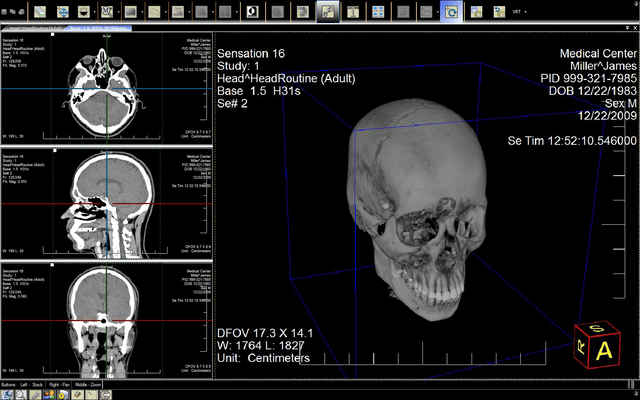
Provide support for industry-standard medical imaging. LEADTOOLS Medical Imaging Suite gives complete DICOM support including DICOM communications with powerful high-level features that simplify the creation of your DICOM client/server applications. With Medical Imaging Suite you get high-level functions that automate sending DICOM Request and Response Command Sets, greatly simplifying the process of coding application communications and complete support for Message Exchange.

This page outlines the Runtime Licenses for LEADTOOL Medical Imaging Suite SDK.

Licensee must purchase a runtime license or server license for each Deployment of Application Software. For purposes hereof, a "Deployment of Application Software" will include Stand Alone Deployments, Stand Alone Deployments with CD Burn License, Concurrent Deployments, Server Licenses and Duplication Licenses. A "Stand Alone Deployment" includes any and all copies of the Application Software installed, used, distributed, leased, or sold by Licensee and any of its customers, employees, distributors, resellers, affiliates or other channel partners. A Stand Alone Deployment with CD Burn License is a Stand Alone Deployment where the user of the Application Software is permitted to "burn" Dicom files onto a CD and to distribute a read only Dicom viewer developed with the Software with each burned CD provided the viewer will only be able to view Dicom files that are on the burned CD. If the Application Software is installed on a server or network by Licensee or its customers, the number of Stand Alone Deployments that must be reported and the number of runtime licenses that must be purchased hereunder will be the number of computers that are permitted access to the Application Software via the network or server. Notwithstanding the foregoing, if the Application Software is installed on a server or network and only a specified number of the computers connected to the server or network can access the Application Software at the same time, the applicable number of computers that are permitted simultaneous access to the Application Software will be a "Concurrent Deployment" for purposes hereof. (For example, if the Application Software is installed on a network with 1000 computers connected, but only 10 computers may access the Application Software at the same time, licensing for 10 Concurrent Deployments and no Stand Alone Deployments will be required for purposes hereof. Additionally, Licensee has the option of purchasing a "Web Server License" for certain types of server installations of the Application Software and a Duplication License for certain types of CD duplication installations of the Application Software.

For more information see Pricing & Licensing and read the Licensing help file in the Evals & Downloads section.

Overview

LEADTOOLS Medical Imaging improvements include 12-bit Lossy JPEG import/Export support, faster multi-frame DICOM creation and retrieval and faster DICOM Communications. Additional image processing functionality has been added. In addition, expanded TWAIN v1.9 support, advanced color conversion functions, and the ability to compress images in memory have also been added. There are New common dialogs and existing dialogs have been enhanced with a progressive new look and feature set. Additional image formats are being supported, pushing the number of LEADTOOLS supported image formats count to over 150.

LEADTOOLS Medical Annotation Module is now included with LEADTOOLS Medical Imaging and Medical Imaging Suite. Additionally, the following add ons are included with LEADTOOLS Medical Imaging Suite:

LEADTOOLS DICOM Communication Module

DICOM Security Module

Take a look at what's new:

Faster DICOM

New Modular Product Structure

Image Processing Enhancements (over 100 new functions)

More Color Conversion Options

New TWAIN V1.9 Support

New Format Support

New Common Dialogs (now for ALL Image Processing functions)

Additional Features

For more information please read the Medical Imaging overview in the evaluations section

LEAD has also extended its DICOM support to include the following:

Support for the latest DICOM specification - The version 14 LEADTOOLS Medical Imaging line significantly extends its position as the DICOM market leader by providing support for the latest version of the DICOM specification

DICOM LUT/Overlay/Palette support - The high-level support for Modality LUT, VOI LUT, Palette Color Image in LEADTOOLS Medical Imaging means developers can implement DICOM Presentation state into an application with ease. LEADTOOLS can also apply the Modality LUT to the image data to further simplify image processing and statistical calculations

DICOM Print SCU support - Add DICOM printing to an application in hours with the new high-level DICOM Print support

DICOM Annotation Object support - Store/retrieve DICOM annotations from a dataset and convert them to LEAD Annotation objects and vice versa. Annotations can also be converted to regions of interest for additional statistical calculations and for storing to DICOM Presentation State

LEADTOOLS' Medical Imaging Suite is simply the best toolkit available for creating DICOM Client/Server Applications. Here's why: Full Support for all Service Classes - Easy to implement all possible DICOM Service Classes for a client and/or server:

DICOM Verification Service Class

DICOM Storage Service Class

DICOM Query/Retrieve Service Class

DICOM Study Content Notification Service Class

DICOM Patient Management Service Class

DICOM Study Management Service Class

DICOM Results Management Service Class

DICOM Print Management Service Class

DICOM Media Storage Service Class

DICOM Storage Commitment Service Class

DICOM Basic Worklist Management Service Class

DICOM Queue Management Service Class

Largest set of hardware manufacturers supported

Direct support for PACs

Most comprehensive file format support

Extensive, ready to use sample source code and executables

4 different Programming interfaces - API, C++ Class Library, ActiveX, VCL

LEADTOOLS gives you powerful high-level features that simplify the creation of your DICOM client/server applications. With Medical Imaging Suite, you get:

High-level functions for initiating and terminating Associations (connections between DICOM applications), automating the process of filling out PDU structures (Protocol Data Units)

Automatic and transparent conversion of DICOM Data Sets to/from the specific Transfer Syntax required by the associated Application Entities (the connected DICOM client(s) and server(s))

High-level functions that automate sending DICOM Request and Response Command Sets (Services), greatly simplifying the process of coding application communications

Complete support for Message Exchange, including DIMSE (DICOM Message Service Element) service user and provider, and Message Exchange Upper Layer Protocol

In addition to special medical features, the Medical Imaging Suite also includes optimized image processing filters, and high performance decompression and viewing of JPEG, LEAD CMP and CCITT G4 image files. With the LEADTOOLS Medical Imaging Suite, developers get a comprehensive imaging toolkit which provides support for Annotation (more than 50 objects, all with hyperlink capabilities and security options), Image Processing (Transforms, Filters, Drawing, Region of Interest), Scanning (TWAIN), Color Conversion, Display, Special Effects (choose from more than 2000 effects), Compression, Image Format (import/export), Printing, Internet/intranet imaging, Database imaging, Imaging Common Dialogs, and Screen Capture.

Included programming interfaces: A low level API, C++ Class Library and .NET components. LEADTOOLS Medical Imaging products ship with sample Source code for C/C++, Visual C++ (MFC), C# and VB.NET.

The following products are included with LEADTOOLS Medical Imaging products making them the complete development solution.

LEADTOOLS Multimedia - for video and audio data capture (WDM, VFW, DV) and playback

LEAD MJPEG Codec - for lossy and lossless real time MJPEG encoding and decoding (including 10-16 bit grayscale)

LEAD JPEG2000 Codec - for lossy and lossless encoding and decoding of JPEG2000 data (including 10-16 bit grayscale)

LEAD DirectShow DICOM Read Filter - Supports JPEG2000 and JPEG lossy and lossless compression, RLE and uncompressed data

LEAD DirectShow DICOM Write Filter - Supports JPEG2000 lossy and lossless, JPEG Lossy (including 12-bit grayscale), JPEG lossless for all bit depths supported in the DICOM standard

Also included are the following LEADTOOLS Components:

LEAD TWAIN

Use the default user interface included with the TWAIN driver.

Create your own user interface to the driver interface.

Bypass the interface entirely for completely automated tasks or batch scanning.

Control the type of image which is acquired (black & white, b/w with halftone, grayscale, color - as supported by the device).

Control the resolution (dpi), position , size, and orientation of the image to be acquired.

Use the Automated Document Feeder for single and multi-page scans, including support for duplex scanning.

Use supplied events and callbacks to code your own special per-page processing

Use selection dialogs to allow selection of TWAIN source, or select among multiple TWAIN sources in code.

Use of native, buffered memory or file transfer modes when acquiring from a TWAIN device.

Flexibility to get and set all TWAIN v1.9 capabilities that the device's TWAIN driver supports.

Save of the device's TWAIN capability settings to a template file, helping to save multiple settings of sources and load them as needed.

Buffered memory transfer mode includes compression support. The scan data is compressed using JPEG, RLE, BITFIELDS, GROUP 3, GROUP 4 or PACKBITS to reduce the data transfer bottle neck.

Perform the save of the Memory Buffered Transfer data directly to a file.

Get the Extended Image Info that some TWAIN scanner drivers support. For example, if the scanner driver supports reading barcodes or patch codes, then that information could be retrieved via LEADTOOLS TWAIN support

LEAD PictureBox

Drag and drop into web pages or windows applications

Unlimited zooming in and out

Manual and auto scroll

Additional viewing modes including: Fit to window, stretch and center

Control source rectangle for viewing portion of interest

Interactive zoom to rectangle using the mouse

Interactive pan of image using the mouse

LEAD Image Processing

User event notification to add support for visual feedback during image processing (Percentage completion, canceling the operation)

More than 60 digital filters and transforms

Smooth, sharpen and edge detection and enhancement

Modify brightness/contrast/gamma

Change hue and saturation

Add noise to one or all color channels

Resize/rotate using various re-sampling techniques

Much more!

LEAD Rubberband

Rubber banding is an operation used often in Windows based applications. It can be used for drawing, selecting or moving objects around. This is a general purpose class that can be used in imaging and non-imaging applications. Basically, it gives the user of the application visual feedback and sends the developer events to add additional support or processing.

PartNumbers: PC-510496-103953 510496-103953 PC-510496-103957 510496-103957 PC-510496-103961 510496-103961 PC-510496-103962 510496-103962 PC-510496-103963 510496-103963 PC-510496-103964 510496-103964 PC-510496-103965 510496-103965 PC-510496-103966 510496-103966 PC-510496-103967 510496-103967 PC-510496-103968 510496-103968 PC-510496-103969 510496-103969 PC-510496-103970 510496-103970 PC-510496-132635 510496-132635

PurchaseOptions: LEADTOOLS Medical Imaging Suite V15.0 - Non Prepaid Stand Alone Runtime License 1 Stand Alone Runtime License , LEADTOOLS Medical Imaging Suite V15.0 - Non Prepaid Concurrent Runtime License 1 Concurrent Runtime License , LEADTOOLS Medical Imaging Suite V15.0 - Prepaid Stand Alone Runtime License 1 Runtime License, per license from 50 up to 99 licenses (minimum quantity 50) , LEADTOOLS Medical Imaging Suite V15.0 - Prepaid Stand Alone Runtime License 1 Runtime License, per license from 100 up to 249 licenses (minimum quantity 100) , LEADTOOLS Medical Imaging Suite V15.0 - Prepaid Stand Alone Runtime License 1 Runtime License, per license from 250 up to 499 licenses (minimum quantity 250) , LEADTOOLS Medical Imaging Suite V15.0 - Prepaid Stand Alone Runtime License 1 Runtime License, per license from 500 up to 999 licenses (minimum quantity 500) , LEADTOOLS Medical Imaging Suite V15.0 - Prepaid Stand Alone Runtime License 1 Runtime License, per license from 1000 up to 2499 licenses (minimum quantity 1000) , LEADTOOLS Medical Imaging Suite V15.0 - Server Runtime License 1 Server Runtime License , LEADTOOLS Medical Imaging Suite V15.0 - Server Runtime License 2 Server Runtime License , LEADTOOLS Medical Imaging Suite V15.0 - Server Runtime License 3 Server Runtime License , LEADTOOLS Medical Imaging Suite V15.0 - Server Runtime License 4 Server Runtime License , LEADTOOLS Medical Imaging Suite V15.0 - Server Runtime License 5 Server Runtime License , LEADTOOLS Medical Imaging Suite V15.0 Prepaid Stand Alone Basic Dicom Enabled Deployments Runtime License 100 Runtime Licenses

Resources: Read the LEADTOOLS Licensing help file, Read the LEADTOOLS Imaging help file, Download the LEADTOOLS V15.0 evaluation on to your computer - Expires after 60 days

Operating System for Deployment: Windows Vista, Windows XP, Windows 2000, Windows 98, Windows NT 4.0

Architecture of Product: 32Bit, 64Bit

Product Type: Component, Add-In

Component Type: .NET WinForms, .NET Class, 100% Managed Code, DLL, VC++ Class Library

Built Using: MFC V4.2 / V6.0, ActiveX Template Library (ATL), Visual C# .NET

Compatible Containers: Microsoft Visual Studio 2005, Microsoft Visual Studio .NET 2003, Microsoft Visual Studio .NET, Microsoft Visual Studio 6.0, Microsoft Visual Studio 97, Microsoft Visual Basic 2005, Microsoft Visual Basic .NET 2003, Microsoft Visual Basic .NET, Microsoft Visual C++ 2005, Microsoft Visual C++ .NET 2003, Microsoft Visual C++ .NET, Microsoft Visual C++ 6.0, Microsoft Visual C++ 5.0, Microsoft Visual C++ 4.0, Microsoft Visual C# 2005, Microsoft Visual C# .NET 2003, Microsoft Visual C# .NET, Microsoft FrontPage, Microsoft Internet Explorer 7.0, Microsoft Internet Explorer 6.0, Microsoft Internet Explorer 5.5, Microsoft Internet Explorer 5.0, CodeGear C++ 5.0 (formerly Borland), CodeGear C++ (formerly Borland), C++Builder 5, C++Builder 4, Delphi 2006 (10.0), Delphi 2005 (9.0), C#Builder, Visual dBase 7.0, Watcom C/C++, .NET Framework 2.0, .NET Framework 1.1, .NET Framework 1.0

Product Class: User Interface Components

Search Items: New Version Dec 03

Keywords: Scan scanning scanned scanner scans OCR optical character recognition Image images Compression compress compresses Conversion convert converting converts conversions Drawing Draw draws image images processing imaging LEAD Technologies ImageImagingToolkitSDKImaging image images Corporate Partner Image PictureJPEGScanBitmap draw artprocessing graphicGIFTarga precision Twain

Product Search

Enter search words:

Screenshot Gallery

Award