by LEAD Technologies - Product Type: Component / Add-In / ASP.NET AJAX (ATLAS) / .NET WinForms / .NET Class / .NET WCF / .NET WPF / Silverlight / .NET WF / DLL / VC++ Class Library
Medical imaging programming libraries. LEADTOOLS Medical Imaging includes hand-picked and optimized features to meet the specific needs of medical imaging application development, such as full DICOM dataset support, support for 8-16 bit grayscale, and 12 and 16 bit image processing and display with window leveling and LUT processing. DICOM 3, the industry standard medical imaging format/protocol is fully and completely supported, allowing programmers access to medical images retrieved from digital imaging modalities such as CT and MR scanners. LEAD's DICOM imaging support is one of the richest in the industry supporting 8, 10, 12, 16, 24 and 32 bit images including JPEG (8, 10 , 12, 16-bit Lossless grayscale, 8, 12-bit lossy grayscale, 24-bit lossless and lossy color), Run Length, Uncompressed, Photometric Interpretation (Monochrome1, Monochrome2, Palletized, RGB, ARGB, CMYK, YBR Full 422, YBR Full), and single and multi-page images. LEAD's Medical Imaging toolkit includes 8-16 bit grayscale display with window leveling. Window leveling is a linear conversion from stored pixel values to values to be displayed; LEADTOOLS can map the stored pixel values of interest using a user defined color map (using a LUT or Palette) or linear gray LUT.
Our regular prices are shown below. Please logon to see your discounted prices.
| Add to Cart | ₩ 5,528,700 | 1 Developer License Mfr. Part No: MEDIMG175 |
Download (819.4 MB) | |
| Add to Cart | ₩ 3,977,600 | 1 Developer Upgrade License from previous version Mfr. Part No: UMEDIMG175 |
Verify | Download (819.4 MB) |
| Add to Cart | ₩ 2,274,000 | 1 Annual Maintenance License Mfr. Part No: AMMEDIMG175 |
Verify | Download (876 KB) |
| Add to Cart | ₩ 1,101,300 | 1 LEADTOOLS Medical Multimedia Module Developer License Mfr. Part No: MDMM175 |
Verify | Download (611.6 MB) |
| Add to Cart | ₩ 792,300 | 1 LEADTOOLS Medical Multimedia Module Developer License Upgrade License from previous version Mfr. Part No: UMDMM175 |
Verify | Download (611.6 MB) |
| Add to Cart | ₩ 453,900 | 1 LEADTOOLS Medical Multimedia Module Annual Maintenance License Mfr. Part No: AMMDMM175 |
Verify | Download (876 KB) |
Our prices include ComponentSource technical support and, for most downloadable products, an online backup and a FREE upgrade to the new version if it is released within 30 days of your purchase. All sales are made on our standard Terms and Conditions and subject to our Return Policy. Please contact us if you require any licensing option not listed, including volume licensing and previous versions.
Our regular prices are shown above. Please logon to see your discounted prices.
What's New in the LEADTOOLS Medical Engine V17.5 Re-mastered
The healthcare industry continues to demand innovation and rapid development capability. This new version of 17.5's Medical Web Viewer Framework and PACS Framework have new major features including cross-platform and mobile device capable viewers, more robust and simpler customization, and a new OEM-ready DICOM Server application with source code.
Medical Web Viewer Framework
Medical Image Viewer
Other Enhancements
What's new in LEADTOOLS Medical Imaging SDK V17.5
LEADTOOLS Medical Imaging includes everything in the Document Imaging product and adds Medical Imaging features: Window-leveling display and processing functions, support for 9-16 and 32 bit grayscale and full DICOM file format support. Add on full DICOM communications support. LEADTOOLS Medical Imaging also includes all the features you need to build a full web-based DICOM-enabled viewing application.
Key Features:
Additional features can be added to Medical Imaging:
DICOM Basic:
LEADTOOLS Medical Imaging product line includes general medical imaging technologies (1-16,24,32 bit color, 1-16 bit grayscale and window leveling of 12 and 16-bit grayscale images), and support for the DICOM file format. Load, process, display, window level and save 12 and 16 bit grayscale images (including support for 16-bit grayscale TIFF). Detect and set LowBit and HighBit for image data, display images with automatic LUT intensity expansion, or set LUT entries and ranges with specific values and gradients. Display images through the LUT without changing the data, or process the image data using the LUT.
DICOM Basic
LEADTOOLS Medical Imaging provides COMPLETE support for the DICOM 2003 specification, including all standard IOD classes and modalities (CR, CT, MR, NM, US, RF, SC, VL, etc.) and complete DICOM Basic Directory support.
With the base DICOM support you can do the following:
NEW Windows Presentation Foundation (WPF) Standard .NET
WPF supports robust imaging capabilities, interface automation, data-driven user interfaces and visualization, as well as Windows shell integration. WPF can natively access Windows Imaging Component (WIC) codecs and APIs, allowing developers to write image codecs for their specific image file formats.
The LEADTOOLS WPF Standard Edition includes controls for everything you need to start adding imaging functions to your Windows Presentation Foundation (WPF) applications.
WPF Standard .NET Features:
NEW Windows Presentation Foundation (WPF) Pro
Use the LEADTOOLS WPF Pro to unleash the power of LEADTOOLS in your XAML applications. Using LEAD's WPF interface, you can add LEADTOOLS OCR, TWAIN scanning, document pre-processing, medical imaging, and much more to any WPF application. Get Expression Blend-compatible and fully styleable controls for complete interoperation support between LEADTOOLS and Windows Presentation Foundation (WPF) images.
Key Features:
LEAD Technologies' most advanced WPF Image Viewer - Leadtools.Windows.Controls.Pro incudes image viewer controls that not only support all Microsoft .NET BitmapSource image objects, but works directly with LEADTOOLS Imaging Pro .NET classes, allowing you to leverage the full power of LEADTOOLS file format and image processing support. The fully styleable control includes scroll, zoom, pan, magnify glass, and image list.
Advanced WPF Image Processing - The Leadtools.Windows.Media namespace contains classes that let you convert a LEADTOOLS image (Leadtools.RasterImage) to and from a WPF image (System.Windows.Media.ImageSource). This namespace also gives you access to all LEADTOOLS image processing functions, allowing you to create powerful imaging applications using the WPF framework.
Benefits include:
WPF Annotations
The Leadtools.Windows.Annotations namespace included with LEADTOOLS Document and Medical products adds powerful annotation capabilities to documents and images in WPF. These include not only lines, shapes, and pointers, but essential tools like redaction (blackout), hotspots, text, images, highlights, sticky notes, images, stamps and hyperlinks.
WPF Transition Effects
The Leadtools.Windows.Media.Transitions namespace allows you to add multiple slide show transition effects to your WPF projects. Choose from 10+ basic effects like wipe, blinds, push, rotate, and zoom, plus dozens of variants.
DICOM Dataset:
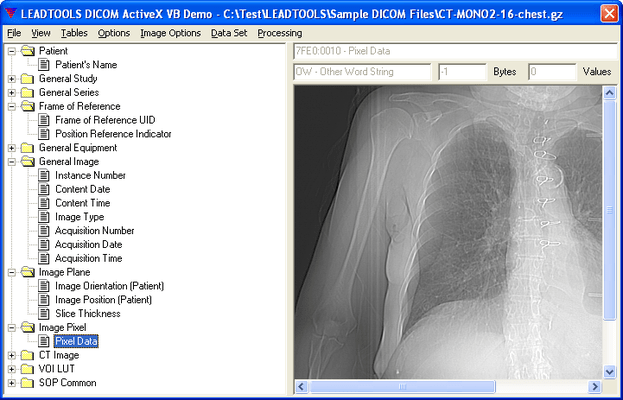
A Data Set is a collection of Data Elements stored in a DICOM file. Each DICOM file may or may not include a header consisting of a Preamble and a Prefix. Each DICOM file represents a separate class of information. For example, one DICOM file may represent the Computed Tomography Image class, and another DICOM file may represent the Radiotherapy Structure Set class. DICOM Standard defines a vast numbers of Class Information Object Definitions as standard classes. LEADTOOLS supports user-defined classes in addition to the standard classes.
For each class supported by DICOM there are certain modules contained in each class. Each module consists of a number of Data Elements, each Data Element having its own tag. These Data Elements can be mandatory or optional, depending on the module and the class. In addition to the standard modules and data elements supported by DICOM, user-defined modules and data elements are also supported by LEADTOOLS.
LEADTOOLS maintains the Data Set internally as a tree structure and provides functions to evaluate the Data Set as a tree or as a list. The developer can create the data set object with all the appropriate elements for the specified class in one function call. LEADTOOLS Medical Imaging toolkit provide a number of functions for maneuvering through the Data Set, getting and setting Data Set information, getting and setting Data Element values, searching the Data Set, and creating, loading and saving Data Sets. LEADTOOLS provides functions to delete individual items, delete entire modules, delete all items and delete one or more images in a Data Set.
To retrieve and store values in the Value Field of the Data Element in a Data Set, LEADTOOLS provides low-level and High-level functions.
What are Value Representations (VR's)?
The value representation of a data element indicates the type of data that can be stored in the value field of the data element. There are a number of value representations that are standard for the DICOM. In addition to the standard value representations, user-defined value representations may also be added using LEADTOOLS.
LEADTOOLS maintains a table (or list) internally along with the code, name, length, restrictions and unit size of all available standard and user defined value representations. LEADTOOLS also provides functions to get, set, delete, and rename the value representations in the table.
What are Data Elements and Tags?
The tag of a data element consists of an ordered pair of 16-bit values that represent a Group number and an Element number. The tag indicates the type of information stored in the value field of the data element. There are a number of tags that are standard in DICOM. In addition to the standard tags, user-defined tags may also be added using LEADTOOLS.
LEADTOOLS maintains a table (or list) internally of all available standard and user-defined tags, including the tag's code, name, value representation and value multiplicity information. LEADTOOLS provides a number of functions for maneuvering through, adding, deleting and modifying the Data Element Tag table. Also Data Element table allows the developer to add support for future Data Elements in DICOM without having to receive an upgrade from LEADTOOLS.
What do Unique Identifiers (UIDs) identify?
A unique identifier identifies items such as Service-Object Pair Classes and images. There are a number of unique identifiers that are standard for the DICOM file format. In addition to the standard unique identifiers, user-defined unique identifiers may also be added using LEADTOOLS.
LEADTOOLS maintains a table (or list) internally of all available standard and user-defined unique identifiers, with the UID's name, value and type information. LEADTOOLS provides a number of functions for maneuvering through, adding, deleting and modifying the UID Table.
What is an Information Object Definition?
An Information Object Definition (IOD) is an abstract data model that specifies information about Real-World objects. It provides a means of standardizing information exchanged between applications. There are a tremendous number of IODs that are standard in DICOM. In addition to the standard IODs, user-defined IODs may also be added using LEADTOOLS.
LEADTOOLS maintains a tree internally of all available standard and user defined Information Object Definitions (IODs). LEADTOOLS' functions allow you to evaluate the internal IOD Structure as a tree or as a list.
LEADTOOLS provides a number of functions for maneuvering through and modifying the IOD Structure such as GetRoot, GetParent, GetChild, GetFirst, GetLast, GetCountModule, etc... The toolkit provides several functions for searching the IOD Structure to insert new items, delete individual items and change the name or the description of an IOD already in the IOD Structure. A developer can use the IOD Structure to validate a DICOM Data Set. Additionally, the IOD table Structure allows user to add support for future IODs in DICOM with the current version of LEADTOOLS.
What are DICOM Basic Directories (DICOMDIR)?
In order to identify a DICOM file-set and to facilitate accessing the information stored in the DICOM files of the file-set, the DICOM standard has defined the Basic Directory IOD. A DICOM file-set contains one or more DICOM files. One of the files contained in the file-set is the DICOMDIR file. The DICOMDIR file contains DICOM Directory information, making it easier to access the information contained in the other DICOM files in the file-set. The DICOM files in the file-set are assigned File IDs; so, they can be referenced by the DICOMDIR File, which itself, is identified by a File ID of DICOMDIR.
DICOM Dir data sets may contain special data element called key elements. A Key element is a data element that also contains special information about other key elements in the data set and their relative location within the data set. The specialized information included in a key element maintains information on key element children, non-key element children, parent key elements, and the logical relationships between the elements.
LEADTOOLS maintains the DICOMDIR data set as a tree; however, all key elements are stored at the same level of the tree. LEADTOOLS provides special functions for searching the DICOM Dir data set, maneuvering through the data set, inserting and deleting key elements, and manipulating key elements.
LEADTOOLS also provides high-level functions to create or update DICOMDIR by adding DICOM files or DICOM Data Set loaded in the toolkit.
DICOM Waveforms:
The DICOM standard supports waveform storage and communication: this includes hemodynamic curve data, cardiac electrophysiology, electrocardiography (ECG) and audio signals (WAV files).
LEADTOOLS waveform support is comprehensive and handles the various features supported by the standard which include:
In addition, LEADTOOLS supports the different waveform-related IODs defined by the standard which include:
DICOM Annotation:
LEADTOOLS medical programming SDKs offer a variety of annotation (image markup) options that can be added to medical, grayscale and color images.
Annotation objects available include Ruler, Protractor, Cross Product, Pointer, Text, Circles, Freehand, etc. LEADTOOLS allows you to read or write annotations as an external annotation file, private DICOM data elements or LEAD or Wang annotation tags within a TIFF file, or annotations can become a permanent part of the image data or applied to a 1-bit image to create an overlay. With LEADTOOLS Annotations, you can choose between low level access to the annotations, or you can implement annotation support through a fully automated mode with a ready to use floating, customizable toolbar and pop-up menus. The superior annotation features provided in LEADTOOLS can be used in any application where image markup is desired.
LEADTOOLS allows the end-user to reposition nodes of an existing freehand object, which prevents the user from having to redraw the object. Enhanced redact objects allow you to restore parts of an image that were blacked out. When combined with annotation security, these redact objects provide a means of granting user-level access to parts of an image. Annotation objects can be stored as a separate object layer, or can be burned or embedded into the actual image. LEADTOOLS allows you to read or write annotations as an external file or as LEAD or Wang annotation tags within a TIFF file. With LEADTOOLS, you can choose between low level access to the annotations, or you can implement annotation support through a fully automated mode with a ready to use floating, customizable toolbar and pop-up menus. The superior annotation features provided in LEADTOOLS can be used in any application where image markup is required.
With LEADTOOLS Annotation support you can:
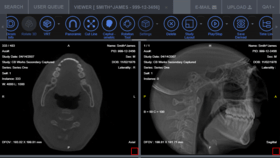
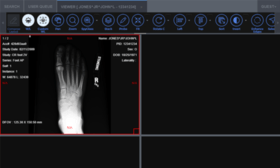
The LEADTOOLS Medical Image Viewer Control is a high-level component for building medical display applications such as DICOM viewers, view stations, teleradiology solutions, and high-end diagnostic workstations found in radiology and other medical specialty departments. Whether you are building a PACS for radiology, cardiology, mammography, ophthalmology, pathology, dermatology, dentistry or any other specialty, this control will eliminate the complexity from your project and give you a solid foundation you can rely on.
Key Features:
The window level tool has settings that can be adjusted programmatically such as full control over the different properties of the display container, such as colors, cursors, rulers and so on. Some settings can be adjusted for the container such as built-in ruler that adjusts based on the DPI of the image and the zoom or scale factor. Interpolated image display for higher quality.
Typical applications that can be built using this control:
JPEG2000 Compression:
LEADTOOLS JPEG2000 compression/decompression conforms to the JPEG2000 International Standard. This new state-of-the-art ISO/ITU still image compression standard provides a fast and flexible solution for high-quality, wavelet-based compression. LEAD has committed to fully support all future parts as they are released and therefore LEADTOOLS JPEG2000 will continue to grow as the JPEG2000 standard grows.
LEADTOOLS JPEG2000 Features currently supports:
JPEG2000 compared to JPEG:
JPEG2000 is a new image-encoding standard that provides a feature set vital to the medical imaging community. JPEG2000 provides high compression with image quality superior to all existing standard encoding techniques. This high compression and quality performance is due to the adaptation of wavelet transforms. Wavelet transforms are mathematical formulas that represent complex structures in the image, thereby compressing an extremely large amount of image data into a relatively small amount of compressed data. This compression technique allows applications to save compressed images with higher compression ratios and better image quality as compared to any other software currently in production.
JPEG2000 is a wavelet-based compression stored in a hierarchical format which can contain several stored resolutions of the image in the same file without duplication of data. For that reason, a JPEG2000 compressed image can then be sent to a device in the resolution that best fits without additional storage overhead. LEAD Technologies has used its more than twelve years in the imaging and compression developer toolkit marketplace to formulate a JPEG2000 product that offers DICOM developers the best JPEG2000 implementation available.
JPEG2000 Key Benefits:
Grayscale Imaging:
Grayscale is a range of shades of gray without apparent color. The darkest possible shade is black, which is the total absence of transmitted or reflected light. The lightest possible shade is white, the total transmission or reflection of light at all visible wavelengths. Intermediate shades of gray are represented by equal brightness levels of the three primary colors (red, green and blue) for transmitted light, or equal amounts of the three primary pigments (cyan, magenta and yellow) for reflected light.
The LEADTOOLS Medical Imaging product line offers complete support for 8-16 bit grayscale, and 12 and 16 bit image processing and display with window leveling and LUT processing.
LEADTOOLS Document and Medical Imaging SDKs include the following grayscale functionality:
Grayscale Image Processing:
LEADTOOLS includes a number of medical image processing functions. Below is a list of key image processing features focused on the medical imaging community and is not a comprehensive list of functionality. If there is a particular image processing function that you need, but can not find below, LEADTOOLS probably supports it. Contact sales@componentsource.com for information.
Region of Interest (ROI)
Use low-level functions to change parts of an image as follows:
DICOM Digital Signatures:
Digital signatures are used to verify the identity of the signer and to ensure that the signed data has not been altered or destroyed in an unauthorized manner. LEADTOOLS is the first commercial toolkit to add comprehensive support for the DICOM Digital Signature Profiles , which include: "Base RSA Digital Signature Profile", "Creator RSA Digital Signature Profile" and "Authorization RSA Digital Signature Profile".
With the complete LEADTOOLS support for Digital Signatures you can easily perform the following:
General Imaging Features:
LEADTOOLS Medical Imaging adds 8-16 bit grayscale support, and 48 and 64 bit color functionality to the Raster Imaging Pro features to make the Medical Imaging a complete imaging solution. Other general imaging features include: Image Processing, Color Conversion, Display, Special Effects (choose from more than 2000 effects), Compression, Image Format (import/export), Printing, Internet/intranet imaging (Web Forms), Database imaging, Imaging Common Dialogs and Screen Capture.
Image Display, Memory and Processing Optimizations (Bitonal Scaling): (*Only available in LEADTOOLS Document Imaging or Medical Imaging Toolkits. †Only available in LEADTOOLS Medical Imaging Toolkits.)
LEAD Technologies continually reviews and adds file format support to give your application control over the display of almost any Raster or Vector image (only available in LEADTOOLS Vector Imaging SDK) you encounter. LEADTOOLS currently supports over 150 different image formats and sub formats, each of which has its own unique set of load/save/display options, which may encompass varying types and/or degrees of compression, a range of image information bit-depths, progressive (multi-pass) image display, the ability to maintain multi-page or multi-channel images, animations, or non-image data, just to name a few. You can depend on LEAD Technologies to provide you with the support you need to give your application control over the display of almost any image you encounter. Image display can be subdivided into two groups: raster image display and vector image display. These groups are described in more detail in the following sections.
Raster Image Display
LEADTOOLS provides numerous functions to let you take control of your application's image display. Control brightness and contrast settings, color reduction with dithering and palette control, scaling/fitting, enlargement/reduction, panning, scrolling, painting with transparency and/or regions.
Further, LEADTOOLS provides high level image-list and thumbnail browser controls, a special magnifying-glass feature, an automated pan-window control, and a Zoom View control that allows you to annoate pre-defined zoomed regions.
Key Features
When used with the AutoScroll option, all Scroll Bar activity is automatic (scroll bars respond to programmatic changes of display settings, and display settings are updated by user's use of scroll bars).
Raster Imaging features that support unicode:
Document Imaging features that support unicode:
Medical Imaging features that support unicode:
Other features that support unicode:
LEADTOOLS products that include unicode support:
Programming Interfaces:
Included programming interfaces: low level C DLL, C++ class libraries, COM objects, .NET class libraries and WPF XAML controls. LEADTOOLS Imaging Pro, Document and Medical Imaging products ship with sample source code for C, Visual C++ (MFC), VB, VB.NET and C#. Supported OS: 32 and 64 bit versions of Windows.
The following products include the Document Imaging SDK
Publisher
Primary Category
Related Products
Related Categories
ComponentSource offers a unique global service, used by over 1,000,000 software developers worldwide.