LEADTOOLS Medical Imaging - .Net/DLL/Class Library/API - V15.0 - Summary

by LEAD Technologies - Product Type: Component / Add-In / .NET WinForms / .NET Class / 100% Managed Code / DLL / VC++ Class Library

Summary

LEADTOOLS Medical Imaging - .Net/DLL/Class Library/API - V15.0 by LEAD Technologies

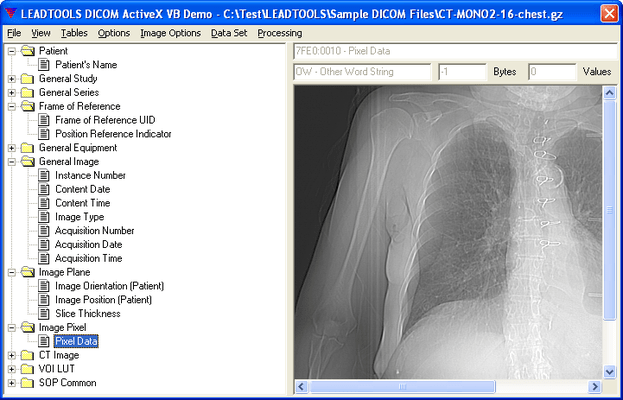
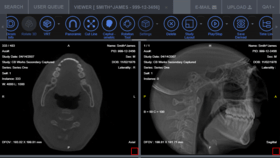
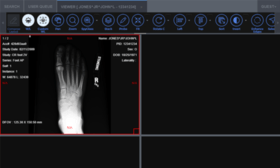
Medical imaging programming libraries. LEADTOOLS Medical Imaging toolkit is a collection of .NET, VC++ Class Libraries and an API that provides complete support for the DICOM 3.0 specification, including all standard IOD classes and modalities, 12 and 16-bit grayscale imaging and much more. The Medical Imaging SDK provides medical-specific annotation objects such as cross product, point and protractor, allowing the measuring and mark-up of medical files. LEADTOOLS Medical Imaging toolkit has more than 50 separate annotation objects. DICOM, the medical imaging format is supported which allows programmers access to medical images stored on digital imaging modalities such as CT and MR scanners.

Overview

LEADTOOLS Medical Imaging improvements include 12-bit Lossy JPEG import/Export support, faster multi-frame DICOM creation and retrieval and faster DICOM Communications. Additional image processing functionality has been added. In addition, expanded TWAIN v1.9 support, advanced color conversion functions, and the ability to compress images in memory have also been added. There are New common dialogs and existing dialogs have been enhanced with a progressive new look and feature set. Additional image formats are being supported, pushing the number of LEADTOOLS supported image formats count to over 150.

Take a look at what's new:

LEADTOOLS Medical Annotation Module is now included

DICOM LUT/Overlay/Palette support

DICOM Print SCU support

DICOM Annotation Object support

Faster DICOM

New Modular Product Structure

Image Processing Enhancements (over 100 new functions)

More Color Conversion Options

New TWAIN V1.9 Support

New Format Support

New Common Dialogs (now in place for ALL Image Processing functions)

Additional Features

For more information please read the Medical Imaging overview in the evaluaions section

LEADTOOLS Medical Imaging toolkit has more than 50 separate annotation objects. DICOM, the medical imaging format is supported which allows programmers access to medical images stored on digital imaging modalities such as CT and MR scanners.

LEAD's DICOM imaging support is the richest in the industry supporting 1,2,3,4,5,6,7,8,12,16,24 and 32 bit images including JPEG (12, 16-bit Lossless grayscale, 8-bit lossy grayscale, 24-bit lossless and lossy color), Run Length, Uncompressed, Photometric Interpretation (Monochrome1, Monochrome2, Palletized, RGB, ARGB, CMYK, YBR Full 422, YBR Full), and single and multi-page images.

LEADTOOLS' DICOM features:

Complete support for the DICOM 3.0 specification, including all standard IOD classes and modalities (CR, CT, MR, NM, US, RF, SC, VL, etc.)

Provides easy implementation and full support for DICOM Basic Directory

Automatic recognition of DICOM files (Little-Endian/Big-Endian, Implicit/Explicit VR, etc.)

High level and low level functions for easy navigation and manipulation (insert, delete, modify) of Data Sets

Single or multi-frame images (compressed or uncompressed)

The following Add Ons are available for purchase to upgrade the functionality of this product

Maintenance

PDF

In addition to special medical features, the Medical Imaging Suite also includes optimized image processing filters, and high performance decompression and viewing of JPEG, LEAD CMP and CCITT G4 image files. With the LEADTOOLS Medical Imaging Suite, developers get a comprehensive imaging toolkit which provides support for Annotation (more than 50 objects, all with hyperlink capabilities and security options), Image Processing (Transforms, Filters, Drawing, Region of Interest), Scanning (TWAIN), Color Conversion, Display, Special Effects (choose from more than 2000 effects), Compression, Image Format (import/export), Printing, Internet/intranet imaging, Database imaging, Imaging Common Dialogs, and Screen Capture.

Included programming interfaces: A low level API, C++ Class Library and .NET components. LEADTOOLS Medical Imaging products ship with sample Source code for C/C++, Visual C++ (MFC), C# and VB.NET.

The following products are included with LEADTOOLS Medical Imaging products making them the complete development solution.

LEADTOOLS Multimedia for video and audio data capture (WDM, VFW, DV) and playback

LEAD MJPEG Codec for lossy and lossless real time MJPEG encoding and decoding (including 10-16 bit grayscale)

LEAD JPEG2000 Codec for lossy and lossless encoding and decoding of JPEG2000 data (including 10-16 bit grayscale)

LEAD DirectShow DICOM Read Filter -Supports JPEG2000 and JPEG lossy and lossless compression, RLE and uncompressed data

LEAD DirectShow DICOM Write Filter - Supports JPEG2000 lossy and lossless, JPEG Lossy (including 12-bit grayscale), JPEG lossless for all bit depths supported in the DICOM standard

What's New in V15.0

64 Bit Support - In addition to Win32 support, LEADTOOLS Raster, Document, Medical and Vector toolkits now provide support for developing applications to target Windows XP 64-bit and Windows Vista 64-bit. The toolkit includes 32 and 64-bit API, C++ Class Library and .NET Class Library interfaces

Dramatically Improved Performance - Increased speed of the LEADTOOLS engines including encoders/decoders (CCITT G3, CCITT G4, JBIG, ABC, JPEG, etc) and many of the image processing functions

Web Forms - Develop rich interactive web-based applications using ASP .NET

A Web ImageViewer control for displaying an image on an ASP.NET 2.0 web form

The ImageViewer is used to display any image file format supported by web browsers (JPEG, GIF, PNG and BMP)

Includes an HTTP handler to serve non-browser supported formats

Large image support through tiling

Includes an HTTP handler to get file information for files on the server or accessible via http

The ImageViewer control can automatically handle zooming and scrolling

New Features Added to the .NET Library

Special Effects for image display

Screen Capture

DICOM and DICOM Communication

Barcode reading and writing

New File Formats in .NET

DJV

SID

TFX

PCT

FPX

WMZ

.NET Viewer and ImageList Enhancements

Multi-select with mouse

Rubberband select

Pan window with Annotations

Magnifying Glass with Annotations

Color Conversion Enhancements - Read and write ICC Profiles from images

Medical Imaging

32-bit Integer Grayscale support – load/save/display (DICOM/TIFF)

Complete native .NET support for DICOM and DICOM Communication

Unicode Support

Vector Format Enhancements

Transparency support for raster objects

Convert Polydraw into Polygon & Polylines

Support for units

Improved support for DWG, DXF and DWF formats

Added support for saving DGN

Added support for NAP format

NITF Format Support

The National Imagery Transmission Format Standard (NITFS) is the suite of standards for formatting and exchanging digital imagery and imagery-related products defined by the United States Department of Defense (US DOD). This standard allows for interoperability of systems used for formatting, transmitting, receiving, and processing imagery and imagery-related information.

Barcode

Improved Barcode Recognition accuracy

Faster Barcode Recognition

New Linear 1D Barcode types

EAN EXT 5

EAN EXT 2

MSI

CODE 11

Standard 2 of 5

Patch Code

PostNet

Databind Support for .NET Viewer Control – Use the .NET database engine to store and retrieve images to/from any database supported by .NET.

New interpolation options for image resize:

Triangular-peaked weighting

Hermite

Bell

Quadratic B-Spline

Cubic B-Spline

BoxFilter (Nearest Neighbor)

Lanczos

Michell

Cosize

CatmullRom

Quadratic

Cubic Convolution

Bilinear

Bresenham

Image Histogram Dialog - Medical Imaging demo that shows how LEADTOOLS functionality can segment, redistribute, and remove noise from the image data. This demo supports most Medical image types including 12 and 16-bit grayscale images, images with signed or un-signed data, and images with a LUT

Printing function using GDI+ - A new function which uses GDI+ for optimized and fast printing of images. It produces a smaller spooler file size, which will increase the speed of the printing over a network

PartNumbers: PC-510495-102568 510495-102568 PC-510495-102569 510495-102569 PC-510495-103271 510495-103271

Publisher PartNumbers: MEDIMG15 UMEDIMG15

PurchaseOptions: LEADTOOLS Medical Imaging V15.0 1 Developer License , LEADTOOLS Medical Imaging V15.0 1 Developer Upgrade License from previous version , LEADTOOLS Medical Imaging V15.0 Annual Maintenance for 1 year

Resources: Read the LEADTOOLS Imaging help file, Read the LEADTOOLS Licensing help file, Download the LEADTOOLS V15.0 evaluation on to your computer - Expires after 60 days

Operating System for Deployment: Windows Vista, Windows XP, Windows 2000, Windows 98, Windows NT 4.0

Architecture of Product: 32Bit, 64Bit

Product Type: Component, Add-In

Component Type: .NET WinForms, .NET Class, 100% Managed Code, DLL, VC++ Class Library

Built Using: MFC V4.2 / V6.0, ActiveX Template Library (ATL), Visual C# .NET

Compatible Containers: Microsoft Visual Studio 2005, Microsoft Visual Studio .NET 2003, Microsoft Visual Studio .NET, Microsoft Visual Studio 6.0, Microsoft Visual Studio 97, Microsoft Visual Basic 2005, Microsoft Visual Basic .NET 2003, Microsoft Visual Basic .NET, Microsoft Visual C++ 2005, Microsoft Visual C++ .NET 2003, Microsoft Visual C++ .NET, Microsoft Visual C++ 6.0, Microsoft Visual C++ 5.0, Microsoft Visual C++ 4.0, Microsoft Visual C# 2005, Microsoft Visual C# .NET 2003, Microsoft Visual C# .NET, Microsoft FrontPage, Microsoft Internet Explorer 7.0, Microsoft Internet Explorer 6.0, Microsoft Internet Explorer 5.5, Microsoft Internet Explorer 5.0, CodeGear C++ 5.0 (formerly Borland), CodeGear C++ (formerly Borland), C++Builder 4, Delphi 2006 (10.0), Delphi 2005 (9.0), C#Builder, Visual dBase 7.0, Watcom C/C++, .NET Framework 2.0, .NET Framework 1.1, .NET Framework 1.0

Product Class: User Interface Components

Search Items: New Version Dec 03

Keywords: Scan scanning scanned scanner scans OCR optical character recognition Image images Compression compress compresses Conversion convert converting converts conversions image images processing imaging LEAD Technologies ImageImagingToolkitSDKImaging image images Corporate Partner Image PictureJPEGScanBitmap draw artprocessing graphicGIFTarga precision Twain

Product Search

Enter search words:

Screenshot Gallery

Award Award