de LEAD Technologies - Tipo de producto: Componente / ActiveX OCX
LEADTOOLS Multimedia - Runtime Licenses - V15.0 by LEAD Technologies
Create professional, high-quality multimedia applications. LEADTOOLS Multimedia SDK lets you add multimedia functionality such as Capture, Play, and Edit, as well as the latest DirectShow filters and multimedia file support - load/convert to and from many formats (WAV, AVI, ASF, WMA, WMV, MPEG-1, MPEG-2, OGG and more). Get programmatic control over multimedia processors, compressors, video and audio inputs, types and sub-types; as well as increased camera control (brightness, contrast, zoom, etc); more flexible capturing options and much more.
Runtime Licensing: This page outlines the Runtime options for LEADTOOLS Multimedia SDK. For Developer pricing please see the main product page by clicking the ActiveX/COM link under the product name at the top of this page.
You may use LEADTOOLS Multimedia SDK and some included filters (see items listed below with a "†") Royalty Free, however LEADTOOLS Multimedia SDK also comes with demo versions of certain bundled software modules including DirectShow filters and video and audio codecs which will require Runtime Licenses to deploy them.
LEADTOOLS Video Streaming Module and LEADTOOLS DVD Module will require runtime licenses.
LEADTOOLS DVD Module - The LEADTOOLS DVD Module extends the LEADTOOLS Multimedia toolkit by adding functionality for programmatically burning, converting, playing and creating DVD images. Includes LEAD MPEG-2 Standard Video Codec (Encoder/Decoder), and several DirectShow filters.
LEADTOOLS Video Streaming Module - The LEADTOOLS Video Streaming Module is perfect for developers who need to serve Video on Demand across the Internet or via Intranets, or create custom video conferencing applications and utilities. The LEADTOOLS Video Streaming Module includes the LEAD H.264 Standard Encoder/Decoder and the MPEG-4 Standard Encoder/Decoder. All the tools you need to provide streaming multimedia content via the web.
For more information see Pricing & Licensing and read the Licensing help file in the Evals & Downloads section.
Key Features:
Multimedia Capture - Create applications that can capture from WDM, native DirectShow including DV, Video for Windows capture devices, control DV devices and more
Multimedia Playback - Create applications that can play all formats supported by DirectShow. Get support for DVD navigation, saving player settings to files and streams, and more
Multimedia Conversion - Add features to your application so your users can convert to and from AVI, Windows Media content, WAVE, and MPEG1 Audio (MP3) formats, select DV devices for output, and more
Multimedia File Formats - The LEADTOOLS Multimedia product line facilitates the capture, playback, processing, compression and conversion of several different multimedia file formats. The list of support formats include:
LEADTOOLS Multimedia products can playback any input file format supported by DirectShow, including:
AVI
WAV
Quicktime 2.0
WMA Windows Media Format
WMV Windows Media Format
ASF Windows Media Format
MPEG1 Layer-3 Audio (MP3)
MPEG
Still image formats including TIFF, JPEG, BMP, PSP thumbnail, etc.
DICOM support with a LEADTOOLS Medical Multimedia Filter Pack or LEADTOOLS Medical Imaging product
OGG (requires OGG DirectShow Filters)
LEADTOOLS Multimedia products can convert any of the supported playback file formats to:
AVI (using any available video compressor on the computer)
WAV (using any available audio compressors on the computer)
WMA Windows Media Format
WMV Windows Media Format
ASF Windows Media Format
MPEG1 Layer-3 Audio (MP3)
Still image formats including TIFF, JPEG, BMP, etc.
ISO
MPEG-2 DICOM
DICOM support with a LEADTOOLS Medical Multimedia Filter Pack or LEADTOOLS Medical Imaging product
Multimedia Compression - Add support to your applications for compressing individual samples with any available DirectShow filters (Memory to memory) and more. (Windows Media)
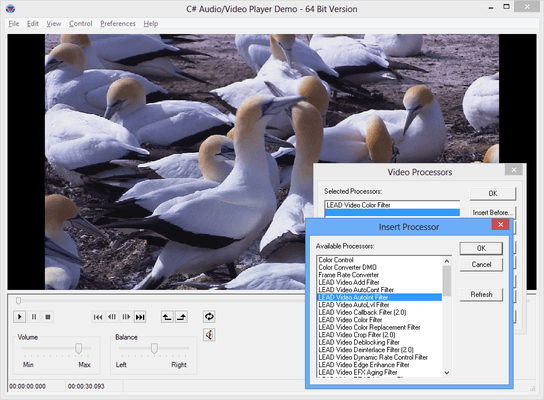
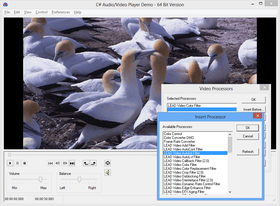
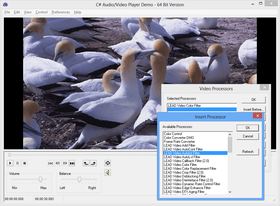
Multimedia Processing - Add to your applications the ability to process AVI, Windows Media content, WAVE, and MPEG1Audio (MP3) formats or data as it is captured using DirectShow filters. Use the LEAD Video callback DirectShow filter to use any of the 200+ image processing functions to process movies during playback, conversion or capture and more
DirectShow Filters - LEADTOOLS Multimedia includes 49 of LEAD's DirectShow filters. Also included are evaluation versions of all the LEAD Audio/Video Codecs, the DVD writer, DVD burner, MPEG-1 multiplexer, MPEG-2 multiplexer, ISO multiplexer, Screen capture filter, Network filters (source, mux, sink and protocol manager) and the following DirectShow filters: Frame Rate Control filter, Video Histogram Equalize filter, Video Overlay filter, Text Overlay filter, Video Unsharp Mask Filter, De-interlace filter, Motion detection filter, Audio detection filter, Video Resize filter, Video Crop filter, Video Callback filter and Video Rotation filter
All LEADTOOLS Multimedia SDK products include the following multimedia technology:
Capture:
Support for WDM, native DirectShow including DV, and Video for Windows capture devices
Compress Audio and Video while capturing
Output compressed and uncompressed AVI, Windows Media content, OGG, DVSD OGG, WAVE, MPEG1Audio (MP3), MPEG1 System, MPEG2 Program, DVD, and Network formats
Control the interleaving mode when writing AVI files
Camera control (Brightness, Contrast, Zoom, Pan, etc)
Editing mode: Change capturing configuration without rebuilding the graph – speeds up the graph modification
Save still bitmaps with control over format and quality
Save capture settings to files and streams; settings include processors, compressors, devices, and controls
Support for built-in audio sources in video devices
Incoming video signal adjustment using the VideoProcAmp interface properties - Brightness, Contrast, Gamma, Hue, etc
Support for analog video capture devices configuration
Capture directly to a file or grab images individually to memory.
Video (Fit to window, stretch, 50%, 75%, 100%, 200%, and full screen) and audio preview during capture
Use the audio source built into the video device or a different audio source
Supports close captioning
Supports TV tuners
Support for multiple built-in configuration dialog boxes
Obtain statistics during capture
Support for video and audio processing filters
Multiple capture modes:
Streaming video and audio
Automatically triggered video frame sequences
Manually triggered video frame sequences
Still images
Mask
Inhibit Run
Conversion:
Convert to and from AVI, Windows Media content, OGG, dvsd OGG, WAVE, MPEG1Audio (MP3), MPEG1 System, MPEG2 Program, DVD**, and Network*** formats
Custom compression for Video (AVI) and audio (AVI, OGG & WAV)
Control the interleaving mode when writing AVI files
Support for DVD navigation
Save conversion settings to files and streams; settings include processors, compressors, devices, and controls
Ability to use a preferred MPEG2 splitter when converting MPEG2 files
Input support for disk, Internet memory, media source or custom (feed every sample or write your own source filter)
Output support for disk, memory, media source or custom (you get every sample)
Support for multiple built-in configuration dialog boxes
Support for video and audio processing filters
Show progress while converting
Playback:
Plays all formats supported by DirectShow
Support for disk, Internet memory, media source or custom (feed every sample or write your own source filter)
Save still bitmaps with control over format and quality
Save player settings to files and streams - settings include processors, flags and controls
Support for DVD navigation
Ability to use a preferred MPEG2 splitter when playing MPEG2 files
Ability to choose the place from where the still images are captured
Time-based, frame-based or synchronized with a track bar positioning
Mark the portion you want to play
Set infinite loop or repeat count
Get content information such as Author, copyright, etc.
Support for video and audio processing filters
Fit to window, stretch, 50%, 75%, 100%, 200%, and full screen video options
Compression:
Compress individual samples with any available DirectShow filters (memory to memory)
Audio/Video Filters: (The list of filters below are available for development. A separate deployment license may be required. Contact sales@componentsource.com for more information.) † Included in the LEADTOOLS Multimedia toolkit and do not require Runtime Licenses. †† Evaluation versions are included with LEADTOOLS Multimedia toolkit, you will require a Runtime License to deploy these filters.
*Video Filters:
Enhancements:
LEAD Video Add Filter† - Brightens a frame by adding two or more frames. Useful in correcting video taken in low-light conditions. For example, astronomers or video surveillance applications should find this filter useful
LEAD Auto Contrast Filter†-Changes the contrast without changing colors (hue). It makes the dark values darker and the light values lighter, which automatically enhances shadows and brightens the video stream
LEAD Auto Intensity Filter† - Performs color leveling on the RGB channel (the sum of the R, G, and B channels), without changing colors. It makes the dark values darker and the light values lighter, which automatically enhances shadows and brightens the video stream. It also maximizes the tonal range of the image and enhances the contrast and intensity using the image's histogram and a color distribution-based algorithm
LEAD Auto Level Filter† - Performs color leveling on the individual R, G and B channels, treating each of the R, G and B channels as a separate entity, without changing colors. It makes the dark values darker and the light values lighter, which automatically enhances shadows and brightens the video stream
LEAD Video Color Replace Filter† - Replaces any range of colors in a video stream with another range of colors
LEAD Video Color Filter† - Adjusts Hue, Saturation, Brightness, Contrast
LEAD Video Deblocking Filter† -Smoothes edges and removes the blocky artifacts present in highly compressed MJPEG or MPEG movies. Extremely useful for improving movies created by digital cameras that can take highly compressed, small video clips
LEAD Video Deinterlace Filter†† - Deinterlaces video with a pattern, deinterlaces only a region of interest (rectangle), and specifies segments in the video to deinterlace and how to deinterlace the segment (no deinterlace, interlace, deinterlace with pattern)
LEAD Video Resize Filter†† - Resizes the video by adjusting the width and height of the frames using normal resize, resample (bilinear interpolation), bicubic interpolation
LEAD Video Crop Filter††- Play, convert or capture only a specific rectangular area within the video
LEAD Video Rotation Filter†† - Flips, Reverses, Rotates 90, 180, and 270 degrees. Very useful when certain devices capture video in a rotated state
LEAD Video Unsharp Mask Filter†† - Powerful algorithm for edge enhancing. Improves the quality of some movies that look "washed out" because of resizing. The Video Unsharp Mask Filter produces better results than Video Edge Enhance
LEAD Video Edge Enhance Filter† - Improves the quality of some movies that look "washed out" because of resizing. The LEAD Video Edge Enhance Filter is similar to Video Unsharp Mask Filter, but much faster
LEAD Video Mosaic Filter†- Conceals a specific area in the video by making it blocky
LEAD Video Gamma Correction Filter† - Applies Gamma Correction (nonlinear brightness) to a video
LEAD Video Histogram Equalize Filter†† -Automatically increases the contrast and details in videos by using the histogram. This effect enhances videos that are too dark or too bright
LEAD Video Text Overlay Filter†† - Adds static or moving text to videos with control over the font, font size, border and background. Additionally, an external XML file can be used to specify text to appear on specific frames
LEAD Video Overlay Filter†† - Superimpose a logo over a video or play a video inside a video (PiP)
LEAD Still Image Reader† - Adds support to DirectShow to read any file format supported by LEADTOOLS. (For example, open CMP or TIFF files in Media Player.) The filter registers the following extensions with DirectShow: pict, pct, pic, dib, gif, cmp, png, jpg, jff, jpe, jtf, fjif, tiff, tif, pcd, but can be customized to register any of the 120+ file formats supported by LEADTOOLS
LEAD Still Image Writer† - Adds support to DirectShow to save any file format supported by LEADTOOLS. It can save several single images (movie0001.cmp, movie0002.cmp, etc) or, it can save all images in one multi-page file (movie.tif)
LEAD YUV Converter† - Converts YUV data to RGB data. Supported YUV input formats: YUY2, YVYU, IYU2, IYU1, UYVY, Y41P, YVU9, IY41, IUYV, YV12. Supported RGB output formats: RGB32, RGB24, RGB565, RGB555, and RGB8
LEAD Video Callback Filter†† - Each video sample is provided in a callback for additional processing before being forwarded to the next component in the graph. The filter can be used during capture, playback or conversion
LEAD Video Motion Detection†† - Motion is emphasized by a frame around the motion and/or displaying a frame of only the motion (areas of the frame without motion are black). Programmatically, the filter will fire a callback each time a frame is received. If motion is detected, the bounding rectangles containing the motion can be retrieved. The possible notifications received with each frame are motion has started, motion, motion has stopped and still. Filter settings include object size, sensitivity and more
Special Effects:
LEAD Video Emboss Filter†- Creates an embossed or bumpmap effect. Can also be used as a DirectX filter with in DirectShow Editing Services (DES)
LEAD Video EFX Aging Filter† - Adds random scratches and noise to the movie giving it the appearance of old film
LEAD Video EFX Brightness Filter† -"Hides" moving objects. In places where there is movement, the brightness of the background changes allowing you to see that there is movement, but you can only guess what it is by the shape
LEAD Video EFX BumpMap Filter† - Applies a bumpmap effect to the video stream
LEAD Video EFX Dizzy Filter† - Applies an effect to the movie that simulates a dizzy feeling
LEAD Video EFX Fire Filter† - Makes moving objects appear to be on fire
LEAD Video EFX Ghost Filter† - Renders moving objects as invisible
LEAD Video EFX Glass Tile Filter† - Makes the video appear as if it is being viewed through glass tiles
LEAD Video EFX Hologram Filter† - Draws a holographic-like shadow of moving objects
LEAD Video EFX Lens Filter† - Adds a fish eye-like effect to the movie. Can also be used to magnify an area in a video
LEAD Video EFX Lightning Filter† - Draws lightning sparks around moving objects
LEAD Video EFX Maze Filter† - Distorts the movie into a crystal maze
LEAD Video EFX Motion Blur Filter† - Makes moving objects blurry. It gives the appearance of a random glow around the motion
LEAD Video EFX Motion Emboss Filter† - Makes moving objects embossed
LEAD Video EFX Motion Mosaic Filter† - Makes moving objects blocky
LEAD Video EFX Motion Scan Filter† - Scans one line per frame and draws it to the destination (Radar effect), distorting the moving objects
LEAD Video EFX Particles Filter† - Renders moving objects into small particles, joining the particles to reform the object when it stops moving
LEAD Video EFX Predator Filter† - Create video effects similar to the Predator movies
LEAD Video EFX Rain Filter† - Adds rain drops to the video as if the video is a pool of water
LEAD Video EFX Streak Filter† - Simulates very fast movement
LEAD Video EFX Wave Filter† - Renders waves around moving objects. The video is the surface of a body of water and moving objects will generate concentric waves as if something touched the surface of the water
*Audio Filters:
LEAD VUMeter Filter† - Detects the strength of an audio stream. Provides a visual indication of the audio level
LEAD Echo Filter† - Adds an echo audio effect
LEAD Volume Control Filter† - Adjusts the volume. Useful for bringing audio files to the same level so audio from one source is not louder than audio from another source
LEAD Chorus Filter† - Create several layers of the same sound. This effect adds depth and resonance to a sound
LEAD Flanger Filter† - Ghosting effect
LEAD Phaser Filter† - Makes the audio thinner or fuller
LEAD Audio Detection†† - Detects audio silence/noise. Very useful for applications such as security (starts capture when there is noise and stops capture when there is silence)
LEAD Audio Callback† - Each audio sample is provided in a callback for additional processing before being forwarded to the next component in the graph. This filter can be used during capture, playback or conversion
LEAD Ogg Splitter† - Play and convert OGG files
LEAD OGG Mulitplexer† - Create OGG files using the LEAD Capture or Convert modules
*Other Filters:
LEAD MPEG-1 Multiplexer† - Create MPEG-1 files
LEAD MPEG-2 Multiplexer† - Create MPEG-2 files
LEAD Frame Rate Control Filter†† - The Frame Rate Control filter provides changes the frame rate of the passing video stream
LEAD RGB Converter† - Converts to and from RGB1 grayscale, RGB1 color, RGB4 grayscale, RGB4 color, RGB8 color, RGB8 grayscale, RGB15 (5:5:5), RGB16 (5:6:5), RGB24, RGB32 and 12 and 16 bit grayscale color spaces
LEAD Screen Capture Filter† – Captures the screen. Use this filter to record video files for training or technical support purposes
LEAD Screen Capture Codec†– Lossless video compression filter designed to be used with the screen capture filter. Provides very high compression ratios without any loss of quality
DICOM Filters Evaluation† - Create and play DICOM files without programming. Just register the DICOM reader and view any DICOM file in LEAD's MM player or Windows Media Player. Use the DICOM writer filter to capture straight into a DICOM file or convert any video to a DICOM file. The writer uses a template DICOM file containing the non-image DICOM tags needed to create valid DICOM files. The writer also has built-in data compression support. The writer is also designed to integrate seamlessly with LEADTOOLS Medical Imaging toolkits where it can stream directly into a LEADTOOLS DICOM DataSet
PartNumbers: PC-512633-90263 512633-90263 PC-512633-89923 512633-89923 PC-512633-89924 512633-89924 PC-512633-89925 512633-89925 PC-512633-89926 512633-89926 PC-512633-89927 512633-89927 PC-512633-90153 512633-90153 PC-512633-90239 512633-90239 PC-512633-90240 512633-90240 PC-512633-90241 512633-90241 PC-512633-90242 512633-90242 PC-512633-90243 512633-90243 PC-512633-90264 512633-90264 PC-512633-89930 512633-89930 PC-512633-89931 512633-89931 PC-512633-89932 512633-89932 PC-512633-89933 512633-89933 PC-512633-89934 512633-89934 PC-512633-90154 512633-90154 PC-512633-90265 512633-90265 PC-512633-89981 512633-89981 PC-512633-89982 512633-89982 PC-512633-89983 512633-89983 PC-512633-89991 512633-89991 PC-512633-90007 512633-90007 PC-512633-90155 512633-90155 PC-512633-90255 512633-90255 PC-512633-90256 512633-90256 PC-512633-90257 512633-90257 PC-512633-90258 512633-90258 PC-512633-90259 512633-90259 PC-512633-90266 512633-90266 PC-512633-89879 512633-89879 PC-512633-89880 512633-89880 PC-512633-89886 512633-89886 PC-512633-89889 512633-89889 PC-512633-89891 512633-89891 PC-512633-90244 512633-90244 PC-512633-90245 512633-90245 PC-512633-90260 512633-90260 PC-512633-90261 512633-90261 PC-512633-90262 512633-90262 PC-512633-90267 512633-90267 PC-512633-89896 512633-89896 PC-512633-89910 512633-89910 PC-512633-89911 512633-89911 PC-512633-89912 512633-89912 PC-512633-89913 512633-89913 PC-512633-90307 512633-90307 PC-512633-90308 512633-90308 PC-512633-90309 512633-90309 PC-512633-90310 512633-90310 PC-512633-90311 512633-90311 PC-512633-90268 512633-90268 PC-512633-89916 512633-89916 PC-512633-89917 512633-89917 PC-512633-89918 512633-89918 PC-512633-89919 512633-89919 PC-512633-89920 512633-89920 PC-512633-90312 512633-90312 PC-512633-90313 512633-90313 PC-512633-90314 512633-90314 PC-512633-90315 512633-90315 PC-512633-90318 512633-90318 PC-512633-90269 512633-90269 PC-512633-90044 512633-90044 PC-512633-90046 512633-90046 PC-512633-90047 512633-90047 PC-512633-90048 512633-90048 PC-512633-90319 512633-90319 PC-512633-90322 512633-90322 PC-512633-90325 512633-90325 PC-512633-90326 512633-90326 PC-512633-90327 512633-90327 PC-512633-90270 512633-90270 PC-512633-90051 512633-90051 PC-512633-90052 512633-90052 PC-512633-90053 512633-90053 PC-512633-90054 512633-90054 PC-512633-90060 512633-90060 PC-512633-90328 512633-90328 PC-512633-90329 512633-90329 PC-512633-90330 512633-90330 PC-512633-90331 512633-90331 PC-512633-90332 512633-90332 PC-512633-90271 512633-90271 PC-512633-90063 512633-90063 PC-512633-90064 512633-90064 PC-512633-90065 512633-90065 PC-512633-90066 512633-90066 PC-512633-90067 512633-90067 PC-512633-90333 512633-90333 PC-512633-90334 512633-90334 PC-512633-90335 512633-90335 PC-512633-90336 512633-90336 PC-512633-90337 512633-90337 PC-512633-90272 512633-90272 PC-512633-90070 512633-90070 PC-512633-90071 512633-90071 PC-512633-90072 512633-90072 PC-512633-90073 512633-90073 PC-512633-90074 512633-90074 PC-512633-90338 512633-90338 PC-512633-90339 512633-90339 PC-512633-90340 512633-90340 PC-512633-90341 512633-90341 PC-512633-90342 512633-90342 PC-512633-90273 512633-90273 PC-512633-90077 512633-90077 PC-512633-90079 512633-90079 PC-512633-90080 512633-90080 PC-512633-90081 512633-90081 PC-512633-90082 512633-90082 PC-512633-90343 512633-90343 PC-512633-90344 512633-90344 PC-512633-90345 512633-90345 PC-512633-90346 512633-90346 PC-512633-90347 512633-90347 PC-512633-90274 512633-90274 PC-512633-90085 512633-90085 PC-512633-90090 512633-90090 PC-512633-90091 512633-90091 PC-512633-90092 512633-90092 PC-512633-90093 512633-90093 PC-512633-90348 512633-90348 PC-512633-90349 512633-90349 PC-512633-90351 512633-90351 PC-512633-90352 512633-90352 PC-512633-90353 512633-90353 PC-512633-90275 512633-90275 PC-512633-90096 512633-90096 PC-512633-90097 512633-90097 PC-512633-90098 512633-90098 PC-512633-90113 512633-90113 PC-512633-90114 512633-90114 PC-512633-90370 512633-90370 PC-512633-90371 512633-90371 PC-512633-90372 512633-90372 PC-512633-90373 512633-90373 PC-512633-90374 512633-90374 PC-512633-90276 512633-90276 PC-512633-90142 512633-90142 PC-512633-90143 512633-90143 PC-512633-90144 512633-90144 PC-512633-90146 512633-90146 PC-512633-90147 512633-90147 PC-512633-90375 512633-90375 PC-512633-90376 512633-90376 PC-512633-90377 512633-90377 PC-512633-90378 512633-90378 PC-512633-90379 512633-90379 PC-512633-90277 512633-90277 PC-512633-90117 512633-90117 PC-512633-90118 512633-90118 PC-512633-90119 512633-90119 PC-512633-90120 512633-90120 PC-512633-90121 512633-90121 PC-512633-90380 512633-90380 PC-512633-90385 512633-90385 PC-512633-90386 512633-90386 PC-512633-90387 512633-90387 PC-512633-90388 512633-90388 PC-512633-90278 512633-90278 PC-512633-90124 512633-90124 PC-512633-90125 512633-90125 PC-512633-90126 512633-90126 PC-512633-90127 512633-90127 PC-512633-90128 512633-90128 PC-512633-90389 512633-90389 PC-512633-90390 512633-90390 PC-512633-90391 512633-90391 PC-512633-90392 512633-90392 PC-512633-90393 512633-90393
PurchaseOptions: LEADTOOLS Multimedia V15.0 DVD Module - Non Prepaid Runtime License 1 Runtime License , LEADTOOLS Multimedia V15.0 DVD Module - Prepaid Runtime License 1 Runtime License, per license from 50 up to 99 licenses (minimum quantity 50) , LEADTOOLS Multimedia V15.0 DVD Module - Prepaid Runtime License 1 Runtime License, per license from 100 up to 249 licenses (minimum quantity 100) , LEADTOOLS Multimedia V15.0 DVD Module - Prepaid Runtime License 1 Runtime License, per license from 250 up to 499 licenses (minimum quantity 250) , LEADTOOLS Multimedia V15.0 DVD Module - Prepaid Runtime License 1 Runtime License, per license from 500 up to 999 licenses (minimum quantity 500) , LEADTOOLS Multimedia V15.0 DVD Module - Prepaid Runtime License 1 Runtime License, per license from 1,000 up to 2,499 licenses (minimum quantity 1,000) , LEADTOOLS Multimedia V15.0 DVD Module - Prepaid Runtime License 1 Runtime License, per license from 2,500 up to 4,999 licenses (minimum quantity 2,500) , LEADTOOLS Multimedia V15.0 DVD Module - Server Runtime License 1 Server Runtime License , LEADTOOLS Multimedia V15.0 DVD Module - Server Runtime License 2 Server Runtime License , LEADTOOLS Multimedia V15.0 DVD Module - Server Runtime License 3 Server Runtime License , LEADTOOLS Multimedia V15.0 DVD Module - Server Runtime License 4 Server Runtime License , LEADTOOLS Multimedia V15.0 DVD Module - Server Runtime License 5 Server Runtime License , LEADTOOLS Multimedia V15.0 Video Streaming Module Codec Enabled - Non Prepaid Runtime License 1 Runtime License , LEADTOOLS Multimedia V15.0 Video Streaming Module Codec Enabled - Prepaid Runtime License 1 Runtime License, per license from 50 up to 99 licenses (minimum quantity 50) , LEADTOOLS Multimedia V15.0 Video Streaming Module Codec Enabled - Prepaid Runtime License 1 Runtime License, per license from 100 up to 249 licenses (minimum quantity 100) , LEADTOOLS Multimedia V15.0 Video Streaming Module Codec Enabled - Prepaid Runtime License 1 Runtime License, per license from 250 up to 499 licenses (minimum quantity 250) , LEADTOOLS Multimedia V15.0 Video Streaming Module Codec Enabled - Prepaid Runtime License 1 Runtime License, per license from 500 up to 999 licenses (minimum quantity 500) , LEADTOOLS Multimedia V15.0 Video Streaming Module Codec Enabled - Prepaid Runtime License 1 Runtime License, per license from 1,000 up to 2,499 licenses (minimum quantity 1,000) , LEADTOOLS Multimedia V15.0 Video Streaming Module Codec Enabled - Prepaid Runtime License 1 Runtime License, per license from 2,500 up to 4,999 licenses (minimum quantity 2,500) , LEADTOOLS Multimedia V15.0 Video Streaming Module Decode Enabled - Non Prepaid Runtime License 1 Runtime License , LEADTOOLS Multimedia V15.0 Video Streaming Module Decode Enabled - Prepaid Runtime License 1 Runtime License, per license from 50 up to 99 licenses (minimum quantity 50) , LEADTOOLS Multimedia V15.0 Video Streaming Module Decode Enabled - Prepaid Runtime License 1 Runtime License, per license from 100 up to 249 licenses (minimum quantity 100) , LEADTOOLS Multimedia V15.0 Video Streaming Module Decode Enabled - Prepaid Runtime License 1 Runtime License, per license from 250 up to 499 licenses (minimum quantity 250) , LEADTOOLS Multimedia V15.0 Video Streaming Module Decode Enabled - Prepaid Runtime License 1 Runtime License, per license from 500 up to 999 licenses (minimum quantity 500) , LEADTOOLS Multimedia V15.0 Video Streaming Module Decode Enabled - Prepaid Runtime License 1 Runtime License, per license from 1,000 up to 2,499 licenses (minimum quantity 1,000) , LEADTOOLS Multimedia V15.0 Video Streaming Module Decode Enabled - Prepaid Runtime License 1 Runtime License, per license from 2,500 up to 4,999 licenses (minimum quantity 2,500) , LEADTOOLS Multimedia V15.0 Video Streaming Module - Server Runtime License 1 Server Runtime License , LEADTOOLS Multimedia V15.0 Video Streaming Module - Server Runtime License 2 Server Runtime License , LEADTOOLS Multimed
Resources: Browse the LEADTOOLS Multimedia Feature Comparison Chart Web page, Read the Leadtools Multimedia COM help file, Read the Leadtools Multimedia DLL help file, Read the LEADTOOLS Imaging help file, Read the LEADTOOLS Licensing help file, Download the LEADTOOLS Multimedia V15.0 evaluation on to your computer - Expires after 30 days
Operating System for Deployment: Windows XP, Windows 2000
Architecture of Product: 32Bit
Product Type: Component
Component Type: ActiveX OCX
Built Using: MFC V4.2 / V6.0, ActiveX Template Library (ATL)
Compatible Containers: Microsoft Visual Studio 6.0, Microsoft Visual Studio 97, Microsoft Visual Basic 6.0, Microsoft Visual Basic 5.0, Microsoft Visual Basic 4.0, Microsoft Visual C++ 6.0, Microsoft Visual C++ 5.0, Microsoft Visual C++ 4.0, Microsoft Visual InterDev 6.0, Microsoft Visual InterDev 1.0, Microsoft Visual FoxPro 6.0, Microsoft ActiveX Control Pad, Microsoft Office 2000, Microsoft Outlook, Microsoft FrontPage, Microsoft Internet Explorer 6.0, Microsoft Internet Explorer 5.5, Microsoft Internet Explorer 5.0
Product Class: User Interface Components
Search Items: New Version Dec 03, New Product June 05
Keywords: image images processing imaging Multimedia media LEAD Technologies ImageImagingToolkitSDKImaging image images Corporate Partner Video multimedia avi capture AIF AIFC Edit film SND conference teleconference Image JPEG art picture sound DirectX Filter compression MPEG-1 MP3 WMV WAV WMA ASF MCMP MJPEG capture motion picture Scan Bitmap draw Twain art processing graphic
Autor
Categoría principal
Productos relacionados
Categorias relacionadas