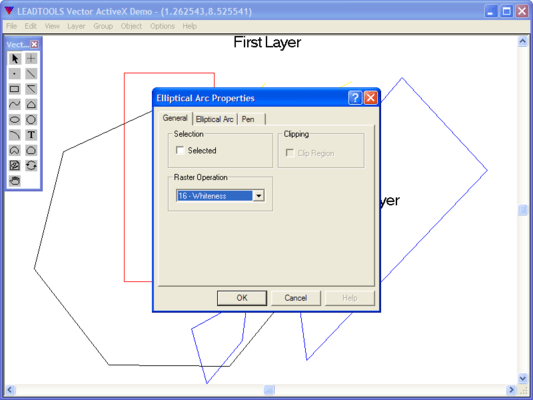
Screenshot Preview

LEADTOOLS Vector Imaging Pro SDK - Resumen

de LEAD Technologies - Tipo de producto: Componente / Complemento / ASP.NET AJAX (ATLAS) / .NET WinForms / .NET Class / .NET WPF / DLL / VC++ Class Library

 *

LEADTOOLS Vector Imaging is no longer offered as an individual product. It is now included in the LEADTOOLS Document Imaging and LEADTOOLS Medical Imaging lines.

Resumen

 *

LEADTOOLS Vector Imaging Pro SDK by LEAD Technologies

URLs: leadtools-vector-imaging, leadtools vector imaging, leadtoolsvectorimaging, leadtools

Provide 2-D and 3-D vector imaging for loading, viewing, modifying and saving vector files to memory/disk in native vector format. LEADTOOLS Vector Imaging Pro SDK includes a low level API, and C++ Class library to add, edit, delete, rotate, translate, and scale objects. Group objects into layers. Change camera and lights. OpenGL, DirectX or GDI engines supported. Convert and save vector images to any of the over 150 raster file formats supported by LEAD.


The LEADTOOLS Vector Imaging Pro SDK includes everything you need to create powerful 2-D and 3-D viewers, editors, and converters that support both vector and raster image formats. LEADTOOLS Vector Imaging eliminates the need to install or license more expensive original applications that have a larger memory footprint and may not have any automation functionality. If you're looking for a feature rich vector imaging SDK then try LEADTOOLS Vector Imaging.

Key Features:
Vector Image File Formats

Primitive Objects Supported

View and Edit

Printing

Conversion

ePrint Integration

Raster Image Support

General Image Features

New WPF Standard .NET

New WPF Pro

Unicode and ANSI Support

Additional Features can be added to Vector Imaging Pro:

Raster PDF Plug-ins

New JPIP Client and Server

Barcods

Vector Image File Formats:

The LEADTOOLS Vector Imaging Pro product line includes image formats that can be be loaded, saved, converted and exported.

Vector Formats:

Computer Graphics Metafile (CGM)

Corel Presentation Exchange Format(CMX)

DRaWing (DRW)

Drawing Interchange Format (DXF)

DWF Format (DWF)

DWG Format (DWG)

ESRI Shape Format (SHP)

Gerber (GBR)

Macintosh Pict Format (PCT)

Microstation DGN (DGN)

NAP

Printer Command Language Format (PCL)

PLT (HPGL)

Scalable Vector Graphic (SVG)

TIFF DXF

Vector Dump Format (VEC)

Windows Metafile Formats (WMF and EMF)

WordPerfect Format (VWPG)

Primitive Objects Supported:

Support for primitive objects include Arc, Bitmap, Brush, Camera, Circle, Clone, Ellipse, Elliptical Arc, Font, Group, Layer, Line, Pen, Pie, Chord, Poly Draw, Polygon, Poly Line, Poly Bezier, Raster, Rectangle, Text, Vertex, H-Poly Bezier, Spline and Clipping objects.

View and Edit Support:

Low and high-level functions to control the view of vector drawings include zooming (both uniform or around any axis), panning, rotation (around any axis) and anti-aliasing. Vector drawings can be edited in any way desired including adding, modifying, deleting and copying objects into the clipboard or between different vector drawings.

Printing Support:

Functionality to scale the vector drawing to any resolution desired without distorting the original image ensures that fine details of the drawing will not be lost during printing.

Vector Conversion Support:

Vector files can be loaded from one format and saved as another, without the need for the original application that created the file.

Raster Image Support:

Vector files can be converted to any resolution raster image and saved to any of the 150+ image file formats and sub-formats that the LEADTOOLS Imaging products support.

General Imaging Features:

Other general imaging features include: Image Format support (import/export), Compression, Image Processing (Transforms, Filters, Drawing, Region of Interest), Color Conversion, Display, Special Effects (choose from more than 2000 effects), Printing, Internet/intranet imaging, Database imaging, Imaging Common Dialogs and Screen Capture.

About LEADTOOLS Vector Imaging Engine:

Add, edit, and delete objects.

Rotate around any axis, translate, and scale (1-1000%) entire images or selected objects.

Convert complex objects to more primitive types.

Group objects into layers or groups, copy or move objects between layers or groups.

Add, edit, delete and copy entire layers and groups between vector images.

Make layers invisible or lock (disable changes to) individual layers.

Convert points from world space to screen space and vice versa.

Perform pixel-accurate hit testing to select/deselect objects.

Select and transform entire objects or individual elements and copy them to/from the Windows clipboard.

Convert vector images on the fly to/from Windows metafile handles.

Use 3D viewing options including lighting, shadow, camera, polygon modes (points, wire-frame, filled).

Common dialogs to simplify tasks needed when working with vector images.

Optimized drawing using GDI engine.

Render or overlay a vector image (or part of a vector image) to a raster image at any size/resolution.

Convert to and from different vector file formats.

Vector images can also be converted and saved as any of the image formats supported by LEAD.

Two programming interfaces are included:

A low level API, and C++ Class library. LEADTOOLS Vector Imaging ships with sample source code for C/C++ and Visual C++ (MFC).

What's New in the LEADTOOLS Imaging and Vector Engines update for 17.5

The Imaging and Vector engines received several updates improving and extending their file format support.

Load / Convert HTML into a raster image

Rasterize vector files (DXF, DWG, SVG and more) in the .NET interface

Additional vector options for rasterizing vector drawings such as background fill, bits per pixel and transformation

RLE compression for PCL

Support for gradient fill and EM units in SVG

What's new in LEADTOOLS Vector Imaging SDK V17.5

Added support for loading PCL6

Optimized load performance of PCL and CGM formats

CGM view options now support Virtual Device Coordinates (VDC)

Added support for loading different DXF paper spaces

Added Geometric text support for DXF

Added CMYK RLE raster data support within PCL

Added support in DWF filter to load according to sheet dimensions

LEADTOOLS Vector Imaging is no longer offered as an individual product. It is now included in the LEADTOOLS Document Imaging and LEADTOOLS Medical Imaging lines.

Provide 2-D and 3-D vector imaging for loading, viewing, modifying and saving vector files to memory/disk in native vector format.

Evals & Downloads: Read the LEADTOOLS products Help files, Read the LEADTOOLS Licensing Help file

Operating System for Deployment: Windows 8, Windows 7, Windows Server 2008, Windows Vista, Windows XP, Windows Server 2003, Windows 2000

Architecture of Product: 32Bit, 64Bit

Product Type: Component, Add-In

Component Type: ASP.NET AJAX (ATLAS), .NET WinForms, .NET Class, .NET WPF, DLL, VC++ Class Library

Compatible Containers: Microsoft Visual Studio 2012, Microsoft Visual Studio 2010, Microsoft Visual Studio 2008, Microsoft Visual Studio 2005, Microsoft Visual Studio 6.0, Microsoft Visual Basic 2012, Microsoft Visual Basic 2010, Microsoft Visual Basic 2008, Microsoft Visual Basic 2005, Microsoft Visual C++ 2012, Microsoft Visual C++ 2010, Microsoft Visual C++ 2008, Microsoft Visual C++ 2005, Microsoft Visual C++ 6.0, Microsoft Visual C# 2012, Microsoft Visual C# 2010, Microsoft Visual C# 2008, Microsoft Visual C# 2005, Microsoft FrontPage, Microsoft Internet Explorer 7.0, Microsoft Internet Explorer 6.0, CodeGear C++ 5.0 (formerly Borland), CodeGear C++ (formerly Borland), Visual dBase 7.0, Sybase PowerBuilder 6.0, Sybase PowerBuilder 5.0, Watcom C/C++, .NET Framework 4.5, .NET Framework 4.0, .NET Framework 3.5, .NET Framework 3.0, .NET Framework 2.0

Keywords: ImageVector CADPro Wire RasterLead VectorImaging Tools leadtools suite 2-D 3-D 2D 3D Vectorial PictureScan Bitmap draw artprocessing graphicTwainDWG DWF DXF EMF WMF CGM DGN DRW HPGL PICT VEC database

LEAD Technologies Image+50 Imaging+50 Toolkit+8 SDK+8, leadtools 17, leadtools V17, lead 17, lead v17, lead tools, lead tools 17, lead tools v17, lead tools v17.0, lead technologies

Imaging image images

Drawing Draw draws

Atención

Para su comodidad, hemos incluido enlaces a Google Translate para traducir la información del producto que todavía tenemos que traducir. Por favor, tenga en cuenta que traducciones automáticas no siempre son totalmente exactas.
Con la tecnología de
Requiere Flash en Firefox y Opera

Búsqueda de productos

Escriba palabras de búsqueda:

¿Por qué comprar en ComponentSource?

ComponentSource ofrece un único servicio global, utilizado por más de 1.000.000 de desarrolladores en todo el mundo.

Más Información | Sobre Nosotros

Galería de capturas de pantalla

Haga clic para obtener una vista previa completa

Captura de pantalla LEADTOOLS Vector Imaging Pro SDK - API, C++ Class Libraries, COM - 17.5 Captura de pantalla LEADTOOLS Vector Imaging Pro SDK - API, C++ Class Libraries, COM - 17.5 Captura de pantalla LEADTOOLS Vector Imaging Pro SDK - API, C++ Class Libraries, COM - 17.5 Captura de pantalla LEADTOOLS Vector Imaging Pro SDK - API, C++ Class Libraries, COM - 17.5 Captura de pantalla LEADTOOLS Vector Imaging Pro SDK - API, C++ Class Libraries, COM - 17.5
Award Award Award