MetaDraw - ActiveX - V3.1

de Bennet-Tec Information Systems - Tipo de producto: Componente / ActiveX OCX

Por favor note que la información sobre este producto no está disponible en español.
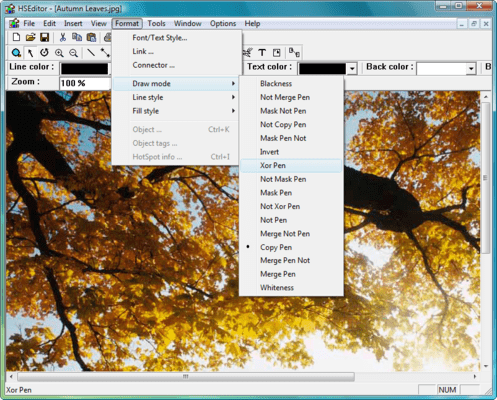
Captura de pantalla MetaDraw - ActiveX - V3.1Give your application support for the creation, editing, and displaying of Metafiles. MetaDraw is a special purpose picturebox/image editing component. To your application, it looks like a standard picturebox, but it offers unique support for metafiles - a graphical format well suited to the drawing and/or moving of graphical objects - including the ability to tag individual graphic objects for HyperGraphic/HotSpot applications. Use as a metafile viewer with support for zoom and scroll.

Opinión media:  Opinión Media para MetaDraw - ActiveX - V3.1 basada en: 1 opinión.

Desde
$479.04
Precio en

Nuestros precios Standard están indicados abajo. Inicia una sesión para ver sus precios con descuento.

MetaDraw ActiveX V3.1

Añadir a la Cesta $ 479.04 1 Developer License Descarga (5.5 MB)
Añadir a la Cesta $ 671.04 1 Developer Subscription License - includes a free license for MetaDraw .Net WinForms Descarga (5.5 MB)
Añadir a la Cesta $ 294.00 1 Developer Upgrade License from V2.0 Verificar Descarga (5.5 MB)
Añadir a la Cesta $ 367.50 1 Developer Upgrade License from V1.0 Verificar Descarga (5.5 MB)
Añadir a la Cesta $ 783.02 1 Developer License with DXF Import and Export Support Descarga (5.5 MB)

Este producto esta disponible con precios reservados al GSA Schedule.Nuestros precios incluyen servicio técnico de ComponentSource y, para la mayoría de los productos disponibles para descarga, una copia de seguridad en línea y una actualización GRATUITA a la nueva versión si ésta se publica en un período de 30 días después de la compra.  Todas las ventas están sujetas a nuestros Términos y condiciones standard y a nuestra Política de devolución. Por favor, póngase en contacto con nosotros si necesita alguna opción de licencia no incluida en la lista anterior, incluida la compra por volumen de licencias y versiones anteriores.

Nuestros precios Standard están indicados arriba. Inicia una sesión para ver sus precios con descuento.

MetaDraw ActiveX component brings the maximum in flexibility and power to developers looking for a reliable Object Oriented Image component for Multimedia, Image Editing/Annotation, HyperGraphics, Drag and Drop Interactive Interfaces.

Why is MetaDraw the tool to use?

You want graphics but you don't want megabytes of storage. Your users want to create and move shapes and images and you need to recognize those shapes. You need to recognize clicks and drags on specific graphic elements; link data to individual hotspots and the list goes on. For a professional application, MetaDraw is the tool to use.

MetaDraw 3 OCX is the most recent ActiveX edition. Designed for support under Visual Studio editions 4 through 6, as well as Delphi, C++, FoxPro, Access, Internet Explorer ( used on Web pages) , and other environments providing ActiveX support.

MetaDraw .Net for WinForms is the first version of MetaDraw that is a true Visual Studio .NET component. A true native .Net component, it is easy to use, with familiar syntax for existing users of MetaDraw OCX editions.

Features:

  • ActiveX and .NET Support - MetaDraw is available in both ActiveX and .NET editions
  • Includes ALL Features of the MetaDraw 2 Plus Pack
  • Arrow Head / EndPoint Symbols support for Lines, Arcs, PolyLines
  • OLE Drag & Drop
  • Multi-Step Undo / Redo Support
  • Object type conversion (text, ellipse -> polygon)
  • New object types: stars, regular polygons, etc
  • .JPG, .PNG format support
  • Link Style Enhancements (segmented links, autolayouts, center marker, colors)
  • Link EditMode (allows user to create and move links with Mouse)
  • Zoom EditMode (allows user to zoom to selected rectangular area with mouse)
  • Object shadows
  • Embedded controls
  • Save/Load pictures to/from database fields
  • Loading picture files via the Internet
  • Use as a MetaFile viewer - supports Scroll and Zoom, even Selective display of individual elements
  • Create, edit, display and save pictures built from a set of graphic objects
  • All Windows graphical primitives are supported
  • Supports merging of images from multiple sources
  • Editing - full support for Object Oriented Editing: Moving objects, Sizing, Change Colors and other attributes
  • The entire image or any part can be exported as a Metafile, bitmap or icon
  • Conversion Support - convert from WMF or DIB to WMF, DIB, BMP or ICO
  • Group or ungroup individual elements or manipulate groups as a single element
  • Full Programmatic Control as well as support for end user editing via the mouse
  • Visual Basic, Delphi and C++ compatibility
  • Print to any printer or device context
  • Hypergraphic Events - respond to Click and MouseMove over tagged objects. MetaDraw even saves your assigned string data for each hotspot stored within the image file
  • Diagramming Links
    • Connecting lines drawn by MetaDraw between specified objects
    • Properties to set arrow head existence, style and size
    • Properties to set connecting line color, thickness and style
    • Properties for text labels along the line (Requires Plus Pack License Option)
    • Connecting line automatically maintained by MetaDraw as the connected objects are repositioned
  • Transparent, Gradient or Bitmap Background
  • Internet Support
    • Use MetaDraw in a Web page
    • Link Hotspots to URL's, even from standard EXE
  • Text Enhancements
    • Multi-line word wrapped text objects
    • Boxed Text Style
    • 16-bit character set support ( display only - 16-bit characters can not be edited in place )
  • EMF Support (Windows Enhanced MetaFile)
  • Support for Transparent Color for Bitmap Objects
  • Improved Polyline/Polygon drawing Interface
    • Each click of the left mouse button adds new straight segment
    • Dragging the mouse with pressed button creates free-shape segment
    • To finish creating the poly object, press Enter key or double-click the left mouse button
  • Object Rotation at Any Angle
  • Support for Multiple Named Tags (of any type) for each element of the Metafile
  • Find Object Function - Locate image elements by tag value
  • Center MetaDraw on a particular portion of the image, or even blink an image element to draw the end-users's attention
  • Container Control Support - MetaDraw can act as a control container
  • Enhanced Resize Markers - 8 markers, one on each corner and one on each side, rather than 4 markers in MetaDraw 1
  • Increased Resolution - Support for LONG value coordinates
  • Object Tag Enhancements - The ObjTagsCount property returns the number of defined object Tags for a given graphic object within the MetaDraw image
  • Dimension Lines - Dimension line objects are lines with terminators at one or both ends.
  • Link, Line and Dimension Line Labels - Using the LinkLabel property, a Text object may be displayed as a label on a Link, Line or DimensionLine object
  • Freehand Edit Mode - A new flag, EFLG_POLYFREEHAND, has been added to the EditFlags property.
  • Object Shadows - Setting the ObjShadow property specifies a shadow for an object in MetaDraw.
  • Mouse Wheel Support / Scroll & Zoon - Supported under Win NT/Win9x, the user may zoom or scroll the image in MetaDraw by rotating the wheel on a wheel mouse. NOTE: There is no standard support for MouseWheel messages under Win95

Subscription Updates Option - The subscription License Option for MetaDraw provides:

  • Free upgrades to new editons of MetaDraw component products introduced over the following 12 months.
  • Free Update Support for life to new features introduced in the current edition of MetaDraw

Búsqueda de productos

Escriba palabras de búsqueda:

Award