MetaDraw WinForms for .Net - .NET Component
by Bennet-Tec Information Systems - 상품타입: Component / .NET WinForms / 100% Managed Code
주의 : 이 제품정보에는 한글안내가 포함되어 있지 않습니다.
Add object oriented image components to your .NET applications. MetaDraw for WinForms .Net is an easy-to-use, robust Object Oriented image component that lets you create user-friendly interfaces that meet your development needs. MetaDraw for WinForms .Net is the .NET version of MetaDraw ActiveX component. This product has been completely rewritten to take advantage of the infrastructure provided by .NET. MetaDraw for WinForms .Net includes the following features: OLE drag and drop, multi-step undo/redo support, JPG, PNG, EMF format support, save/load pictures to/from database fields, zoom, arrow head/end point symbols, support for lines, arcs, poly lines and more.

일반 적인 소비자 가격은 하기에 표시되어 있습니다. 고객님의 할인가격은 표시 하시려면 로그인 해주시기 바랍니다.
MetaDraw WinForms for .Net V1.1
| 주문 |
₩ 541,200 |
1 Developer License |
|
다운로드 (1.8 MB) |
| 주문 |
₩ 758,100 |
1 Developer License with Subscription |
|
다운로드 (1.8 MB) |
| 주문 |
₩ 271,100 |
1 Developer Upgrade License from MetaDraw ActiveX V3.x |
확인 |
다운로드 (1.8 MB) |
| 주문 |
₩ 433,800 |
1 Developer Upgrade License from MetaDraw ActiveX V2.x |
확인 |
다운로드 (1.8 MB) |
MetaDraw WinForms for .Net V2.0
| 주문 |
₩ 541,200 |
1 Developer License |
|
다운로드 (3.1 MB) |
| 주문 |
₩ 758,100 |
1 Developer License with Subscription |
|
다운로드 (3.1 MB) |
| 주문 |
₩ 162,700 |
1 Developer Upgrade License from MetaDraw .Net 1.1 |
확인 |
다운로드 (3.1 MB) |
MetaDraw WinForms for .Net
| 주문 |
₩ 216,900 |
1 Developer License - Subscription Renewal |
|
다운로드 (29 KB) |
가격에는 ComponentSource의 기술지원 요금이 포함되어 있습니다. 또한 다운로드 판매를 하고 있는 상품의 대부분은 온라인 백업요금이 포함되어 있어서 구입날로부터 30일 이내에 새로운 버전이 발매된 경우 무료로 업그레이드해 드리고 있습니다. 모든 주문에 대해서 당사표준 계약조건 및 반품조건 의 내용이 적용됩니다. 다음의 경우,고객 서비스로연락하시기 바랍니다. (상기의 리스트에 게재되지 않은 대량의 라이센스나 구 버전 등의 라이센스 옵션이 필요한 경우)
일반 적인 소비자 가격은 상기에 표시되어 있습니다. 고객님의 할인가격은 표시 하시려면 로그인 해주시기 바랍니다.
MetaDraw for WinForms .Net is the first version of MetaDraw that is a true Visual Studio .NET component. A true, native .Net component - easy to use, with familiar syntax for existing users of MetaDraw OCX editions.
Features:
- Arrow Head / EndPoint Symbols support for Lines, Arcs, PolyLines
- OLE Drag & Drop
- Multi-Step Undo / Redo Support
- Object type conversion (text, ellipse -> polygon)
- New object types: stars, regular polygons, etc
- .JPG, .PNG format support
- Link Style Enhancements (segmented links, autolayouts, center marker, colors)
- Link EditMode (allows user to create and move links with Mouse)
- Zoom EditMode (allows user to zoom to selected rectangular area with mouse)
- Object shadows
- Embedded controls
- Save/Load pictures to/from database fields
- Loading picture files via the Internet
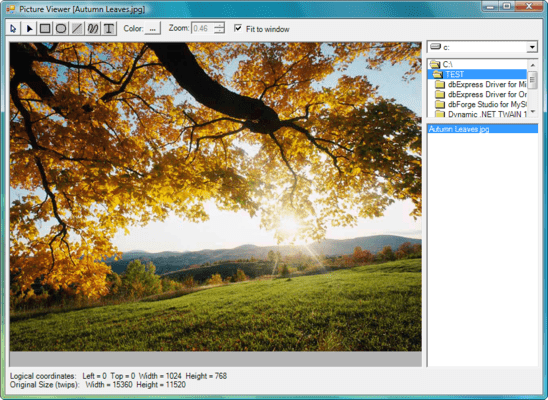
- Use as a MetaFile viewer - supports Scroll and Zoom, even Selective display of individual elements
- Create, edit, display and save pictures built from a set of graphic objects
- All Windows graphical primitives are supported
- Supports merging of images from multiple sources
- Editing - full support for Object Oriented Editing: Moving objects, Sizing, Change Colors and other attributes
- The entire image or any part can be exported as a Metafile, bitmap or icon
- Conversion Support - convert from WMF or DIB to WMF, DIB, BMP or ICO
- Group or ungroup individual elements or manipulate groups as a single element
- Full Programmatic Control as well as support for end user editing via the mouse
- Visual Basic, Delphi and C++ compatibility
- Print to any printer or device context
- Hypergraphic Events - respond to Click and MouseMove over tagged objects. MetaDraw even saves your assigned string data for each hotspot stored within the image file
- Transparent, Gradient or Bitmap Background
- EMF Support (Windows Enhanced MetaFile)
- Support for Transparent Color for Bitmap Objects
Diagramming Links
- Connecting lines drawn by MetaDraw between specified objects
- Properties to set arrow head existence, style and size
- Properties to set connecting line color, thickness and style
- Properties for text labels along the line
- Connecting line automatically maintained by MetaDraw as the connected objects are repositioned
Internet Support
- Use MetaDraw in a Web page
- Link Hotspots to URL's, even from standard EXE
Text Enhancements
- Multi-line word wrapped text objects
- Boxed Text Style
- 16-bit character set support ( display only - 16-bit characters can not be edited in place )
Improved Polyline/Polygon drawing Interface
- Each click of the left mouse button adds new straight segment
- Dragging the mouse with pressed button creates free-shape segment
- To finish creating the poly object, press Enter key or double-click the left mouse button
- Object Rotation at Any Angle
- Support for Multiple Named Tags (of any type) for each element of the Metafile
- Find Object Function - Locate image elements by tag value
- Center MetaDraw on a particular portion of the image, or even blink an image element to draw the end-users's attention
- Container Control Support - MetaDraw can act as a control container
- Enhanced Resize Markers - 8 markers, one on each corner and one on each side, rather than 4 markers in MetaDraw 1
- Increased Resolution - Support for LONG value coordinates
- Object Tag Enhancements - The ObjTagsCount property returns the number of defined object Tags for a given graphic object within the MetaDraw image
- Dimension Lines - Dimension line objects are lines with terminators at one or both ends.
- Link, Line and Dimension Line Labels - Using the LinkLabel property, a Text object may be displayed as a label on a Link, Line or DimensionLine object
- Freehand Edit Mode - A new flag, EFLG_POLYFREEHAND, has been added to the EditFlags property.
- Object Shadows - Setting the ObjShadow property specifies a shadow for an object in MetaDraw.
- Mouse Wheel Support / Scroll & Zoon - Supported under Win NT/Win9x, the user may zoom or scroll the image in MetaDraw by rotating the wheel on a wheel mouse
Subscription Updates Option - The subscription License Option for MetaDraw WinForms for .NET provides:
- Free upgrades to new editons of MetaDraw WinForms for .NET component products introduced over the following 12 months.
- Free Update Support for life to new features introduced in the current edition of MetaDraw WinForms for .NET