FlowChart.NET Professional Edition - .NET - V5.1 - Resumen

de MindFusion Group - Tipo de producto: Componente / .NET WinForms / .NET Class / 100% Managed Code

Resumen

MindFusion FlowChart.NET Professional by MindFusion Group

Enhance your applications with diagramming and graphing capabilities. MindFusion FlowChart.NET Professional helps you create and present work flow and process diagrams; database entity-relationship diagrams; organizational charts; object hierarchy and relationship charts, graphs, and trees. Its' basic types of objects - boxes, tables, and arrows - can be grouped and attached one to another and combined in complex structures. MindFusion FlowChart.NET Professional provides more than 50 predefined box shapes, as well as custom-designed and custom-painted boxes. FlowChart.NET Professional Source Code available.

Main differences between Standard and Professional Editions:

Import/Export Visio XML Drawing files

Multilevel Undo/Redo support

Layered graph layout

Spring-Embedder graph layout

Grid layout

Path finding in graphs

A suite of auxiliary controls:

Overview control

Node shapes toolbar

Ruler control

Main Features

FlowChart.NET is designed in such way that you can create with it even the most complex schemes. In order to do so you combine different FlowChart.NET objects and set their properties. You can respond to the users' interaction with the flowchart objects with the events the control provides.

Below you can see a list of the most important FlowChart.NET characteristics separated in groups:

The FlowChart.NET component

Redistribution is royalty free

Assembly is strong-named

Is digitally signed

Can be purchased with source code

Is written in C#

User interaction

Several user interaction modes

Scrolling and zooming

Panning

Copy and paste to/from Windows clipboard

Automatic scrolling while dragging objects with the mouse

Alignment to grid

Multiple selection

Tool-tip

Docking points can be defined for nodes

Undo / redo support

Programming

Programmatic access to the diagram objects and selections

Numerous properties for customizing appearance and behavior

Numerous utility methods

Path finding and cycle detection

Rich event set

Store and retrieve diagrams into/from

Files on disk

.NET streams

ASCII strings

XML documents

Output

To display via Windows Forms

Printing

Print preview

To browser via the utility WebChart class

Export image files

Diagram elements

More than 70 predefined node shapes

Tables with unlimited number of rows and columns

Control hosts allow using .NET controls as diagram nodes

Arrows can comprise multiple segments

Arrow segments can be straight lines or curves

Automatic layout

Spring-Embedder graph layout

Directional tree layout

Radial tree layout

Layered graph layout

Grid layout ( FlowChart.NET Pro only)

Automatic arrow routing

Appearance

Nodes can display images and text

Various text alignment styles

Text can be laid-out in polygonal areas

Styled HTML-like text formatting

Customizable fonts and colors

Ability to define custom node shapes

Custom painting of nodes

Shadows

User-assigned mouse cursors

Z order

Rich choice of pen and brush styles

Transparent nodes

Invisible nodes

Behavior

Lock diagram elements

Read-only mode supported

Tables can be scrolled

Expand / collapse object hierarchies

In-place text editing

Dynamic positioning of arrows relative to linked nodes

Linking via arrows

Nodes to nodes

Tables to tables

Nodes to tables

Unconnected arrows

Hierarchical grouping

Attaching objects (nodes/tables) to other objects

Attaching objects to arrow control points

Attaching objects to arrow segments

Auxiliary controls (FlowChart.NET Pro only)

Overview control

Ruler control

Shapes toolbar

What's New in MindFusion FlowChart.NET Professional V5.1?

The DiagramView3D control now lets you display graphs in 3D

The SpringLayout feature can arrange graphs in 3D space

SpringLayout produces more symmetrical layouts

SpringLayouts can be animated

PdfExporter.DefaultEncoding lets you specify a far-eastern text encoding and PdfExporter.EnableBackground specifies whether page background should be painted

Improved how links are routed across nested ContainerNodes

New CreateImage overloads added

ScrollUpHyperLink and ScrollDownHyperLink properties added to HtmlBuilder ShapeXml and ConnectorXml arguments passed to VisioImporter events

The MergeUndoRecords lets you merge multiple undo records into one

StartOrientation and EndOrientation properties added to OrthogonalLayout

What's New in MindFusion FlowChart.NET Professional V5.0.3?

Visual Studio 2008 support

Possibility to use any Windows Forms control for in-place editing

New ResizeToFitText overload allows preserving the width of cells

Improved reflexive links when connecting rows of the same table

ValidateAnchorPoint event handlers receive a TableRow argument

ContainerChildAdded and ContainerChildRemoved events

The Arrange(DiagramItemCollection) method can arrange items in a container

Routing links between nodes in a container

Improved performance of container nodes in multiple selection

New CutToClipboard overload allows copying groups to the clipboard

Shape.DisplayName displayed in ShapeListBox and ShapeToolbar instead of Shape.Id

What's New in MindFusion FlowChart.NET Professional V5.0.2?

Laying out unconnected subgraphs so that the diagram covers a minimal area

OrthogonalLayout supports nodes of different sizes

OrthogonalLayout can handle a much larger number of links

Improved API for the FlowLayout layout algorithm

It is no longer required to use the World unit to scale fonts when zooming

Text of ContainerNode and DiagramLink objects can be edited in place

There are type converters provided for the RectangleF and SizeF types

Dropping a DiagramView onto a form automatically adds a Diagram instance

DiagramView.DelKeyAction specifies the function of the Del key

The Route method returns a boolean to indicate if a route has been found

What's New in MindFusion FlowChart.NET Professional V5?

Document/View architecture

FlowChart.NET implements the Model-View-Controller (MVC) architectural pattern in its new version 5. The MVC design pattern as applied to FlowChart.NET separates the diagram data (model) from its representation to the user (view) and controlling it by the user (controller). According to the MVC design pattern, FlowChart.NET Version 5 provides two new classes instead of the FlowChart class, namely Diagram and DiagramView.

Support for custom diagram item types

The FlowChart.NET API has been redesigned to allow for seamless integration of custom node and link types. You can define a custom item type by deriving from DiagramLink or DiagramNode. You could also derive from more specific node types such as ShapeNode or ContainerNode. New items can be added to a diagram by instantiating them and adding them to the Nodes or Links collections. To improve support for custom types, many type-specific methods have been replaced with more generic versions, e.g. FindNode instead of FindBox and FindTable.

Containers

The ContainerNode class implements diagram nodes that can function as containers for other nodes. Containers can be folded to hide their content, and unfolded to show it again. Containers can be nested one within another, without limitation on the depth of nesting.

Orthogonal graph layout

OrthogonalLayout is a secondary layout algorithm that can be used to arrange links after an initial node arrangement has already been applied. The orthogonal layout is useful when there are much more links than nodes in a graph. The algorithm strives to achieve the following criteria, while preserving as much of the initial node configuration as possible: links must not overlap; only vertical and horizontal routing lines are used; graph routing is performed with respect to the specified main layout direction; links crossings are minimized; bends are minimized.

Graphics interface

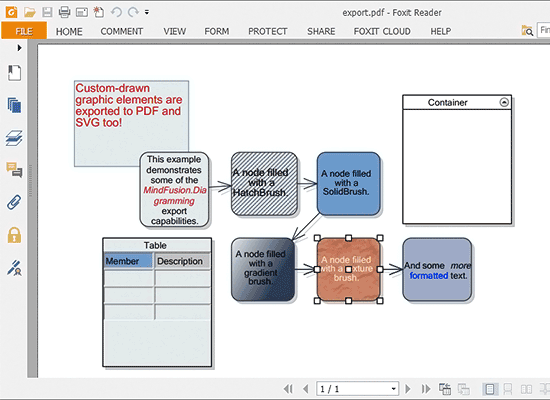
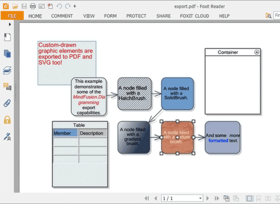
Now all drawing is done through an IGraphics interface, for which the control provides GdiGrahics, SvgGraphics and PdfGraphics implementations. Thus the files created by SvgExporter and PdfExporter can contain custom-drawn elements, which you draw either by handling custom drawing events or by implementing the Draw method in your custom item types.

API changes

Conformity with the .NET Framework naming conventions has been improved.

What's New in MindFusion FlowChart.NET Professional V4.3.1?

Shape Designer now supports arc elements

VisioExporter preserves the relationship between table rows

Now VisioExporter supports all ArrowTextStyle members

What's New in MindFusion FlowChart.NET Professional V4.3?

support for shape libraries

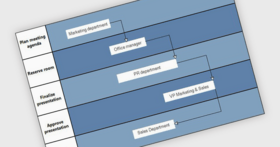
support for swimlane diagrams

ShapeListBox control

a new brush type - PathGradientBrush

mouse button mapping

more precise hit-testing for multiple-selection

What's New in MindFusion FlowChart.NET Professional V4.2?

The PdfExporter component lets you export FlowChart.NET diagrams to PDF

Simulated Annealing graph layout algorithm

KeepInsideParent constraint property added to NodeConstraints

KeepRatio constraint property added to NodeConstraints

now the control lets you implement custom expand/collapse logic

the middle mouse button can be used for panning

PanCursor property added

LeaveInplaceEditMode event added

BeginInplaceEdit and EndInplaceEdit methods added to the Table and Cell classes

HtmlBuilder raises a CreatingArea event to allow customization of the AREA tags

What's New in MindFusion FlowChart.NET Professional V4.1?

Export diagrams to DXF format

Image and ImageRectangle properties added to the ShapeTemplate class

The PathFinder class can ignore the direction of arrows when looking for paths

Now users can change the orientation of cascading arrows

New arrows can be routed while users fraw them

Initialization events raised when users start drawing new items

New text styles implemented for arrows

The TextRendering property enables or disables smoothing of text

Draw formatted text inside custom-drawn items using the DrawStyledText method

What’s new in MindFusion FlowChart.NET Professional V4.0.4?

Now the VisioImporter can import UML Activity diagrams

ExportTablesAsGroups property added to VisioExporter

RoundedArrows allows using arcs as joins between arrow segments

Drawing of ArrowCrossing improved

FitSizeToText lets you preserve the width or height of a box

ToolTipDelay property added

Custom XML serialization of Tag objects

AllowIncomingArrows and AllowOutgoingArrows properties added

The LayeredLayout algorithm has been improved

Hit-testing speed improved

Table drawing speed improved

What's new in MindFusion FlowChart.NET Professional V4.0.3?

HtmlBuilder can create image map areas for Arrow objects

HtmlBuilder can create areas for expandable nodes' +/- buttons

WebChart marked with the AllowPartiallyTrustedCallers attribute

Grid points are drawn faster when GridStyle is set to Points

Table nodes are drawn faster now

GridLayout produces better results with less iterations

TableSectionExpanded and TableSectionCollapsed events added

CaptionBackBrush property added to the Table class

Now the control allows setting ZoomFactor to values < 10

The HyperLink property moved from Node to ChartObject

PartNumbers: PC-515694-161892 515694-161892 PC-515694-161895 515694-161895 PC-515694-161911 515694-161911 PC-515694-161898 515694-161898 PC-515694-161923 515694-161923 PC-515694-161904 515694-161904 PC-515694-161901 515694-161901 PC-515694-161914 515694-161914 PC-515694-161907 515694-161907 PC-515694-161917 515694-161917 PC-515694-161920 515694-161920

PurchaseOptions: FlowChart.NET V5.1 - Professional Edition 1 Developer Subscription License (12 Months Subscription Included) , FlowChart.NET V5.1 - Professional Edition 4 Developer Team Subscription License (12 Months Subscription Included) , FlowChart.NET V5.1 - Professional Edition 8 Developer Team Subscription License (12 Months Subscription Included) , FlowChart.NET V5.1 - Professional Edition 1 Site Wide Subscription License (Allows Unlimited Developers at a Single Physical Address) (12 Months Subscription Included) , FlowChart.NET V5.1 - Professional Edition 1 Enterprise Subscription License (Unlimited number of developers of an enterprise at all its physical addresses) - (12 Months Subscription Included) , FlowChart.NET V5.1 - Professional Edition with Source Code 1 Developer Subscription License - with Source Code (12 Months Subscription Included) , FlowChart.NET V5.1 - Professional Edition with Source Code 4 Developer Team Subscription License - with Source Code (12 Months Subscription Included) , FlowChart.NET V5.1 - Professional Edition with Source Code 8 Developer Team Subscription License - with Source Code (12 Months Subscription Included) , FlowChart.NET V5.1 - Professional Edition with Source Code 1 Site Wide Subscription License (Allows Unlimited Developers at a Single Physical Address) - with Source Code (12 Months Subscription Included) , FlowChart.NET V5.1 - Professional Edition with Source Code 1 Enterprise Subscription License (Unlimited number of developers of an enterprise at all its physical addresses) - with Source Code (12 Months Subscription Included) , FlowChart.NET Professional - Upgrade / Subscription Renewal 1 Upgrade / Subscription Renewal (12 months subscription, for all license types)

Resources: Read the FlowChart.NET help file, Browse the differences between FlowChart.NET editions Web pages, Browse the FlowChart.NET License Agreement Web pages, Download the FlowChart.NET V5.1 evaluation on to your computer - Output Displays Evaluation Label

Operating System for Deployment: Windows Vista, Windows XP, Windows ME, Windows 2000, Windows NT 4.0

Architecture of Product: 32Bit

Product Type: Component

Component Type: .NET WinForms, .NET Class, 100% Managed Code

Built Using: Visual C# .NET

Compatible Containers: Microsoft Visual Studio 2008, Microsoft Visual Studio 2005, Microsoft Visual Basic 2008, Microsoft Visual Basic 2005, Microsoft Visual C++ 2008, Microsoft Visual C++ 2005, Microsoft Visual C# 2008, Microsoft Visual C# 2005, .NET Framework 3.5, .NET Framework 3.0, .NET Framework 2.0

Product Class: User Interface Components

Search Items: New Product Oct 03, New Product Mar 04, New Version Mar 04, New Product Apr 04, New Version Apr 04, New Product May 04, New Product June 04, New Product Aug 04, New Product Sep 04, New Product Nov 04, New Product Feb 05, New Product May 05, New Product June 05, New Product Aug 05

Keywords: Flow Diagramming diagram diagrams flowchart Professional Partner MindFusion FlowChart.NET Professional, FlowChart.NET

Búsqueda de productos

Escriba palabras de búsqueda:

Award Award