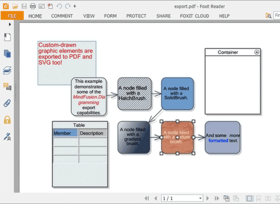
Screenshot Preview

FlowChart.NET Standard Edition - Summary

by MindFusion Group - Product Type: Component / .NET WinForms / .NET Class / 100% Managed Code

Summary

FlowChart.NET Standard Edition by MindFusion Group

URLs: mindfusion-flowchart-net-standard, mindfusion flowchart net standard, mindfusionflowchartnetstandard, mindfusion

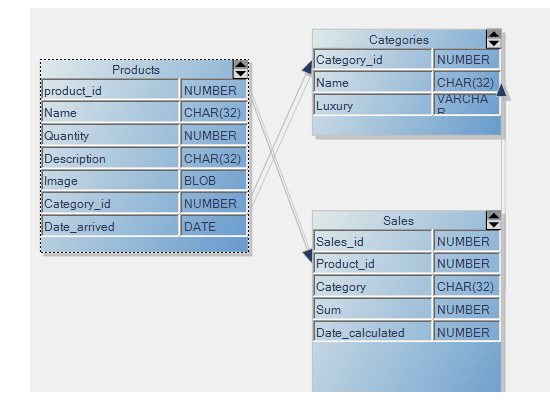
Enhance your applications with diagramming and graphing capabilities. FlowChart.NET Standard helps you create and present work flow and process diagrams; database entity-relationship diagrams; organizational charts; object hierarchy and relationship charts, graphs, and trees. FlowChart.NET Standard basic types of objects - boxes, tables, and arrows - can be grouped and attached one to another and combined in complex structures. FlowChart.NET provides more than 50 predefined box shapes, as well as custom-designed and custom-painted boxes. FlowChart.NET Standard can be purchased with Source Code. Buy FlowChart.NET Standard and obtain 12 months of free upgrades. MindFusion FlowChart.NET Standard renewals will extend your FlowChart.NET Standard subscription for another year. FlowChart NET Standard Enterprise and FlowChart NET Standard Site Licenses also available.

A document with all differences between FlowChart.NET Standard and FlowChart.NET Professional Editions can be found in the 'Evals and Downloads' section. Professional Edition includes:

FlowChart.NET Professional Edition includes:

Import/Export Visio XML Drawing files

Multilevel Undo/Redo support

Layered graph layout

Spring-Embedder graph layout

Grid layout

Path finding in graphs

A suite of auxiliary controls:

Overview control

Node shapes toolbar

Ruler control

FlowChart.NET Standard Main Features

FlowChart.NET is designed in such way that you can create with it even the most complex schemes. In order to do so you combine different FlowChart.NET objects and set their properties. You can respond to the users' interaction with the flowchart objects with the events the control provides.

Below you can see a list of the most important FlowChart.NET characteristics separated in groups:

FlowChart NET Standard component

Redistribution is royalty free

Assembly is strong-named

Is digitally signed

Can be purchased with source code

Is written in C#

FlowChart NET Standard User interaction

Several user interaction modes

Scrolling and zooming

Panning

Copy and paste to/from Windows clipboard

Automatic scrolling while dragging objects with the mouse

Alignment to grid

Multiple selection

Tool-tip

Docking points can be defined for nodes

Undo / redo support

FlowChart NET Standard Programming

Programmatic access to the diagram objects and selections

Numerous properties for customizing appearance and behavior

Numerous utility methods

Path finding and cycle detection

Rich event set

FlowChart NET Standard Store and retrieve diagrams into/from

Files on disk

.NET streams

ASCII strings

XML documents

FlowChart NET Standard Output

To display via Windows Forms

Printing

Print preview

To browser via the utility WebChart class

Export image files

FlowChart NET Standard Diagram elements

More than 70 predefined node shapes

Tables with unlimited number of rows and columns

Control hosts allow using .NET controls as diagram nodes

Arrows can comprise multiple segments

Arrow segments can be straight lines or curves

FlowChart NET Standard Automatic layout

Spring-Embedder graph layout

Directional tree layout

Radial tree layout

Layered graph layout

Grid layout ( FlowChart.NET Pro only)

Automatic arrow routing

FlowChart NET Standard Appearance

Nodes can display images and text

Various text alignment styles

Text can be laid-out in polygonal areas

Styled HTML-like text formatting

Customizable fonts and colors

Ability to define custom node shapes

Custom painting of nodes

Shadows

User-assigned mouse cursors

Z order

Rich choice of pen and brush styles

Transparent nodes

Invisible nodes

FlowChart NET Standard Behavior

Lock diagram elements

Read-only mode supported

Tables can be scrolled

Expand / collapse object hierarchies

In-place text editing

Dynamic positioning of arrows relative to linked nodes

FlowChart NET Standard Linking via arrows

Nodes to nodes

Tables to tables

Nodes to tables

Unconnected arrows

FlowChart NET Standard Hierarchical grouping

Attaching objects (nodes/tables) to other objects

Attaching objects to arrow control points

Attaching objects to arrow segments

What's New in MindFusion FlowChart.NET 5.7?

Interactive node alignment via alignment guides

FractalLayout tree layout algorithm

Specify start and end nodes for LayeredLayout

ButtonComponent supports repeat mode

Slider and spinner components for CompositeNodes

DiagramView can use third-party scrollbars

What's New in MindFusion FlowChart.NET 5.6.4?

Snap links to nodes from a distance

Serialization of CompositeNode components

DiagramView3D improvements

WmfExporter now exports the swimlane grid

GetNearestNode method added

What's New in MindFusion FlowChart.NET 5.6.3?

CompositeLayout multi-level graph layout algorithm

Improved alignment in FlowchartLayout branches

OrthogonalLayout improved to create less link bends

DisableMirroring constraint prevents users from flipping a node

Scripting and CompositeLayout sample projects added

What's New in MindFusion FlowChart.NET 5.6.2?

Define node shapes using Visio-like shape formulas

Define node shapes through GraphicsPath objects

Improved support for nodes with non-uniform size in SpringLayout

Improved symmetry in SpringLayout

SpringLayout.Randomize randomizes initial node positions

What's New in MindFusion FlowChart.NET 5.6.1?

Export/Import improvements

The swimlane grid can be exported to Visio by setting the ExportLanes property of VisioExporter.

PdfExporter supports radial gradients.

VisioImporter can import attributes from shape masters.

Improved support for importing Visio groups.

Parsing SVG content became slow after the additions in V5.6. Now parsing speed has been improved.

CompositeNode improvements

The FocusedComponent property specifies which component has the keyboard focus.

Components now raise MouseMove, GotFocus and LostFocus events.

Convert point coordinates between the diagram and component coordinate systems by calling ToDocument or ToLocal methods.

The Draw method of components now receives a RenderOptions parameter.

An advanced CompositeNode -derived sample class in included in the Demo project.

What's New in MindFusion FlowChart.NET 5.6?

Now you can compose nodes from various kinds of components

Standard border, text, image and shape components added

Standard button, checkbox and edit components added

Simple, stack and grid panels for component layout added

SvgNodes now support SVG text and marker elements

NodePointed or LinkPointed events added

What's New in MindFusion FlowChart.NET 5.4?

Swimlane layout

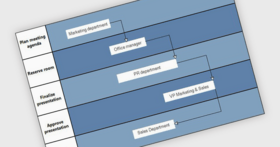
Swimlane Layout can be used to arrange process diagrams in which nodes representing activities are placed in swimlanes representing resources. The index of the resource allocated to an activity should be assigned to the corresponding node's LayoutTraits [SwimlaneLayoutTraits.Lane]. By default, the algorithm works with the diagram's LaneGrid, but its SwimlaneGrid property can be set to any class that implements ISwimlaneGrid. This allows applying the layout to a custom-drawn grid rendered through the DrawBackground event, or one composed of locked background nodes.

Export diagrams to WMF format

WmfExporter creates WMF (Windows MetaFile) images from the content of Diagram objects. In order to use this component, add a reference to the MindFusion.Diagramming.Export.Wmf.dll assembly to your project. To create a WMF file from a diagram, create a WmfExporter instance and call its Export method, passing a Diagram object as parameter.

Other export improvements

SvgExporter supports dashed pens.

Support for shapes with alternating fill style added to PDF and SVG exporters.

Improved quality of curved shapes in SVG.

PdfExporter supports bitmaps with Format32bppPArgb pixel format.

Text formatting improvements

TextPadding specifies the size of the padding area between the text of nodes and their borders.

Speed of the styled text formatting algorithm has been improved.

Miscellaneous

Items can be drawn with the right mouse button when RightButtonActions is set to Draw.

ControlNodes now check the SelectionOnTop property before bringing hosted controls to front.

Fixed a ShowArrowHeads bug in DiagramView3D.

The order of child nodes in TreeLayout can be reversed by setting Balance to Reversed.

LinkType adds support for Bezier links to SpringLayout.

SerializationBinder allows loading diagram files that contain serialized instances of renamed types.

What's New in MindFusion FlowChart.NET 5.3.5?

Support for .NET 4

The package now includes a .NET 4 version of the MindFusion.Diagramming assemblies, available in the VS2010 subfolder of the installation folder. These assemblies can also be used in applications that target the .NET 4 Client Profile. The VS2010 folder also includes sample projects for Visual Studio 2010. Versions 2 and 3 of the .NET runtime are still supported.

Other Improvements

The Toolbox Installer tool can be used to automatically add the MindFusion.Diagramming components to a tab of the Visual Studio toolbox.

The Id property added to DiagramItem allows assigning custom identifiers to items. It can also be used to just store additional custom data similarly to Tag.

Call FindLinkById and FindNodeById to find items by their Id.

Shadows can be painted using any brush type and not only in solid color.

The ShadowColor property has been replaced by ShadowBrush.

The FoldedContainerSize property allows setting the size of folded containers to be larger than their caption bar.

ShapeNodes whose Brush is set to a PathGradientBrush instance now use a gradient path corresponding to their Shape instead of a rectangle.

What's New in MindFusion FlowChart.NET 5.3.4?

ArrowHead enhancements

The type of the HeadShape, BaseShape and IntermediateShape properties of DiagramLink has been changed from enum ArrowHead to class Shape, which is also used to define ShapeNode shapes. The ArrowHeads class now exposes Shape definitions that correspond to the ArrowHead enumeration members from previous versions. It is also possible to assign any Shapes member or a custom shape as an arrowhead. When used for arrowheads, position (50, 0) in the shape definition corresponds to the arrowhead's tip point.

Now IntermediateShape arrowheads are also rendered for Bezier links.

Different arrowhead shapes can be filled with distinct brushes as set through HeadBrush, BaseBrush and IntermediateBrush.

Arrowheads can be custom drawn at arbitrary locations through the DrawArrowhead method.

Support for intermediate arrowheads added to DxfExporter.

Other Enhancements

The ShapeDesigner tool now supports filled decoration objects (used in BPMN shapes).

ShapeDesigner allows drawing the shape's text region outside the shape outline.

HitTest method added to TreeViewNode.

A new LoadFromXml overloaded method allows loading diagram items without changing the diagram's properties.

UBendMaxLen property added to QuickRouter.

SvgNodes support rgb(%) notation for color values.

Added support for SVG symbol references.

What's New in MindFusion FlowChart.NET 5.3.3?

The static FromSvg method of the Shape class creates a shape corresponding to the outline of an SVG drawing

The ContentAlign property of SvgNode specifies how a drawing is aligned relatively to the node

Improved support for gradients in SVG

SvgContent can parse files with embedded CSS styles

Adjustment handles styling

LinkCreateCancelled and NodeCreateCancelled events raised when the user cancels item creation

The Parent property of TreeViewItem returns the parent item

The Table property of the Row class returns the TableNode that contains the specified row

TriggerRerouting can be set to WhileModifying to re-route links while their incident nodes are moved or resized

MiddleSegment and MiddleSegmentRotated styles added to the LinkTextStyle enumeration

Granularity property added to QuickRouter

Improved LayeredLayout speed in EnforceLinkFlow mode

Behavior classes have more control over interaction through the OnMouseDown, OnMouseMove and OnMouseUp methods

What's New in MindFusion FlowChart.NET 5.3.2?

Topological graph layout algorithm

The DiagramItem.Query method implements relationship queries on the graph

PdfExporter multi-language support

GetProjectionRect and PointToClient methods added to DiagramView3D

DiagramView3D.ShowArrowHeads enables rendering of link arrowheads

QuickRouter now avoids link routes that include long U bends

LayeredLayout can straighten links that cross multiple layers in the graph

the Expandable property has been implemented for TreeViewNodes

ResizeToFitText method added to TreeViewNode

Behavior can be set to Pan to enable panning with the left mouse button

DiagramNode.SetBounds can move a node without affecting its related items

What's New in MindFusion FlowChart.NET V5?

Document/View architecture

FlowChart.NET implements the Model-View-Controller (MVC) architectural pattern in its new version 5. The MVC design pattern as applied to FlowChart.NET separates the diagram data (model) from its representation to the user (view) and controlling it by the user (controller). According to the MVC design pattern, FlowChart.NET Version 5 provides two new classes instead of the FlowChart class, namely Diagram and DiagramView.

Support for custom diagram item types

The FlowChart.NET API has been redesigned to allow for seamless integration of custom node and link types. You can define a custom item type by deriving from DiagramLink or DiagramNode. You could also derive from more specific node types such as ShapeNode or ContainerNode. New items can be added to a diagram by instantiating them and adding them to the Nodes or Links collections. To improve support for custom types, many type-specific methods have been replaced with more generic versions, e.g. FindNode instead of FindBox and FindTable.

Containers

The ContainerNode class implements diagram nodes that can function as containers for other nodes. Containers can be folded to hide their content, and unfolded to show it again. Containers can be nested one within another, without limitation on the depth of nesting.

Orthogonal graph layout

OrthogonalLayout is a secondary layout algorithm that can be used to arrange links after an initial node arrangement has already been applied. The orthogonal layout is useful when there are much more links than nodes in a graph. The algorithm strives to achieve the following criteria, while preserving as much of the initial node configuration as possible: links must not overlap; only vertical and horizontal routing lines are used; graph routing is performed with respect to the specified main layout direction; links crossings are minimized; bends are minimized.

Graphics interface

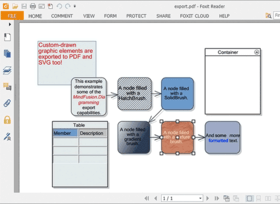
Now all drawing is done through an IGraphics interface, for which the control provides GdiGrahics, SvgGraphics and PdfGraphics implementations. Thus the files created by SvgExporter and PdfExporter can contain custom-drawn elements, which you draw either by handling custom drawing events or by implementing the Draw method in your custom item types.

API changes

Conformity with the .NET Framework naming conventions has been improved.

Enhance your applications with diagramming and graphing capabilities.

Pricing: FlowChart.NET 5.7 - Standard Edition 1 Developer Subscription License (12 Months Subscription Included), FlowChart.NET 5.7 - Standard Edition 4 Developer Team Subscription License (12 Months Subscription Included), FlowChart.NET 5.7 - Standard Edition 8 Developer Team Subscription License (12 Months Subscription Included), FlowChart.NET 5.7 - Standard Edition 1 Site Wide Subscription License (Allows Unlimited Developers at a Single Physical Address) (12 Months Subscription Included), FlowChart.NET 5.7 - Standard Edition 1 Enterprise Subscription License (Unlimited number of developers of an enterprise at all its physical addresses) - (12 Months Subscription Included), FlowChart.NET 5.7 - Standard Edition with Source Code 1 Developer Subscription License - with Source Code (12 Months Subscription Included), FlowChart.NET 5.7 - Standard Edition with Source Code 4 Developer Team Subscription License - with Source Code (12 Months Subscription Included), FlowChart.NET 5.7 - Standard Edition with Source Code 8 Developer Team Subscription License - with Source Code (12 Months Subscription Included), FlowChart.NET 5.7 - Standard Edition with Source Code 1 Site Wide Subscription License (Allows Unlimited Developers at a Single Physical Address) - with Source Code (12 Months Subscription Included), FlowChart.NET 5.7 - Standard Edition with Source Code 1 Enterprise Subscription License (Unlimited number of developers of an enterprise at all its physical addresses) - with Source Code (12 Months Subscription Included), FlowChart.NET Standard Edition Upgrade/1 Year Subscription Renewal 1 Developer Subscription Renewal License (12 Months Subscription Included), FlowChart.NET Standard Edition Upgrade/1 Year Subscription Renewal 4 Developer Team Subscription Renewal License (12 Months Subscription Included), FlowChart.NET Standard Edition Upgrade/1 Year Subscription Renewal 8 Developer Team Subscription Renewal License (12 Months Subscription Included), FlowChart.NET Standard Edition Upgrade/1 Year Subscription Renewal 1 Site Wide Subscription Renewal License (Allows Unlimited Developers at a Single Physical Address) (12 Months Subscription Included), FlowChart.NET Standard Edition Upgrade/1 Year Subscription Renewal 1 Enterprise Subscription Renewal License (Unlimited number of developers of an enterprise at all its physical addresses) - (12 Months Subscription Included), FlowChart.NET Standard Edition with Source Code Upgrade/1 Year Subscription Renewal 1 Developer Subscription Renewal License - with Source Code (12 Months Subscription Included), FlowChart.NET Standard Edition with Source Code Upgrade/1 Year Subscription Renewal 4 Developer Team Subscription Renewal License - with Source Code (12 Months Subscription Included), FlowChart.NET Standard Edition with Source Code Upgrade/1 Year Subscription Renewal 8 Developer Team Subscription Renewal License - with Source Code (12 Months Subscription Included), FlowChart.NET Standard Edition with Source Code Upgrade/1 Year Subscription Renewal 1 Site Wide Subscription Renewal License (Allows Unlimited Developers at a Single Physical Address) - with Source Code (12 Months Subscription Included), FlowChart.NET Standard Edition with Source Code Upgrade/1 Year Subscription Renewal 1 Enterprise Subscription Renewal License (Unlimited number of developers of an enterprise at all its physical addresses) - with Source Code (12 Months Subscription Included)

Evals & Downloads: Read the FlowChart.NET help file, Browse the differences between FlowChart.NET editions Web pages, Browse the FlowChart.NET License Agreement Web pages, Download the FlowChart.NET 5.7 evaluation on to your computer - Output Displays Evaluation Label

Operating System for Deployment: Windows 7, Windows Vista, Windows XP, Windows ME, Windows 2000, Windows NT 4.0

Architecture of Product: 32Bit

Product Type: Component

Component Type: .NET WinForms, .NET Class, 100% Managed Code

Built Using: Visual C# .NET

Compatible Containers: Microsoft Visual Studio 2010, Microsoft Visual Studio 2008, Microsoft Visual Studio 2005, Microsoft Visual Basic 2010, Microsoft Visual Basic 2008, Microsoft Visual Basic 2005, Microsoft Visual C++ 2010, Microsoft Visual C++ 2008, Microsoft Visual C++ 2005, Microsoft Visual C# 2010, Microsoft Visual C# 2008, Microsoft Visual C# 2005, .NET Framework 4.0, .NET Framework 3.5, .NET Framework 3.0, .NET Framework 2.0

Product Class: User Interface Components

Keywords: flowchart.net standard, flowchart net standard, flowchart standard, mindfusion standard, buy flowchart.net standard, buy flowchart net standard, buy mindfusion standard, purchase flowchart.net standard, purchase flowchart net standard, purchase mindfusion standard, order flowchart.net standard, order flowchart net standard, order mindfusion standard, flowchart.net standard reseller, flowchart net standard reseller, mindfusion standard reseller, flowchart.net standard distributor, flowchart net standard distributor, flowchart.net standard subscription, flowchart net standard subscription, mindfusion standard subscription, renew flowchart.net standard, renew flowchart net standard, renew mindfusion standard, upgrade flowchart.net standard, upgrade flowchart net standard, upgrade mindfusion standard, flowchart.net standard site, flowchart net standard site, mindfusion standard site, flowchart.net standard enterprise, flowchart net standard enterprise, mindfusion standard enterprise

Flow Diagramming diagram diagrams flowchart

Part numbers: PC-514436-406370 514436-406370 PC-514436-406372 514436-406372 PC-514436-406382 514436-406382 PC-514436-406374 514436-406374 PC-514436-406388 514436-406388 PC-514436-406378 514436-406378 PC-514436-406376 514436-406376 PC-514436-406384 514436-406384 PC-514436-406380 514436-406380 PC-514436-406386 514436-406386 PC-514436-406389 514436-406389 PC-514436-406390 514436-406390 PC-514436-406391 514436-406391 PC-514436-406392 514436-406392 PC-514436-406393 514436-406393 PC-514436-406394 514436-406394 PC-514436-406395 514436-406395 PC-514436-406396 514436-406396 PC-514436-406397 514436-406397 PC-514436-406398 514436-406398

Product Search

Enter search words:

Why buy from ComponentSource?

ComponentSource offers a unique global service, used by over 1,000,000 software developers worldwide.

More Info | About Us

Award Award