MindFusion Planner .net - Summary

by MindFusion Group - Product Type: Component / .NET WinForms / .NET Class / 100% Managed Code

Summary

MindFusion Planner .net by MindFusion Group

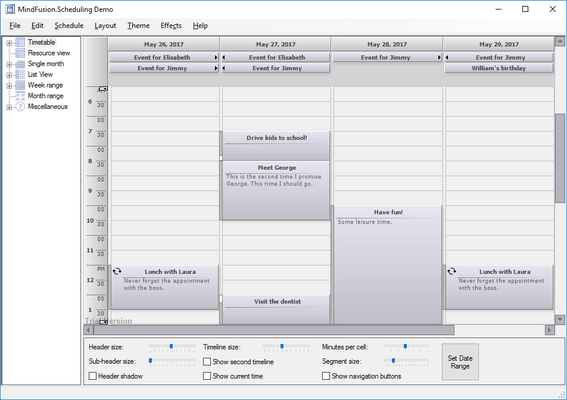
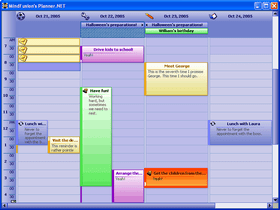
Add calendar and scheduling functionality to your .NET applications. Planner.NET is a calendar and scheduling component for the .NET framework that supports yearly, monthly, weekly and daily schedule views as well as recurrent appointments. Each view provides a distinct layout of the time cells and can display events such as appointments and meetings. The timetable view displays a day's schedule where the columns represent dates, locations, tasks or contacts, and the rows represent hours or minute intervals. Planner.NET is royalty free. Source Code is available. VB.NET and C# samples included. Visual Studio .NET, VS2005 and VS2008 compatible.

Overview

Planner.NET provides your applications with a rich set of calendar and scheduling features. With Planner.NET you can present task and appointments information during different time periods (hours, days, weeks and months) as well as recurrent appointments or show all engagements at a specific day or several consequent days. Planner.NET can display a schedule in several view types, such as:

A range of months, displaying several months in a grid, each of the months displaying its days in a smaller grid

A single month view, displaying the days of a month and allowing scrolling to previous or next month

A range of weeks, displaying days in a grid in which the days of a week occupy a single row

A range of days, displaying a single day on each row or column

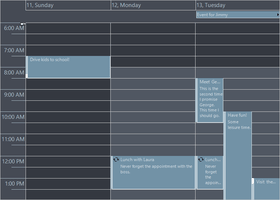
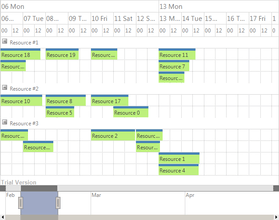
A timetable view, displaying the allotment of resources to distinct hours of a day. The columns of this view can be grouped by location, task or contact

Planner.NET provides intuitive user-interaction model for creating or editing appointments and events in a schedule. In addition, its programmatic interface places at your disposal many useful functions, ranging from printing and XML serialization to displaying reminders and checking what occurrences of recurrent events happen in a specified time interval. The control has been tested with the most popular Dotnet (.NET) development environments and programming languages like CSharp, VB.NET or Delphi.NET. It can be used to create applications in Visual Studio .NET (VS.NET) C#, Visual Basic .NET (VB .NET) or Delphi .NET among others.

Planner.NET consists of three assemblies:

Schedule.dll assembly defines the schedule data model and implements the Schedule class which serves as a document in the document-view architecture. This assembly also defines classes such as Item and Appointment which represent individual events in the schedule

Calendar.NET.dll assembly implements several calendar and schedule view as part of the Calendar Windows Forms control class. All views are implemented in the same control to allow drilling down the schedule data simply by changing the views. Each view allow creating new schedule items in it by typing over a time cell. Schedule items can be moved around and resized to change their start time and duration

ScheduleStandardForms.dll implements several standard dialogs that allow creating and editing schedule data such as tasks, contacts and appointments. Planner.NET provides assemblies for versions 1.1 and 2.0 of the .NET framework.

What's New in Planner.NET V4.4.1?

Visual Studio 2008 support

Schedule serialization has been redesigned to allow easier custom item and tag serialization and more robust compatibility with earlier file format versions

Several new methods have been added to the ItemDrawContext class

List view has been greatly improved; FreeDrag, CellUnit, EnableSnapping and SnapUnit are several of its propertiesItemModificationStyle property has been added to the Calendar class

CellLayout property has been added to the MonthSettings class; it affects the way cells in the SingleMonth and MonthRange views are laid out

Schedule.GetFreePeriod method overloads enable you to find an unoccupied period of time with a specific duration

Various minor properties added to the Calendar class

New samples demonstrating the new features

New reporting functions

What's New in Planner.NET V4.3?

List view replaces the old DayRange view

List view displays arbitrary long sequences of seconds, minutes, hours, days, weeks, months or years

the Position enumeration contains a None value, which indicates that headers will not be displayed

TimeFormat property has been added to AppointmentForm, TaskForm and RecurrenceForm

TimelineSettings exposes three new properties: NowColor, NowFillColor and ShowCurrentTime

WeekRangeHeaderStyle enumeration contains a Reference member, which indicates whether the view header should display the name of the corresponding resource when grouping is enabled

CurrentTime property has been added to the Calendar class; it may be used to 'override' the current system time

Calendar.ToolTip gives access to the underlying .NET ToolTip object associated with the control

What's New in Planner.NET V4.2.1?

The EnableOptimization property improves the drawing speed of items

An information header can be optionally displayed in Timetable views

ResourceViewSettings.CellOffset specifies the offset of the cells from the view origin

What's New in Planner.NET V4.2?

Theme class allows creating custom themes

Theme Editor tool lets you create custom themes interactively

New Style class properties for text margins size

GetVisibleItems method returns a collection of all visible items

ItemCreationCanceled event raised when users cancel item creation

What's New in Planner.NET V4.1?

Database serialization support (only in the .NET 2 version)

Microsoft Outlook Import/Export Library

Recurrences have been improved

Cells can be deselected by holding down the Control key and clicking

Items can be interactively created by dragging with the mouse

Interactive item cloning can be canceled by right clicking

MonthWeekHeaderClick event added

ItemCloning and ItemCloned events added

The reminder checks in the schedule can now be turned off

Improved design-time brush editors

What's New in Planner.NET V4.0?

Advanced reporting component implemented in Planner.NET

The Timetable view supports grouping first by resource and then by date

Interactive cloning of items

Enhanced control over user interaction

Resource-specific selection

Styles let you set the border width and color of each side of items

Now collision detection can be disabled programmatically

What's New in Planner.NET V3.2?

The DayRange view now supports grouping

A new theme - Silver - has been added

ItemSelectionChanged event raised when an item is selected or deselected

Improved item ordering

Improved interaction with items in the Resource view

Improvements and bug fixes in printing and print preview

Landscape property added to PrintOptions

TimetableSettings.SelectWholeDayOnHeaderClick property added

Non-contiguous time range selection supported now

SnapUnitCount makes items in resource view snap at arbitrary intervals

What's New in Planner.NET V3.1?

Schedule items can display formatted text

The resource view now supports filtering

GetItemBounds returns the bounding rectangle of an item

ItemModificationCanceled event raised when modification is canceled

Text smoothing can be enabled via the TextRendering property

Improved tooltips support

What's New in Planner.NET V3.0?

A new view type, called Resource view, has been implemented

The Resource class implements a new general type of resources

Styles redesigned to support cascading propagation of style attributes

The timetable view can display cells with accuracy down to the second

CollapseResourceRow, ExpandResourceRow and IsResourceRowExpanded methods added

MinItemLength specifies the minimal length of user-created items

A new item editor added, allows modifying items description and header text

A new theme called Lila added

The Timetable view can be zoomed in or out

PartNumbers: PC-516409-150383 516409-150383 PC-516409-150384 516409-150384 PC-516409-150385 516409-150385 PC-516409-150386 516409-150386 PC-516409-150387 516409-150387 PC-516409-150388 516409-150388 PC-516409-150389 516409-150389 PC-516409-150390 516409-150390 PC-516409-150391 516409-150391 PC-516409-150392 516409-150392 PC-516409-150393 516409-150393

PurchaseOptions: Planner.NET V4.4.1 - with Source Code 1 Developer License (12 Months Subscription Included) , Planner.NET V4.4.1 - with Source Code 4 Developer License (12 Months Subscription Included) , Planner.NET V4.4.1 - with Source Code 8 Developer License (12 Months Subscription Included) , Planner.NET V4.4.1 - with Source Code 1 Site Wide License (Allows Unlimited Developers at a Single Physical Address) (12 Months Subscription Included) , Planner.NET V4.4.1 - with Source Code 1 Enterprise License (Allows unlimited number of developers of an enterprise at all its physical addresses (worldwide)) (12 Months Subscription Included) , Planner.NET V4.4.1 1 Developer License (12 Months Subscription Included) , Planner.NET V4.4.1 4 Developer License (12 Months Subscription Included) , Planner.NET V4.4.1 8 Developer License (12 Months Subscription Included) , Planner.NET V4.4.1 1 Site Wide License (Allows Unlimited Developers at a Single Physical Address) (12 Months Subscription Included) , Planner.NET V4.4.1 1 Enterprise License (Allows unlimited number of developers of an enterprise at all its physical addresses (worldwide)) (12 Months Subscription Included) , Planner .NET - Upgrade / Subscription Renewal 1 Upgrade / Subscription Renewal (12 months subscription, for all license types)

Resources: Read the Planner.NET help file, Read the Planner.NET License Agreement, Download the Planner.NET V4.4.1 evaluation on to your computer - Output displays evaluation messages

Operating System for Deployment: Windows Vista, Windows XP, Windows Server 2003, Windows 2000

Architecture of Product: 32Bit, 64Bit

Product Type: Component

Component Type: .NET WinForms, .NET Class, 100% Managed Code

Built Using: Visual C# .NET

Compatible Containers: Microsoft Visual Studio 2008, Microsoft Visual Studio 2005, Microsoft Visual Studio .NET 2003, Microsoft Visual Basic 2008, Microsoft Visual Basic 2005, Microsoft Visual Basic .NET 2003, Microsoft Visual C++ 2008, Microsoft Visual C++ 2005, Microsoft Visual C++ .NET 2003, Microsoft Visual C# 2008, Microsoft Visual C# 2005, Microsoft Visual C# .NET 2003, Delphi 2005 (9.0), Delphi 8.0, .NET Framework 3.5, .NET Framework 3.0, .NET Framework 2.0, .NET Framework 1.1

Product Class: Business Components

Search Items: Source Code

Keywords: Calendar calendaring calendars Scheduling Schedule Schedules Professional Partner MindFusion Planner .net,

Product Search

Enter search words:

Award