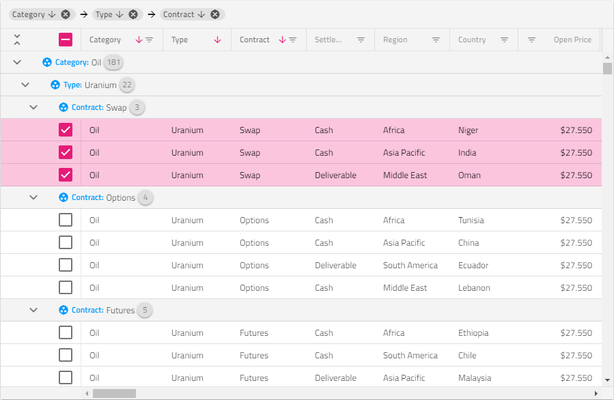
Screenshot Preview

Infragistics NetAdvantage for .NET

by Infragistics - Product Type: Component / ASP.NET WebForms / ASP.NET AJAX (ATLAS) / .NET WinForms / .NET Class / .NET WPF / Silverlight / 100% Managed Code / Windows Runtime Controls / jQuery / JavaScript / AJAX

NetAdvantage for .NET includes NetAdvantage ASP.NET, NetAdvantage Windows Forms, NetAdvantage Silverlight (Line of Business and Data Visualization), NetAdvantage WPF (Line of Business and Data Visualization), NetAdvantage Windows UI and Infragistics Ignite UI components.


Also available is NetAdvantage Ultimate which includes everything included in NetAdvantage for .NET plus NUCLiOS, NetAdvantage for Windows Phone, NetAdvantage for LightSwitch, NetAdvantage ICONS, and 5 User Quince Subscription.

Add, grid, ribbon, scheduling, toolbar, menu, listbar, tree, UI and editing functionality to your .NET, jQuery, Visual Studio, ASP.NET, WPF, Silverlight and Tablet PC applications. Infragistics NetAdvantage for .NET is a comprehensive presentation layer toolset for quickly building and styling polished application UIs and delivering a great user experience, for jQuery, Windows Forms, ASP.NET, WPF and Silverlight. NetAdvantage for .NET contains all essential UI controls (over 100 in all) for applications built using Visual Studio: grids, scheduling, charting, gauges, navigation, ribbon, toolbars, menus, listbars, trees, tabs, explorer bars, UI and many other editors, as well as Application Styling, Excel import/export and a Document Export Engine for PDF and XPS formats. Infragistics NetAdvantage for .NET tools work natively within Visual Studio and include Office and Windows styles. Included with every purchase of NetAdvantage for .NET, Infragistics provides product support, source code to the controls and frameworks, two releases yearly of customer driven products and features and more. If you buy NetAdvantage for .NET Priority Support, the price also includes one years worth of priority phone and guaranteed response web-based technical support. NetAdvantage for .NET upgrades and renewals are also available.


Average Review:   based on 22 reviews.
From
$ 1,295.00

Best Seller

  |   

Top Download

Our regular prices are shown below. Please logon to see your discounted prices.

Price in Showing: All Prices | Renewals Only

Infragistics NetAdvantage for .NET 2013 Volume 1 (includes Ignite UI, Indigo Studio, ASP.NET, Windows Forms, Windows UI, Silverlight, and WPF Controls, annual subscription & full Windows Forms, WPF and ASP.NET Source code) - Renewals  

Add to Cart $ 505.75 1 Developer Subscription License - 90-Day Early Bird Subscription Renewal - (can be purchased up to the end of the 10th month of your existing subscription*)
Mfr. Part No: 929990
Verify Download (29 KB)
Add to Cart $ 535.50 1 Developer Subscription License - 60-Day Early Bird Subscription Renewal - (can be purchased between the first and last day of the 11th month of your existing subscription*)
Mfr. Part No: 929960
Verify Download (29 KB)
Add to Cart $ 595.00 1 Developer Subscription License - Subscription Renewal - (can be purchased until the last day of the 12th month of your existing subscription)
Mfr. Part No: 929900
Verify Download (29 KB)

Infragistics NetAdvantage for .NET 2013 Volume 1 with Priority Support (includes Ignite UI, Indigo Studio, ASP.NET, Windows Forms, Windows UI, Silverlight, and WPF Controls, annual subscription & full Windows Forms, WPF and ASP.NET Source) - Renewals  

Add to Cart $ 760.75 1 Developer Subscription License with Priority Support - 90-Day Early Bird Subscription Renewal - (can be purchased up to the end of the 10th month of your existing subscription*)
Mfr. Part No: 92999P
Verify Download (29 KB)
Add to Cart $ 805.50 1 Developer Subscription License with Priority Support - 60-Day Early Bird Subscription Renewal - (can be purchased between the first and last day of the 11th month of your existing subscription*)
Mfr. Part No: 92996P
Verify Download (29 KB)
Add to Cart $ 895.00 1 Developer Subscription License with Priority Support - Subscription Renewal - (can be purchased until the last day of the 12th month of your existing subscription)
Mfr. Part No: 92990P
Verify Download (29 KB)

Infragistics NetAdvantage for .NET Corporate 2013 Volume 1 (A Corporate license gives you the convenience of one key for multiple (minimum 10) licenses)  

Add to Cart $ 595.00 1 Developer Subscription License - Subscription Renewal - (can be purchased until the last day of the 12th month of your existing subscription) (minimum quantity 10)
Mfr. Part No: 9299V
Verify Download (29 KB)
Add to Cart $ 895.00 1 Developer Subscription License with Priority Support - Subscription Renewal - (can be purchased until the last day of the 12th month of your existing subscription) (minimum quantity 10)
Mfr. Part No: 9299VP
Verify Download (29 KB)

Our prices include ComponentSource technical support and, for most downloadable products, an online backup and a FREE upgrade to the new version if it is released within 30 days of your purchase.  All sales are made on our standard Terms and Conditions and subject to our Return Policy. Please contact us if you require any licensing option not listed, including volume licensing and previous versions.

Our regular prices are shown above. Please logon to see your discounted prices.

What’s new in NetAdvantage .NET 2013 Volume 1?

What’s New for HTML5/jQuery (Ignite UI) Developers?

Pivot Data Selector
An interactive jQuery based UI control that enables users to select data slices.

  • Dropdowns for selecting database, cube and measure group.
  • A metadata tree displaying all dimensions, measures, hierarchies and levels.
  • Drop areas for selecting of hierarchies and measures.
  • A deferred update checkbox.
  • An update button to refresh the view connected to the data selector.

Pivot Grid

  • A jQuery-based data presentation control for displaying data in a pivot table.

Pivot View
Using the Ignite UI Pivot Grid, Pivot Data Selector and Splitter controls assembled in one two-panel control, The Pivot View gives you every tool you need for manipulating multidimensional (OLAP) data in on feature-rich pivot grid. Key Features:

  • Browser Based Business Intelligence - Bind to server-side XMLA data sources like Oracle, SAP & SQL Server Ananlysis Services, or server & client-side Flat data sources.
  • Rich Data Discovery - Enable rich data discovery with drilldown, sorting, and data filtering.
  • Multiple layouts - Change how the row headers are arranged for display with regards to the amount of space they occupy with the Standard or default Compact View.
  • Build the Complete Experience - Using the Pivot Data Selector control to provide users with the ability to add or remove hierarchies and measure to and from the Pivot Grid.
  • Data Selection - Select which database to connect to, which cube to extract data from, or a set of measure groups using drop-downs in the Pivot Data Selector.
  • Metadata Tree - Display available dimensions with their respective hierarchies, along with a list including all available measures. They are loaded in the tree once the user chooses a database, cube, and measure group.
  • Deferred Update - Immediate and Deferred modes are supported, which give control to the user on the frequency of the grid updates.
  • Configurable Panel Views - Swap the Pivot Grid and the Selector using the DataSelectorPanel properties of the Pivot View.

Doughnut Chart
Similar to a Pie Chart, the Doughnut Chart is used to show categorical statistics expressed in percentages. Key Features:

  • Multiple Ring Series & Data-Binding - The Doughnut Chart supports one or more rings surrounding a hollow or empty center. The center may either be a "blank circle" or may contain a label. •
  • Configurable Inner Radius - The inner radius of the Doughnut Chart center is configurable, allowing you to select the center as an object and extend the boundary or set the inner radius via a property setting.
  • Slice / Section Labeling - Control how each slice or section of the Doughnut Chart is labeled. Options are available to automatically select how the labels are displayed inside or outside the chart.
  • Slice Selection - Allow users to select slices and change the color of selected slices. Slices can be selected either programmatically or using touch and mouse gestures.
  • “Others” Category - The underlying data for any Doughnut Chart can often contain small value items, too numerous to display in a significant manner via separate slices. For such occasions, the "Others" category allows for automatic aggregation of several data values into a single slice. You can set the threshold to designate which values get their own slice and which values will get rolled under "Others."
  • Styling & Themes - Customize and style the Doughnut Chart to your app design and your brand.

Funnel Chart
Visually showcase diminishing values in your HTML5 Web applications and sites with the new funnel chart, a single series chart that displays data in a funnel shape with a variable number of sections, each representing the data as different portions of 100%. Key Features:

  • Weighted Slices - Configure slices to be displayed with different heights based on their value. This display option allows for a more obvious visual clue for the value of a slice compared to other slices.
  • Slice Selection - Enable slices to be selected and configure selected and unselected styles for chart slices.
  • Bezier Curve Shape - Display the smallest value on top, as opposed to the regular view.
  • Inverted Funnel - Allow users to select slices and change the color of selected slices. Slices can be selected either programmatically or using touch and mouse gestures.
  • Styling - The Funnel Chart offers built-in styling whereby it attempt to obtain default values for some of its properties from CSS classes.

Sparkline
The new Sparkline control is a data-intense, design-simple graphic that allows end users to spot trends, variations and patterns in data in a clear and compact representation. Key Features:

  • Sparkline Types - Configure the Sparkline Chart to display one of four baseline microchart types: Line, Area, Column, and Win/Loss.
  • Data Binding - Each Sparkline Chart can be populated automatically by data-binding it to an igDataSource for both static and live data scenarios.
  • Markers Support - Display markers such as First/Last, High/Low, Negative and Normal.
  • Trend Lines - Many different trend lines can be applied to help users analyze their data, including linear, weighted, quadratic, cubic, quartic, quintic, logarithmic, exponential, and more.
  • Adjust Ranges - Apply Normal, Minimum, and Maximum ranges to any Spark Chart type.
  • Styling - The Sparkline Chart control offers built-in styling where the control attempts to obtain default values for some of its properties from CSS classes.

Radial Gauges
The round and semi-round gauges are easy to use and highly configurable to present dashboards capable of displaying clocks, industrial panels, automotive dashboards and even aircraft cockpits. Key Features:

  • Fully Configurable Radial Scale - Control the Start and End positions of the scale, major and minor tick marks, labels, color ranges, and sweep direction.
  • Configurable Needle - Customize the Gauge's needle attributes, such as color, length, point, base, and cape.
  • Configurable Backing - Configure the Radial Gauge to control various visual attributes such as colors, shape around the Gauge edges (fitted or circular), oversweep, and corner radius.
  • Motion Framework Animations Support - The Radial Gauge control supports animated transitions between configuration states. The control gradually animates as it redraws changes to the needle, needle position, scale range, color range and more.

Data Chart

  • The Category Series is expanded to include the Category Point chart type.
  • New scientific charts supported include Polar Spline Area Series, Polar Spline Series, and the Radial Area Series.
  • Also known as Scatter Plots or scattergraph, you can benefit from this type of mathematical diagram in your Web and hybrid apps using Cartesian coordinates to display values for two variables for a set of data. You can also enable trend lines to facilitate data analysis. Scatter Spline Series is now supported.

Grid

  • Cell merging and column fixing capabilities.

KnockoutJS Support

  • Enhanced support for MVVM data patterns via the KnockoutJS library for several key controls, including Combo Box, Editors and Tree.

Splitter

  • Create dynamic layouts with resizable and collapsible panels.

Tile Manager

  • Based on the Layout Manager control, the Tile Manager give touch-friendly, table-ready, interactive UI that allows your end users to expand, collapse and move widgets on the page.

What’s New for Silverlight Developers?

  • Doughnut Chart - The hollow center in the Doughnut Chart gives developers an opportunity to display multiple series of data, represented by rings drawn around the hole.
  • Syntax Parsing Engine - This powerful framework has functionality including Lexing/Parsing, Document Searching, Syntax Tree/Error Reporting, Document Navigation and EBNF Support.
  • Syntax Editor - The Syntax Editor has been updated with support for SQL as well as additional visual highlighting options such as visible whitespace, current line highlight and a ruler margin.
  • Menu/Context Menu - Invoke commands that are defined in a ViewModel in an MVVM (Model-View-VewModel) scenario. With improvements to the Menu and Context Menu controls, NetAdvantage for Silverlight now supports the ICommand interface.
  • Gantt - With Save Project to XML functionality, the Gantt control offers greater compatability with MS Project 2010.
  • Geographic Map - Display client-side and server-side data on various sources of imagery. Interact with new geographic map series including proportional symbol series, geographic tile series, high density geographic scatter series and more. A simplified API supports various geographic imagery providers like OpenStreetMap, Bing Maps, Esri ArcGIS, and Cloudmade maps.
  • Data Chart - New features in the Data Chart to improve the experience as to how users interact with their data in their chart - using the mouse or touch gestures.

What’s New for WPF Developers?

  • Ribbon - Microsoft Office Application Menu 2010 (also referred to as Backstage) functionality so developers can add easy access to task-centered functions in their WPF applications.
  • Doughnut Chart - The hollow center in the Doughnut Chart gives developers an opportunity to display multiple series of data, represented by rings drawn around the hole.
  • Syntax Parsing Engine - This powerful framework has functionality including Lexing/Parsing, Document Searching, Syntax Tree/Error Reporting, Document Navigation and EBNF Support.
  • Syntax Editor - The Syntax Editor has been updated with support for SQL as well as additional visual highlighting options such as visible whitespace, current line highlight and a ruler margin.
  • Menu/Context Menu - Invoke commands that are defined in a ViewModel in an MVVM (Model-View-VewModel) scenario. With improvements to the Menu and Context Menu controls, NetAdvantage for Silverlight now supports the ICommand interface.
  • Gantt - With Save Project to XML functionality, the Gantt control offers greater compatability with MS Project 2010.
  • Geographic Map - Display client-side and server-side data on various sources of imagery. Interact with new geographic map series including proportional symbol series, geographic tile series, high density geographic scatter series and more. A simplified API supports various geographic imagery providers like OpenStreetMap, Bing Maps, Esri ArcGIS, and Cloudmade maps.
  • Data Chart - New features in the Data Chart to improve the experience as to how users interact with their data in their chart - using the mouse or touch gestures.

What’s New for ASP.NET Developers?

MVC Wrappers
The following MVC Wrappers are offered for the newest Ignite UI contols:

  • Pivot Grid
  • Pivot Data Selector
  • Pivot View
  • Splitter
  • Tile Manager
  • Funnel Chart
  • Doughnut Chart
  • Sparkline
  • Radial Gauge

What’s New for Windows Forms Developers?

  • Touch Experience - Touch, Panning Gesture and Multi-Gesture support in controls like Editor, Grid, Tabs, List View, Tree and Value List.
  • Grid - Full Touch support, DataErrorInfo for Rows, alternate row formatting, hot tracking and the ability to export drop-down lists to Excel.

What’s New for Windows UI Developers?
New to the Ultimate suite is NetAdvantage for Windows UI.  The product is like two toolsets in one, with controls for both XAML and HTML development.

New controls for Windows UI include:

  • XAML Barcode
  • XAML Calendar
  • XAML Currency Input
  • XAML Date Time Input
  • XAML Masked Input
  • XAML Numeric Input
  • XAML Data Chart
  • HTML Grid
  • HTML Hierarchical Grid
  • HTML Data Chart
  • HTML Map
  • HTML Pie Chart
  • HTML Date Picker
  • HTML Date Editor
  • HTML Currency Editor
  • HTML Numeric Editor
  • HTML Masked Editor
  • HTML Text Editor

Infragistics NetAdvantage for .NET is a true framework, not just a collection of disparate controls. Infragistics labored hard before writing a line of code to devise a mature architecture based on shared assemblies and common object models. This creates what Infragistics refer to as leveraged learning, meaning the effort to learn the first of the interface elements lets you learn the rest much easier. It also makes it easier to create standardized interfaces for your applications and even create your own elements by extending and inheriting visual elements from Infragistics Presentation Layer Framework. Its a primary reason for corporations to standardize all their development teams on NetAdvantage for .NET.

NetAdvantage for .NET includes the full .NET source code.

Priority Support: One years worth of priority phone and guaranteed response web-based technical support.

Subscription Service - This service is a convenient way to ensure customers are always using the latest versions of Infragistics components. Subscription Service entitles Program members to automatically receive all major upgrades (full version releases), new products included in the covered Suite, and minor updates (enhancements and service patches) for the period of one year. Because the development team is committed to keeping in step with new technology, the Subscription Service is the best way to ensure your applications are compatible with even the most recent changes in technology.


Infragistics NetAdvantage for .NET includes:

Windows Forms Rich Client Components

  • WinGrid
  • WinCalcManager
  • WinChart
  • WinCombo
  • WinDataSource
  • WinTrackBar
  • WinDesktopAlert
  • WinDockManager
  • WinExtras
    • WinAnimation
    • WinButton
    • WinCalculator
    • WinDropdownButton
    • WinPopupContainer
    • WinLabel
    • WinFormattedLinkLabel
    • WinFormattedTextEditor
    • WinProgressBar
    • WinScrollBar
    • WinStatusBar
    • WinTooltipManager
  • WinEditors
    • WinCalculator
    • WinCalculatorDropdown
    • WinCheckEditor
    • WinColorPicker
    • WinComboEditor
    • WinCurrencyEditor
    • WinDateTimeEditor
    • WinFontNameEditor
    • WinFormattedLinkLabel
    • WinMaskedEdit
    • WinNumericEditor
    • WinOptionSet
    • WinProgressBar
    • WinTextEditor
  • WinExplorerBar
  • WinGauge
  • WinGridBagLayoutPanel
  • WinGridExcelExporter
  • WinGridDocumentExporter
  • WinGroupBox
  • WinInkProvider
  • WinLayoutManagers
  • WinListbar
  • WinListView
  • WinPrinting
    • WinPrintDocument
    • WinPrintPreviewControl
    • WinPrintPreviewThumbnail
    • WinGridPrintDocument
    • WinSchedulePrintDocument
  • WinSchedule
    • WinDayView
    • WinWeekView
    • WinMonthViewSingle
    • WinMonthViewMulti
    • WinCalendarCombo
    • WinCalendarInfo
    • WinCalendarLook
  • WinSpellChecker
  • WinTabbedMdi
  • WinTabs
  • WinToolbars
  • WinTree

Web Forms Components

  • WebAsyncRefreshPanel
  • WebGrid
  • WebCalcManager
  • WebChart
  • WebCombo
  • WebDialogWindow
  • WebImageViewer
  • WebSplitter
  • WebDateChooser
  • WebEditors
    • WebCurrencyEdit
    • WebDateTimeEdit
    • WebMaskEdit
    • WebNumericEdit
    • WebPercentEdit
    • WebTextEdit
  • WebGauge
  • WebGridExcelExporter
  • WebGroupBox
  • WebHtmlEditor
  • WebImageButton
  • WebListbar
  • WebMenu
  • WebNavBar
  • WebPanel
  • WebSpellChecker
  • WebTab
  • WebToolbar
  • WebTree
  • WebResizingExtender
  • WebSchedule
    • WebCalendar
    • WebCalendarView
    • WebDayView
    • WebMonthView
    • WebScheduleInfo
    • WebScheduleSqlClientProvider
    • WebScheduleOleDbProvider
    • WebWeekView

WPF controls

  • xamDataGrid
  • xamSchedule
  • xamDataCards
  • xamDataCarousel
  • xamDataPresenter
  • xamChart
  • xamCarouselListbox
  • xamCarouselPanel
  • xamDockManager
  • xamMonthCalendar
  • xamOutlookBar
  • xamTabControl
  • xamTilesControl
  • xamRibbon
  • xamEditors
  • xamMaskedEditor
  • xamDateTimeEditor
  • xamCurrencyEditor
  • xamNumericEditor
  • xamComboEditor
  • xamCheckEditor
  • xamTextEditor
  • WPF Reporting Infragistics.Excel
  • XLS Export
  • XLS Import
  • DataPresenterExcelExporter
  • xamColorPicker
  • xamContextMenu
  • xamDialogWindow
  • xamMenu
  • xamSlider
  • xamSpellChecker
  • xamTagCloud 
  • xamSchedule
  • xamDayView
  • xamScheduleView 
  • xamDataTree

Silverlight controls

  • xamGrid
  • xamWebChart
  • xamContextMenu
  • xamDialogWindow
  • xamEditors
  • xamComboEditor
  • xamMaskedEditor
  • xamNumericEditor
  • Infragistics.Excel
  • Drag and Drop Framework
  • xamHtmlViewer
  • xamMenu
  • xamOutlookBar
  • xamSlider
  • xamSpellChecker
  • xamTree
  • xamTagCloud
  • xamTileView
  • xamColorPicker
  • Infragistics.Compression
  • Persistence Framework
  • xamRibbon
  • Virtual Collection xamSchedule
  • xamDayView
  • xamScheduleView
  • xamDataTree

NetAdvantage for jQuery Controls:

  • Data Source
  • Date Picker
  • igCurrencyEditor
  • igDateEditor
  • igMaskEditor
  • igNumericEditor
  • igPercentEditor
  • igTextEditor File Upload
  • Grid
  • Rating
  • Video Player

NetAdvantage for Windows UI Controls

  • XAML Barcode
  • XAML Calendar
  • XAML Currency Input
  • XAML Date Time Input
  • XAML Masked Input
  • XAML Numeric Input
  • XAML Data Chart
  • HTML Grid
  • HTML Hierarchical Grid
  • HTML Data Chart
  • HTML Map
  • HTML Pie Chart
  • HTML Date Picker
  • HTML Date Editor
  • HTML Currency Editor
  • HTML Numeric Editor
  • HTML Masked Editor
  • HTML Text Editor

Product Search

Enter search words:

Why buy from ComponentSource?

ComponentSource offers a unique global service, used by over 1,000,000 software developers worldwide.

More Info | About Us

Screenshot Gallery

Click for full screen preview

Screenshot of Infragistics NetAdvantage for .NET - for .NET - 2013 Volume 1 Screenshot of Infragistics NetAdvantage for .NET - for .NET - 2013 Volume 1 Screenshot of Infragistics NetAdvantage for .NET - for .NET - 2013 Volume 1 Screenshot of Infragistics NetAdvantage for .NET - for .NET - 2013 Volume 1 Screenshot of Infragistics NetAdvantage for .NET - for .NET - 2013 Volume 1
Award Award