by Guru Components - Product Type: Component / .NET WinForms / .NET Class / 100% Managed Code
Netrix Shapes by Guru Components
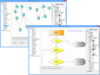
Add flowchart and shape drawing capabilities to your applications. Netrix Shapes is a sophisticated HTML driven drawing .NET WinForms component that can be used to create flow diagrams and workflow designs with advanced design elements. It provides advanced editing features like: inserting elements, accessing the Document Object Model (DOM), formatting text and comprehensive, object based, CSS support. It comes with basic HTML editing controls, like ColorPicker, FontPicker, and StyleEditor, which you can freely use independently of the basic control. With PropertyGrid support and a complete .NET like API this control provides you a .NET like interface and has many advantages over a Interop-DLL. It has a table cell width slider, custom glyphs and many other features.
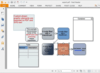
Netrix Shapes Elements - NetRix Shapes component comes with a full User Interface, PropertyGrid support and additional controls (ColorPicker, FontPicker, StyleEditor) in nine languages. The component supports MS Word table editing, Drag & Drop etc. In addition to the pre-defined shapes offered by Netrix Shapes, programmers can also create custom shapes using the shape element. Predefined shapes serve two purposes - they provide a more compact representation of a small number of very frequently encountered drawing operations (particularly rectangles and circles).
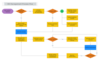
Netrix Shapes Drawing Capability - Shape elements represent shapes: rectangles, ovals, circles, triangles. Each shape is described as a path formed from a series of connected lines and curves. Netrix Shapes uses elements and attributes to describe the outline, fill, position and other properties of each shape. Cascading Style Sheet (CSS) styles are used to position the individual shape elements on the Web page, alongside the usual HTML elements such as P and IMG.
The control has a lot of new features not part of MSHTML:
Complete rewritten .NET like API
Simplified and improved interfaces
Configurable context menu
Advanced table editor, select columns, rows, cells, etc like MS Word does
All element DHTML events are available as .NET events
All elements are represented as native .NET objects for easy manipulation
Full programmatic access to document and all elements, as well as their properties.
Only 700 KB in size (PropertyGrid support and UI needs additonal 700 KB with ten language packs)
Does not need interop assembly interop.mshtml.dll as part of your program
Replaces file monikers internally to display embedded images as well
Access of document through XmlDocument based interface
Beautifies the code internally, no more terrible MSHTML code (Export as XHTML 1.0 or HTML 4.0)
Full HTML 4.0 support, including editor for OPTGROUP
Completely written in C#
Toolbox (VS.NET Designer) support
Sophisticated Insert Entity Control, just for free as part of the demo application (with colored browser version support advice bar)
Main Features - Netrix WYSIWYG Shapes control with these important features:
VML Designer Support
Complete table support (resizing, column width, join/split cells, multiple cell selection, ...)
Drag and Drop support
Drag and Drop from outside the control
Grid and Snap to grid
Ruler for easy assign of elements
Glyphs , shows tag pictures inside the editor view
Displays Grid in background
Displays frames, let the user edit within a framed view
Relative paths to images, no terrible monikers used
Complete UI with propertygrid support out-of-the-box
Edit any element directly
HTML colors enabled color editor
Font editor with font preview
Style editor
Unit editor
Document property editor
Head element editing: META, LINK,
Localizable, 9 languages supported out-of-the-box
Multiselection
Absolute positioning, global and per element, like VS.NETs GridLayout
Auto detect URL and E-Mail addresses, inserts anchors automatically
Show zero borders around invisible tables and images
TAB key support: Increase /Decrease indent level in lists (OL/UL+LI) with TAB/Shft-TAB and jump from cell to cell inside tables (if enabled programmatically)
Wrap support: Select text and wrap any element around it Switch stylesheet on and off without changing HTML code
Switch from designmode to preview without reloading
Edit META, LINK, Title, and Script blocks with integrated editors
Supports OPTGROUP with special editor
Get element related lists: all parents, all children, current
Handle events flexible: Mouse over element, Key, Mouse click, Selection
Unlimited UNDO/REDO, packed for complex operations
Full HTML 4.0 support - even for the "exotics"
Full Printer Template Support
Table editing features supported
Merge cells
Split single cell
Resize columns/rows with mouse
Select multiple cells (even irregular shape) and assign properties
Works well with nested tables (unlimited nesting levels)
Advanced features customizable (on/off, highlight colors)
PartNumbers: PC-518463-164166 518463-164166 PC-518463-164167 518463-164167 PC-518463-164168 518463-164168 PC-518463-164169 518463-164169 PC-518463-164170 518463-164170 PC-518463-164171 518463-164171 PC-518463-164172 518463-164172
PurchaseOptions: Netrix Shapes V1.6 1 Developer License , Netrix Shapes V1.6 2 Developer License - price per license , Netrix Shapes V1.6 3 Developer License - price per license , Netrix Shapes V1.6 4 Developer License - price per license , Netrix Shapes V1.6 1 Enterprise Source code License (includes unlimited Developer License and full Source code) , Netrix Shapes Subscription 1 Developer 1 Year Subscription License , Netrix Shapes Subscription 1 Enterprise Source code 1 Year Subscription License (includes unlimited Developer License and full Source code)
Resources: Read the Netrix Shapes help file, Read the NetRix License Agreement, Download the Netrix Shapes V1.6 evaluation on to your computer - Expires After 30 Days
Operating System for Deployment: Windows Vista, Windows XP
Architecture of Product: 32Bit, 64Bit
Product Type: Component
Component Type: .NET WinForms, .NET Class, 100% Managed Code
Compatible Containers: Microsoft Visual Studio 2008, Microsoft Visual Studio 2005, Microsoft Visual Basic 2008, Microsoft Visual Basic 2005, Microsoft Visual C++ 2008, Microsoft Visual C++ 2005, Microsoft Visual C# 2008, Microsoft Visual C# 2005, .NET Framework 3.5, .NET Framework 3.0, .NET Framework 2.0
Keywords: Drawing Draw draws Flow Diagramming diagram diagrams flowchart Professional Partner shape
Publisher
Primary Category
Related Products
Related Categories