by Nevron - Product Type: Component / .NET WinForms / .NET Class / 100% Managed Code
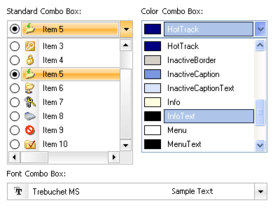
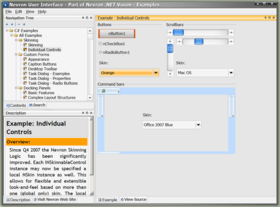
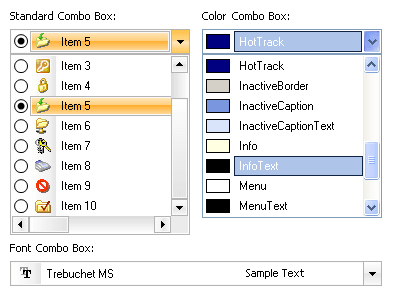
Create distinguished, stylish and modern end-user interfaces. Nevron User Interface Suite for .NET fully supports Visual Studio 2005 and .NET Framework 2.0. It includes a rich and powerful docking library (Enterprise Edition only), professional and extensible command bars and a set of extended Windows Forms controls designed to bring the latest GUI standards and technologies to your Windows Forms applications. The suite introduces lots of new custom controls which make it easy to create a modern end-user presentation layer. The Professional Edition includes: command bars, buttons, color tools, comboboxes, listboxes and more. Includes both Visual Studio 2003 and Visual Studio 2005 compatible components.

Our regular prices are shown below. Please logon to see your discounted prices.
| Add to Cart | ₩ 562,200 | 1 Developer License Mfr. Part No: N.UI.NET.82.PRO |
Download (312.4 MB) | |
| Add to Cart | ₩ 449,800 | 1 Developer License, per Developer from 5 up to 9 Developers (Minimum quantity 5) | Download (312.4 MB) |
| Add to Cart | ₩ 914,200 | Priority Support Service Mfr. Part No: N1S |
Verify | Download (29 KB) |
| Add to Cart | ₩ 1,828,400 | Premium Support Service Mfr. Part No: N2S |
Verify | Download (29 KB) |
Our prices include ComponentSource technical support and, for most downloadable products, an online backup and a FREE upgrade to the new version if it is released within 30 days of your purchase. All sales are made on our standard Terms and Conditions and subject to our Return Policy. Please contact us if you require any licensing option not listed above including volume licensing and previous versions.
Our regular prices are shown above. Please logon to see your discounted prices.
What’s new Nevron User Interface for .NET Q2 2008? - Following is a list of bug fixes introduced in this release:
What's New Q4 2007:
Nevron User Interface Q4 2007 - Explore rich, extremely flexible and fast docking library, professional and extensible command bars and unique features like skinning support, rich-text labels, superior performance plus much more. The suite contains lots of modern complex controls such as MS Outlook Navigation Pane, Windows XP ExplorerBar as well as complete set of extended Windows Forms controls designed to bring to your .NET applications the latest GUI standards and technologies. Version Q4 2007 includes both VB.NET and C# examples. Following is a list of the new features introduced in this release:
In this release Nevron User Interface for .NET includes a powerful new control named NTreeList. The control is based on the NTreeViewEx and extends it by adding list-view functionality. This combination allows for complex data-related tasks like grouping, sorting, binding, etc. The control appearance and functionality is highly customizable. Following are the some of the major features of the control:
Nevron User Interface for .NET - New Features in Q3 2007
DataGridView (VS 2005 only)
The NDataGridView is an extended System.Windows.Forms.DataGridView control which modifies the appearance to match the Nevron one, adds custom scrollbars, column and row headers and features like additional predefined column which displays child relations in a drop-down manner.
TreeViewEx (VS 2005 only)
The NTreeViewEx is a completely custom control written from scratch in 100% C# code. Its main purpose is to eliminate most of the drawbacks of the standard tree-view which ships with Windows Forms while providing superior performance and memory optimization. The control is capable of displaying 100 000+ nodes with ease and at the same time resizing remains instant. Following is a brief description of the control's main features:
What's new in Nevron User Interface for .NET Q2 2007:
What's new in Nevron User Interface for .NET Q1 2007:
What's New in Q4 2006:
What's New in Q3 2006?
User Interface for .NET
Main features
Docking Panels
Nevron User Interface introduces a powerful docking library which provides your applications with the latest WYSIWYG docking standards and technologies. These are interface structured hierarchies of predefined controls that can be docked, floated or redocked using visual feedback at run-time. The unique tree-based layout system allows for practically any complex structure to be achieved in a few lines of code. The dock manager uses advanced logic for getting a valid dock area and overcomes limitations of the standard docking behavior experienced in other products. Nevron Docking Panels are extremely flexible and feature-rich. The framework support nested containers as well as multiple dock managers per form. By default all UI elements are rendered by a common renderer, all layout operations are performed by a common layout engine, drag events are handled by a common drag handler, etc. All of these objects can be replaced with your own custom ones either at the manager's level or per docking panel instance.
Key Features:
Docking Panels - Document View
Nevron Docking Panels now provide a complete document support including 3 different types of document view style, document layout persistency, standard mdi menu merge and much more. Nevron Docking Panels is the only library on the market which provide you with the complete set of document views: TabbedMdi - bring to you applications the latest Visual Studio tabbed mdi interfaces. Unlimited nesting of tabbed groups. Complete control over the document tabstrips via the DocumentStyle, exposed by the DockManager. StandardMdi - Although well designed and much professional looking sometimes the tabbed documents are not the solution you will need. Nevron Docking Panels provides you with multiple document interfaces style found in the standard Windows Form control. Using a well designed object model a document might be easily hosted on either a tabbed mdi view or on a standard one. SingleDocument - sometimes an application may need only one document to be opened at a time. In this case you should use the SingleDocument view style. The document model comes with a built-in manager, member of the dock manager, which controls all the document registered with the framework. The DocumentManager exposes lots of events, some of them cancelable which allows you to provide custom application-oriented logic. The example adds three documents to the view and hosts a property grid in a dockable panel. Play with the properties of the DocumentStyle, selected in the property grid.
Docking Panels - Mdi Menu Merge
Nevron Docking Panels now provide a complete document support. For the StandardMdi view when a document is maximized there should be commands (hosted on a menu bar) which allow for restoring of the window. This feature is implemented via an interface - INMdiMenuTarget which allows you to provide your own custom mdi menu merge implementation.
Docking Panels - Border Support
Nevron Docking Panels provide generic border support. Based on the core INControlBorderProvider interface you may completely customize the border of a panel using either the visual editor or programmatically.
Docking Panels - Layout Persistency
Nevron Docking Panels now provide complete layout persistency including panels, documents and styles. You may choose among 5 different persistency formats - Binary, XML, SOAP, CustomBinary and CustomXML. The last two formats are entirely custom and allow for painless migration from one version to another. The persistency features are exposed by a NDockingFrameworkState object which when attached to a valid NDockManager instance may completely serialize/deserialize its state.
Docking Panels - Design-time Support
Complete design-time support is a main beneficial feature of any component developed under .NET platform. Nevron docking panels now provide rich and intuitive design-time support with the same behavior experienced as if the form is running at run time. Just drop a NDockManager component on a form and using its verbs add panels on the sides of the form. Nevron NDockManager takes full advantage of the System.CodeDom namespace and provide completely custom code generation of zones and panels. The example is created by the Windows Forms Designer and demonstrates the Code Dom serialization provided by the dock manager.
Docking Panels - Command Model
Nevron Docking Panels now provide an extensible command model which seamlessly integrate with the framework and allows you to define global tasks and methods and specify keyboard shortcuts form them. The NDockManager exposes a new NDockingFrameworkCommander object which serves as a command manager. It has some predefined commands like NextDocument, NextPanel, CloseDocument, etc. and allows you to register your own custom commands. Each command might be assigned multiple shortcut combinations (like the NextDocument command which is assigned both Ctrl+Tab and Ctrl+F6 shortcuts). You may either inherit from the NDockingFrameworkCommand class and override the ExecuteCore method or create a default command and hook to its Executed event.
Docking Panels - Auto Hide Support
Nevron Docking Panels now provide the so called "Auto Hide" feature - a panel may be pinned to any of the root container's edges. When a panel is autohiding it will be associated with a tab in a tabstrip and will only be displayed when the user hovers or selects that tab.
Docking Panels - True WYSIWYG Docking Hints
Our docking framework now provides a unique feature - when generating hints the exact bounds that the panel will occupy after drop are calculated. In this way the user will have a complete idea what he is about to do.
Docking Panels - Translucent Fill Hints
Now you may specify your favourite hint to be displayed while you are dragging a panel - reversible frame or translucent fill. Select a favourite fill color and alpha value to be used when generating a translucent fill.
Docking Panels - Docking Stickers, Stickers Templates
Introduced for the firts time in Visual Studio 2005, the so called docking stickers are very intuitive and enable the user to visually select the area where a panel should be docked. Nevron Docking Panels extend this feature greately and not only provide you with it but give you complete control over stickers' appearance via the DockingStickerTemplate object. The framework ships with a total of 16 predefined templates including the famous "Squares" and "Diamonds" as well lots of fresh new designs which will give you a distinguished and professional looking docking panels.
Services
The most important features of our docking framework are controlled by separate objects (services). These are the NDockingHintService and NHitTestService. These objects might be replaced with your own custom ones via the manager's RegisterService method.
Appearance Styles
All aspects of visual representation are grouped in objects (styles) which allow for easier customization. All the styles are stored in a INStyleComposite instance, member of the NDockManager. You may even replace the default styles with your own custom ones.
Following are the styles provided by the NDockManager:
Lock/Unlock of the panels
The NDockManager now may lock all the visual functionality of the panels (dragging, caption buttons) - simply call its LockPanels method.
Command Bars
Nevron Command Bars provides you with distinguished menus and toolbars created entirely from scratch. The framework shares a consistent, feature-rich yet easy to use API across all command bars which allows for any complex logic to be easily implemented. Based on the core Nevron UI render logic all command bars are professional looking and fully customizable in each aspect of visual representation. The rich design-time support enables you to easily create modern MS Office 2003-like menus and toolbars with dock/undock/redock capabilities.
Key Features:
Publisher
Primary Category
Related Products
Related Categories