by Newtone - Product Type: Component / ASP.NET WebForms / .NET WinForms
ImageKit.NET by Newtone
100% native .NET image processing component. ImageKit.NET lets you add image-processing functionality to your .NET applicationsquickly and easily. Retrieve images from TWAIN scannersand digital cameras; load and save image files in a variety of formats; apply image filters and transformations to your images; display images in the display, pan window, or thumbnail controls. ImageKit.NET contains components for both Windows Forms and Web Forms applications.

Add image processing capabilities to your .NET applications quickly and easily with the ImageKit.NET. The ImageKit.NET contains both native .NET components and .NET class libraries and allows you to load and save images of a variety of image formats; retrieve images from TWAIN scanners and digital cameras; apply various imaging effects and transformations; and display those images in various controls including the ImageKit and Thumbnail controls for both WinForm and WebForm as well as ASP.NET(AJAX) applications.
ImageKit.NET features:
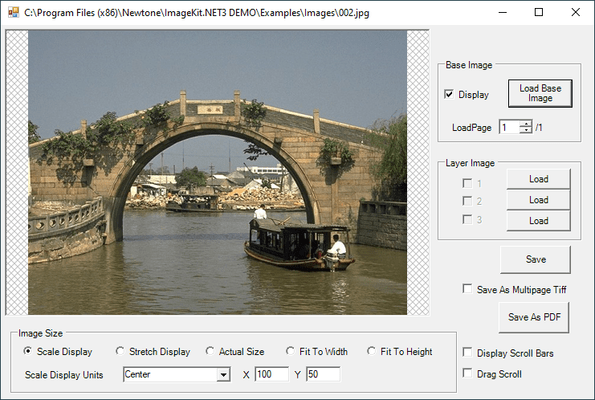
Displaying Images
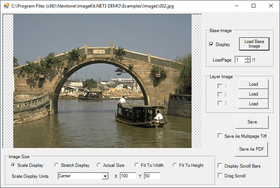
Display images in scale, stretch, actual size, fit-to-height, and fit-to-width display mode. Automatically display black and white images in high quality
Display up to 100 different images simultaneously within the ImageKit Control using the ImageKit.NET's Layer interface
Set different display positions transparent colors for each image layer. Display both raster and vector images at the simultaneously
Pan Window Display
The PanWindow control displayslarge images in their entirety while a detailed area on the same image is displayed in the ImageKit control
Use the PanWindow viewfinder, scroll the image within the ImageKit Control
Regional Processing
Select regions on the image for processing
Regional selection can be rectangular, polygonal, elliptical or can be determine by a mask image. Setting coordinates for regional selection can be as easy as clicking or dragging your mouse on the image
File Formats and Compression
The ImageKit.Net supports a variety of raster and vector file formats and compressions.
Native .Net support includes:
BMP - 1, 4, 8, 16, 24, 32 bit
BMP - RLE4, RLE8 4, 8 bit (Loading only. Images are saved as uncompressed bmp)
JPEG - 8 bit grayscale, 24 bit color / Standard DCT, Progressive DCT (Loading only. Images are saved as Standard DCT) / Exif (JPEG compression, main and thumbnail image, loading only);
GIF - Transparency / Interlace / 1, 4, 8 bit / Animation (Loading only. Possible to save gif-animation in single files only)
TIFF - 1, 4, 8, 16, 24, 32 bit / Supported compression: Uncompressed, CCITTRLE (Loading only), FAX3-1D, FAX3-2D (Loading only), FAX4, PACKBITS, LZW (Color mode: palette, rgb, cmyk) / (Multipage: loading and saving)
PNG - 1, 4, 8, 24 bit / transparency
WMF - (Loading only. Saved as raster image)
EMF - (Loading only. Saved as raster image)
Extendable Functionality
It is possible to extend the power of the ImageKit.NET to support JPEG2000, SVG, DXF, and other formats and compressions not natively supported in .NET framework.
Extended support includes:
BMP - 1, 4, 8, 16, 24, 32 bit
BMP - RLE4, RLE8 4, 8 bit
JPEG - 8 bit grayscale, 24 bit color / Standard DCT, Progressive DCT / Exif (JPEG compression, main and thumbnail image, load only)
JPEG2000 - Part1 / CodeStream
GIF - Transparency / Interlace / 1, 4, 8 bit / Loads and Saves animation
TIFF - 1, 4, 8, 16, 24, 32 bit / Supported compression: Uncompressed, CCITTRLE, FAX3 (1D, 2D), FAX4, JPEG*, PACKBITS, LZW (Color mode: palette, rgb, cmyk) (Multipage: load and save)
PNG - 1, 4, 8, 24 bit / transparency / interlace
FPX - 8-bit grayscale, 24 bit / Supported compression: Uncompressed, JPEG compression, Single Color compression
PCX - 1, 4, 8, 24 bit
WMF**
EMF**
DXF (2D)**
(*) Not all Tiff-Jpeg format files are supported, particularly older versions of this format
(**) Vector data may be altered or lost when it is loaded or saved
Image Effects and Transformations
Create or copy images
Combine images, paste images together or layer images on top of each other
Create a panorama view from two raster images by simply setting attachment locations
Copy and paste images to and from the clipboard
Apply numerous effect filters including blur, mosaic, outline, emboss, oilpaint, canvas, glasstile, lens, ripple, whirlpinch, waves, motionblur
Convert image bit count
Adjust sharpness, noise reduction, rgb levels, contrast, brightness
Resize, rotate, flip, mirror
Create custom filter
TWAIN Support
The ImageKit.NET allows you to add scanning functions to your applications quickly and easily. Retrieve images from TWAIN scan devices such as scanners, digital cameras, film scanners. Use the scan driver's user interface or build your own custom user interface making scanning a nearly seamless operation.
Set scan conditions, pixel type, resolution, bit count, brightness, contrast, highlight, threshold, shadow, scan units, scan position and more.
Retrieve the range of values supported by a particular scan driver.
Support for memory transfer with compression (JPEG, PNG)
Support for file transfer - Set and retrieve the compression method for file and memory transfer
Support for dropout color - This sets the dropout color when using a custom-built scan interface
Support for noise filter - Reduces noise in black and white (1-bit color) images
Support for image filter - Improves image quality. LOWPASS improves halftone images, BANDPASS improves images that include text, and HIGHPASS improves images that have lines
Auto paper size detection - When paper size is set to "undefined" (1000), this function automatically detects the size of the paper and scans
Support for deskew - Corrects skewed documents
Support for moire filter (Epson Scanners)
Support for unsharpness filter (Epson Scanners)
Support for dynamic threshold (Panasonic Scanners
Support for deskew smoothing (Panasonic Scanners)
ADF duplex scanning support
Retrieve thumbnail images from digital cameras
Supports monochrome halftone settings
Supports scaling
Set paper size when scanning
Retrieve the range of setting values for a give scan property
Database Imaging
Retrieve images from and save images to database using BLOB format
Thumbnail Control
By selecting the folder and file type, you can automatically display multiple image files as thumbnails. Displays thumbnails in an easy to use, fast, customizable control
Web Form Controls
Contains Web versions of the ImageKit, PanWindow and Thumbnail controls that can be used in web applications
AJAX
The Web ImageKit, PanWindow, and Thumbnail controls can all be used within an AJAX Update panel
Magnifier
Includes a magnifying glass function. Set magnification level, border, and size. Shape can be rectangular, elliptical, or rounded rectangle
Loading and Saving Images
The ImageKit control provides you with numerous functions for loading and saving image files. Load functions for each file type are provided but there is also a load function that automatically detects each file type.
Load files of one type and save them as a different type.
Load BLOB image data from and save BLOB image data to database
Load from and save to stream
Load images from and save images to separate color planes
Load images from and save images to memory data
Other
Supports “Click Once” and “No Touch” deployment
Contains numerous sample programs
PartNumbers: PC-518381-157652 518381-157652 PC-518381-157653 518381-157653 PC-518381-157654 518381-157654
PurchaseOptions: ImageKit.NET V1.0 1 Developer License , ImageKit.NET V1.0 4 Developer Team License , ImageKit.NET V1.0 1 Site Wide License (Allows Unlimited Developers at a Single Physical Address)
Resources: Read the ImageKit.NET Class Library help file, Read the ImageKit.NET Reference help file, Download the ImageKit.NET V1.0 for VS2003 Evaluation on to your computer - Expires after 90 days, Download the ImageKit.NET V1.0 for VS2005 Evaluation on to your computer - Expires after 90 days, Download the ImageKit.NET V1.0 for VS2008 Evaluation on to your computer - Expires after 90 days
Operating System for Deployment: Windows Vista, Windows XP, Windows Server 2003, Windows 2000
Architecture of Product: 32Bit
Product Type: Component
Component Type: ASP.NET WebForms, .NET WinForms
Compatible Containers: Microsoft Visual Studio 2008, Microsoft Visual Studio 2005, Microsoft Visual Studio .NET 2003, Microsoft Visual Studio .NET, Microsoft Visual Basic 2008, Microsoft Visual Basic 2005, Microsoft Visual Basic .NET 2003, Microsoft Visual Basic .NET, Microsoft Visual C++ 2008, Microsoft Visual C++ 2005, Microsoft Visual C++ .NET 2003, Microsoft Visual C++ .NET, Microsoft Visual C# 2008, Microsoft Visual C# 2005, Microsoft Visual C# .NET 2003, Microsoft Visual C# .NET, Microsoft Internet Explorer 7.0, Microsoft Internet Explorer 6.0, Microsoft Internet Explorer 5.5, Microsoft Internet Explorer 5.0, .NET Framework 3.5, .NET Framework 3.0, .NET Framework 2.0, .NET Framework 1.1
Keywords: image images processing imaging Newtone Corporation Imaging image images Professional Partner Scan scanning scanned scanner scans Image images Compression compress compresses Conversion convert converting converts conversions Drawing Draw draws image images processing imaging ImagingToolkit ImagingSDK image images Raster Vector Picture Format Scan
Publisher
Primary Category
Related Products
Related Categories