ResizeKit

by Newtone - 상품타입: Component / ActiveX OCX / VCL

주의 : 별도의 안내가 없는 경우에는 영어제품 입니다.
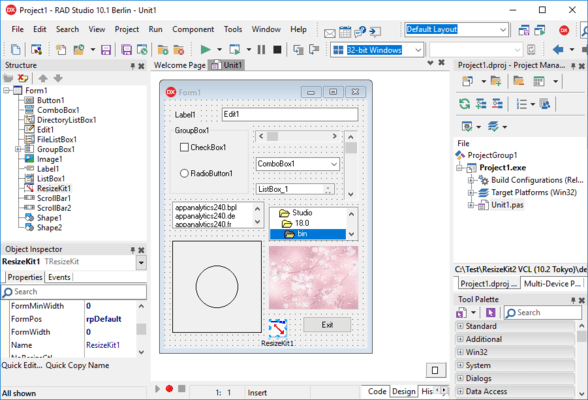
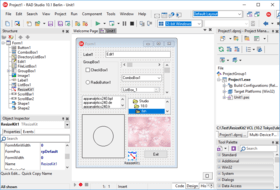
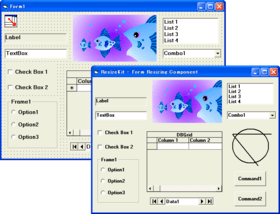
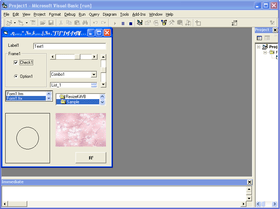
ResizeKit - ActiveX/VCL - V1.5 의 스크린샷Make your applications size and resolution independent. ResizeKit is an ActiveX/VCL component that automatically changes the size of all controls and fonts so they will be displayed on any sized form. Full control is provided to customize the resizing process. Even if the user switches the size of the display while running an application, the ResizeKit will perceive the new size and automatically adjust the size of the components and fonts.

80,900₩
통화 선택

일반 적인 소비자 가격은 하기에 표시되어 있습니다. 고객님의 할인가격은 표시 하시려면 로그인 해주시기 바랍니다.

ResizeKit V1.5- VB Edition

주문 ₩ 80,900 1 Developer License 다운로드 (502 KB)

ResizeKit V1.5 - C++Builder Edition

주문 ₩ 80,900 1 Developer License (C++ Builder 6) 다운로드 (240 KB)
주문 ₩ 80,900 1 Developer License (C++ Builder 5) 다운로드 (229 KB)

ResizeKit V1.5 - Delphi Edition

주문 ₩ 80,900 1 Developer License (Delphi 2005) 다운로드 (204 KB)
주문 ₩ 80,900 1 Developer License (Delphi 7) 다운로드 (200 KB)
주문 ₩ 80,900 1 Developer License (Delphi 6) 다운로드 (199 KB)
주문 ₩ 80,900 1 Developer License (Delphi 5) 다운로드 (197 KB)
주문 ₩ 80,900 1 Developer License (Delphi 4) 다운로드 (197 KB)

ResizeKit V1.5 - Borland Developer Studio 2006 Edition

주문 ₩ 80,900 1 Developer License 다운로드 (293 KB)

ResizeKit V1.5 - Borland Developer Studio 2007 Edition

주문 ₩ 80,900 1 Developer License 다운로드 (203 KB)

본 제품은 GSA Schedule 가격으로 제공해 드릴수 있습니다.가격에는 ComponentSource의 기술지원 요금이 포함되어 있습니다. 또한 다운로드 판매를 하고 있는 상품의 대부분은 온라인 백업요금이 포함되어 있어서 구입날로부터 30일 이내에 새로운 버전이 발매된 경우 무료로 업그레이드해 드리고 있습니다.  모든 주문에 대해서 당사표준 계약조건 반품조건 의 내용이 적용됩니다. 다음의 경우,고객 서비스로연락하시기 바랍니다. (상기의 리스트에 게재되지 않은 대량의 라이센스나 구 버전 등의 라이센스 옵션이 필요한 경우)

일반 적인 소비자 가격은 상기에 표시되어 있습니다. 고객님의 할인가격은 표시 하시려면 로그인 해주시기 바랍니다.

What's New?
ResizeKit BDS 2006 (Borland Developer Studio 2006 Edition) added.


Overview

Simply place the Resize Component on the form and make applications for all screen resolutions. You can attach the ResizeKit ActiveX Component or VCL Component directly on your form and make applications of any size. The ResizeKit automatically changes the size of all controls and fonts so they will be displayed on any sized form. Without writing one line of code, you have the ability to change the size of your displayed form and to make applications that don't depend on the size changes of the user or changes in screen resolution. Even if the user switches the size of the display while running an application, the ResizeKit will perceive the new size and automatically adjust the size of the components and fonts.

To use the ResizeKit, simply attach the Resize Component to the form during design. The ResizeKit contains properties, methods and events to allow you to customize the resizing process. It can even resize most third party controls. The ResizeKit can be used from the first day on new programs and of course on established programs without changing the design or code. The ResizeKit for Visual Basic, is an ATL ActiveX component that is fast and lightweight. The ResizeKit for Delphi and C++Builder offers both types of VCL components in the same package.

Features of the ResizeKit

  • Automatically resizes all controls and fonts on the form
  • Simply place the Resize Component on the form - No need to redesign or add additional code
  • Create applications that are size and screen resolution independent
  • Maximum and minimum form height and width can be specified
  • Initial location of the form can be specified
  • Controls and fonts can also be excluded from resizing
  • Runtime royalty-free license - Distribute unlimited applications
  • Contains both ActiveX and VCL components in the same package
  • The ResizeKit ActiveX component is based on ATL so it is fast and lightweight
  • The ResizeKit VCL component has unified .EXE so applications can be distributed in one simple unit
  • The ResizeKit for Delphi and C++Builder offers both types of VCL components in the same package
  • Resizes most third party controls without the need for additional code *
  • Contains properties, methods, and events to allow you to customize the resize process
  • Useful sample programs are included

*Third party controls that do not specify Left, Top, Height, or Width parameters can also be easily resized by specifying these characteristics of the application in the ExitResize Event. Although the ResizeKit does not automatically resize the fonts and cell sizes in Grid and Spread applications they can also be resized by programming code in this event. A simple sample of this code is included.


상품검색

검색어를 입력해주세요:

Quick 링크

개발처/발매처

주요 카테고리

관련 상품

Award