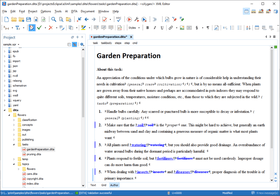
Screenshot Preview

oXygen XML Author Enterprise

by SyncRO Soft - 상품타입: Add-In / 어프리케이션

주의 : 별도의 안내가 없는 경우에는 영어제품 입니다.

*

Easy to use interface specially suited for XML content authors. <oXygen/> XML Author is derived from the oXygen XML Editor IDE, its main features focusing on CSS visual XML editing and XML source editing. Other oXygen XML Author features include: remote editing over FTP, HTTP/WebDAV and HTTPS/WebDAV, database support, subversion (SVN) client, files and directories comparison tools, XML Digital Signature and XML Canonicalizatio, XPath support, Microsoft Office - Office Open XML (OOXML) and Open Document Format (ODF) support.

$444.51
통화 선택

일반 적인 소비자 가격은 하기에 표시되어 있습니다. 고객님의 할인가격은 표시 하시려면 로그인 해주시기 바랍니다.

oXygen XML Author V13.2 Enterprise Named Users   *

주문 $ 444.51 1 Named User License  * 다운로드 (491.5 MB)
주문 $ 422.73 5-9 Named User License - price per license  * 다운로드 (491.5 MB)
주문 $ 399.96 10-19 Named User License - price per license  * 다운로드 (491.5 MB)
주문 $ 378.18 20-49 Named User License - price per license  * 다운로드 (491.5 MB)

oXygen XML Author V13.2 Enterprise Floating Users   *

주문 $ 1,334.52 1 Floating User License  * 다운로드 (491.5 MB)
주문 $ 1,268.19 5-9 Floating User License - price per license  * 다운로드 (491.5 MB)
주문 $ 1,200.87 10-19 Floating User License - price per license  * 다운로드 (491.5 MB)
주문 $ 1,134.54 20-49 Floating User License - price per license  * 다운로드 (491.5 MB)

oXygen XML Author V13.2 Enterprise & 1 year Support & Maintenance Pack (SMP) Named Users   *

주문 $ 537.57 1 Named User License & 1 year Support & Maintenance Pack (SMP)  * 다운로드 (491.5 MB)
주문 $ 510.84 5-9 Named User License & 1 year Support & Maintenance Pack (SMP) - price per license  * 다운로드 (491.5 MB)
주문 $ 484.11 10-19 Named User License & 1 year Support & Maintenance Pack (SMP) - price per license  * 다운로드 (491.5 MB)
주문 $ 457.38 20-49 Named User License & 1 year Support & Maintenance Pack (SMP) - price per license  * 다운로드 (491.5 MB)

oXygen XML Author V13.2 Enterprise & 1 year Support & Maintenance Pack (SMP) Floating Users   *

주문 $ 1,613.70 1 Floating User License & 1 year Support & Maintenance Pack (SMP)  * 다운로드 (491.5 MB)
주문 $ 1,533.51 5-9 Floating User License & 1 year Support & Maintenance Pack (SMP) - price per license  * 다운로드 (491.5 MB)
주문 $ 1,452.33 10-19 Floating User License & 1 year Support & Maintenance Pack (SMP) - price per license  * 다운로드 (491.5 MB)
주문 $ 1,372.14 20-49 Floating User License & 1 year Support & Maintenance Pack (SMP) - price per license  * 다운로드 (491.5 MB)

oXygen XML Author V13.2 Enterprise Upgrades Named Users   *

주문 $ 187.11 1 Named User License Upgrade from any previous version  * 확인 다운로드 (491.5 MB)
주문 $ 178.20 5-9 Named User License Upgrade from any previous version - price per license  * 확인 다운로드 (491.5 MB)
주문 $ 168.30 10-19 Named User License Upgrade from any previous version - price per license  * 확인 다운로드 (491.5 MB)
주문 $ 159.39 20-49 Named User License Upgrade from any previous version - price per license  * 확인 다운로드 (491.5 MB)

oXygen XML Author V13.2 Enterprise Upgrades Floating Users   *

주문 $ 560.34 1 Floating User License Upgrade from any previous version  * 확인 다운로드 (491.5 MB)
주문 $ 532.62 5-9 Floating User License Upgrade from any previous version - price per license  * 확인 다운로드 (491.5 MB)
주문 $ 503.91 10-19 Floating User License Upgrade from any previous version - price per license  * 확인 다운로드 (491.5 MB)
주문 $ 476.19 20-49 Floating User License Upgrade from any previous version - price per license  * 확인 다운로드 (491.5 MB)

oXygen XML Author V13.2 Enterprise & 1 year Support & Maintenance Pack (SMP) Upgrades Named Users   *

주문 $ 279.18 1 Named User License & 1 year Support & Maintenance Pack (SMP) Upgrade from any previous version  * 확인 다운로드 (491.5 MB)
주문 $ 265.32 5-9 Named User License & 1 year Support & Maintenance Pack (SMP) Upgrade from any previous version - price per license  * 확인 다운로드 (491.5 MB)
주문 $ 251.46 10-19 Named User License & 1 year Support & Maintenance Pack (SMP) Upgrade from any previous version - price per license  * 확인 다운로드 (491.5 MB)
주문 $ 237.60 20-49 Named User License & 1 year Support & Maintenance Pack (SMP) Upgrade from any previous version - price per license  * 확인 다운로드 (491.5 MB)

oXygen XML Author V13.2 Enterprise & 1 year Support & Maintenance Pack (SMP) Upgrades Floating Users   *

주문 $ 839.52 1 Floating User License & 1 year Support & Maintenance Pack (SMP) Upgrade from any previous version  * 확인 다운로드 (491.5 MB)
주문 $ 797.94 5-9 Floating User License & 1 year Support & Maintenance Pack (SMP) Upgrade from any previous version - price per license  * 확인 다운로드 (491.5 MB)
주문 $ 755.37 10-19 Floating User License & 1 year Support & Maintenance Pack (SMP) Upgrade from any previous version - price per license  * 확인 다운로드 (491.5 MB)
주문 $ 713.79 20-49 Floating User License & 1 year Support & Maintenance Pack (SMP) Upgrade from any previous version - price per license  * 확인 다운로드 (491.5 MB)

oXygen XML Author V13.2 Enterprise Support & Maintenance Pack (SMP) Renewal Named Users   *

주문 $ 55.44 1 Named User License Support & Maintenance Pack (SMP) Renewal  * 확인 다운로드 (491.5 MB)
주문 $ 52.47 5-9 Named User License Support & Maintenance Pack (SMP) Renewal - price per license  * 확인 다운로드 (491.5 MB)
주문 $ 49.50 10-19 Named User License Support & Maintenance Pack (SMP) Renewal - price per license  * 확인 다운로드 (491.5 MB)
주문 $ 47.52 20-49 Named User License Support & Maintenance Pack (SMP) Renewal - price per license  * 확인 다운로드 (491.5 MB)

oXygen XML Author V13.2 Enterprise Support & Maintenance Pack (SMP) Renewal Floating Users   *

주문 $ 167.31 1 Floating User License Support & Maintenance Pack (SMP) Renewal  * 확인 다운로드 (491.5 MB)
주문 $ 159.39 5-9 Floating User License Support & Maintenance Pack (SMP) Renewal - price per license  * 확인 다운로드 (491.5 MB)
주문 $ 150.48 10-19 Floating User License Support & Maintenance Pack (SMP) Renewal - price per license  * 확인 다운로드 (491.5 MB)
주문 $ 142.56 20-49 Floating User License Support & Maintenance Pack (SMP) Renewal - price per license  * 확인 다운로드 (491.5 MB)

가격에는 ComponentSource의 기술지원 요금이 포함되어 있습니다. 또한 다운로드 판매를 하고 있는 상품의 대부분은 온라인 백업요금이 포함되어 있어서 구입날로부터 30일 이내에 새로운 버전이 발매된 경우 무료로 업그레이드해 드리고 있습니다.  모든 주문에 대해서 당사표준 계약조건 반품조건 의 내용이 적용됩니다. 다음의 경우,고객 서비스로연락하시기 바랍니다. (상기의 리스트에 게재되지 않은 대량의 라이센스나 구 버전 등의 라이센스 옵션이 필요한 경우)

일반 적인 소비자 가격은 상기에 표시되어 있습니다. 고객님의 할인가격은 표시 하시려면 로그인 해주시기 바랍니다.

 *

What's new in <oXygen/> XML Author 13.2?

  • DITA map metrics added - DITA Maps Metrics Report enriched with the following additional information, conditional processing attributes, number of elements, attributes, words and characters used in the DITA Map structure, information types like number of containing maps, bookmaps, or topics.
  • Improved the usage of profiling/conditional text - The usage of Edit Profiling Attributes action is no longer restricted to profiling only entire elements. Now it also works on selections, that can contain  multiple elements.
  • Prefixed oxygen CSS properties extensions - Oxygen-specific CSS properties are now prefixed with the -oxy- marker. The old, unprefixed form is now deprecated.
  • Browse reference manual action - A new contextual action is available for DITA, DocBook, TEI and XHTML documents which opens the documentation of the selected XML element in a Web browser.

What's new in <oXygen/> XML Author 13?

  • Referred Content Quick Editing - A new "Edit Reference" action, available from the contextual menu, allows you to edit referred content by opening the target file containing it and positioning the caret at the precise location where the action was invoked in the main file.
  • Configure default background and foreground colors - You can now change the default Author background (white) and foreground (black) colors from the preferences. If colors are specified in the CSS file they overwrite the default values.
  • Author Folding Management Actions - All the actions previously available only in the Text mode for fold management are also available in the Author editing mode when right clicking a fold triangle. Many powerful actions, like collapse/expand child folds, close all other folds or expand/collapse all folds, can be performed from the fold marker contextual menu.
  • CSS Detection from XHTML link Element - If an XHTML document specifies a CSS using the link element then the CSS is detected and used by the Author mode to render the XHTML content.
  • New Paste Recovery Strategy: Unwrap - A new recovery strategy was added when using the schema-aware editing mode. This is particularly useful when pasting content from office applications or the web browser. The content is automatically converted to match the editor schema when editing DITA, DocBook, TEI or HTML. In some cases additional wrapper elements may result after the conversion and these are automatically removed by this strategy if they are found to be invalid at the insertion point.
  • Change Case and Word Statistics Actions - Four new actions allow you to convert the selected content to upper case, lower case or to capitalize sentences and words. There is also a new action that counts the number of words and characters from the current opened file.

What's new in <oXygen/> XML Author 12.2?

  • Change Tracking State Stored in Document - The initial change tracking state can be configured to be always on, always off or stored in the document.
  • Improved Paste Support - The intelligent paste benefits from a new recovery strategy that automatically removes invalid wrapper elements.
  • Insert Row in Tables Keeps the Current Row Structure - The Insert Row action available in the DITA, DocBook, TEI and XHTML built-in frameworks inserts a row with a structure that is as close as possible to that of the row at the current cursor position.
  • Intelligent ID management - For DITA, DocBook, TEI and XHTML documents ID support was enhanced to automatically remove ID attributes if content was copied in the same document, thus avoiding duplicate IDs. If the content is moved then the IDs are preserved.
  • Enhanced DITA Validation - A default validation scenario which uses Schematron rules to check for error cases that are not covered by the DITA DTDs was added to the DITA Document Type.
  • DITA to EPUB - <oXygen/> provides a built-in transformation scenario for converting from a DITA Map to EPUB.
  • DocBook to EPUB - <oXygen/> provides a built-in transformation scenario for converting from DocBook to EPUB.

What's new in <oXygen/> XML Author 12.1?

  • Smart Paste - Automatic Conversion to DITA, DocBook, TEI, etc. - Styled content can be inserted by copying content from Office applications (for example Microsoft Word and Microsoft Excel, OpenOffice.org Writer and OpenOffice.org Calc) and Web browsers (Mozilla Firefox, Microsoft Internet Explorer, etc.) and pasting it in the Author editor. The styles and general layout of the copied content, like sections with headings, tables, list items, bold and italic text, hyperlinks, are converted in the target document equivalent XML elements. <oXygen/> provides default implementations for the following document types: DITA, DocBook, TEI, XHTML but this support can be configured also for user defined document types.
  • Automatic Refresh of Included Content - The content referred by xi:include elements and conref attributes is refreshed automatically when it is modified and saved in another editor panel.
  • Manage Tracked Changes at Word Level - Now you can accept or reject tracked changes either entirely or only fragments of them.
  • Different Visualization Modes of Documents Containing Tracked Changes - New visualization modes allow you to preview documents as if all their tracked changes were accepted or rejected.
  • Content Completion Supports Custom Actions - You can customize the content of the Content Completion window, Elements view and Element Insert menus Author controls, by adding items (which, when invoked, perform custom actions) or by filtering the default contributed ones.
  • Support for Auto Margins - The CSS properties margin-left:auto and margin-right:auto are now supported.
  • New CSS Extension Functions - New CSS extension functions were added to improve string operations (substring, indexof and lastindexof) and to provide XPath evaluation support (xpath).

What's new in <oXygen/> XML Author 12?

  • Profiling/Conditional Text for Any XML Document - <oXygen/> offers generic conditional text support for any XML documentation framework, including (but not limited to) DITA and DocBook. All you need to do is to define the profiling attributes and corresponding profiling values in the <oXygen/> options.
  • Code Templates - The XML code templates (snippets) are available through content completion also in the Author mode. They can be configured in the Editor/Templates/Code Templates options page.
  • Drag and Drop or Paste Files to Create Links - A link to an image or to a file can be quickly inserted when editing in the Author mode by dragging the file into the opened document, or by pasting it. Pasting an image data (copied from another application) in the editor creates an image file on disk, and then creates an XML reference to that file: for DocBook it creates a figure element, for DITA an image element, while for other documents it inserts the file path. The behavior can be controlled/extended using the Author API.
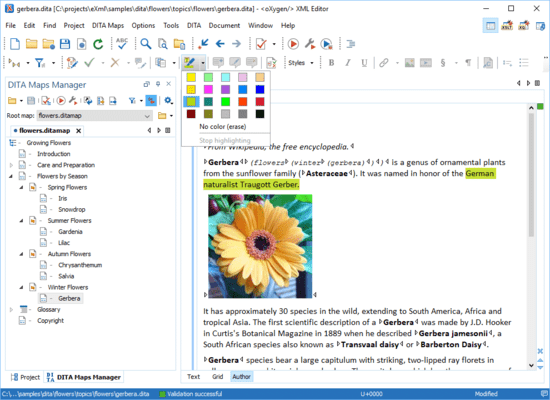
  • Content Annotations/Comments - An annotation can be associated with a section of the Author content without modifying or deleting the content. Annotations can highlight virtually any content from your document, except read-only text. Such comments are marked in Author editor with a configurable background color.
  • Support for the "text-transform" CSS Property - The CSS property called "text-transform" is now supported in the Author mode allowing to render text as lower-case, upper-case or capitalized.

What's new in <oXygen XML/> Author V11.2?

  • Reusable component - A fragment of a topic can be extracted in a separate file for reuse in different topics. The component can be reused by inserting an element with a conref attribute where the content of the component is needed.
  • Add/remove content reference attribute to/from existing elements - The DITA framework includes actions for adding, editing and removing a content reference (conref, conkeyref, conrefend attributes) to/from an existing element.
  • Speed improvements when opening large DITA maps - When a map contains a large number of topic references now the map is opened three times faster in the DITA Maps Manager view.
  • Keep spaces in elements that are not modified - A new option allows formating and saving only the modified elements. This keeps the formating of the other elements for easy comparing of the two versions of the file in a versioning system.
  • Improvement in Outline view - The start of the content of an inline child element is displayed both in that element and in the parent element in the Outline view. The parent element may remain collapsed in the Outline view which makes the document navigation faster.
  • Workspace access plugin - A new type of plugin was added. This plugin provides support for customizing the menus, toolbars and views of the application and for opening and closing documents. It is active in both Text mode and Author mode of all opened documents.

What's new in <oXygen XML/> Author V11.1?

  • Schema-aware Editing Mode - The insertion of XML fragments and attributes is checked against the associated schema. If the XML fragment is not accepted at the caret position, multiple strategies are employed to determine a better insert position. The developers can implement other strategies as needed by customizing the <oXygen/> Author mode.
  • Schema-aware Editing Mode for DITA, Docbook, TEI and XHTML - All the major XML documentation frameworks were enhanced with specific schema-aware editing support. For instance, when editing a Docbook document the text inserted directly in a section is wrapped automatically in either a title or a para element. Typing text between the rows of a table will result in automatic creation of table row and table cell elements around the inserted text. Pasting a list item into a section will also create the parent list element and so on. The same functionality is available for DITA, TEI and XHTML.
  • Schema-aware Whitespace Normalization and Serialization - When a document is loaded into the Author mode, the XML schema information is taken into account to decide whether or not whitespaces are relevant. For instance spaces between sibling elements are relevant if the model of the parent element is mixed, and they are ignorable if the parent element has an element-only content.
  • Compact Rendering in Full Tags Mode - A new, more compact layout is used for the "full-tags" display mode of the Author page. This layout is much more ergonomic placing multiple XML tags on the same line.
  • Quick Up/Down Navigation - By enabling the "Quick up/down" in the visual editing mode, the caret is moved directly between the lines of text without going through intermediate positions between blocks (the intermediate position can still be reached using the left/right arrows or with the mouse). For instance you can move the caret directly from the title text into the paragraph text, without going through the intermediate position between them. This is a very helpful feature when reviewing documents or editing mainly content.
  • Update Author API - There are new methods available in the Author API. For example you can close an editor or you can create an XSLT or XQuery transformer. Schema-aware editing can be customized for a specific document type by registering an AuthorSchemaAwareEditingHandler.

What's new in <oXygen XML/> Author V11?

  • Improved Author editing experience for non technical users - The Author mode has new location tooltips and current element highlights that help the user to identify the position in the edited document. By default it turns on a more constrained editing mode that avoids for instance inserting text in the elements that do not allow text nodes or inserting elements not allowed by the schema.
  • Track Changes annotations - When editing with track changes on, it is possible to annotate each change with comments.
  • Support for embedded SVG images - Embedded SVG images are rendered now in the XML Author mode.
  • Allow more than one toolbar with custom actions - You can define up to four toolbars containing custom actions at document type level.
  • API for text highlights management - Developers can programatically highlight or find highlighted text regions from the XML Author.

What's new in <oXygen XML/> Author V10.3?

  • Automatic generation of ID attributes - ID attributes can be generated automatically for a configurable list of XML element names for a number of frameworks (DITA, DocBook and TEI). The pattern for the unique ID values is also configurable.
  • New EAD framework - A new XML framework was added for editing Encoded Archival Description(EAD) XML documents in Author mode.

What's new in <oXygen XML/> Author V10.2?

  • Compact representation for the tags-on view - <oXygen/> offers 6 different modes for presenting the element tags, ranging from no tags to full tags with attributes. In version 10.2 the tags are displayed in a compact way allowing the user to see more of his document in the same editing area.
  • Improved support for included content - The representation of included content (external entities, XInclude, etc.) was updated to label the included content with only a small icon that allows to open the referred document. The content of the included document is rendered in the including document and can appear both in block and in inline contexts.
  • Support for CSS "width" properties - <oXygen/> XML version 10.2 provides support for the CSS "width" properties: min-width, max-width and width. This allows specifying the width for tables, table columns, paragraphs, images, etc.
  • New CSS extension function - attributes() - This CSS extension function returns a string containing serialized form of the the attributes of the current element and allows writing a CSS for oXygen XML Author that presents parts of the document as XML code.

 *

oXygen XML Author Editions

oXygen XML Author comes in two editions. For information on the differences between Enterprise and Professional please see the oXygen XML Features Matrix document in the Evals & Downloads section.

oXygen XML Author is derived from the oXygen XML Editor IDE, its main features focusing on CSS visual XML editing and XML source editing. Other features include:

  • Remote Editing over FTP, HTTP/WebDAV and HTTPS/WebDAV - Documents can be stored on WebDAV or FTP servers. Using <oXygen/> XML Author you can browse the content of the repositories, load and save the documents.
  • Database support - Using the Database perspective you can browse tables or collections from databases, inspect or modify data, specify XML Schemas for the XML fields and collections.
  • Subversion (SVN) Client -<oXygen/> XML Author makes easier the document sharing between content authors by including a Subversion (SVN) client. The SVN client allows you to browse repositories, check for changes, commit changes, update your working copy and examine the revision history.
  • Files and Directories comparison tools - A complete diff and merge solution is available in <oXygen/> XML Author. It offers both directory and file comparison, six different diff algorithms and multiple levels of comparison.
  • XML Digital Signature and XML Canonicalization - The digital signature is a requirement when exchanging information in an untrusted network. Since XML is used for content storage it is important to be able to sign the XML files or messages.
  • XPath support - XPath is a language for addressing specific parts of an XML document. XPath, like the Document Object Model (DOM), models an XML document as a tree of nodes. An XPath expression is a mechanism for navigating through and selecting nodes from the XML document. You can execute XPath queries on opened documents. Both XPath versions 1.0 and 2.0 are supported.
  • Microsoft® Office 2007 - Office Open XML (OOXML) - <oXygen/> XML Author offers support for editing, transforming and validating documents composing the Office Open XML (OOXML) package directly through the archive support. This support is also available for other zipped files.
  • Open Document Format (ODF) -<oXygen/> XML Author allows you to extract, validate, edit and process the XML data stored in OpenDocument files and any other ZIP-based archive. These capabilities allow developers to use data from ODF documents together with validation and transformations (using XSLT or XQuery) to other file formats.

oXygen XML Author Frameworks - The main frameworks available in oXygen XML Author are:

  • DocBook WYSIWYG Editor -<oXygen/> XML Author comes with the DocBook DTDs and XSL stylesheets for generating HTML and Formatting Objects files. Writing a document in DocBook and publishing it is now a simple task.
  • DITA WYSIWYG Editor  - <oXygen/> XML Author allows the users with less knowledge of XML to edit DITA documents in a similar way to a regular text processing application. The DITA Open Toolkit is included in the standard <oXygen/> XML Author distribution allowing publishing of DITA Maps to different output formats.
  • TEI WYSIWYG Editor  - <oXygen/> XML Author comes with the TEI DTDs and stylesheets. Just as with the DocBook framework writing and publishing a TEI document is very easy.
  • XHTML WYSIWYG Editor -<oXygen/> XML Author includes schemas, catalogs and templates for XHTML. You can create documents conforming either to transitional or strict XHTML DTDs.

주의

제품 리뷰의 한국어 번역이 완료되지 않는 제품은 Google통역 서비스와 연동되어 표시되어 있습니다.통역 기계에 의한 자동 번역인 관계로 한국어 표기가 조금 부자연 스러운 점 양해 바랍니다.
에서 제공
FireFox와 Opera에서는 Flash가 필요합니다.

상품검색

검색어를 입력해주세요:

ComponentSource에서 구입하는 이유?

ComponentSource는 세계 1,000,000명 이상의 개발자에게 각종 글로벌 서비스를 제공합니다.

상세 | About Us

화면 바로가기 갤러리

클릭해서 이미지를 확대

 oXygen XML Author - Enterprise - V13.2의 스크린샷  oXygen XML Author - Enterprise - V13.2의 스크린샷  oXygen XML Author - Enterprise - V13.2의 스크린샷  oXygen XML Author - Enterprise - V13.2의 스크린샷  oXygen XML Author - Enterprise - V13.2의 스크린샷
Award