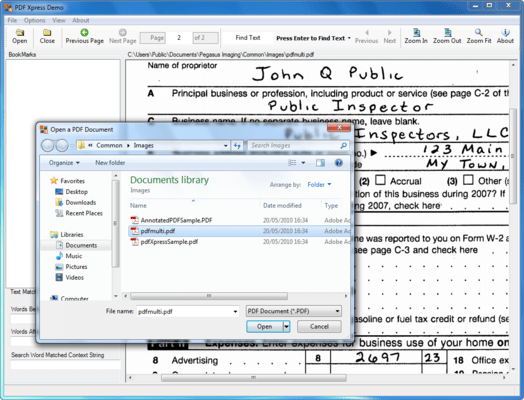
by Pegasus Imaging Corporation - Product Type: Component / .NET WinForms / ActiveX OCX / VCL / VC++ Class Library
PDFXpress Reader Edition by Pegasus Imaging Corporation
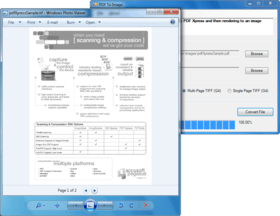
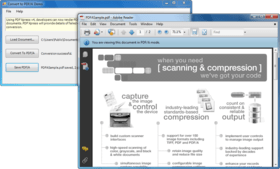
Build applications to view PDF files. PDFXpress Reader Edition is offered for those requiring only PDF viewing capability. It is delivered as both a Microsoft .NET component and COM control. It offers full read support of all PDF formats, built using Adobe 3 technology. PDFXpress reads all PDF files that Adobe supports.

Main Features Include:
Programming environments: Win32 visual development environments
Sample code is included for: C#, VB.NET, VB 6, Delphi 7/8
Deploys within .NET as a managed control
Can also be used in any development environment that hosts ActiveX/COM
Client/Server web development capabilities
Can be used in a multi-threaded environment
Customer-acclaimed technical support
Adobe PDF Support
Read single and multi-page PDF files
Support Native PDF files
Support Post Script-based PDF files
Support black and white image PDF files encoded to CCITT G3-1D, CCITT G3-2D, CCITT G4, and JBIG2
Support color image PDF files encoded to JPEG and JPEG 2000
What's New in V2.0:
The PDF Xpress v2 Software Development Kit (SDK) offers expanded capabilities to access and modify content within PDF documents. PDF Xpress empowers developers requiring PDF support within applications, and is delivered as both a .NET component and an ActiveX COM control.
PDF Xpress provides technology to software engineers building applications for creation, modification, and viewing of PDF files. Software engineers may extract text from PDF files, and use PDF Xpress v2 features to return the location and context of text search results. Annotations, bookmarks, thumbnails, and metadata can also be added, modified, or deleted. New page insert and move options offer PDF Xpress v2 users the flexibility to repurpose and reconfigure PDF documents – merging multiple PDFs or splitting a single PDF into multiple documents. Optimized rasterization enables high resolution display of large images, such as engineering drawings. Seamless interaction with PDF Xpress v2 is facilitated by new read-from-memory and write-to-memory support. By using PDF Xpress v2 in conjunction with other Pegasus Imaging components, developers can write applications to create highly compressed image-only or image-over-text PDF documents, and enable end users to view and modify PDF files.
PDF Xpress v2 Professional includes the following new capabilities:
Upgraded PDF support, taking advantage of many performance improvements and enhancements
PDF v1.6 document creation
Text extraction and use of PDF Xpress features to return location and context of text search results. (Extract text from Normal or Searchable Image PDFs then identify text matches using any desired technique. PDF Xpress will provide the context and location of the match phrase.)
Searchable Image (Image with Hidden Text) PDF Creation - using OCR Xpress with PDF Xpress sample code (PDF Xpress v2 provides the ability to construct an image-over-text PDF, using text output from OCR Xpress, and the associated image compressed by ImagXpress. This enables the developer to create highly compressed image-over-text PDFs, with searchable text.)
PDF Document Load From Memory & Save To Memory - without the need to store as a file
Page Insertion – Insert a page or range of pages from one PDF document into another (this capability can be used to merge multiple PDFs into one PDF or split one PDF into multiple PDFs)
Page Move – Move a page from one location to another in a PDF document
PDF Annotations Export to XFDF (XML) – Express annotations from the PDF document as XML data
PDF Annotations Import from XFDF (XML) – Create, modify, and delete PDF annotations using XML data
Thumbnail Delete – Delete a thumbnail in a PDF document, in addition to create and replace
Bookmark Modify & Delete – Modify and delete bookmarks in a PDF document, in addition to read and add
Document Metadata Read, Modify, & Write
Large File Optimized Rasterization (i.e. for display of large engineering drawings)
The Reader Edition contains a subset of features found within the Professional Edition. PDF Xpress includes the following new capabilities in the v2 Reader Edition:
Upgraded PDF support, taking advantage of many performance improvements and enhancements
Text extraction and use of PDF Xpress features to return location and context of text search results. (Extract text from Normal or Searchable Image PDFs then identify text matches using any desired technique. PDF Xpress will provide the context and location of the match phrase.)
PDF Document Load From Memory
PDF Annotations Export to XFDF (XML) – express annotations from the PDF document as XML data
Document Metadata Read
Large File Optimized Rasterization (i.e. for display of large engineering drawings)
PartNumbers: PC-515550-150747 515550-150747 PC-515550-150753 515550-150753 PC-515550-150748 515550-150748 PC-515550-150749 515550-150749 PC-515550-150750 515550-150750 PC-515550-150751 515550-150751 PC-515550-150754 515550-150754
PurchaseOptions: PDFXpress Reader Edition V2.0 1 Developer License , PDFXpress Reader Edition V2.0 1 Developer Upgrade License from PDFXpress Reader Edition V1.0 , PDFXpress Reader Edition V2.0 - Runtime Licenses 1-4 Installations (per CPU) , PDFXpress Reader Edition V2.0 - Runtime Licenses 5-9 Installations (per CPU) , PDFXpress Reader Edition V2.0 - Runtime Licenses 10-24 Installations (per CPU) , PDFXpress Reader Edition V2.0 - Runtime Licenses 25-49 Installations (per CPU) , PDFXpress Reader Edition V2.0 - Server License 1 Server (CPU) License
Resources: Read the PDFXpress Professioal .NET help file, Read the PDFXpress Professional ActiveX help file, Read the PDFXpress version history, Browse the Licensing Information Web pages, Download the PDFXpress Professional V2.0 evaluation on to your computer - Displays Nag Screens
Operating System for Deployment: Windows Vista, Windows XP, Windows Server 2003, Windows ME, Windows 2000, Windows 98, Windows NT 4.0, Windows 95, Windows NT 3.51
Architecture of Product: 32Bit
Product Type: Component
Component Type: .NET WinForms, ActiveX OCX, VCL, VC++ Class Library
Built Using: ActiveX Template Library (ATL)
General: Internet Enhanced, Includes Digital Signature, Marked as Safe for Scripting, Marked as Safe for Initialization, OCX96 Compatible, Supports Component Categories, Supports Apartment Model Threading
Compatible Containers: Microsoft Visual Studio 2008, Microsoft Visual Studio 2005, Microsoft Visual Studio .NET 2003, Microsoft Visual Studio .NET, Microsoft Visual Studio 6.0, Microsoft Visual Studio 97, Microsoft Visual Basic 2008, Microsoft Visual Basic 2005, Microsoft Visual Basic .NET 2003, Microsoft Visual Basic .NET, Microsoft Visual Basic 6.0, Microsoft Visual Basic 5.0, Microsoft Visual Basic 4.0, Microsoft Visual C++ 2008, Microsoft Visual C++ 2005, Microsoft Visual C++ .NET 2003, Microsoft Visual C++ .NET, Microsoft Visual C++ 6.0, Microsoft Visual C++ 5.0, Microsoft Visual C++ 4.0, Microsoft Visual C# 2008, Microsoft Visual C# 2005, Microsoft Visual C# .NET 2003, Microsoft Visual C# .NET, Microsoft Visual InterDev 6.0, Microsoft Visual FoxPro 6.0, Microsoft ActiveX Control Pad, Microsoft Access 2003, Microsoft Access 2002, Microsoft Access 2000, Microsoft Internet Explorer 6.0, Microsoft Internet Explorer 5.5, Microsoft Internet Explorer 5.0, Microsoft Internet Explorer 4.0, C++Builder 4, C++Builder 3, Delphi 8.0, Delphi 7.0, Delphi 6.0, Delphi 5.0, C#Builder, IBM VisualAge for Basic, IBM VisualAge C++, Sybase PowerBuilder 6.0, Sybase PowerBuilder 5.0, Watcom C/C++, .NET Framework 3.5, .NET Framework 3.0, .NET Framework 2.0, .NET Framework 1.1, .NET Framework 1.0
Product Class: Business Components
Search Items: New Product Dec 04, New Product Aug 05, New Product Sep 05
Keywords: pdf Pegasus Image Imaging Professional Partner PDF Adobe Acrobat display viewer view open pdf