by PEERNET - Product Type: Driver
TIFF Image Printer by PEERNET
URLs: peernet-tiff-image-printer, peernet tiff image printer, peernettiffimageprinter, peernet
Convert anything into a high-quality TIFF image. With TIFF Image Printer, if you can print it, you can distribute or archive it electronically as a high-quality TIFF image file; word processing documents, graphic application files, accounting spreadsheets, legal files, and more. TIFF Image Printer provides high quality TIFF output while ensuring that created files are readable by standard image viewers. Creating a TIFF image file using TIFF Image Printer is as simple as printing to your desktop printer.
Features:
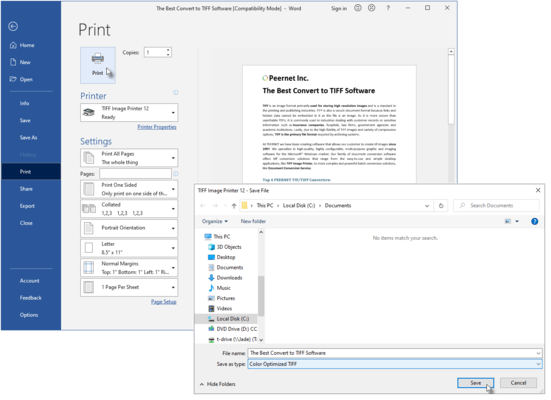
With eTIFF, converting a document into a high-quality TIFF image file is as easy as 1-2-3 . . .
1) Start your application, and open the document you want to convert.
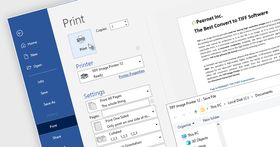
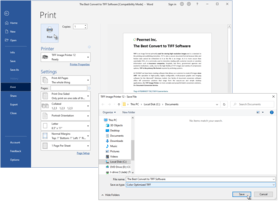
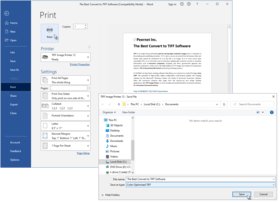
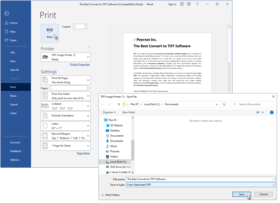
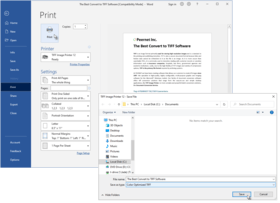
2) Print your document, but instead of your standard printer, select TIFF Image Printer.
3) When prompted, select where you want to save the TIFF image file, and you're done!
For users requiring custom TIFF images that meet a specific business requirement you can set the printing preferences for your TIFF Image Printer to produce the exact outputted images you require.
Printing preference options for TIFF Image Printer include the following:
Compression options
Select from multiple compression options for color images, indexed images, greyscale images, and monochrome images.
Further customize the file size of your outputted images with extensive color reduction options (reduce to optimal palette, reduce to greyscale palette, reduce to black and white, and none.
Image options
Rotate your output images as required (0, 90, 180, and 270 degrees).
Produce your images at a resolution of 1200, 720, 600, 400, 360, 300, 240, 200, 150, 120, 100, 75, 60, or 50 dots per inch.
Watermark options
Select a saved graphic file for use as a watermark on either the first page or all pages of your outputted images.
Stretch, tile, or center the watermark.
Set a different watermark for portrait and landscape pages.
Email options
Enable email options to automatically attach your outputted images to an email message, ready for sending.
Populate the To, CC, BCC, Subject, and Message fields of the email message with defaulted text.
Fax image options
Produce fax-ready images using either Profile F or Profile S.
Select the fax resolution that best suits your requirements (408 x 391, 400 x 400, 300 x 300, 204 x 196, 204 x 98, 200 x 200, or 200 x 100 dots per inch).
File naming options
Set a default directory and file name for all driver output, or have the driver prompt you for this information when the print job is run.
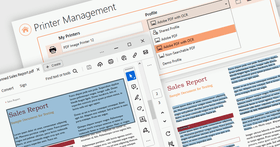
Using advanced file naming, select or create profiles that set the file naming format you need.
Save options
Select either serialized (each page of the document saved as an individual image) or multi-page (entire document saved as a single, multi-page image) output.
Append outputted images to an existing file.
Run options
Specify commands to be run at the start of the print job, at the end of the print job, at each page, and on file close.
What's new in TIFF Image Printer 9.0.013
Improved performance of printing lots of small documents in a row.
Improved performance of text extraction.
Fixed issue with COM API reporting jobs not completed when no jobs in print queue, introduced by Windows 7 and Windows 2008 SP1.
What's new in TIFF Image Printer 9.0.012
New feature added to support rendering pages at resolution of printer when in Fax Mode. This feature is enabled by default. It solves the problem of Excel documents creating more pages when forced to rendered document at Fax resolution (200 dpi) as was default in prior releases
Enhanced support of paper selection based on paper width and height. A few products do not always select paper type (Letter, A4, etc.) but instead only use the width and height of the paper. Product now matches postscript printer driver behaviour for this situation
For PNSrv9 COM users, improved speed of creating printer pool, enhanced clean-up of ports and printers to ensure all registry keys removed
What's New in TIFF Image Printer 9.0.011
Support added for:
Windows 7 (SP1)
Internet Explorer 9.0
Adobe Acrobat and Reader X (10.0.xx)
New features and fixes:
New feature added to support saving sent messages in the sent folder when using extended MAPI.
Resolved issue with memory leak in spooler (spoolsv.exe) process.
What's New in TIFF Image Printer 9.0.010
Resolves issues in the PNSrv9 COM Interface where the SetTIFFCompressionOptions method did not correctly configure compression to JPEG in TIFF when called with any of the JPEG compression options as follows:
pnColorCompressionMethod.pnColorCompressionJPEG[High|Medium|Low]Quality
pnIndexedCompressionMethod.pnIndexedCompressionJPEG[High|Medium|Low]Quality
pnGreyscaleCompressionMethod.pnGreyscaleCompressionJPEG[High|Medium|Low]Quality
which resulted in only LZW compressed images instead of JPEG compressed images in TIFF files.
What's New in TIFF Image Printer 9.0.009
Resolved conversion performance/speed issue found on computers with no internet access.
What's New in TIFF Image Printer 9.0.008
Added feature to allow enabling Fax Mode to use a full 256 greyscale palette when dithering to black and white. The default is still to use a 64 greyscale palette to reduce size of fax and eliminate low intensity colors used normally to shape areas.
Added feature to allow setting the Control String prefix and suffix to a single unicode character value. By using this feature, products like Crystal Reports 11 and Adobe Reader can be configured so the product recognizes control strings. The default prefix of '~0%' and suffix '?' are used if this feature is not in affect.
Fixed an issue in the [TIFF File Format] section of the config C.INI file and the script S.INI file. The keywords for the Color Compression and Greyscale Compression entries:
High quality JPEG
Medium quality JPEG
Low quality JPEG
were not being recognized.
What's New in TIFF Image Printer 9.0.007
Resolved a multi-thread issue causing trial watermark to appear randomly on output when printer used in highly threaded application on computers with more then 4 CPUs.
What's New in TIFF Image Printer 9.0.006
Resolved another issue with paper sizes off by 1 pixel when user paper size specified instead of form name.
What's New in TIFF Image Printer 9.0.005
Resolved issues in Fax Mode with paper sizes off by 1 pixel.
Added support to detect pre-rotated forms like 'A4 Rotated', so operation like rotated landscape pages will be applied correctly to these paper sizes.
Enhanced watermark brightness to allow full range from -100 to 100 for improved control.
Resolved issues with PrintRange, SkipPage, and watermark control strings.
Resolved issue with $copies variable not reporting correct number of copies selected during print operation.
What's New in TIFF Image Printer 9.0.004
Fixed spooled page count for PNSrv9 COM users on Windows 2008 systems.
What's New in TIFF Image Printer 9.0.003
Fixed auto selecting of paper size in fax mode to when paper is printed landscape.
What's New in TIFF Image Printer 9.0.002
Added new feature to support auto selecting of paper size in fax mode based on first page of document.
What's New in TIFF Image Printer 9.0.001
TIFF Image Printer 9.0 has been upgraded and enhanced to unify the driver with PEERNET's family of image printer drivers, PDF Image Printer and Raster Image Printer. All drivers now share the same user interface, options and most features as applicable.
Technical Enhancements Include:
Improved the performance of the printer driver to take advantage of parallel processing capabilities on multi-core machines.
Custom paper size improved, major improvement for those working with large paper or rotated paper sizes such as AutoCad users.
New Color Reduction options have been added to give greater control over the output files:
Reduce to 256 color palette will reduce each page to a maximum of 256 colors.
Reduce to 16 color palette will reduce each page to a maximum of 16 colors.
Reduce to optimal palette, 256 colors max will reduce each page to its minimum number of colors with a maximum of 256 colors.
Reduce to optimal palette, 16 colors max will reduce each page to its minimum number of colors with a maximum of 16 colors.
Output file type, color reduction and dithering methods are now all controlled on the Save tab to make it easier to select the output file type.
Fixes Include:
Fixed bug of 0 byte jobs from Excel
Fixed bug of duplicate text in text extraction when printing from Publisher 2003
Fixed bug of Error Log recording more than errors
What's New in TIFF Image Printer 8.0.018
Rollout of additional license/pricing models to meet the wide range of needs of customers. Note all editions include the Developer APIs (COM, Script, ...) at no additional cost.
End User Edition (per User License)
Unlimited End User Edition (per User License)
Service License (per Server License)
What's New in TIFF Image Printer 8.0.015
Fixed - Issue where clients processing through multiple print queues at the same time would randomly getting TIFFSetField andéor packbits decode errors
Fixed - Issue where clients using the email option were sometimes getting message 'PEERNET Job has stop working'
What's New in TIFF Image Printer 8.0.014
Support added for:
Windows 7
Windows 2008 R2
Fixed and updated:
Issue where printing to multiple copies of the printer at the same time were causing jobs to hang
Adding the printer manually using Add Printer Wizard now works for all Windows platforms including Windows Vista which was giving error 2 in prior releases
What's New in TIFF Image Printer 8.0.005?
Performance improvements to speed up the creation of 600 to 1200 dpi TIFF files
Fixed issue where on some system getting error "WriteFile failed, cancelling job"
PNSrv8 COM automation API enhanced to support highly threaded conversion of documents
PNSrv8 COM automation API can now be used in Visual Basic 6, Visual Basic 5 or Visual Basic for Applications (VBA).
PNSrv8 COM automation API can now optionally track job information (defaulted to not track information).
PNSrv8 COM automation API has many new methods to assist in the creation of high quality conversion programs or processes.
PNSrv8 COM automation API manual and samples updated to demonstrate the numerous ways to utilize this interface.
What's New in TIFF Image Printer 8.0.004
Added or Fixed:
Windows 7 and Windows Server 2008 R2 ready.
Windows Internet Explorer 8 ready.
Resolved issue where file names containing certian unicode values causing random crashes.
Resolved issue where on some Window XP computers, jobs were not completing do to low system resources.
What's New in TIFF Image Printer V8.0.003 ?
Release of the PNSrv8 COM Interface
The PNSrv8 COM Interface was designed to make it easier for you, the developer, to programmatically control the TIFF Image Printer through your .NET applications by providing the ability to control and communicate with the TIFF Image Printer 8.0 during the printing and file creation process. It replaces and greatly enhances the older script file methodology used in the previous versions of the printer.
The COM object provides the following control:
Set the printer’s preferences directly through the COM interface
Easily wait until the file has been created to continue your workflow
Use a pool of printers to increase processing capacity
Attach to events to add custom processing at key points
Track the files printed and the output files associated with each file
Retrieve detailed information about the output files created
Added and fixed:
Black pages when converting color images using a CMYK compression has been resolved
Issue of print failing when the incorrect DevMode is sent
Colour reduction to BW missing in control stings
License wizzard prompt getting hidden
Getting "can not change thread mode when aleady set" error message
Following Text Extraction items have been corrected:
Spaces in words appearing in the text extraction file for Times Roman font
Issue of only getting text from the last page when multipage was selected
Printing from Visio
What's New in TIFF Image Printer V8.0?
TIFF Image Printer 8.0 was developed for and supports Microsoft Windows 2008, Windows Vista (up to SP1), Windows 2003 (up to SP2), Windows XP (up to SP3) and Windows 2000 (up to SP4)Rollup#1.
TIFF Image Printer 8.0 can be licensed on Microsoft Windows 2008, Windows Vista, Windows 2003, Windows XP and Windows 2000.
Platform updates in TIFF Image Printer 8.0
Support for Microsoft Windows 2008
Support for SP1 for Windows Vista
Support for SP3 for Windows XP
Updated and enhanced fax support:
Added support for creating Profile C color fax images.
Added the ability to create fax format TIFF images in Letter, Legal, A4(ISO), A3(ISO) and B4(ISO) paper sizes.
Added support for new fax resolutions 100x100, 204x391, 300x600, 400x800, 600x600, 600x1200, and 1200x1200.
Added the ability to control how the fax image is scaled and its alignment on the fax-sized page.
Added the ability to do page and image processing:
Automatically trim page margins based on a customizable intensity level
Crop and discard image margins or crop and keep an inside area of the image
Adjust the image brightness level
Copy all or part of the image to a new page of the same or different size, and choose scaling and alignment of the new image.
New image resampling features allow you to scale the output image to a particular width and height. The new dimensions can be set using:
Pixels
as a percentage of the original size
or by setting a new image resolution (DPI).
All printing is processed synchronously with the print job in the print spooler. The print job is held in the print queue until the TIFF file is created and is ready for further processing. This is different from the previous versions of the driver and should simplify the automation process for application developers who are watching the printer queue to determine when the TIFF file is created.
Improved the text extraction algorithm and added new features:
Added text layout options to better preserve the formatting of the text in the original document
Text extraction files encoded as ANSII, UTF-8 or UTF-16
Emulate Windows, Unix or Mac end-of-line encoding
Emit page breaks in the text file
A reduced fax mode palette is now used when creating Profile S and Profile F fax format TIFF images.
Units for custom paper size, image processing and page processing are now entered as inches (English units) or centimeters (Metric units).
Fixed the following issues:
Fixed problem where appending files with text extraction is turned on would overwrite text file content instead of appending.
Fixed problem with narrow margins and missing borders when the printing a page with a border that is very close to the page edge.
Fixed problem where Profile F fax was created with the wrong fill order. Profile F fax was being created with MSB2LSB fill order when it should be LSB2MSB.
Fixed problem where an A4 paper size and 0” margins in Word gives the error message “The margins in section 1 are outside the printable area of the page”.
What's New in TIFF Image Printer V7.0?
Support Office 2007
Product name has been changed from PEERNET.DRV eTIFF to TIFF Image Printer
Supports Windows XP Professional x64 Edition and Windows 2003 x64 Edition - it supports both AMD64 and Intel Extended Memory 64 Technology (EM64T) (This product does not support Itanium-based Systems)
Supports specifying LZW and Packbits compression for black and white TIFF images - LZW black and white compressed TIFF images are useful for creating black and white images that can be opened by Adobe Photoshop
All processing of strings and file names are now fully UNICODE compliant throughout the architecture - This resolves several issues on Chinese and Japanese Windows as well as other version of Windows using UNICODE languages
The print process has been architected to support printing without the possibility of the print queue locking up or users blocking each other when printing at the same time from within a terminal server client session
All printing is now processed synchronously simplifying the automation process for application developers
Added a Copy Printer program that supports creating copies of the TIFF Image Printer 7.0
TIFF Image Printer support Windows 2000 and up - it does not support older Microsoft Windows versions such as NT 4.0, Windows 95, 98, 98 SE and ME
With this release, the TIFF Image Printer 7.0 processing model is now identical to the PEERNET.DRV eTIFF 6.0 printing model. The default installation is back to spool document and start printing immediately.
Convert anything into a high-quality TIFF image.
Pricing: TIFF Image Printer 9.0.013 End User Edition - Without On-Going Support 1 User License, TIFF Image Printer 9.0.013 End User Edition - Without On-Going Support 1 User License, price per User from 2 - 4 Users, TIFF Image Printer 9.0.013 End User Edition - Without On-Going Support 1 User License, price per User from 5 - 9 Users, TIFF Image Printer 9.0.013 End User Edition - Without On-Going Support 1 User License, price per User from 10 - 24 Users, TIFF Image Printer 9.0.013 End User Edition - Without On-Going Support 1 User License, price per User from 25 or more Users, TIFF Image Printer 9.0.013 End User Edition - On-Going Support Included 1 User License, TIFF Image Printer 9.0.013 End User Edition - On-Going Support Included 1 User License, price per User from 2 - 4 Users, TIFF Image Printer 9.0.013 End User Edition - On-Going Support Included 1 User License, price per User from 5 - 9 Users, TIFF Image Printer 9.0.013 End User Edition - On-Going Support Included 1 User License, price per User from 10 - 24 Users, TIFF Image Printer 9.0.013 End User Edition - On-Going Support Included 1 User License, price per User from 25 or more Users
Evals & Downloads: Read the TIFF Image Printer Quick Start Guide, Read the TIFF Image Printer User Guide, Read the TIFF Image Printer Fact Sheet, Read the TIFF Image Printer License Agreement, Download the TIFF Image Printer 9.0.013 evaluation on to your computer - Expires after 30 days
Operating System for Deployment: Windows 7, Windows Server 2008, Windows Vista, Windows XP, Windows Server 2003, Windows 2000
Architecture of Product: 32Bit, 64Bit
Product Type: Driver
Built Using: MFC V4.2 / V6.0
Compatible Containers: Microsoft Visual Studio .NET 2003, Microsoft Visual Studio .NET, Microsoft Visual Studio 6.0, Microsoft Visual Studio 97, Microsoft Visual Basic .NET 2003, Microsoft Visual Basic .NET, Microsoft Visual Basic 6.0, Microsoft Visual Basic 5.0, Microsoft Visual Basic 4.0, Microsoft Visual Basic 3.0, Microsoft Visual C++ .NET 2003, Microsoft Visual C++ .NET, Microsoft Visual C++ 6.0, Microsoft Visual C++ 5.0, Microsoft Visual C++ 4.0, Microsoft Visual C# .NET 2003, Microsoft Visual C# .NET, Microsoft Visual J++ 6.0, Microsoft Visual J++ 1.1, Microsoft Visual InterDev 6.0, Microsoft Visual InterDev 1.0, Microsoft Visual FoxPro 6.0, Microsoft Visual FoxPro 5.0, Microsoft ActiveX Control Pad, Microsoft Office 2003, Microsoft Office XP, Microsoft Office 2000, Microsoft Office 97, Microsoft Access 2003, Microsoft Access 2002, Microsoft Access 2000, Microsoft Access 97, Microsoft Access 95, Microsoft Access 2.0, Microsoft SQL Server 2000, Microsoft SQL Server 7.0, Microsoft SQL Server 6.5, Microsoft Outlook 2002, Microsoft Outlook 2000, Microsoft Outlook, Microsoft Repository, Microsoft Exchange Server 5.5, Microsoft Exchange Server 5.0, Microsoft Site Server, BizTalk Server, Microsoft Internet Information Server 5.0, Microsoft Internet Information Server 4.0, Microsoft Internet Information Server 3.0, Microsoft SNA Server, Microsoft FrontPage, Microsoft Internet Explorer 6.0, Microsoft Internet Explorer 5.5, Microsoft Internet Explorer 5.0, Microsoft Internet Explorer 4.0, Microsoft Internet Explorer 3.0, Netscape Navigator, CodeGear C++ 5.0 (formerly Borland), CodeGear C++ (formerly Borland), C++Builder 6, C++Builder 5, C++Builder 4, C++Builder 3, Delphi 8.0, Delphi 7.0, Delphi 6.0, Delphi 5.0, Delphi 4.0, Delphi 3.0, Delphi 2.0, Delphi 1.0, IntraBuilder 1.5, C#Builder, Visual dBase 7.0, JBuilder 9, JBuilder 8, JBuilder 7, JBuilder 6, JBuilder 5, JBuilder 4, JBuilder 3.5, JBuilder 3, JBuilder 2, JBuilder 1, Kylix 1.0, Kylix 3.0, IBM VisualAge for Basic, IBM VisualAge C++ V4.0, IBM VisualAge C++, IBM VisualAge for Java 4, IBM VisualAge for Java 3, IBM VisualAge for Java 2, IBM VisualAge for Java, Sybase Power++ Pro 2.0/2.1, Sybase PowerBuilder 9.0, Sybase PowerBuilder 8.0, Sybase PowerBuilder 7.0, Sybase PowerBuilder 6.0, Sybase PowerBuilder 5.0, Sybase PowerJ Pro 3.0, Sybase PowerJ Pro 2.0, Sybase Enterprise Application Studio 3.0, Sybase Power Studio, Sybase SQL Anywhere 6.0, Sybase SQL Anywhere 5.5, Watcom C/C++ 11.0, Watcom C/C++, Oracle Database 9i, Oracle 9i JDeveloper, Oracle JDeveloper 3.0, Visual Café 4.0, Visual Café 3.0, Visual Café 2.0, WebLogic Workshop, WebLogic Portal, Tuxedo, dBase 2000, SilverStream, Fortran 90, Fortran 95, Fortran 77, Computer Associates Advantage Gen V6.0, Computer Associates Advantage Gen V5.1, IBM WebSphere Studio, IBM DB2 8.x, ASP.NET Web Matrix
Product Class: Component Development Tools
Keywords: tiff conversion driver print convert etif etiff tif tiffimage tiffimageprinter imageprinter
PEERNET
Image images Compression compress compresses Conversion convert converting converts conversions
Conversion Convert converts converting
Imaging image images
Print Preview Printing previews prints
Part numbers: PC-510961-395102 510961-395102 PC-510961-395103 510961-395103 PC-510961-395104 510961-395104 PC-510961-395105 510961-395105 PC-510961-395106 510961-395106 PC-510961-395107 510961-395107 PC-510961-395108 510961-395108 PC-510961-395109 510961-395109 PC-510961-395110 510961-395110 PC-510961-395111 510961-395111
Publisher
Primary Category
Related Products
Related Categories
ComponentSource offers a unique global service, used by over 1,000,000 software developers worldwide.