de Pegasus Imaging Corporation - Tipo de producto: Componente / .NET WinForms / ActiveX DLL
FormFix - Professional - V3.0 by Pegasus Imaging Corporation
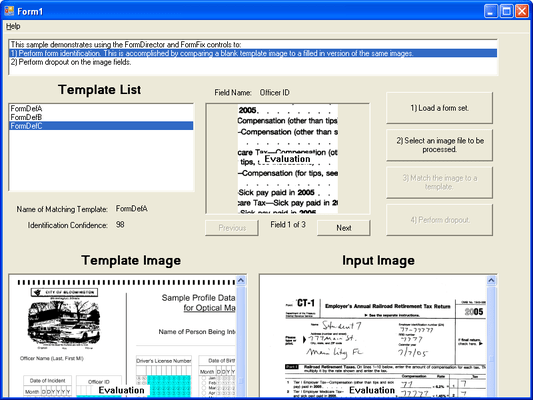
Add identification, form registration, OMR technology to your application. FormFix delivers both .NET and ActiveX COM components offering bitonal template-based form identification, form registration, form drop out, and OMR technology to developers of forms processing applications. Highly flexible and optimized for speed, FormFix's form recognition and form registration improve ICR, OCR, and OMR accuracy. It easily interfaces with Pegasus recognition engines, and with any recognition engine supporting memory-to-memory data transfers. ImagXpress and ScanFix Xpress are included with FormFix for image handling, advanced image cleanup, and TWAIN scanning. Professional Edition has full speed of processing forms (Standard Edition is delayed at approximately 5 seconds per page).

Form Setup
API support for setting up fields, form templates, and sets of form templates
Flexible architecture for defining custom operations at any stage of processing
Define OMR, text, image, or custom fields on each form
Extensive support for form processing operations
Form Identification
Match forms against previously defined unfilled templates and return confidence values
Provide automatic identification without the need for registration marks, ID marks, or anchor marks
Match forms that are rotated 90, 180, or 270 degrees from template image
Match forms that have been scaled from 90% to 110% of the template size
Match forms scanned with resolution of 50% to 150% of the template resolution
Match forms that are skewed up to 20 degrees by pre-processing with the included ScanFix
Identify thousands of different forms
Limit a recognition operation to a subset of the available templates
Set the level of effort expended in completing form matching
Return Identification Certainty indicating confidence of form matching
Accept a Minimum Certainty level for acceptance as a matched form
Return up to 100 alternative form matches of lower certainty
Quickly identify forms, even when using very large sets of template forms
Form Registration
Automatically align a filled form to its master template based on image contents, to within one or two pixels of the blank template without requiring registration marks
Analyze the master template form content and determine anchor points automatically
Adjust alignment within a drop out zone to compensate for small differences between forms
Support an alternate registration process using anchor marks in each corner
Register forms even when the forms exhibit these characteristics:
Skew (up to 20 degrees)
Smaller or larger image size than the template (up to 10%)
Forms scanned at different resolutions (up to 50% greater and lesser) than the template resolution
Rotation (at 90, 180, and 270 degrees from the template)
Form Drop Out
Remove template forms at sub-second speeds
Provide confidence values to highlight problem images
Adjust for distortion caused by printing, copying or scanning
Precisely remove lines, broken lines, shading, noise, guide text, and more
Automatically repair text that intersects with lines or guide text defining the form, that was damaged during template removal (fills broken characters)
Apply "character repair" across areas of the image where the form was removed
Apply "character smoothing" to smooth the edges of characters for increased OCR accuracy
Support for form drop out only within specified fields or the entire image
Create new images using pixels cropped from a source image (field clips)
OMR (Optical Mark Recognition and Mark Sense)
Detect the presence or absence of marks or characters (for verification of signature presence for example)
Support programmatic specification for bubble shape
Support OMR recognition at 0, 90, 180, and 270 degree orientation
Specify fields as grids (rows by columns) or single bubbles
Support single and multiple mark recognition
Recognize check-marked check boxes
Set custom recognition parameters on a per-field basis
Allow an unlimited number of fields
Support programmatic specification for threshold for positive marks
Return confidence values to check accuracy of OMR
Form Overlay
Enables the use of dropout to access the filled, variable data
Overlay archived "data only" file over form template for display or print
This process dramatically reduces storage requirements
Increase data transmission speed
Image Input, Image Output, and Image Handling
FormFix Professional includes ImagXpress Document for image viewing, compression, conversion, thumbnail image support, document image processing and editing, TWAIN scanning, annotation, printing, and more
FormFix Standard includes ImagXpress Standard for basic image conversion, image processing, and TWAIN scanning
Bitonal Image Cleanup
FormFix Professional includes ScanFix Xpress for advanced bitonal image cleanup technology such as dot shading removal, line removal, character smoothing, inverse text correction, hole punch removal, deskew, despeckle, rotate, mirror, flip and more
FormFix Standard includes ScanFix Xpress Lite for bitonal image cleanup technology such as deskew, despeckle, rotate, mirror, flip and more
Image and Data Transfer Tool
Included with FormFix is the FormDirector component, providing communication among multiple Pegasus Imaging components (including FormFix, SmartZone, and ScanFix Xpress)
Assists in organizing, storing, and retrieving the descriptions and control parameters you will use while processing forms
Supports reading, revising and writing form template set files
Supports reading, revising and writing form template definition files
Handles over 10,000 unique form templates
For bitonal files (grayscale and color will be supported in a future edition)
Supports Unicode characters
Supports customization, including customer-defined field types and private customer data attached to form sets, forms, and fields
Replaces the form definition and form drop out features of SmartScan Xpress ICR/OCR/OMR (form definition files), FormFix (table files), and Prizm Color IP (form definition and form suite files)
PartNumbers: PC-517540-107810 517540-107810 PC-517540-107811 517540-107811 PC-517540-107812 517540-107812 PC-517540-107813 517540-107813 PC-517540-107814 517540-107814 PC-517540-107815 517540-107815 PC-517540-107816 517540-107816
PurchaseOptions: FormFix Professional V3.0 1 Developer License , FormFix Professional V3.0 - Runtime Licenses 1-4 Installations (per CPU) , FormFix Professional V3.0 - Runtime Licenses 5-9 Installations (per CPU) , FormFix Professional V3.0 - Runtime Licenses 10-24 Installations (per CPU) , FormFix Professional V3.0 - Runtime Licenses 25-49 Installations (per CPU) , FormFix Professional V3.0 - Runtime Licenses 50-99 Installations (per CPU) , FormFix Professional V3.0 - Server License 1 Server (CPU) License
Resources: Read the FormFix help file, Read the Pegasus Licensing Information, Download the FormFix V3.0 for .NET evaluation on to your computer - Displays nag screens, Download the FormFix V3.0 for ActiveX evaluation on to your computer - Displays nag screens
Operating System for Deployment: Windows Vista, Windows XP, Windows 2000
Architecture of Product: 32Bit
Product Type: Component
Component Type: .NET WinForms, ActiveX DLL
Compatible Containers: Microsoft Visual Studio 2005, Microsoft Visual Studio .NET 2003, Microsoft Visual Studio .NET, Microsoft Visual Studio 6.0, Microsoft Visual Basic 2005, Microsoft Visual Basic .NET 2003, Microsoft Visual Basic .NET, Microsoft Visual Basic 6.0, Microsoft Visual C++ 2005, Microsoft Visual C++ .NET 2003, Microsoft Visual C++ .NET, Microsoft Visual C++ 6.0, Microsoft Visual C# 2005, Microsoft Visual C# .NET 2003, Microsoft Visual C# .NET, .NET Framework 2.0, .NET Framework 1.1, .NET Framework 1.0
Keywords: Scan scanning scanned scanner scans OCR optical character recognition image images processing imaging Pegasus Image Imaging Imaging image images Professional Partner form suite pegasus imaging FormFix Form Fix
Autor
Categoría principal
Productos relacionados
Categorias relacionadas