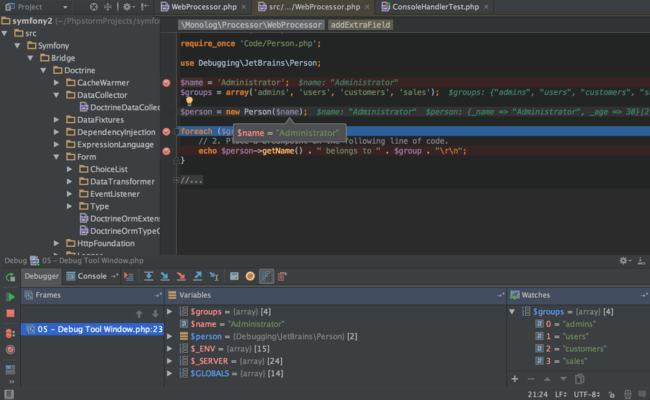
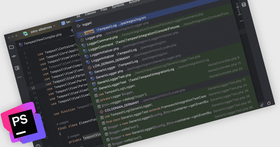
Screenshot Preview

PhpStorm - Summary

by JetBrains - Product Type: Application

Summary

PhpStorm by JetBrains

URLs: phpstorm, jetbrains

PHP IDE with refactorings, code completion, on-the-fly code analysis and coding productivity orientation. PhpStorm provides a rich and intelligent code editor for PHP with syntax highlighting, extended code formatting configuration, on-the-fly error checking, and smart code completion. PhpStorm is an IDE for HTML, JavaScript and PHP. PhpStorm code completion (Ctrl + Space) finalizes classes, methods, variable names, and PHP keywords, plus commonly used names for fields and variables depending on their type. PhpStorm editor respects PHPDoc in your code and provides appropriate code completion suggestions based on @property, @method and @var annotations. When you edit the PHPDoc for your code with PhpStorm, the variables names and types are auto-completed from the corresponding code blocks. PHP code refactorings also consider PHPDocs to keep them up-to-date. PhpStorm IDE allows to use Smarty template engine and offers productivity features for working with .tpl files. Thorough source code analysis allows PhpStorm to provide a sophisticated code completion even to an unannotated code.

PhpStorm - PHP IDE with Intelligent editor for productive coding

PhpStorm provides a rich and intelligent code editor for PHP with syntax highlighting, extended code formatting configuration, on-the-fly error checking, and smart code completion.

PhpStorm PHP Code Completion

Code completion (Ctrl + Space) finalizes classes, methods, variable names, and PHP keywords, plus commonly used names for fields and variables depending on their type.

PhpStorm PHPDoc Support

The PhpStorm editor respects PHPDoc in your code and provides appropriate code completion suggestions based on @property, @method and @var annotations. When you edit PHPDoc for your code, the variables names and types are auto-completed from the corresponding code blocks. PHP code refactorings also consider PHPDocs to keep them up-to-date.

PhpStorm PHP Refactoring

Rename refactoring works for files, functions, constants, classes, properties, methods, parameters, local and global variables. Make global project changes easily and safely. Local changes are made instantly in-place.

PhpStorm Smarty Templates Editing

PhpStorm IDE allows you to use a Smarty template engine and offers the following productivity features for working with .tpl files:

Configurable syntax highlighting for keywords, strings, variables and braces

Syntax errors highlighting

Smarty functions and attributes completion

Automatic insertion of paired braces, quotes and closing tags

Commenting of the selected block with a single hotkey

Custom Smarty delimiters support

PhpStorm Efficient project analysis and navigation

Thorough source code analysis allows PhpStorm to provide a sophisticated code completion, even to unannotated code, for example:

Function return type is deducted from its body and return statements

Class property types (and declarations) are extracted from the constructor code

File structure view and class, method and call hierarchy views allow for faster code review and navigation.

PhpStorm Unit testing without interruptions

Develop PHP Unit tests in PhpStorm and run them instantly from directory, file or class using the context menu options. Dedicated Run/Debug configurations allow you to the required set of tests at any time. Tests are executed in a dedicated Test Runner UI, displaying results overview and detailed stats for the whole suite and every particular test. In case of a test failure you can instantly get from the stacktrace to the line of code where the error occurred.

Code stepping and evaluation with built-in debugger

PhpStorm provides numerous options for debugging your PHP code allowing you to:

Set conditional breakpoints with smart step into that allows you to choose a particular method to step into from the call chaininspect context-relevant local variables and user-defined watches, including arrays and complex objects, and edit values on the fly

Evaluate an expression in runtime

Debug a page in multiple sessions simultaneously

Keep a debugging session alive while moving between pages

What’s new in PhpStorm V5.0?

PHP Editor - Detect variable types and significantly reduce the number of false positives during code inspection.

PHP Code Quality - Show more potential so you can fix them before running code.

Frameworks - New MVC view for Symfony2 & Yii frameworks.

Databases - Live database schema, generation of schema migration scripts, export query result to file or clipboard as CSV, TSV, HTML, SQL INSERT or SQL UPDATE.

Live HTML/PHP/CSS/JS Editing Preview - Start editing code and see changes immediately in the browser.

What’s new in PhpStorm V4.0?

PHP 5.4 Language Features Support - Including traits and all the new syntax improvements: class member access on instantiation, short array syntax, array dereferencing on function call, binary literals and expressions in static calls.

Code Coverage for PHPUnit - Code Coverage for PHPUnit marks covered and uncovered lines visually right in the editor and shows how much of your code is covered with tests.

Drupal Coding Style Support - PhpStorm 4.0 contains a bundled predefined coding style for the popular Drupal content management platform. Currently just reformatting your code in PhpStorm removes 99% of errors reported by Drupal coder-review and helps your code meet Drupal coding standards.

Check Your Code with PHP Code Sniffer - PhpStorm 4.0 allows you to check your code on the fly with PHP Code Sniffer (phpcs), just by opening a PHP file. The check is triggered every time you change something in the file, so it's extremely easy to fix problems reported by PHP Code Sniffer.

Smarter JavaScript Completion - More relevant suggestions now appear at the top of the list in many cases. Suggested names are ordered by their definition scope nesting, i.e. global variables are placed at the bottom of the list.

Custom Code Folding Regions - This feature gives you a possibility to define your own code-folding regions with special line comments both in Visual Studio and NetBeans style.

What’s new in PhpStorm V3.0?

PHP UML - Understand and change code by providing editable UML class diagrams for PHP code. Quickly examine your application structure, create and edit classes and their relationships. Many refactorings can be applied directly from the diagram, via the shortcut menu.

Profiler integration - Profile your scripts from PHPStorm with either Xdebug or Zend Debugger. See aggregate reports and jump from execution statistics directly to functions in your PHP code.

New PHP formatting options - Full support for Zend, PEAR and other standards.

Platform Improvements - More streamlined UI across all modern Operating Systems and Mac OS X Lion compatibility (including full screen)

Smart Duplicated Code Detector - Added for all major supported languages

PHPUnit Testing Improvements - Switch between tests and source code

XSLT - XSLT 2.0 support and XSLT Debugger added

What’s new in PHPStorm V2.0?

Complete PHP 5.3 Support - Full namespaces and closure support is added in 2.0.

Automatic Code Completion - This long-requested feature is now available: code completion dropdown is invoked automatically on typing (enabled by default). Code completion has also been improved to support array indexes in PHP code.

Zend Debugger and Xdebug - The IDE will automatically listen for debugger connection, requesting missing file mappings as needed, so with a single button-click in the browser the debugger will pop up with your page source. It also works on all AJAX requests while a debugger cookie is set.

Browser-initiated Debugging Support - You can use the Zend Toolbar, XDebug toolbar or our browser bookmarklets to initiate debugging directly from any page in a modern browser such as Firefox, IE, Google Chrome or Safari.

Command Line Tool Support - You can quickly run shell commands with dedicated support for framework tools, including completion and parameter info for Zend_Tool and Symfony tool and adding these features for custom tools via an XML descriptor.

Advanced Code Inspection - The new PhpStorm introduces several new code inspections: Control flow / Unreachable statement, Control flow / Wrong catch clauses order, Probably bug / Wrong string concatenation operator and Type compatibility / Invalid foreach() argument type.

New Git Log UI - Now you will be able to filter changes by branch, tag or developer, highlight changes made in a specific folder, or show differences right in the IDE.

GitHub Integration - Many of you have heard about Github and some are probably using it for your projects. Now you'll be able to check out your existing GitHub repository right from the IDE and auto-open it as a project.

Mercurial Support - Pulling and pushing changes from IDE, visual merging.

Better SQL Console - Full-fledged editor for SQL queries. Easier, yet more flexible connection configuration with automatic driver downloads. Editable query results table.

IDE for HTML, JavaScript and PHP.

Pricing: PhpStorm V5.0 - Personal 1 Personal User License - price per license - includes one year of free product upgrades (for individual developers purchasing the license with their own funds and for their personal use), PhpStorm V5.0 - Personal Annual Upgrade Subscription , PhpStorm V5.0 - Commercial 1-9 Commercial User License - price per license - includes one year of free product upgrades, PhpStorm V5.0 - Commercial 10-19 Commercial User License - price per license - includes one year of free product upgrades, PhpStorm V5.0 - Commercial 20-49 Commercial User License - price per license - includes one year of free product upgrades, PhpStorm V5.0 - Commercial Annual Upgrade Subscription

Evals & Downloads: Read the License Agreement, Download the PhpStorm Mac V5.0 evaluation on to your computer - Expires After 45 Days, Download the PhpStorm Linux V5.0 evaluation on to your computer - Expires After 45 Days, Download the PhpStorm Windows V5.0 evaluation on to your computer - Expires After 30 Days

Operating System for Deployment: Windows 7, Windows Vista, Windows XP, Red Hat Enterprise Linux 5.x, Red Hat Enterprise Linux 4.x, RedHat Linux 9.x, RedHat Linux 8.x, openSUSE 11.x, SUSE Linux 10.x, Ubuntu 10.x, Ubuntu 9.x, Mac OS X

Architecture of Product: 32Bit

Product Type: Application

Keywords: phpstorm, phpstorm ide, jetbrains phpstorm, phpstorm 1.0, phpstorm distributor, phpstorm reseller, phpstorm jetbrains, phpstorm user license, phpstorm developer license, phpstorm commercial license, phpstorm personal license, phpstorm licensing

jetbrains, jet brains, intellij, intellij idea, resharper, teamcity, team city, rubymine, ruby mine, youtrack, dottrace, dot trace, jetbrains idea, intellij download

Development

HTML Editing Edit editor

ide, ides, integrated development environments, integrated dev environments, dev environments, development programs, development environment, development environments, software development tool

Part numbers: PC-535627-494074 535627-494074 PC-535627-494086 535627-494086 PC-535627-494080 535627-494080 PC-535627-494082 535627-494082 PC-535627-494084 535627-494084 PC-535627-494088 535627-494088

Mfr. Part No: PS40CL PS40PL PSCUS PSPUS

Product Search

Enter search words:

Quick Links

Publisher

Primary Category

Related Products

Related Categories

Why buy from ComponentSource?

ComponentSource offers a unique global service, used by over 1,000,000 software developers worldwide.

More Info | About Us

Award Award