Pocket Chart FX for .NET

by Software FX - Product Type: Component / .NET Compact Framework

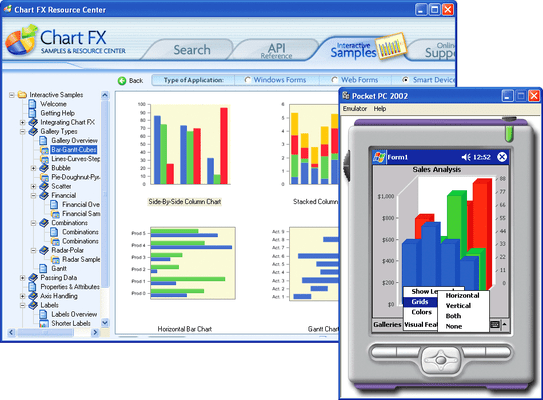
Cutting-Edge Charting Technology for the .NET Compact Framework. Pocket Chart FX for .NET is a charting component for rapidly developing applications that extend enterprise data visualization and analysis capabilities to mobile devices. Pocket Chart FX for .NET can quickly build powerful graphical applications that connect to your mission critical data and run on Smart Devices, anytime, anywhere.

From
$569.05
Price in

Our regular prices are shown below. Please logon to see your discounted prices.

Pocket Chart FX for .NET V6.2

Add to Cart $ 569.05 1 Developer License - Includes 25 Deployment Licenses
Mfr. Part No: PCN62
Download (10.0 MB)
Add to Cart $ 379.05 25 Additional Deployment Licenses
Mfr. Part No: PCN62AD
Verify Download (29 KB)

This product is available on the GSA Pricing ScheduleOur prices include ComponentSource technical support and, for most downloadable products, an online backup and a FREE upgrade to the new version if it is released within 30 days of your purchase.  All sales are made on our standard Terms and Conditions and subject to our Return Policy. Please contact us if you require any licensing option not listed above including volume licensing and previous versions.

Our regular prices are shown above. Please logon to see your discounted prices.

Pocket Chart FX for .NET: Third-generation charting component for mobile and smart devices.
As opposed to other vendors which provide first-generations of their .NET Compact Framework products, Software FX has been building and offering charting components for Microsoft’s mobile environments for over a decade. With Pocket Chart FX for .NET you can expect a component with the right feature set, portability and memory footprint for your mobile applications.

Pocket Chart FX for .NET offers a familiar Chart FX API
Perhaps one of the main advantages Chart FX provides is a consistent API and Object model throughout the platforms that are supported throughout its family of products (.NET, COM and Java). This means, developers can leverage their knowledge in a particular Chart FX product to move or port an application to a completely different platform.

Is the entire Chart FX functionality available in the Pocket Chart FX for .NET?
Although many of the features of Chart FX for .NET are supported by the Pocket Chart FX for .NET, due to constraints of mobile devices, the .NET Compact Framework is a subset of the .NET Framework. This means many features of Windows, GDI, and the .NET Framework that you have come to know and love in your Windows Forms or Web Forms applications were unable to be implemented. Some of features that have a special impact on some important aspects in a chart control have been simplified. For example, setting the pen width is not available in the Pocket Chart FX for .NET. This means you will not be able to change the width for any of the borders or lines in a chart. In general, this means that you will see a variety of differences between the full-featured Chart FX for .NET and the Pocket Chart FX for .NET. Softwar e FX's directive, for performance and footprint reasons, was to make Pocket Chart FX for .NET as efficient and feature-rich as the platform would allow.

Because of the limitations imposed by the .NET Compact Framework and the mobile devices themselves, Pocket Chart FX for .NET does not display toolbars or dialogs that end users can interact with to further customize charts without additional development efforts. This helps preserve the limited screen real estate in mobile environments and avoid UI conflicts with your application. In any case, implementing interaction functionality is a simple property setting in your UI. For example, if you want to change the gallery type, you can simply add a menu item to your application and set a chart property when the user selects the menu item. Software FX provide a quick start sample that provides exactly this functionality among other things.

Note: Although Pocket Chart FX for .NET does not provide built-in UI, you can process mouse related events to implement drill-down and process other mouse related interactions.


Product Search

Enter search words:

Why buy from ComponentSource?

ComponentSource offers a unique global service, used by over 1,000,000 software developers worldwide.

More Info | About Us

Award