PowerWEB for ASP.NET Suite - ASP.NET - V1.0 - Summary

by Dart Communications - Product Type: Component / ASP.NET WebForms / AJAX

Summary

PowerWEB for ASP.NET Suite - ASP.NET - V1.0 by Dart Communications

AJAX-enabled server controls to help you build rich Internet applications. PowerWEB for ASP.NET Suite controls provide "flash-free" asynchronous callbacks, turn-key HTML authoring/editing and in-line interactive image viewing. It includes: PowerWEB TextBox for ASP.NET - an AJAX-enabled HTML-editing textbox, PowerWEB LiveControls for ASP.NET - a suite of 21 Web Controls that allow you to raise server-side callbacks and update form elements without reloading the entire HTML page, PowerWEB Zoom for ASP .NET - an AJAX-enabled interactive image viewer that provides in-place pan, zoom and dynamic loading of high resolution images and PowerWEB File Upload for ASP.NET with adds file upload functionality to your ASP.NET application, including real-time progress reporting and server-side streaming. PowerWEB File Upload for ASP.NET uses Ajax techniques to transfer files from browser to web server while minimizing the server memory footprint.


PowerWEB LiveControls for ASP.NET

Features:

The ability to manipulate non-LiveControls in Code-Behind and have them updated on the client without a refresh (this is not guaranteed to work with all 3rd party controls)

Addition of Windows-like mouse, key, and click events to visual LiveControls

No need for Java applets, Flash, or complex JavaScript

Will automatically fallback to standard ASP.NET postbacks when unsupported browser detected

Compatible with IE 5.0 +, IE 5 Mac, Mozilla 1.3+, Mozilla 1.3+ Mac, Galeon, Konqueror and Opera 5

The ability of controls to operate in blocking or non-blocking manner on the client

A LiveTimer that is capable of polling the server at a specified interval

Limits the amount of data sent round-trip to maximize performance

A LiveCallback control that easily enables "Remote Scripting" implementations

Compatible with all versions of the .NET Framework

LiveControls for ASP.NET includes the following server controls:

LiveButton - Use the LiveButton control to create a push button on the Web page. You can create either a submit button or a command button

LiveCallback - Use the LiveCallback to create custom callbacks into code-behind

LiveCheckBox - Use the LiveCheckBox control to allow the user to select a true or false state

LiveCheckBoxList - The LiveCheckBoxList control provides a multi selection check box group that can be dynamically generated with data binding. It contains an Items collection with members corresponding to individual items in the list

LiveDataGrid - Use the LiveDataGrid control to display the fields of a data source as columns in a table dynamically. Each row in the LiveDataGrid control represents a record in the data source. The LiveDataGrid control supports selection, editing, deleting, paging, and sorting

LiveDropDownList - Use the LiveDropDownList control to create a single selection drop-down list control

LiveHyperlink - Use the LiveHyperLink control to create a link to another Web page

LiveImage - Use the LiveImage control to display an image on the Web page

LiveImageButton - Use the LiveImageButton control to display an image that responds to mouse clicks

LiveLabel - Use the LiveLabel control to display text in a set location on the page

LiveLinkButton - Use the LiveLinkButton control to create a hyperlink style button on the Web page

LiveListBox - Use the LiveListBox control to create a list control that allows single or multiple item selection

LiveMessageBox - Use LiveMessageBox to inform the user, ask the user for confirmation, or prompt the user for information

LivePanel - Use the LivePanel control as a container for other controls

LivePlaceHolder - Use the LivePlaceHolder control as a container to store dynamically added server controls to the Web page. The LivePlaceHolder control does not produce any visible output and is only used as a container for other controls on the Web page

LiveRadioButton - The LiveRadioButton server control permits you to intersperse the radio buttons in a group with other content in the page

LiveRadioButtonList - The LiveRadioButtonList control provides page developers with a single-selection radio button group that can be dynamically generated through data binding

LiveSound - Use LiveSound to play a sound file client-side during a callback

LiveTextBox - Use LiveTextBox to display a text box control for user input

LiveTimer - Use LiveTimer to raise an event at user-defined intervals, enabling server polling

LiveControls for ASP.NET includes the following sample applications demonstrating use of the above controls:

LiveAuction - Demonstrates using LiveControls to update an imaginary auction for a guitar in real-time

LiveProgress - Demonstrates using LiveControls to the update a progress bar based on information from the server

LiveComparison - Compares the difference between using LiveControls and standard Microsoft controls

LiveShoppingCart - Demonstrates a shopping cart that can be updated with real-time server price information as options are chosen without a postback

LiveSlideShow - Demonstrates a slideshow that is driven by server-side image URLs

LiveTutorial - Demonstrates how the PowerWEB LiveControls for ASP.NET can be used and explains the technology

LiveStockQuote - Demonstrates a stock quote application that updates stock prices and news without a refresh

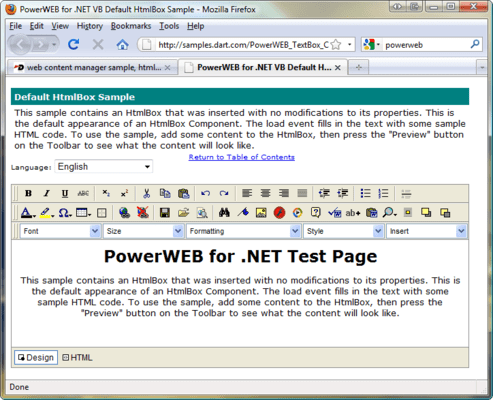
PowerWEB TextBox for ASP.NET

Standard Features

Complete support for Cascading Style Sheets (CSS)

Full featured image management upload images to server, preview, then configure their placement on the TextArea

Compatible with ASP.NET validation controls

Intuitive processing of directory structures

Build tables with intelligent table editing plus right-click menu support for insertion and configuration

Insert and upload images easily

Switch between HTML WYSIWYG editing mode or HTML tag editing mode

Easily upload images to the Web server and modify image properties

No ActiveX, Java, or client component requirement only HTML and pure Javascript. Requires just a browser to run

No need to manipulate external XML or configuration files

Fully documented client-side API for customization

All text fully customizable for international language support

Comprehensive display control: customize the toolbar to display only the tools you want the end-user to have or remove the text area and just have a customized toolbar for your site

Built-in Print functionality

Cut, Copy, and Paste, just like a word processor

Add unlimited custom fonts

Special characters and symbols easily available with a toolbar button

Easily use Code Behind to implement user roles

Filter the file types that can be uploaded

Supports secure Web servers

Use an unlimited amount of HtmlBox controls on a web form with little added HTML/JavaScript overhead since they all share the same client side code

Integrates with IBuySpy

Intuitive On-line Help integrates with Visual Studio .NET

100% Managed Code

Unique Features

Skin support (includes 4 pre-configured skins) and lets you make your own

Powerful Property Builder for customization

All buttons can be completely customized no other product supports this level of customization

Create custom dialogs, menus, drop downs, and buttons with only a few lines of code

Zero-code customization; build custom website control without any coding

Base classes can be used to create custom dialogs and toolbar items

Windows-style, draggable dialogs

Multiple color pickers, lets you choose the picker you need for your bandwidth requirement

Enhance your editor using graphical multi-state buttons, background images, edit window images, etc

PowerWEB Zoom for ASP.NET

Developed as an ASP.NET server control, PowerWEB Zoom can be quickly and easily integrated into applications by both novice and expert developers. Combined with high-resolution images, the control renders an interactive interface within a browser and manages on-the-fly content delivery between the client and server. Zoom can also be configured for image quality and performance.

PowerWEB Zoom automatically delivers cross-browser compatibility on both Windows and Macintosh platforms, supporting Internet Explorer, Mozilla/Firefox, and Safari. Zoom also supports development on .NET Framework versions 1.x and 2.0 with all versions of Visual Studio as well as Visual Web Developer 2005.

Compatibility with ASP.NET 1.x and 2.0

Cross-browser support

Interactive image panning and zooming

Intuitive interface and on-screen tools such as a Zoom Slider, Compass Navigator, Magnifier and Thumbnail

Configurable keyboard shortcuts for all controls

On-demand delivery of image data

On-demand image scaling and rendering

Configurable render quality modes

Interoperability with all other PowerWEB products for producing richer user experience

Server object and event model

Client-side API for additional integration and customization

PowerWEB File Upload includes:

4 Web server controls

Samples for .NET 1.1 and 2.0 in C# and VB.NET

Full MS Help 2.0 Documentation, including extensive examples

UploadManager - Used to configure page-level upload behaviour, including upload destination and streaming behaviour

Upload - The interactive upload control which allows end-users to select files and initiate a file transfer

OpenFileDialog - A control which can be attached to browser elements, to provide custom open file dialog and upload behaviour

ProgressPanel - A fully customizable panel which displays file upload statistics and progress bar for each file included in an upload operation

Compared to the native ASP.NET HtmlInputFile control, the PowerWEB File Upload control:

Can upload multiple files

Is a visual control that can be styled

Uses Ajax to upload files, eliminating the full-page refresh

Streams files to memory, disk, or any other streaming interface (to eliminate large memory allocations on the server)

Allows the user to cancel the upload at any time

PowerWEB File Upload also includes advanced web controls that enhance your users' experience:

True drag/drop/run operation is provided, automatically modifying the web.config file in the design-time environment

The OpenFile control allows the user to select multiple files within a single dialog box

The ProgressPanel control can be styled and customized for any application

PartNumbers: PC-517489-126512 517489-126512 PC-517489-126513 517489-126513

Publisher PartNumbers: P-4000-SUB P-4000-SUB-RENEW

PurchaseOptions: PowerWEB for ASP.NET Suite 1 Developer License - includes One Year Standard Support/Updates , PowerWEB for ASP.NET Suite Subscription Renewal - includes One Year Standard Support/Updates

Resources: Read the PowerWEB Zoom for ASP.NET help file, Read the PowerWEB LiveControls for ASP.NET help file, Read the PowerWEB TextBox for ASP.NET help file, Read the Dart PowerWEB Licensing Agreement, Download the PowerWEB Zoom for ASP.NET V1.0 evaluation on to your computer - Expires After 30 Days, Download the PowerWEB LiveControls for ASP.NET V1.6.2 evaluation on to your computer - Expires After 30 Days, Download the PowerWEB TextBox for ASP.NET Eval V3.1.1 evaluation on to your computer - Expires After 60 Days

Operating System for Deployment: Windows Vista, Windows XP

Architecture of Product: 32Bit, 64Bit

Product Type: Component

Component Type: ASP.NET WebForms, AJAX

Compatible Containers: Microsoft Visual Studio 2008, Microsoft Visual Studio 2005, Microsoft Visual Basic 2008, Microsoft Visual Basic 2005, Microsoft Visual Basic .NET 2003, Microsoft Visual C++ 2008, Microsoft Visual C++ 2005, Microsoft Visual C++ .NET 2003, Microsoft Visual C# 2008, Microsoft Visual C# 2005, Microsoft Visual C# .NET 2003, .NET Framework 3.5, .NET Framework 3.0, .NET Framework 2.0, .NET Framework 1.1

Keywords: webservices web-services Text word words processing textbox Product Suites Suite bundles bundle Dart Communications Corporate Partner

Product Search

Enter search words:

Screenshot Gallery

Award