by Infragistics - Product Type: Application
Quince Pro by Infragistics
URLs: quince-pro, quince pro, quincepro, infragistics
Build your own private design library. Quince Pro is a way to house your style guide that is private, secure and organized. Designed for availability and scalability in the cloud with access from any Silverlight-enabled device, Quince Pro relieves you of the costly burden of constantly updating Web sites, wikis, and printed style guides that rapidly go stale and obsolete. By tagging UI patterns, examples and your designs, you can later reuse them across private libraries for various teams and in your company for future projects and inspiration Quince Pro is fully hosted on Amazon Web Services for best-in-class security, availability, and scalability. It is accessible from anywhere on any device that runs Silverlight -- VPN not required.

Quince Pro - Build your own Private Design Libraries
Quince Pro is a private, secure and organized way to collaborate, communicate and cultivate private UX design libraries to ensure consistent user experiences across teams, departments and companies. Quince Pro builds on Quince, the free community-driven online resource, that lets you discover, use and understand best practices in UI design. Through UI patterns and examples, you can design and build the best user experience for your users.
Collaborate - Quince Pro gives you the ability to privately build your 'style guides' in a collaborative workspace to ensure a consistent look and feel across your organization.
Communicate - Historically, to ensure a consistent look and feel across applications, designers created style guides in enormous Word documents or on wikis. These documents became stale, obsolete and unwieldy. Quince Pro enables your design teams to clearly communicate their design patterns to your development team.
Cultivate - Creating immersive user experiences is not a finite project with a beginning and an end. Pattern libraries should continue to grow and improve as new ideas evolve and new technologies emerge. This isn't possible in a PDF or Word doc, or even a wiki. These become stagnant and stale. Quince Pro lets you continue to refine, nurture, and cultivate your design library so that the user experiences are always fresh.
Quince Pro Highlighted Benefits
Private libraries communicate your designs to your team through design frameworks, style guides and pattern libraries
By tagging UI patterns, examples and your designs, you can later reuse them across private libraries for various teams and in your company for future projects and inspiration
Helps improve communication of your design intent to the development teams
Great learning tool for experienced and new designers in building exceptional user experiences
As a cloud-based service, Quince Pro offers you many benefits including:
Fully hosted on Amazon Web Services for best-in-class security, availability, and scalability
Accessible from anywhere on any device that runs Silverlight -- VPN not required
Backups of customer data is maintained for as long as you maintain a subscription (and up to a year after your subscription expires so you can come back at any time!)
No installation -- built on Silverlight
No IT support costs
Securely Share UX Design Guidance with your Team
Organizations often create style guides to help ensure usable, appealing and consistent user experiences. By using Quince Pro and its private design libraries, you can share them with stakeholders on your team. Having librarian and member access levels per design library allows teams to share their design library contents in a variety of ways. Librarians have full access to libraries, including creating and editing UX design patterns and examples, and making annotations on examples. Members are allowed to view library contents, and give their comments and feedback on them so they can participate in the focused design conversation that Quince Pro facilitates. User-based subscriptions allow teams to add all the designers and developers on your team to envision, influence and implement designs.
Manage Multiple Private UX Design Libraries
When you, as a user experience professional, need to create a style guide, create your own Quince Pro design library to share with your team. Organize your UX design patterns into multiple private design libraries, each containing its own separate patterns and examples. Design libraries appear as virtual binders (which you can customize the appearance of) within your Quince Pro workspace. With Quince Pro, your design libraries are living, breathing documents that can continue to grow and evolve. At the same time, your design libraries are completely private. As a librarian, only the members to whom you grant access to your private design library will be able to view any part of that library. You can collaborate with other UX designers on your team to amass a wealth of valuable UX design guidance in each of your private design libraries. Share these design libraries to communicate your UX design guidance across all stakeholders on your team. Finally, your team members can cultivate the rich patterns and examples you have provided for them in a private design library when creating successful solutions.
Discover Patterns and Examples in Various Ways using Quince Pro
Capture well-established best practices for user interface design solutions in Quince Pro, and communicate them to all stakeholders without anything getting lost in translation. Your team members can search for patterns and examples of patterns in multiple ways. By accessing these design patterns that have proven successful before (and their associated examples), your team members will gain many ideas on how to solve the problems they encounter each day as they're designing user interfaces. By using Quince Pro, you ensure consistent UIs across your project, department or company.
Collect, Organize and Share Examples with My Corkboard
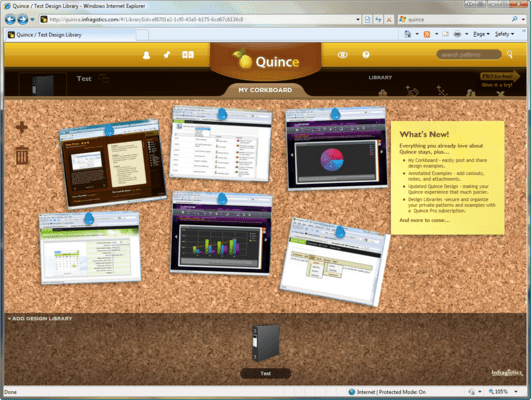
Easily collect examples of the best user experiences by pinning them up onto My Corkboard for later organization into multiple private design libraries. Share these examples across design libraries and with other team members. My Corkboard is always available throughout the Quince Pro workspace from the bottom of your screen, enabling you to use it from any view.
Callout Drawing Tools Make it Easy to Mark Up Examples
You can call attention to any aspect of your examples using the powerful set of callout drawing tools in Quince Pro including arrow callouts, sticky notes, boxes and highlights. Highlight any region of an example that you want to start a conversation on, and annotate it with whatever information you need (including file attachments or URLs). There really is no limit to the number of annotations you can draw on an example, because you can reposition where you see them in the virtual workspace window.
Add Annotations with File and URL Attachments
You can add files and URL-based attachments to any annotations you make on the patterns and examples in Quince Pro. Supplement your pattern and example descriptions using all variety of content types including PDF documents, UML diagrams, CSS stylesheets, screenshots, etc. With annotations and the flexibility of file and URL attachments, your patterns and examples will continually evolve, as the living, breathing design guidance of your team.
Guide the Design Conversation to Effectively Communicate, Collaborate and Cultivate
Keep the design conversation focused and on the record where your design and development teams can see and reply. Make your collaboration efficient and organized with the use of notes, callouts, attached documents, URLs, and related patterns that keep the discussion in context. All content, feedback and comments are right there in Quince Pro rather than filed away in a folder on somebody's desk, the subject of a forgotten water cooler conversation, or in an isolated, month-old e-mail on a finer point of the implementation. Quince Pro is your way to communicate your ideas to all team members, to collaborate on the best patterns and examples, and to cultivate this knowledge into highly successful solutions.
Superior Printing and PDF Export from Quince Pro
When you need a hardcopy of your examples and their associated collateral, or a PDF document that you can share or reference offline, Quince Pro affords you the full convenience to print or export to PDF from within the Quince Pro environment. Your examples and all associated collateral appear in an impressive, neatly formatted document ideal for sharing and reference.
Quince Pro is Hosted in the Amazon Cloud for Best-in-Class Reliability, Scalability, Availability and Security
Quince Pro is a SaaS (Software as a Service) that's completely maintained for you by Infragistics. It is fully hosted Quince Pro in the cloud on Amazon Web Services for its best-in-class reliability, scalability, availability and security. Backups of your data are maintained for as long as you maintain your subscription to Quince Pro, and there's no troublesome installation of software on your end because any client device supporting the latest version of Silverlight can access Quince Pro -- VPN not required.
Build your own private design library.
Pricing: Quince Pro Quince Pro - up to 5 Users - One-year Quince Pro subscription that allows you to have up to 5 users, and total storage of 5 GB. To continue to use the software after 1 year, you need to rebuy a license, Quince Pro Quince Pro - up to 30 Users - One-year Quince Pro subscription that allows you to have up to 30 users, and total storage of 30 GB. To continue to use the software after 1 year, you need to rebuy a license
Operating System for Deployment: Windows 7, Windows Vista
Architecture of Product: 32Bit
Product Type: Application
Keywords: quince pro, infragistics quince pro, quincepro, quince ux, quince ux patterns, quince ui, quince ui patterns, buy quince pro, buy infragistics quince, buy infragistics quince pro, quince pro 30 users, quince pro 15 users, quince pro 5 users, quince pro subscription, quince pro renewal, infragistics quince pro subscription, infragistics quince pro renewal
infragistics, netadvantage, infragistic, ultra suite, calendar widgets, data widgets, netadvantage net, netadvantage 2009, infragistics 2009, infragistics controls, netadvantage for net, infragistics asp.net, activethreed, protoview, sheridan software
User Interface UI
Part numbers: PC-534354-274995 534354-274995 PC-534354-274996 534354-274996
ComponentSource offers a unique global service, used by over 1,000,000 software developers worldwide.