Screenshot Preview

SQL Backup Lite - Récapitulatif

par Red Gate Software - Type de produit : Application

 *

Please note that SQL Backup Lite is no longer available. Please visit the SQL Backup Pro page instead.

Récapitulatif

 *

SQL Backup Lite by Red Gate Software

URLs: red-gate-sql-backup-lite, red gate sql backup lite, redgatesqlbackuplite, red-gate, red gate, redgate

A simple SQL backup tool for small businesses. SQL Backup Lite creates smaller, faster backups of SQL Server databases. Backups are compressed, reducing storage space and hardware requirements (often known as "database zip"), they are created in less time than native backups. SQL Backup is a leading tool for creating, compressing and protecting your SQL Server backups. Compatible with SQL Server 2000, 2005 and 2008, it includes a range of features to make backups faster and simpler.

Manage multiple servers' backup operations remotely. Includes enterprise level functionality. SQL Backup is one of the leading tools for creating, compressing and protecting your SQL Server backups. Compatible with SQL Server 2000, 2005 and 2008, it includes a range of features to make backups faster, simpler and more secure. SQL Backup is used by nearly 5,000 organizations worldwide such as GE, 3M, AT&T, Los Alamos National Labs, Unilever, Panasonic and the US Navy.

With SQL Backup you can:

Save time and space – compress database backups by up to 95%for faster backups and restores

Protect your data – use up to 256-bit AES encryption

Monitor your data – graphic visualization of activities to identify problems before they arise

SQL Backup is available in two editions: Pro and Lite.

Feature:LitePro

Up to 95% smaller backups*YesYes

Integrates with SQL Server to schedule database backup jobsYesYes

Multiple threads to optimize backup performanceYesYes

SQL Server 2005 compatible backupsYesYes

User-friendly GUIYesYes

Timeline Monitoring™ from the GUI so you can visualize and change the properties of past, present, and future activitiesYesYes

Context-sensitive help fileYesYes

Hints embedded in the GUI, so you can have on-the-spot software supportYesYes

Command-line interface so you can run your backup and restore operations in script and batch filesYesYes

Extended stored procedure to run backup and restore operations using Microsoft SQL Server Management Studio, or database connectivity layers such as ADO or OLE DBYesYes

Compression levelStandardHigh

AES Encryption 256-bitNone256-bit

Enterprise and server level reportsNoYes

Email notificationNoYes

Cluster-aware installation mechanismNoYes

Access and manage all server backups remotely, from a central, client-based GUINoYes

Simple log shipping process with the Log Shipping WizardNoYes

Supports clustersNoYes

Supports 64-bit versions of SQL ServerNoYes

Feature list:

Compression – three levels of compression, giving you a choice to optimize for speed or for size*.

Compression Analyzer – samples data to help you determine which compression level is best suited to your requirements.

Extremely secure backups – with 256-bit AES encryption, SQL Backup Pro secures your backup files from unauthorized access.

Management of restoration is easier and requires less time. Complexity is removed through the filtering options provided.

Makes both backing up and restoring faster– as the time taken to back up is significantly reduced, this will reduce the chance of something going wrong during the backup process.

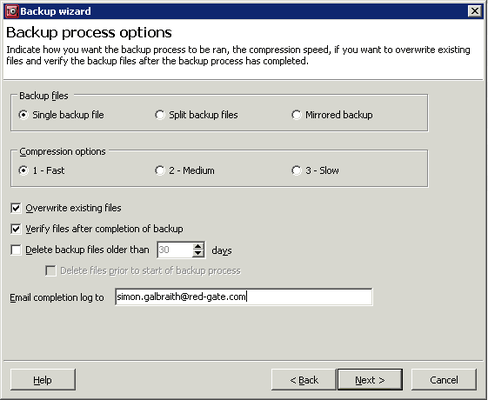
GUI – take advantage of the user-friendly wizards to guide you through the backup and restore process.

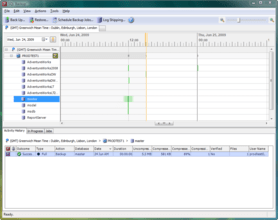
Timeline Monitoring™ lets you visualize the properties of past, current and future activities. The timeline is highly interactive, allowing you to zoom in and out to view potential clashes and the status of backups and restores. With one click, you can quickly change the properties of scheduled backups and restores.

Enhanced backup and restore history are available in both the timeline and the activity history tab, so that you can identify problem areas before they cause backups to fail.

Integrates with SQL Server Agent – so you can schedule database backups to run regularly with no intervention.

Enterprise and server level reporting means you can generate reports across your entire enterprise or just for a single server.

Command-line interface – for power users who want total control of SQL Backup. Use syntax similar to T-SQL's BACKUP and RESTORE commands to set up your maintenance plans.

Extended stored procedure – run backup and restore operations using Microsoft SQL Server Management Studio.

Split backups – take advantage of multi-CPU and high-speed disk array systems to speed up the backup and restore process even further.

Mirrored backups – create two or more backup files simultaneously to different disks, to minimize the possibility of media errors.

Multiple threads within the engine let you achieve backups to a single file faster.

Log Shipping wizard guides you through the process of setting up log shipping backup and restore jobs.

Hints for on-the-spot software support – click the Hints icons on the GUI to read concise tips when you want assistance.

*Please note that if SQL Backup Lite is installed on the SQL Server, you can choose only compression level 0 (no compression) or compression level 1, the default compression level. Level 1 is the fastest compression level, but it can result in larger backup files than backup files produced using compression level 2 or 3. Compression levels 0, 1, 2 and 3 are all available with a SQL Backup Pro license.

SQL Backup 6.4 is a minor release that includes support for additional new keywords:

Keyword support for restoring a database using the latest backups, including all available transaction log files

Keyword support for backing up all user databases or all system databases on an instance

Keyword support for specifying a different source database when restoring from disk (with 'LATEST' keywords)

In addition, there are further bug fixes and enhancements:

DISCONNECT_EXISTING can now be used with RESTORE on databases that are already in a "Recovering" state

Database name is now case-insensitive when restoring with LATEST_FULL

Fixes to automatic deletion of old SQL Backup log files

Fixes to prevent event-log flooding with Microsoft Cluster Service errors on active/active clusters

Miscellaneous minor bug fixes in the engine and GUI

SQL Backup 6.3 is a minor release, including the following enhancements and bug fixes:

New keyword support for network resilience to restore commands

New support for erasing backup files (with options) independently from a backup command

New keyword support for backups to use native SQL Server 2008 Enterprise Edition's compression level

New keyword support for restore jobs to restore the most recent backup file

New dialog to activate serial numbers on multiple servers

Bug fix to be able to import SQL Server registrations into SQL Backup from SQL Server 2008 Management Studio

Improvements to the file browser for 64-bit systems

Improvements around handling the conversion of sqb files

Better error handling for certain situations, such as when deduplication is used or if the disk is running out of space

Miscellaneous minor bug fixes in engine and GUI

Please note that SQL Backup Lite is no longer available. Please visit the SQL Backup Pro page instead.

A simple SQL backup tool for small businesses.

Evals & Downloads: Read the SQL Backup help file, Read the SQL Backup Data sheet, Read the Red Gate End User License Agreement

Operating System for Deployment: Windows Vista, Windows XP, Windows Server 2003, Windows 2000

Architecture of Product: 32Bit, 64Bit

Product Type: Application

Compatible Containers: Microsoft SQL Server 2008, Microsoft SQL Server 2005, Microsoft SQL Server 2000

Keywords: red gate sql backup lite, sql back up lite, sql backup lite, buy sql backup lite, sql backup lite reseller, sql backup lite distributor, buy sql back up lite, sql back up lite distributor, sql back up lite reseller

Red Gate Software Red-Gate RedGate

SQL query language

Storage Store

Database DB Management

Database DB Reporting Report reports

Attention

Pour votre référence, nous avons inclus des liens á Google Translate pour les informations sur le produit qui n'ont pas encore été traduites. Veuillez noter que les traductions automatiques ne sont pas toujours complètement exactes.
Fourni par
Flash est requis dans Firefox et Opera

Recherche produit

Entrez vos critères de recherche :

Informations connexes

View All Related News... 

Pourquoi acheter chez ComponentSource ?

ComponentSource offre un service international unique, reconnu par plus de 1 000 000 développeurs de logiciels partout dans le monde.

Complément d'informations | Notre société

Award