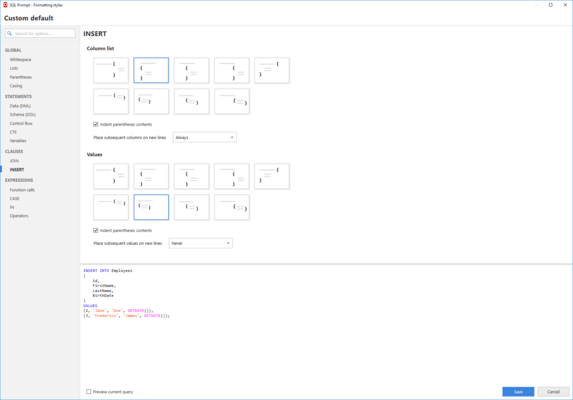
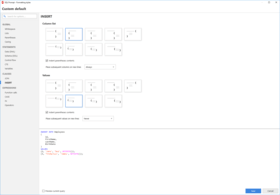
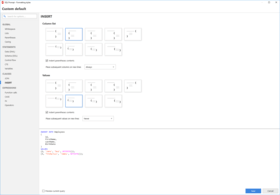
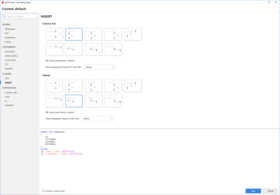
Screenshot Preview

SQL Prompt Pro - Resumen

de Red Gate Software - Tipo de producto: Aplicación

Resumen

 *

SQL Prompt Pro by Red Gate Software

URLs: red-gate-sql-prompt-pro, red gate sql prompt pro, redgatesqlpromptpro, red-gate, red gate, redgate

Intelligent code completion and layout for MS SQL Server. SQL Prompt automates the retrieval of database object names, syntax, and snippets as you write, intelligently offering only appropriate code choices. Automatic script layout provides easy code readability – particularly useful when working with unfamiliar scripts. SQL Prompt is highly productive straight out of the box. It is also customizable so you can make it perform exactly the way you want it to. Using SQL Prompt will improve your productivity and dramatically reduce your time at the keyboard.


SQL Prompt

Write SQL fast and accurately with code completion

Understand code more easily with script layout

Continue to use your current editor – SQL Prompt works within SSMS, Query Analyzer, and Visual Studio

Keyword formatting, join completion, code snippets, and many more powerful features

SQL Prompt simply sits behind the scenes and provides unobtrusive help when you press CTRL+SPACEBAR or when you type "." after a table/view/alias name.

SQL Prompt Pro - Intelligent code completion for SQL Server plus layout for easy code readability.

SQL Prompt Standard - Intelligent code completion for SQL Server.

SQL Prompt works with Visual Studio 2005 and 2008, Query Analyzer, SQL Server Management Studio 2005 and 2008, and SSMS Express Edition.

Feature list

Table/View/Column/Sproc name completion

Layout makes scripts easy to read

JOIN/JOIN ON syntax completion

Expand wildcard to column names list

Object creation-SQL viewing pane

Mouse-over tool tips that give object definitions including a useful summary

Parameter hinting for user-defined functions

Cross-database queries

Distributed queries with linked SQL Server instances

Scripted objects included in candidate list

Cursors, cursor variables, and related statements

Auto-uppercasing of keywords and pop-up after keywords

Column selector screen, plus qualify object/column names option

FeatureStandardProSupported for Visual Studio

Code completion•••

Instant access to schema information•••

SQL snippets•••

Statement expansion•••

Find invalid objects••

Search••

Column dependencies•••

Auto-generation of aliases•••

Script as ALTER from query window••

Wildcard expansion - single instance•••

Wildcard expansion - entire script ••

Format SQL •

Decrypt encrypted objects •

Summarize scripts •

Find unused variables and parameters •

Qualify object names •

Smart rename •

Split table •

Encapsulate as stored procedure •

Uppercase keywords •

What's New in SQL Prompt Pro V5.0

SQL Prompt 5 includes a number of significant new features:

Find Invalid Objects - SQL Prompt 5 enables you to easily find invalid objects in your database. This can be useful, for example, if you have inherited a legacy database and you want to know if objects are referencing other objects that no longer exist in the database.

Script Object as ALTER from a query window - If you are navigating a query that contains a reference to an object, SQL Prompt 5 enables you to script out that object directly from the query window by pressing F12.

View column dependencies - SQL Prompt 5 enables you to view a list of objects that reference a column.

SQL Refactor functionality - SQL Refactor has been retired with the release of SQL Prompt 5. Much of the functionality of SQL Refactor is now available in SQL Prompt Professional Edition, including the following:

Smart Rename

Qualify Object Names

Expand Wildcards

Split Table

Encapsulate as New Stored Procedure

Find Unused Variables and Parameters

Summarize Script

SQL Prompt 4 Release notes

Enhanced user interface

The user interface for intellisense suggestions and object definitions has been redesigned to be less intrusive and to make SQL Prompt's features more easily discoverable.

The Options dialog box has also been completely reinvented, with better navigation and a rationalised set of options.

Improved SQL Grammar support

Enhanced T-SQL grammar support for SQL 2000, SQL 2005 and SQL 2008 SQL server editions. Suggestions are more accurate and reliable, and cover a more extensive scope of T-SQL.

Performance improvements

SQL Prompt 4 caches database objects dramatically faster than SQL Prompt 3, and does so much more quickly across high latency networks.

Snippet enhancements

Snippets are now stored as separate files, and so can be easily shared among other SQL Prompt users.

There is a new, separate interface for creating and managing your snippets, including an option to go to the folder where snippets are stored.

Column picker

The column picker has been radically improved, so that it is simpler to find and use, for example it is now clearly labelled, and shows the number of columns currently selected.

Options

Many SQL Prompt 3 options have been removed and replaced with sensible defaults, to simplify the configuration and make more intuitive behavior. The Options dialog box itself has been drastically re-engineered so that it is much quicker to find the option you want, understand its purpose, and preview its effect.

Right-click context menus

Right-click context menus have been implemented inside your query editor for creating SQL Prompt snippets and applying your preferred formatting to code.

Temporary storage only of database objects on disk

Database objects are only cached during your current session. When closing down your query editor, the SQL Prompt object cache is emptied, to save disk space. Offline mode working is therefore no longer supported.

Format styles (Pro feature)

Styles allow you to save and share your format options with other SQL Prompt users.

Decrypts encrypted objects: (Pro feature)

SQL Prompt 4 can now decrypt encrypted objects from SQL 2000, SQL 2005 and SQL 2008 to allow you to view their creation script.

Importing snippets and aliases

As a major new installation, existing user-created snippets and aliases or your old configuration options will not automatically be imported into v4. Red Gate offers two free tools that help migrate snippets and aliases from v3.9, Snippet migrator and Alias importer.

Installing SQL Prompt 4 will disable SQL Prompt 3 and start a new trial period. If you wish to re-enable SQL Prompt 3 you will need to uninstall SQL Prompt 4. If you have user-defined aliases or snippets in SQL Prompt 3 which you wish to retain, we have a migration tool available.

Intelligent code completion and layout for MS SQL Server.

Pricing: SQL Prompt Pro 5.3 with 12 Months of Support and Upgrades 1 User License, SQL Prompt Pro 5.3 with 12 Months of Support and Upgrades 5 User License, SQL Prompt Pro 5.3 with 12 Months of Support and Upgrades 10 User License, SQL Prompt Pro 5.3 with 24 Months of Support and Upgrades 1 User License, SQL Prompt Pro 5.3 with 24 Months of Support and Upgrades 5 User License, SQL Prompt Pro 5.3 with 24 Months of Support and Upgrades 10 User License, SQL Prompt Pro 5.3 with 36 Months of Support and Upgrades 1 User License, SQL Prompt Pro 5.3 with 36 Months of Support and Upgrades 5 User License, SQL Prompt Pro 5.3 with 36 Months of Support and Upgrades 10 User License, SQL Prompt Pro 5.3 Renewal License - 12 Months of Support and Upgrades 1 User Renewal License, SQL Prompt Pro 5.3 Renewal License - 12 Months of Support and Upgrades 5 User Renewal License, SQL Prompt Pro 5.3 Renewal License - 12 Months of Support and Upgrades 10 User Renewal License, SQL Prompt Pro 5.3 Renewal License - 24 Months of Support and Upgrades 1 User Renewal License, SQL Prompt Pro 5.3 Renewal License - 24 Months of Support and Upgrades 5 User Renewal License, SQL Prompt Pro 5.3 Renewal License - 24 Months of Support and Upgrades 10 User Renewal License, SQL Prompt Pro 5.3 Renewal License - 36 Months of Support and Upgrades 1 User Renewal License, SQL Prompt Pro 5.3 Renewal License - 36 Months of Support and Upgrades 5 User Renewal License, SQL Prompt Pro 5.3 Renewal License - 36 Months of Support and Upgrades 10 User Renewal License

Evals & Downloads: Read the SQL Prompt help file, Read the SQL Prompt Data sheet, Read the Red Gate End User License Agreement, Download the SQL Toolbelt evaluation on to your computer - Expires after 14 days

Operating System for Deployment: Windows Vista, Windows XP, Windows Server 2003, Windows 2000

Architecture of Product: 32Bit

Product Type: Application

Compatible Containers: Microsoft SQL Server 2008, Microsoft SQL Server 2005, Microsoft SQL Server 2000, .NET Framework 3.5, .NET Framework 3.0

Keywords: SQL Prompt Pro SQLPrompt

Red Gate Software Red-Gate RedGate

SQL query language

Database DB Management

Database DB Reporting Report reports

Part numbers: PC-518564-568028 518564-568028 PC-518564-568030 518564-568030 PC-518564-568032 518564-568032 PC-518564-568034 518564-568034 PC-518564-568036 518564-568036 PC-518564-568038 518564-568038 PC-518564-568040 518564-568040 PC-518564-568042 518564-568042 PC-518564-568044 518564-568044 PC-518564-568046 518564-568046 PC-518564-568048 518564-568048 PC-518564-568050 518564-568050 PC-518564-568052 518564-568052 PC-518564-568054 518564-568054 PC-518564-568056 518564-568056 PC-518564-568058 518564-568058 PC-518564-568060 518564-568060 PC-518564-568062 518564-568062

Mfr. Part No: P72U10M12 P72U10M24 P72U10M36 P72U1M12 P72U1M24 P72U1M36 P72U5M12 P72U5M24 P72U5M36

Atención

Para su comodidad, hemos incluido enlaces a Google Translate para traducir la información del producto que todavía tenemos que traducir. Por favor, tenga en cuenta que traducciones automáticas no siempre son totalmente exactas.
Con la tecnología de
Requiere Flash en Firefox y Opera

Búsqueda de productos

Escriba palabras de búsqueda:

¿Por qué comprar en ComponentSource?

ComponentSource ofrece un único servicio global, utilizado por más de 1.000.000 de desarrolladores en todo el mundo.

Más Información | Sobre Nosotros

Award