일반 적인 소비자 가격은 하기에 표시되어 있습니다. 고객님의 할인가격은 표시 하시려면 로그인 해주시기 바랍니다.
Refactor! Pro for .NET V3.0.8
| 주문 |
₩ 146,200 |
1 Developer License - Includes one year subscription |
|
다운로드 (21.0 MB) |
Refactor! Pro for .NET V3.0.8 and CodeRush for Visual Studio.NET V3.0.8
| 주문 |
₩ 369,200 |
1 Developer License - Includes one year subscription |
|
다운로드 (42.3 MB) |
가격에는 ComponentSource의 기술지원 요금이 포함되어 있습니다. 또한 다운로드 판매를 하고 있는 상품의 대부분은 온라인 백업요금이 포함되어 있어서 구입날로부터 30일 이내에 새로운 버전이 발매된 경우 무료로 업그레이드해 드리고 있습니다. 모든 주문에 대해서 당사표준 계약조건 및 반품조건 의 내용이 적용됩니다. 다음의 경우,고객 서비스로연락하시기 바랍니다. (상기의 리스트에 게재되지 않은 대량의 라이센스나 구 버전 등의 라이센스 옵션이 필요한 경우)
일반 적인 소비자 가격은 상기에 표시되어 있습니다. 고객님의 할인가격은 표시 하시려면 로그인 해주시기 바랍니다.
What’s new in Refactor! Pro V3.0x?
Refactor! Pro 3.0 adds 27 new refactorings, including 15 dedicated to ASP.NET, 3 for XAML, and 9 for C#, VB, C++, and, as an early experience option, we've added refactoring support for JavaScript.
New source code refactorings in this 3.0 release:
- Consolidate Using Statements
- Convert to Auto-implemented Property (convert all)
- Convert to Built-in Type
- Convert to Create & Set
- Convert to Initializer
- Convert to IsNothing
- Convert to System Type
- Expand Lambda Expression
- Inline Alias
New XAML refactorings in this 3.0 release:
- Extract to XAML Resource
- Extract to XAML Resource (replace all)
- Replace with XAML Resource
New ASP.NET refactorings in this 3.0 release:
- Add AssociatedControlID Attribute
- Add RunAt Attribute
- Convert to Pixels
- Convert to Points
- Convert to Skin
- Extract Script
- Make Id Unique
- Merge Styles
- Move Style Attributes to External CSS
- Move Style Attributes to Theme
- Move Style Attributes to Theme (use SkinId)
- Reorder Attributes
- Set CssClass
- Split Style
- Toggle ViewState
What's new in Refactor! V2.5x?
- Convert to Auto-Implemented Property - Removes the backing store and converts a property to an auto-implemented property. (C# 3.0 only)
- Create Backing Store - Converts an auto-implemented property to a conventional property with a backing store. (C# 3.0 only)
- Extract String to Resource - Extracts the string at the caret into a resource file.
- Extract XML Literal to Resource - Extracts this embedded XML literal to a resource file. (VB 9.0 only)
- Inline Constant - Replaces a constant reference with its defined value, removing the constant declaration if there are no other references to it.
- Introduce Alias - Introduces a new file-scoped alias for the current type or namespace name and replaces it with the newly-created alias.
- Introduce Alias (replace all) - Introduces a new file-scoped alias for the current type or namespace and replaces all references to it in the current file with the newly-created alias.
- Introduce Constant (local) - Declares a new local constant, initialized to the value of the string or number at the caret.
- Make Explicit - Converts the implicitly-typed local variable to a variable with an explicit type. (C# 3.0 and VB 9.0 only)
- Make Explicit (and Name Anonymous Type) - Converts the implicitly-typed local variable to a variable with an explicit type, creates a named type to represent the expression on the right, and replaces the anonymous type with a newly-declared type. (C# 3.0 and VB 9.0 only)Other anonymous types in this project having the same shape will also be replaced by the new type.
- Make Implicit - Converts an explicitly-typed variable declaration to an implicit one. (C# 3.0 and VB 9.0 only)
- Remove Redundant Assignment - Removes redundant initialization of a variable.
- Rename Type to Match File - Renames the type to match the file name, updating references as necessary.
- Widen Scope (promote to constant) - Moves the local constant declaration out of the member and up to the type, replacing all matching values in the type with a reference to the constant.
What’s new in Refactor V2.2.x?
- Add Parameter - New refactoring: Adds a new parameter to a method declaration and updates all calls accordingly
- Add Validator - New refactoring: Adds one or more selected Validators to the active input control (the control containing the caret). [ASP .NET only]
- Boolean to Enum - New refactoring: Converts a Boolean type to an enumeration, updating client code if necessary
- Break Apart Parameters - New refactoring: Places each parameter on a separate line
- Create Method Stub - New refactoring: Generates a method for the selected call, with appropriate parameters and return result
- Extract ContentPlaceHolder - New refactoring: Moves the selected content from a .master page to a new .aspx file, placing it inside tags, and inserts a new tag at the extraction point inside the master page. [ASP .NET only]
- Extract ContentPlaceHolder (and create master page) - New refactoring: Moves the content that is outside of the selection (in the active .aspx page) to a new master page, inserting a tag to reference the extracted content, and then wraps the selection in the aspx page with tags and adds a MasterPageFile attribute to link to the new master page. [ASP .NET only]
- Extract Function (outside of class) - New refactoring: Moves selected code into a new function within the enclosing namespace. [C++ only]
- Extract Style (class) - New refactoring: Converts an inline style to a named class style. [ASP .NET only]
- Extract Style (id) - New refactoring: Converts an inline style to a named id style. [ASP .NET only]
- Move Method to Header - New refactoring: Moves a method from a source file into the class declaration (in the header file). [C++ only]
- Move Method to Source File - New refactoring: Move a method's implementation to a source file and create a declaration in the header file. [C++ only]
- Move Style Attributes to CSS - New refactoring: Moves styling attributes from the active control to a new CSS class and applies the class to the control. [ASP .NET only]
Simplify your .NET Code
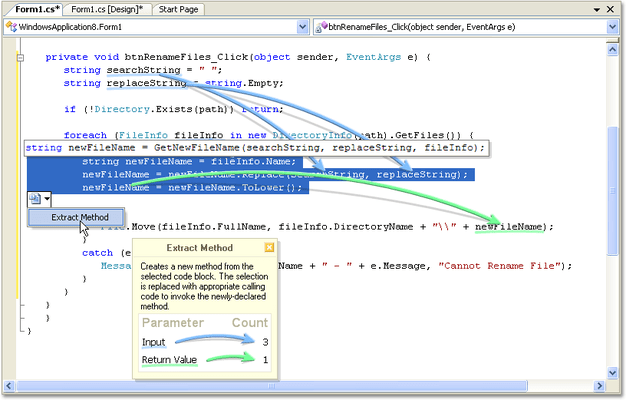
- To perform an extract method, just select the block of code you want to extract, and press the Refactor Key
- To reorder parameters, place the cursor on the type of the parameter and press the Refactor Key
- To create a method overload, place the cursor at the start of the method declaration and press the Refactor Key
- To reverse a conditional or replace a nested conditional with a guard clause, place the cursor on the "if" keyword and press the Refactor Key
Refactor is one of the only code simplification and refactoring tools able to provide so much functionality with just one key.
Say Goodbye to Modal Speed Bumps
Developers need tools that help them concentrate on producing code. Complex modal user interfaces, code preview windows, and distracting popup dialogs slow you down. With Refactor, nothing gets between you and your code. All Refactor UI is grafted onto the surface of the editor. So if you need to reorder parameters to a method, you'll actually see the parameters move in the code.
Refactor is one of the only refactoring and code simplification tools to ship without any modal interface to slow you down.
Cut and Paste Refactoring
Much of refactoring is simply about moving code from one location to another. Refactor exploits the clipboard to allow you to initiate refactorings simply by cutting from one location and pasting at a target location. Let's say you need a new, small method derived from a chunk of a large, unwieldy method. These large complicated code blocks can be daunting to even highly-skilled coders but with Refactor you can simply cut out a chunk from the big method and paste it where you want the new method to appear.
Refactor is one of the only refactoring and code simplification tools to use cut and paste as an entry point to refactoring.
Refactoring Smart Tags
While you work, Refactor analyzes the code, looking for opportunities to simplify. When a refactoring is available, you'll see a refactoring smart tag appear below the identifier at the caret or near the selected code block. Just click the smart tag to see which refactorings are available.
Multiple Language Support
Refactor is designed to be completely language neutral, just like Visual Studio .NET. While refactor currently supports Visual Basic and C#, the remarkable thing is that the refactorings are all coming from a single code base. There is no language-specific C# or VB code in the product. That means when the CodeRush Core Engine gains support for a new programming language, Refactor will too.
Refactor! is one of the only refactoring and code simplification tools that supports both Visual Basic and C#
Extensibility
Refactor! was built upon the DXCore for Visual Studio .NET extensibility framework, and exposes additional interface that developers can easily exploit to create their own custom refactorings and code simplification tools. Note: CodeRush is not required to be able to use Refactor!
Refactor is one of the only refactoring and code simplification tools with built in extensibility