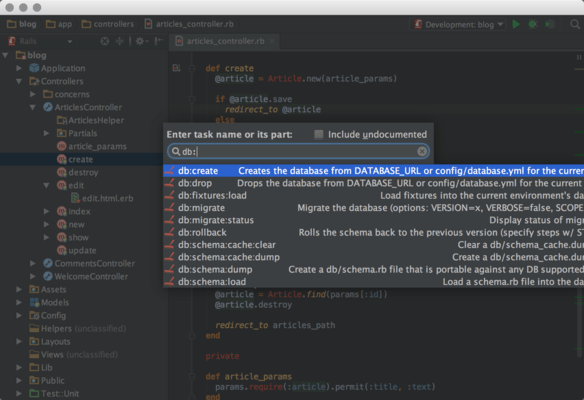
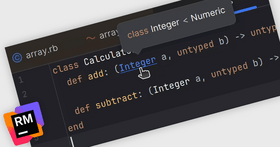
Screenshot Preview

RubyMine

by JetBrains - 상품타입: 어프리케이션

주의 : 별도의 안내가 없는 경우에는 영어제품 입니다.

*

Ruby and Rails IDE that provides essential tools for developers. RubyMine brings a whole range of developer tools, all tightly integrated together to create a development environment for productive Ruby development and Web development with Ruby on Rails. RubyMine includes the Smart Ruby Coding Assistance which is an intelligent Ruby code editor, with complete Ruby coding assistance, smart, scope-based and type-aware code completion. RubyMine also includes syntax and error highlighting and code formatting along with code refactoring and intention actions. RubyMine supports Windows, Mac OS X and Linux platforms.

$146.02
통화 선택

일반 적인 소비자 가격은 하기에 표시되어 있습니다. 고객님의 할인가격은 표시 하시려면 로그인 해주시기 바랍니다.

RubyMine V3.0   *

주문 $ 146.02 1 Commercial License (for companies, organizations and individuals) for 1-9 Licenses (price per license) - includes Upgrades for 1 Year  * 다운로드 (209.9 MB)
주문 $ 144.53 1 Commercial License (for companies, organizations and individuals) for 10-19 Licenses (price per license) - includes Upgrades for 1 Year  * 다운로드 (209.9 MB)
주문 $ 141.55 1 Commercial License (for companies, organizations and individuals) for 20-49 Licenses (price per license) - includes Upgrades for 1 Year  * 다운로드 (209.9 MB)
주문 $ 87.22 1 Upgrade Subscription Renewal - includes Upgrades for 1 Year  * 확인 다운로드 (209.9 MB)

가격에는 ComponentSource의 기술지원 요금이 포함되어 있습니다. 또한 다운로드 판매를 하고 있는 상품의 대부분은 온라인 백업요금이 포함되어 있어서 구입날로부터 30일 이내에 새로운 버전이 발매된 경우 무료로 업그레이드해 드리고 있습니다.  모든 주문에 대해서 당사표준 계약조건 반품조건 의 내용이 적용됩니다. 다음의 경우,고객 서비스로연락하시기 바랍니다. (상기의 리스트에 게재되지 않은 대량의 라이센스나 구 버전 등의 라이센스 옵션이 필요한 경우)

일반 적인 소비자 가격은 상기에 표시되어 있습니다. 고객님의 할인가격은 표시 하시려면 로그인 해주시기 바랍니다.

 *

What’s new in RubyMine V3.0?

  • Rails 3.0 - RubyMine 3.0 provides complete support for Rails 3.0. The complete set of up-to-date developer tools is supported, such as RSpec 2.0, Bundler 1.0, Cucumber 0.9.x and RVM. RubyMine 3 adds an ability to install any Rails gem version from the New Project wizard.
  • Ruby Code Coverage With RCov - Code coverage reports are now available in RubyMine for Rails, Ruby Script, Test::Unit, Shoulda, Cucumber, RSpec run configurations and for Rake tasks. RCov needs to be enabled in the 'Coverage' tab inside run configurations settings and works in both Run and Debug modes.
  •  Reliable Ruby/Rails Debugger - RubyMine 3 features a significantly improved Ruby debugger that just works without additional configuration or manual gems installation. Especially for Windows users RubyMine contains a pre-compiled ruby-debug-ide gem bundled to simplify the debugging. Just hit Debug and it works.
  • Better Git Support, Plus Mercurial - Git integration has been improved with new options such as Git log view and Show file history for folder. RubyMine 3.0 also provides out of the box Mercurial VCS integration.
  • JavaScript Debugger - Let RubyMine install a special Mozilla Firefox plugin for you and debug your JavaScript code from RubyMine, in the same debugger UI, with conditional breakpoints, frames/variables/watches views and evaluate expression function.
  • Zen Coding For Fast HTML/CSS Coding - Code HTML and CSS faster—with Zen coding snippets. The snippets work for new code generation and for surrounding existing elements.
  • Integration with Issue Trackers - RubyMine integrates with the following issue trackers: JIRA, JetBrains YouTrack, Lighthouse, Pivotal Tracker, GitHub and Redmine.

What’s new in RubyMine V2.0.2? - This IDE update fixes some reported issues, introduces compatibility with the latest Ruby/Rails development libraries and tools, and improves existing integrations:

  • RVM gemsets support added
  • Bundler gem is supported up to version 0.9
  • RubyMine now bundles pre-compiled ruby-debug gem for Windows users of Ruby 1.8
  • HAML markup smarter auto-Indentation and other HAML enhancements
  • Cucumber support improvements and fixes

What’s new in RubyMine V2.0?

  • Supports Ruby 1.9 and latest Rails
  • New refactorings and duplicates detection
  • Easier Testing with Cucumber, Shoulda and RSpec
  • Web Pages Building With HAML and Sass
  • New Code Inspections and 'Quick Fix' actions
  • Rails i18n and Spell-checker
  • Extending IDE Scripts in Ruby
  • Improved RubyMine UI and usability
  • Continuous Integration with TeamCity

What’s new in RubyMine V1.1.1?

  • All RubyMine's version control integration features now work with Subversion 1.6.
  • Improved 'Unresolved Ruby reference', 'Unreachable code' and other Ruby/Rails inspections
  • Fixed some problems in 'Extract Method' and 'Rename' refactorings
  • Resolved some code completion issues and general code editor issues
  • Fixed exceptions in Gem manager
  • Fixed 'Go To Test/Subject' navigation for HAML views
  • Pressing # key converts selected ruby expression to "#{SELECTED_EXPRESSION}"
  • Fixed JRuby debug problem with 'Step over'
  • 'Tools | Rake Tasks' no longer shows undocumented tasks. For undocumented tasks use 'Tools | Run Rake Task'

What’s new in RubyMine V1.1?

  • Rails (2.3.x) support - With version 1.1 RubyMine fully supports the latest stable Ruby on Rails framework version 2.3.2 and provides special support for some of the features
  • Application Templates - Select an application template while creating a new Rails project to customize the application skeleton or perform routine tasks on project creation.
  • Localized Views - RubyMine knows views can be localized. They are grouped accordingly when showing in Project view and you can chose which to open when switching to view from an action.
  • Code Insight - render 'show' render 'users/login'
  • HAML syntax highlighting - Now RubyMine simplifies writing Rails views in HAML. Syntax highlighting for the markup and the injected ruby code is only the first step. Future versions will add more assistance for working with this markup language.

Cucumber BDD framework support

  • .feature files syntax highlighting - Syntax highlighting for .feature files makes writing and reading them easier.
  • GUI Test Runner for Cucumber - Cucumber tests are executed in the unified Test Runner UI with visual notification of test results, details and statistics for whole suit, a single scenario and step.
  • Running Cucumber Tests. Run Configurations - You can run all feature files in a folder, a single file or any set of tests using a Rake task. Run configurations for Cucumber tests allow creating custom configurations, e.g. by tags, and are useful to quickly execute tests from anywhere inside the IDE.

Remote Debug for Ruby and Rails - If you need to investigate a problem on a remote server, you can do it using Remote Debug from RubyMine 1.1. Create special remote debug run configuration, map source folders on remote and local machines, and explore what's happening on the remote machine.

DRb server support for Rspec - Start RSpec DRb server and run your tests on it — all from RubyMine. Select Tools | Run RSpec DRb Server, set your RSpec run configuration to execute tests on that server and that's it.


 *

RubyMine Features

Ruby

  • Smart Ruby Coding Assistance - Intelligent Ruby code editor, with complete Ruby coding assistance, smart, scope-based and type-aware code completion. Ruby code completion uses type inference and offers extremely accurate results.
  • Ruby Syntax Highlighting and Code Styling - Fully customizable Ruby syntax highlighting with brace matching and folding. Additional color and keyboard schemes bundled for seamless transition to RubyMine.
  • Ruby-Aware Refactorings and Intention Actions - Extract method, introduce variable, and other Ruby-aware refactorings and intention actions to automatically transform Ruby code.
  • Automatic Code Inspections - Smart on-the-fly inspections for Ruby, Rails, HTML, JavaScript and CSS instantly point out errors and offer one-click quick-fixes.
  • Advanced Ruby Code Navigation and Search - Many specialized views to explore your Ruby projects. Search and navigate around with the good old Usage Search, jump to overridden methods, classes and modules with active gutter icons, and more.
  • Version Control Integration - VCS changelists, code compare, merge and more tools for all modern version control systems, including Git, Perforce, Subversion, and CVS.
  • Integrated Ruby Gems Manager - Browse local and remote gems, install the missing ones and add them to your project in a simple and convenient UI.

Ruby on Rails
RubyMine is designed to fully support Ruby on Rails development with dedicated run configurations, complete RHTML coding assistance, and more. All of the Ruby-aware features are at your disposal for creating Rails applications. Of course, the same goes for HTML, CSS and JavaScript editing support.

  • Advanced Application Views and Navigation - The special “Rails” Project View shows Controllers, Models, Views, and DB migrations providing logical grouping and quick access to these items and their contents such as controller methods, associated views, etc.
  • Ruby-on-Rails-aware Code Completion - Parameters completion for Rails-specific methods such as render, validates_*, find_by, etc. Understanding Rails models types in the code.
  • RHTML Support with Coding Assistance - RHTML syntax coloring and formatting, code completion, refactoring and intention actions, all available both for HTML markup and Ruby code within RHTML files.
  • Quick Documentation Lookup - Multiple ways to get hints and documentation for Ruby code. View Method parameters, RDoc documentation for a symbol, all with a single keystroke. Doc is built on the fly from code comments.
  • Running Rails Applications - Run Ruby on Rails applications right from RubyMine and monitor server and application logs.
  • Graphical Ruby Debugger - Full Ruby and Rails applications debugging support in IntelliJ IDEA’s tried and true debugger UI.

주의

제품 리뷰의 한국어 번역이 완료되지 않는 제품은 Google통역 서비스와 연동되어 표시되어 있습니다.통역 기계에 의한 자동 번역인 관계로 한국어 표기가 조금 부자연 스러운 점 양해 바랍니다.
에서 제공
FireFox와 Opera에서는 Flash가 필요합니다.

상품검색

검색어를 입력해주세요:

Quick 링크

개발처/발매처

주요 카테고리

관련 상품

ComponentSource에서 구입하는 이유?

ComponentSource는 세계 1,000,000명 이상의 개발자에게 각종 글로벌 서비스를 제공합니다.

상세 | About Us

화면 바로가기 갤러리

클릭해서 이미지를 확대

 RubyMine - Application - V3.0의 스크린샷  RubyMine - Application - V3.0의 스크린샷  RubyMine - Application - V3.0의 스크린샷  RubyMine - Application - V3.0의 스크린샷
Award