de Accusoft Pegasus (formerly Pegasus Imaging Corp.) - Tipo de producto: Componente / .NET WinForms / .NET Class / .NET WF
ScanFix Xpress .NET by Accusoft (formerly Pegasus Imaging Corp.)
URLs: scanfix-xpress, scanfix xpress, scanfixxpress, accusoft-pegasus, accusoft pegasus, accusoftpegasus
Scanned image cleanup SDK. ScanFix Xpress .NET improves image quality and increases content recognition accuracy by applying image processing and enhancements to color, grayscale, and black and white images. ScanFix Xpress provides brightness/contrast correction, clean up of noisy colors, color detection, color drop out or color extract, plus many additional image cleanup features. Remove lines and dot shading, smooth and repair characters, and eliminate unnecessary borders. An Auto Binarize operation easily converts images from color or grayscale to black and white. ScanFix Xpress includes the ImagXpress component, and integrates easily with other Accusoft Pegasus components to create document capture systems.

ScanFix Xpress Primary Features:
Fast and effective image cleanup on bitonal, grayscale, and color images.
Color detection, brightness/contrast adjustment, color drop, noise reduction, and various filters applied to 24-bit and 8-bit images.
Deskew, auto-negate, auto-border crop, image registration, blank page and blank rectangle detection, flip, dilate, erode, mirror, rescale, rotate, and shear applied to 1-bit, 8-bit and 24-bit images.
Despeckle, line removal, blob and hole removal, dot shading removal, correction of inverse text, and comb removal applied to 1-bit images.
Confidence reporting on clean up results.
Save batch processing instructions to support application workflow among other components including FormFix, FormDirector, SmartZone, and Barcode Xpress components.
Seamlessly integrate with other Accusoft Pegasus components, including ImagXpress, Notate Xpress, TwainPRO, PrintPRO, ImageGear and others.
Improve content recognition accuracy
Create smaller compressed files
When standard enhancement and cleanup aren't enough, and your scanned documents seem beyond repair, ScanFix Xpress is the SDK for the job. Building on Accusoft's 20 years of image enhancement patents, research, and development, ScanFix Xpress SDK delivers industry-leading color, grayscale, and bitonal image cleanup, and boasts a collection of image enhancement options.
Using the cleanup and enhancement features that ScanFix Xpress has to offer, you can easily improve the results of your scanned images, reduce file sizes, and prepare your images for further processing, such as OCR.
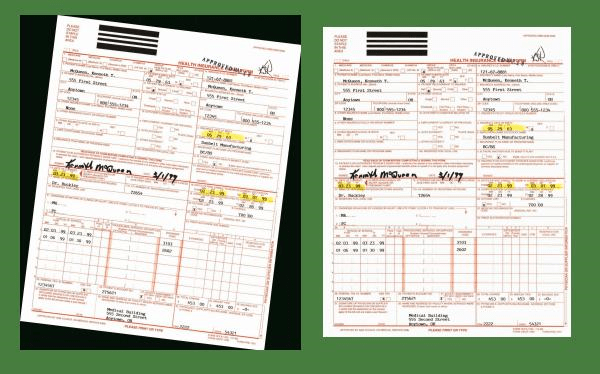
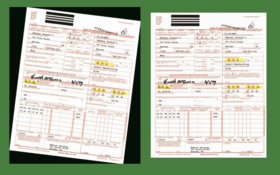
Color Deskew and Crop
Color Detect with Automatic Binarization
Color Drop
Image Detergent
Image Filters
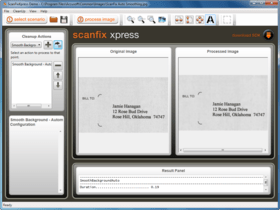
Noise Removal and Character Smoothing
Dot Shading Removal
and more
.NET Technical Notes
Programming environments include: Visual Studio 2005 and Visual Studio 2008
Deployment environments include: Windows 2000, XP, Vista, and Windows 7; Server 2000 / 2003 / 2008
Sample code is included for:
VS 2005 (VB.NET and Visual C#)
VS 2008 (VB.NET and Visual C#)
AnyCPU deployment supports 64-bit and 32-bit Windows applications
Deploys within .NET as a managed control and is fully compliant with .NET Framework 2.0 and above
Can be used in multi-threaded applications
Confidence values available for many cleanup operations
Includes 6 controls: ScanFix Xpress v6, ImagXpress Professional v10, NotateXpress v10, ThumbnailXpress v3, TwainPRO v6, and PrintPRO v5
Color Detect & Auto Binarize
Color Detect:
Allows for mixed document color scanning applications containing both color and black and white documents
Analyzes 24-bit images looking for significant amounts of saturated color data
Recommends if color images can safely be converted to bitonal
Auto Binarize:
Provides improved automatic conversion of 8-bit and 24-bit grayscale and color images to black and white
Automatic mode analyzes images to determine best binarization methods and settings
Offers user-configurable options to fine tune results
Color Removal
Color Drop:
Locates specified RGB colors in 24-bit images and drops those colors to white or a specified color
Identifies pixels to change based on proximity to user-specified color values
Provides very precise control over color manipulation
Supports color conversion and color blending to target color
Virtual Bulb ®:
Performs software-based HSV color dropout on 24-bit images, emulating a hardware-based dropout scanner through much more powerful and flexible technology
Allows multiple hues and ranges within hues to be dropped to white and adjacent colors to fade into shades of gray
Compensates for variations in color saturation and brightness caused by printing environments
Image Detergent ® & Filters
Image Detergent:
Cleans up noise and variations in specified colors in 24-bit color images
Flattens each color region to a specified color by adjusting each color region to its center point
Offers an automatic mode to clean dominant colors or can specify color list
Removes JPEG compression artifacts commonly found around characters in scanned color documents
Allows multiple colors to be adjusted without increasing processing time
Removes JPEG compression artifacts commonly found around characters in scanned color documents
Filters:
Applies various filter operations to 8-bit and 24-bit images
Offers a variety of options including smoothing filters (Gaussian, median, average), sharpening filters (unsharp mask), morphological filters (dilate, erode, open, close), edge detection filters (Laplacian, Prewitt), and provision for user defined convolution filters
Page Enhancement
Color Deskew:
Automatically straightens crooked 1, 8, and 24-bit images
Reports correction angle in a fraction of a second, based on image contents, not document perimeter or border
Offers user configurable High Quality vs. High Speed setting
Auto Border Crop:
Automatically converts dark borders to white or removes border completely on 1, 8, and 24-bit images
Reduces image file size (physical dimensions and compressed file size)
Automates border crop (user configurable to report or automatically correct)
Use on microfilm/microfiche scans or small document images
Blank Page / Blank Rectangle Detection:
Identifies and reports blank pages, or blank areas of interest, on 1, 8, and 24-bit images
Configures settings to accommodate bleed-through or noisy images (i.e. ignore hole punches)
Increases storage capacity by eliminating blank pages
Image Registration:
Registers the image "contents" to be a specified distance from the top and/or left side of the page
Applies to 1, 8, and 24-bit images
Use with zonal recognition to establish the position of the text
Character Enhancement
Character Completion & Smoothing:
Repairs, smoothes, and thickens incomplete characters on 1-bit images
Performs well on poor dot matrix text
Smoothes ragged edges on letters
Dilate and Erode:
Thickens or thins objects in 1, 8, and 24-bit images
Apply horizontal, vertical, or diagonal adjustments
Increases recognition accuracy in lightly printed or very thick text
Hole Punch & Line Removal
Hole Punch & Blob Removal:
Removes hole punches and larger areas of black on 1-bit images
Enables user configurable threshold settings
Line Removal:
Automatically removes solid or broken lines (horizontal and vertical) from scanned forms and documents on 1-bit images
Automatically repairs text that intersects with lines (fill broken characters), essential for accurate OCR / ICR and forms processing
Comb Removal (commonly used in ICR forms):
Automatically removes data entry combs from forms in 1-bit images
Automatically repairs text that intersects with lines (fill broken characters), essential for accurate ICR
Background Cleanup
Noise Removal:
Removes random specks or noise on 1-bit images
Performs speck removal based on user-specified speck size
Dot Shading Removal:
Automatically removes dot shading for improved OCR accuracy on 1-bit images
Removes scanner noise caused by colored backgrounds
Significantly reduces compressed file sizes without destroying text
Text Correction
Auto Inverse Text Correction:
Detects and automatically converts inverted text zones on 1-bit images
Changes white-on-black text to normal black-on-white
Auto Negate:
Analyzes 1, 8, and 24 bit images to determine if they are inverted (light text on dark background, dark text on light background)
Offers automated correction to reverse colors, if needed (user configurable to report or automatically correct)
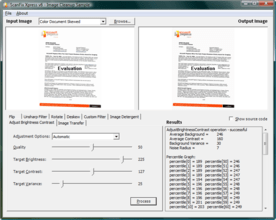
Adjust Brightness & Contrast
Analyzes and corrects the brightness and contrast of 8-bit grayscale and 24-bit color document
Corrects the image using either a globally applied brightness remapping or adaptive remapping
Additional Image Processing
Performs Flip, Mirror, Rescale, Rotate, and Shear on 1, 8, and 24-bit images
Offers Smooth-Zoom to double the width and height of a 1-bit image and smooth objects for better recognition (ideal for improving barcode and OCR results)
Sub-Image Processing
Applies to 1, 8, and 24-bit images
Separates out an area, from the original document image, prior to image processing
Speeds up processing and outputs only the smaller area of interest
ScanFix Xpress includes the following components:
ScanFix Xpress for image cleanup
ImagXpress for image compression/decompression and display
NotateXpress for adding image annotations
PrintPRO for printing
ThumbnailXpress to view thumbnail images
TwainPRO to acquire images from TWAIN devices
What's new in ScanFix Xpress Version 6
Automatic Color Detection - analyzes image content then recommends if images should remain color or can safely be converted to bitonal
Automatic Binarization - greatly improved for color and grayscale images
Brightness and Contrast Adjustment - on color and grayscale images
Color Drop - to remove specified colors from an image
Image Detergent - reduces color noise and variation - great for removing JPEG compression artifacts around characters
Virtual Bulb - emulates a color dropout scanner
Deskew, Border Removal, Blank Page/Rectangle Detection, Dilate/Erode, and more - now available for color and grayscale images
64-bit (AnyCPU) Support for .NET - Build applications targeting both 64-bit and 32-bit Windows .NET architectures
Scanned image cleanup SDK.
Pricing: ScanFix Xpress .NET V6.0 1 Developer License, ScanFix Xpress .NET V6.0 Deployment Licensing(A minimum of 5 client licenses is required for first time purchases) 1 Client Runtime License, price per client (5 to 9) (minimum quantity 5), ScanFix Xpress .NET V6.0 Deployment Licensing(A minimum of 5 client licenses is required for first time purchases) 1 Client Runtime License, price per client (10 to 24) (minimum quantity 10), ScanFix Xpress .NET V6.0 Deployment Licensing(A minimum of 5 client licenses is required for first time purchases) 1 Client Runtime License, price per client (25 to 49) (minimum quantity 25), ScanFix Xpress .NET V6.0 Deployment Licensing(Servers are licensed per core, annually. Minimum 2 core per server.) 1 Server (CPU) Deployment License (Minimum quantity 2 per server)
Evals & Downloads: Read the ScanFix Xpress .NET help file, Read the Accusoft End User License Agreement, Download the ScanFix Xpress V6.0 .NETevaluation on to your computer - Expires after 30 days
Operating System for Deployment: Windows 7, Windows Vista, Windows XP, Windows Server 2003, Windows ME, Windows 2000, Windows 98, Windows NT 4.0, Windows 95, Windows NT 3.51
Architecture of Product: 32Bit, 64Bit
Product Type: Component
Component Type: .NET WinForms, .NET Class, .NET WF
Compatible Containers: Microsoft Visual Studio 2008, Microsoft Visual Studio 2005, Microsoft Visual Studio .NET 2003, Microsoft Visual Studio .NET, Microsoft Visual Basic 2008, Microsoft Visual Basic 2005, Microsoft Visual Basic .NET 2003, Microsoft Visual Basic .NET, Microsoft Visual C++ 2008, Microsoft Visual C++ 2005, Microsoft Visual C++ .NET 2003, Microsoft Visual C++ .NET, Microsoft Visual C# 2008, Microsoft Visual C# 2005, Microsoft Visual C# .NET 2003, Microsoft Visual C# .NET, Microsoft Access 2003, Microsoft Access 2002, Microsoft Access 2000, Watcom C/C++, .NET Framework 3.5, .NET Framework 3.0, .NET Framework 2.0
Keywords: ScanFix Xpress Scan Fix Xpress ScanFix eXpress scanning scanner Color, grayscale, bitonal image cleanup Improve content recognition accuracy recognize smaller compressed files compress images image
Pegasus Image Imaging accusoft
image images processing imaging
Imaging image images
Part numbers: PC-516269-282815 516269-282815 PC-516269-282817 516269-282817 PC-516269-282818 516269-282818 PC-516269-282819 516269-282819 PC-516269-282820 516269-282820

Autor
Categoría principal
Productos relacionados
Categorias relacionadas
ComponentSource ofrece un único servicio global, utilizado por más de 1.000.000 de desarrolladores en todo el mundo.