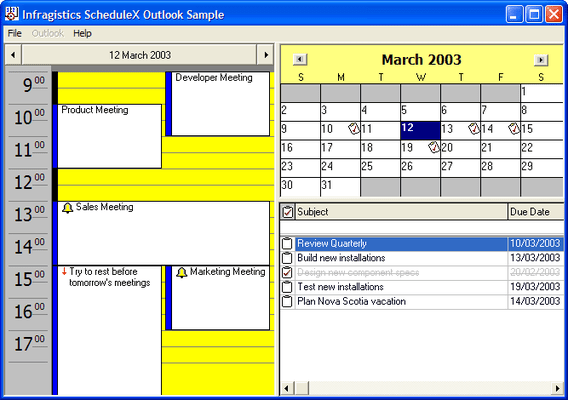
Screenshot Preview

ScheduleX

by Infragistics - 상품타입: Component / ActiveX OCX

 *

ScheduleX is now officially part of UltraSuite.

If you require information on upgrading ScheduleX, please visit the page above or Contact Us for pricing and availability.

주의 : 별도의 안내가 없는 경우에는 영어제품 입니다.

*

Build complete scheduling and task management applications. ScheduleX combines three powerful, lightweight (ATL) components for calendar, task management and scheduling applications. Using the advanced ScheduleX 's Calendar, DayView and TaskPad components, create Personal Information Management (PIM) software, project management and tracking, or any application that requires advanced scheduling. All ScheduleX components default to the familiar Outlook user interfaces. Infragistics ScheduleX was formerly known as Sheridan Protoview ScheduleX.



평균    2 리뷰(s).
 *

ScheduleX Key Features:

  • Advanced Calendar
  • DayView Synchronization With Calendar
  • TaskPad With Alarms

ScheduleX synchronized Microsoft Outlook-Style UI Components

  • All components default to the familiar Outlook user interfaces
  • Calendar & DayView communicate with each other for true application synchronization of information
  • NEW Read and write component information (appointments, tasks, dates) from all three components to and from a file based on the iCalendar format
  • NEW Property to get/set strings to allow International customization of the component
  • NEW Multi-Byte support

ScheduleX Calendar View

  • Display one, three, six or twelve month calendars
  • Control vertical or horizontal orientation
  • Set day orientation inside day cell
  • Assign data variants, custom colors, fonts and images to days
  • Multiple selection of days
  • Set first day of the week
  • Customize day and month names
  • Show/hide spin buttons for month and/or year
  • Change months and years using drop-down or spin buttons
  • Set header colors for area behind month/year
  • Place images in individual day cells
  • Supports reoccurring Week, Month and Year images

ScheduleX DayView

  • NEW Built-in default appointment dialog. An Outlook-style dialog box to allow end-users to create new appointments and alarms or modify existing ones
  • NEW Before and after events to override the default behavior of the component
  • NEW Execute programs on the start time of an appointment
  • Create appointments with alarms
  • Optional track bars for smooth scrolling through days and times
  • Set the start and end display times
  • Set display to hour/half-hour/15-minute increments
  • Set background color for times
  • Use images for appointments
  • In-place editing/read-only property for appointments
  • Assign data variants to appointments
  • Pop-up menu on right-click at run-time to add appointments to a day

ScheduleX TaskPad

  • NEW Additional properties, methods and events for greater control over the TaskPad
  • NEW Ability to change headings of the TaskPad
  • Display images for completion of tasks
  • Set dates for completion of tasks
  • Set fonts and colors for completed tasks (with strikeouts)
  • Pop-up menu on right-click at run time to add, delete or complete a task
  • Complete collection of Outlook task fields

주의

제품 리뷰의 한국어 번역이 완료되지 않는 제품은 Google통역 서비스와 연동되어 표시되어 있습니다.통역 기계에 의한 자동 번역인 관계로 한국어 표기가 조금 부자연 스러운 점 양해 바랍니다.
에서 제공
FireFox와 Opera에서는 Flash가 필요합니다.

상품검색

검색어를 입력해주세요:

ComponentSource에서 구입하는 이유?

ComponentSource는 세계 1,000,000명 이상의 개발자에게 각종 글로벌 서비스를 제공합니다.

상세 | About Us

화면 바로가기 갤러리

클릭해서 이미지를 확대

 ScheduleX - ActiveX - V9.0의 스크린샷  ScheduleX - ActiveX - V9.0의 스크린샷  ScheduleX - ActiveX - V9.0의 스크린샷
Award