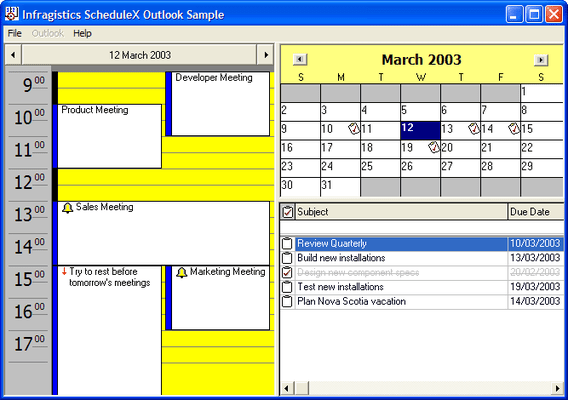
Screenshot Preview

ScheduleX

經 Infragistics - 產品類型: 構件 / ActiveX OCX

ScheduleX ‎現已正式成為UltraSuite

‎如果您需要 關於ScheduleX‎的升級方面的資訊,請訪問上述網頁或 聯繫我們 ‎以瞭解價格和供應方面的資訊。

‏請注意: 除非另有說明,此為英語產品

*

Build complete scheduling and task management applications. ScheduleX combines three powerful, lightweight (ATL) components for calendar, task management and scheduling applications. Using the advanced ScheduleX 's Calendar, DayView and TaskPad components, create Personal Information Management (PIM) software, project management and tracking, or any application that requires advanced scheduling. All ScheduleX components default to the familiar Outlook user interfaces. Infragistics ScheduleX was formerly known as Sheridan Protoview ScheduleX.



平均評分:   基於 2 評分
 *

ScheduleX Key Features:

  • Advanced Calendar
  • DayView Synchronization With Calendar
  • TaskPad With Alarms

ScheduleX synchronized Microsoft Outlook-Style UI Components

  • All components default to the familiar Outlook user interfaces
  • Calendar & DayView communicate with each other for true application synchronization of information
  • NEW Read and write component information (appointments, tasks, dates) from all three components to and from a file based on the iCalendar format
  • NEW Property to get/set strings to allow International customization of the component
  • NEW Multi-Byte support

ScheduleX Calendar View

  • Display one, three, six or twelve month calendars
  • Control vertical or horizontal orientation
  • Set day orientation inside day cell
  • Assign data variants, custom colors, fonts and images to days
  • Multiple selection of days
  • Set first day of the week
  • Customize day and month names
  • Show/hide spin buttons for month and/or year
  • Change months and years using drop-down or spin buttons
  • Set header colors for area behind month/year
  • Place images in individual day cells
  • Supports reoccurring Week, Month and Year images

ScheduleX DayView

  • NEW Built-in default appointment dialog. An Outlook-style dialog box to allow end-users to create new appointments and alarms or modify existing ones
  • NEW Before and after events to override the default behavior of the component
  • NEW Execute programs on the start time of an appointment
  • Create appointments with alarms
  • Optional track bars for smooth scrolling through days and times
  • Set the start and end display times
  • Set display to hour/half-hour/15-minute increments
  • Set background color for times
  • Use images for appointments
  • In-place editing/read-only property for appointments
  • Assign data variants to appointments
  • Pop-up menu on right-click at run-time to add appointments to a day

ScheduleX TaskPad

  • NEW Additional properties, methods and events for greater control over the TaskPad
  • NEW Ability to change headings of the TaskPad
  • Display images for completion of tasks
  • Set dates for completion of tasks
  • Set fonts and colors for completed tasks (with strikeouts)
  • Pop-up menu on right-click at run time to add, delete or complete a task
  • Complete collection of Outlook task fields

注意

還未完成翻譯的產品說明, 我們提供了Google 翻譯的連結方便您使用. 但請注意, 自動翻譯有時候可能會有翻譯錯誤.
由「」技術提供
在Firefox 和Opera 需要Flash.

產品搜索

輸入搜索詞:

為什麼從ComponentSource購買?

ComponentSource 提供獨特的全球國際服務, 在世界各地共有超過1,000,000 開發者客戶.

更多訊息 | 關於我們

獎勵