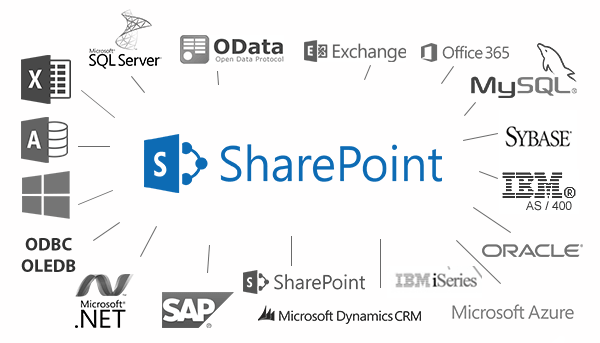
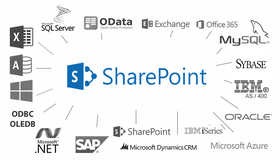
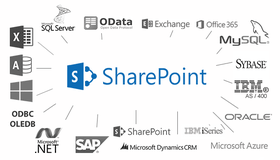
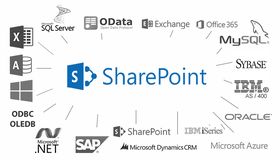
Screenshot Preview

SharePoint Business Data List Connector

經 Layer 2 - 產品類型: 構件 / Add-In / ASP.NET WebForms / 100% 受控代碼

‏請注意: 除非另有說明,此為英語產品

*

Connect a SharePoint list with external data. SharePoint Business Data List Connector (BDLC) connects any type of  SharePoint 2007 / 2010 list (no Web Part) with external business data using list settings, e.g. for contacts, tasks or events. The data can be presented without any restrictions, with the full read-only and optionally write-back (Create, Update, Delete: CRUD) functionality of common SharePoint lists. Views, sorting and grouping, filters and calculated fields can all be created. BDLC can be used to connect real SharePoint lists to databases, such as MS SQL Server, Oracle, IBM DB2, MySQL, Sybase Advantage Database Server, Sybase Adaptive Server Enterprise, Informix, Postgres SQL, IBM UniData, IBM UniVerse, AS/400 (IMB iSeries), Progress, Microsoft Office data files or other SharePoint lists.

₩1,283,600

‏我們的常規價格如下。 請登錄後查看打折後的價格。

價格

SharePoint Business Data List Connector 3   *

加入購物車 ₩ 1,283,600 1 Single Server License  * 下載 (408 KB)

我們的價格包括ComponentSource的技術支持。對於大多數可下載的產品,還提供線上備份和免費升級為新版本,若新版本在購買後的30日內發佈的話。  所有銷售都是按照我們的標準條款 進行的,並且適用我們的退貨政策. 請 聯繫我們 若您需要任何未在列出的License選擇,包括批量License及以前的版本。

‏我們的常規價格見上。 請登錄後查看打折後的價格。

 *

What's New in SharePoint Business Data List Connector 3?
SharePoint Business Data List Connector includes optional write-back to external data source features. CRUD (Create, Update, Delete)is fully supported for the external data source, if SharePoint list items are created, updated or deleted. In this way any SharePoint list, e.g. contacts, tasks, events, KPI-lists could be used as "front-end" to LOB data, e.g. databases, Office data, CRM and ERP systems.


 *

SharePoint Business Data List Connector (BDLC) offers a "SharePoint External List" by connecting a real SharePoint list (no Web Part) to external business back-end data, using a very simple web-based list settings dialogue. No programming or additional tools are required.

SharePoint Business Data List Connector (BDLC) connects any SharePoint list (no Web Part) directly with almost any external LOB data using common list settings in just minutes:

1. Enter connection string
2. Enter select statement
3. Enter primary keys

Alerts and workflows can be used, to take business actions, if external data records are changed. Full write-back (CRUD) to data source. The feature comes with a robust installer and is available for WSS and SharePoint 2007/2010.

SharePoint Business Data List Connector can be configured easily with a few simple list settings only directly in the browser. The desired data can be populated to the list and presented with the familiar UI and navigation features of common SharePoint lists made available: Views, sorting and grouping, filters, calculated fields. Lookup features can be created as usual for presentation of and interaction with external data in SharePoint lists. The list data can be updated manually or automatically in background, using a timer service. List workflows and notifications per RSS or email can be used out-of-the-box, to take business actions in SharePoint, if external LOB data records are changed. For example the Business Data List Connector can be used to implement a sales dashboard application, which empowers end users to gain insight into the underlying data in a reusable way, e.g. with aggregations and transformations  and quickly being notified in case of changes.

With SharePoint Business Data List Connector, you can connect SharePoint lists directly to databases, such as:

  • SQL Server 2008
  • SQL Server 2005
  • SQL Server 2000 / 7.0
  • Oracle
  • IBM DB2
  • MySQL
  • Sybase Advantage Database Server
  • Sybase Adaptive Server Enterprise
  • Informix
  • Postgre SQL
  • IBM UniData
  • IBM UniVerse
  • AS/400 (IMB iSeries)
  • Progress
  • FireBird
  • Interbase
  • Paradox
  • Ingres
  • Mimer SQL
  • Lightbase
  • Pervasive
  • SQLBase  (Gupta/Unify)
  • Cache
  • Teradata
  • VistaDB
  • DBMaker
  • Netezza DBMS
  • Valentina
  • and more.

SharePoint Business Data List Connector can pull data to SharePoint lists directly from data files too, for instance:

  • Microsoft Office Excel 2007
  • Microsoft Office Excel (other versions)
  • Microsoft Office Access 2007
  • Microsoft Office Access (other versions)
  • Visual Foxpro
  • DBF / Foxpro
  • SQLite
  • Filemaker
  • Textfiles (csv)  with delimited columns or fixed length columns
  • HTML-tables

SharePoint Business Data List Connector can also link SharePoint lists directly to server and services:
(Available for WSS 3.0, SharePoint Foundation and SharePoint Server 2007 / 2010)

  • OLAP, Analysis Services -  to provide Business Intelligence data in a real SharePoint list for further processing
  • Microsoft SharePoint - to pull list data from another SharePoint site collection or installation
  • Microsoft Project - to access project management data via a SharePoint list
  • Active Directory - to provide user or device data in a custom SharePoint list
  • Microsoft Exchange - to access contacts, events, tasks or other Exchange data
  • Microsoft Index Server - to access Index Server queries via a custom SharePoint list
  • IBM Lotus Notes - to connect a custom SharePoint list to Notes data
  • Intuit Quickbase - to access online application data
  • Composit Information Server - a Java-based application server
  • ODBC DSN - to connect further data sources via ODBC Data Source Names
  • UDL - to connect SharePoint lists via the Universal Data Link protocol with external data sources

注意

還未完成翻譯的產品說明, 我們提供了Google 翻譯的連結方便您使用. 但請注意, 自動翻譯有時候可能會有翻譯錯誤.
由「」技術提供
在Firefox 和Opera 需要Flash.

產品搜索

輸入搜索詞:

快速連結

發佈者

首要類別

相關產品

相關類別

為什麼從ComponentSource購買?

ComponentSource 提供獨特的全球國際服務, 在世界各地共有超過1,000,000 開發者客戶.

更多訊息 | 關於我們

獎勵