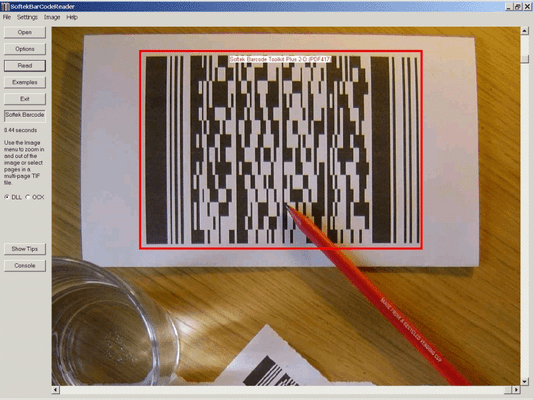
Screenshot Preview

Softek Barcode Reader Toolkit for Apple OSX

經 Softek Software - 產品類型: 構件 / 靜態程式庫

‏請注意: 除非另有說明,此為英語產品

*

Reads barcodes from image files. The Softek Barcode Toolkit for Apple OSX reads barcodes from TIF and JPG files. Imaging applications can use the toolkit to read barcodes strings from scanned documents and cross reference them against database tables. The toolkit supports both Shell and 'C' programming interfaces and supports all the common barcode formats.


$244.02
價格

‏我們的常規價格如下。 請登錄後查看打折後的價格。

Softek Barcode Reader Toolkit for Apple OSX V7.1.1   *

加入購物車 $ 244.02 1 User/Developer License (Not Run-time Royalty Free)  *
Mfr. 部件號: 008/1
下載 (4.3 MB)
加入購物車 $ 489.02 4 User/Developer License (Not Run-time Royalty Free)  *
Mfr. 部件號: 008/2
下載 (4.3 MB)
加入購物車 $ 783.02 8 User/Developer License (Not Run-time Royalty Free)  *
Mfr. 部件號: 008/3
下載 (4.3 MB)
加入購物車 $ 979.02 1 Server License (Not Run-time Royalty Free)  *
Mfr. 部件號: 008/4
下載 (4.3 MB)
加入購物車 $ 2,939.02 1 Site Wide License (Allows Unlimited Users/Developers at a Single Physical Address) (Not Run-time Royalty Free)  *
Mfr. 部件號: 008/5
下載 (4.3 MB)
加入購物車 $ 2,939.02 1 Distribution License (Allows unlimited Users at any Number of Physical Addresses)  *
Mfr. 部件號: 008/6
下載 (29 KB)
加入購物車 $ 293.02 1 year Support and Upgrades License  * 下載 (28 KB)
加入購物車 $ 1,000.00 Source Code Escrow Annual Subscription - (An Escrow Agreement will be sent to you for signature - please read Licensing section below)  * 下載 (43 KB)

我們的價格包括ComponentSource的技術支持。對於大多數可下載的產品,還提供線上備份和免費升級為新版本,若新版本在購買後的30日內發佈的話。  所有銷售都是按照我們的標準條款 進行的,並且適用我們的退貨政策. 請 聯繫我們 若您需要任何未在上面列出的License選擇,包括批量License及以前的版本。 

‏我們的常規價格見上。 請登錄後查看打折後的價格。

 *

The Softek Barcode Toolkit enables application programmers to read barcodes from image files. The image files can be from any source, but will typically come from a scanner or computer fax modem. The barcode recognition engine is contained in a single library file, which makes product upgrades a simple matter. The application programmer can use either the Shell or the 'C' interface. The choice of interface will depend on the type of language being used and the type of application to be developed.

A few lines of code are all that is needed to read a barcode from an image. As can be seen from this example using the 'C' interface:

hBarcode = STCreateBarCodeSession() ;
bar_count = STReadBarCode(hBarcode, file, 0, &bar_codes, &bar_codes_type) ;
for (i = 0; i < bar_count; i++)
{
printf ('Barcode = %s\n', bar_codes[i]) ;
}

Using the Shell interface is even simpler:

$ ./bardecode -t any -j 1 -f file.tif
1234567890

Image Formats:

  • TIF
  • JPG

The following types of barcode are currently supported:

  • CODE-39
  • CODE-128
  • CODE-2-of-5 Interleaved
  • Codabar
  • EAN-8
  • EAN-13
  • Patch Codes
  • UPC-A
  • UPC-E

Barcode Widths:

The main requirement is for each black or white bar in a barcode to be clearly visible on the image. All barcodes have at least 2 sizes of bar and the image needs to be of high enough quality to show this. For example, a Code 39 barcode consists of 9 bars per character, of which 3 must be wide and 6 must be narrow. The wide bars should be around 2.5 times the size of the narrow bars - but for simplicity we will say 2 times the size. This means that each character needs at least 12 pixels in an image. This assumes that each pixel in the image lies either entirely in a black bar or entirely in a white bar. In practise, this isn't possible and so the resolution should allow around 36 pixels per character.

So, to encode a string of 10 characters (including the start and stop *) you will need at around 360 pixels. If the barcode is 1 inch wide on the paper then you will need to scan at a resolution of around 400 DPI. If the barcode is 2 inches wide then you will need to scan at a resolution of at least 200 DPI.

Some types of barcode have more than 2 widths of bar and a higher resolution still will be needed to ensure that the different widths can be distinguished on the image.

As for barcode height - if you have a very wide barcode then you need to ensure that it is high enough to cope with any skewing that takes place when the image is scanned.

In summary - the success of a project can depend on specifying the correct barcode size and image resolution.

  • Code 39 Number of Characters 10, Minimum Number of Pixels (approx) 340
  • Code 2 of 5 (interleaved) Number of Characters 10, Minimum Number of Pixels (approx) 190
  • Code 128 (code set A) Number of Characters 10, Minimum Number of Pixels (approx) 280
  • Code 128 (code set B) Number of Characters 10, Minimum Number of Pixels (approx) 280
  • Code 128 (code set C) Number of Characters 10, Minimum Number of Pixels (approx) 170
  • EAN-13 Number of Characters 13, Minimum Number of Pixels (approx) 190
  • EAN-8 Number of Characters 8, Minimum Number of Pixels (approx) 140
  • UPC-A Number of Characters 12, Minimum Number of Pixels (approx) 190
  • UPC-E Number of Characters 8, Minimum Number of Pixels (approx) 120

注意

還未完成翻譯的產品說明, 我們提供了Google 翻譯的連結方便您使用. 但請注意, 自動翻譯有時候可能會有翻譯錯誤.
由「」技術提供
在Firefox 和Opera 需要Flash.

產品搜索

輸入搜索詞:

為什麼從ComponentSource購買?

ComponentSource 提供獨特的全球國際服務, 在世界各地共有超過1,000,000 開發者客戶.

更多訊息 | 關於我們

獎勵