Softek Barcode Reader Toolkit for Solaris - Static Link Library - V6.0

by Softek Software - 상품타입: Component / Static Link Library

주의 : 이 제품정보에는 한글안내가 포함되어 있지 않습니다.
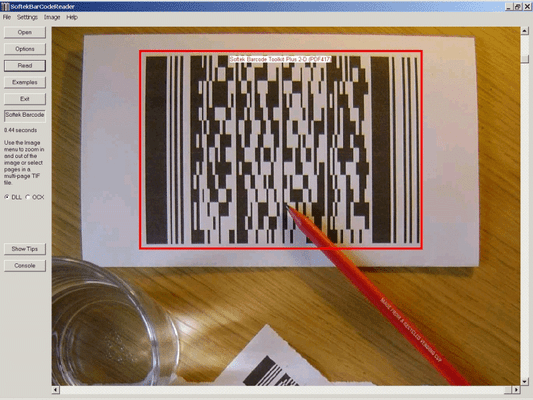
Softek Barcode Reader Toolkit for Solaris - Static Link Library - V6.0 의 스크린샷Reads barcodes from image files. The Softek Barcode Toolkit for Linux reads barcodes from TIF and JPG files. Imaging applications can use the toolkit to read barcodes strings from scanned documents and cross reference them against database tables. The toolkit supports both Shell and 'C' programming interfaces and supports all the common barcode formats.


287,300₩
통화 선택

일반 적인 소비자 가격은 하기에 표시되어 있습니다. 고객님의 할인가격은 표시 하시려면 로그인 해주시기 바랍니다.

Softek Barcode Reader Toolkit for Solaris V6.07

주문 ₩ 287,300 1 User/Developer License (Not Run-time Royalty Free) 다운로드 (876 KB)
주문 ₩ 575,700 4 User/Developer License (Not Run-time Royalty Free) 다운로드 (876 KB)
주문 ₩ 921,900 8 User/Developer License (Not Run-time Royalty Free) 다운로드 (876 KB)
주문 ₩ 1,152,600 1 Server License (Not Run-time Royalty Free) 다운로드 (876 KB)
주문 ₩ 3,460,100 1 Site Wide License (Allows Unlimited Users/Developers at a Single Physical Address) (Not Run-time Royalty Free) 다운로드 (876 KB)
주문 ₩ 3,460,100 1 Distribution License (Allows unlimited Users at any Number of Physical Addresses) 다운로드 (29 KB)
주문 ₩ 171,900 1 User/Developer Upgrade License from previous versions (Not Run-time Royalty Free) 확인 다운로드 (876 KB)

Softek Barcode Reader Toolkit for Solaris V6.x

주문 ₩ 345,000 1 year Support and Upgrades License 다운로드 (28 KB)
주문 ₩ 1,177,300 Source Code Escrow Annual Subscription - (An Escrow Agreement will be sent to you for signature - please read Licensing section below) 다운로드 (43 KB)

본 제품은 GSA Schedule 가격으로 제공해 드릴수 있습니다.가격에는 ComponentSource의 기술지원 요금이 포함되어 있습니다. 또한 다운로드 판매를 하고 있는 상품의 대부분은 온라인 백업요금이 포함되어 있어서 구입날로부터 30일 이내에 새로운 버전이 발매된 경우 무료로 업그레이드해 드리고 있습니다.  모든 주문에 대해서 당사표준 계약조건 반품조건 의 내용이 적용됩니다. 다음의 경우,고객 서비스로연락하시기 바랍니다. (상기의 리스트에 게재되지 않은 대량의 라이센스나 구 버전 등의 라이센스 옵션이 필요한 경우)

일반 적인 소비자 가격은 상기에 표시되어 있습니다. 고객님의 할인가격은 표시 하시려면 로그인 해주시기 바랍니다.

The Softek Barcode Toolkit enables application programmers to read barcodes from image files. The image files can be from any source, but will typically come from a scanner or computer fax modem. The barcode recognition engine is contained in a single library file, which makes product upgrades a simple matter. The application programmer can use either the Shell or the 'C' interface. The choice of interface will depend on the type of language being used and the type of application to be developed.

A few lines of code are all that is needed to read a barcode from an image. As can be seen from this example using the 'C' interface:

hBarcode = STCreateBarCodeSession() ;
bar_count = STReadBarCode(hBarcode, file, 0, &bar_codes, &bar_codes_type) ;
for (i = 0; i < bar_count; i++)
{
printf ('Barcode = %s\n', bar_codes[i]) ;
}

Using the Shell interface is even simpler:

$ ./bardecode -t any -j 1 -f file.tif
1234567890

Image Formats:

  • TIF
  • JPG

The following types of barcode are currently supported:

  • CODE-39
  • CODE-128
  • CODE-2-of-5 Interleaved
  • Codabar
  • EAN-8
  • EAN-13
  • Patch Codes
  • UPC-A
  • UPC-E

Barcode Widths:

The main requirement is for each black or white bar in a barcode to be clearly visible on the image. All barcodes have at least 2 sizes of bar and the image needs to be of high enough quality to show this. For example, a Code 39 barcode consists of 9 bars per character, of which 3 must be wide and 6 must be narrow. The wide bars should be around 2.5 times the size of the narrow bars - but for simplicity we will say 2 times the size. This means that each character needs at least 12 pixels in an image. This assumes that each pixel in the image lies either entirely in a black bar or entirely in a white bar. In practise, this isn't possible and so the resolution should allow around 36 pixels per character.

So, to encode a string of 10 characters (including the start and stop *) you will need at around 360 pixels. If the barcode is 1 inch wide on the paper then you will need to scan at a resolution of around 400 DPI. If the barcode is 2 inches wide then you will need to scan at a resolution of at least 200 DPI.

Some types of barcode have more than 2 widths of bar and a higher resolution still will be needed to ensure that the different widths can be distinguished on the image.

As for barcode height - if you have a very wide barcode then you need to ensure that it is high enough to cope with any skewing that takes place when the image is scanned.

In summary - the success of a project can depend on specifying the correct barcode size and image resolution.

  • Code 39 Number of Characters 10, Minimum Number of Pixels (approx) 340
  • Code 2 of 5 (interleaved) Number of Characters 10, Minimum Number of Pixels (approx) 190
  • Code 128 (code set A) Number of Characters 10, Minimum Number of Pixels (approx) 280
  • Code 128 (code set B) Number of Characters 10, Minimum Number of Pixels (approx) 280
  • Code 128 (code set C) Number of Characters 10, Minimum Number of Pixels (approx) 170
  • EAN-13 Number of Characters 13, Minimum Number of Pixels (approx) 190
  • EAN-8 Number of Characters 8, Minimum Number of Pixels (approx) 140
  • UPC-A Number of Characters 12, Minimum Number of Pixels (approx) 190
  • UPC-E Number of Characters 8, Minimum Number of Pixels (approx) 120

상품검색

검색어를 입력해주세요:

Award