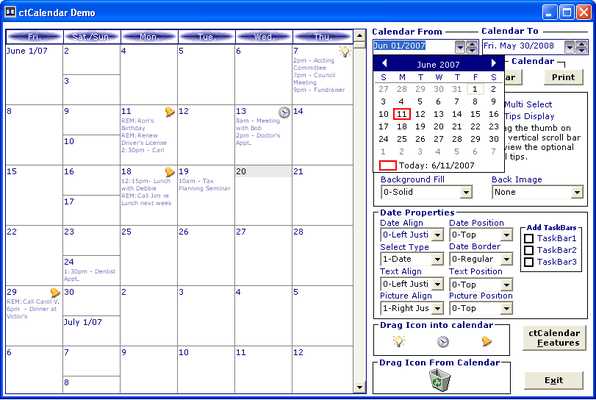
Screenshot Preview

Solutions::PIM Professional

de DBI Technologies - Tipo de producto: Componente / ActiveX OCX

 *

Solutions::PIM Professional is now available as part of Studio Controls for COM.

If you require more information, please visit the pages above or Contact Us for pricing and availability.

Por favor note que al menos que se indique lo contrario, esta es la versión en Inglés del producto.

*

Build Personal Information Management (PIM) applications. Solutions::PIM Professional delivers the tools Windows© Developers need for creative calendaring, appointment scheduling and personal information management applications. This collection of twelve (12) powerful ActiveX components is designed to work together using common properties and events for seamless integration by Windows© Developers into any application. Build appointment based applications that manage time as you see it.



Opinión media:   basada en: 1 opinión.
 *

DBI has packaged multiple calendar views into Solutions::PIM Professional offering a variety of visual presentations, including the unique multi-column day view, a week view, a month view, a year view, a planner view, a scrolling calendar, Contacts, and a date edit with a drop down calendar.

To find out what's new for V3.0 please read the What's New in V3.0 Web page in the Evals and Demos section.

Print Options:

Solutions::PIM Professional makes it easy to create powerful appointment scheduling applications that end users crave. Combine the unique functionality with built-in printing and developers have instant reporting at their fingertips. Deliver what end-users want the most - reports. Many of the controls in Solutions::PIM Professional are able to produce a printed report of their contents complete with custom headers. Controls supporting the built-in print functionality are: ctCalendar, ctList, ctMonth, ctMDay, and ctYear.

Additionally, many of the controls in Solutions::PIM Professional contain a PrintInWindow method. This event allows a snapshot of the control to be printed anywhere on a page. When a programmer uses the host language to obtain a valid printer handle, they can create their own custom reports. After the handle has been obtained, the programmer can use the PrintInWindow method to place one or more of the controls anywhere on the page for flexible report formatting. The controls supporting PrintInWindow are: ctCalendar, ctDate, ctList, ctMonth, and ctMDay.

Subscription:

  • The Subscription Service provides one full year of product/component upgrades plus digitally signed CAB files for each of the 12 components included in Solutions::PIM Professional

General Features:

  • Fills & Styles: The visual components included in Solutions::PIM Professional have been upgraded with new fill and styles presentation features as found in Windows XP and .NET
  • Sample Code: in Visual Basic 6.0, and Visual FoxPro 7.0
  • Internet Ready : All controls have been marked "Safe For Scripting" and "Safe for Download"

 *

Feature Components:

  • Calendar Components : Scheduling without a calendar is extremely difficult, and Solutions::PIM Professional offers four great calendar presentations complete with full customization to make your appointment and resource scheduling development easier. First off, ctDate is a visual representation of a monthly calendar depicting one or more months at a time. Following is ctMonth, a more sophisticated calendar capable of containing text and images for each date. Up next is ctCalendar, a scrolling calendar with the ability to show multiple weeks at a time. And then ctYear, a control capable of displaying an entire year in a single view
  • Multi-Column Day View Components: Every schedule is comprised of a series of appointments, and in order to keep track of daily appointments, Solutions::PIM Professional includes the unique multi-column day/resource view, ctMDay. Adding appointments is incredibly easy with the ctMDay control. Simply click, drag or select an area within the control, and start typing. The appointment is automatically created when the first key is entered. ctMDay's multiple columns can be implemented to show multiple days in a single view, or multiple resources in a single view. The ctMDay control now allows for the time increment to be set for any value from 1 to 60, and not just for just the standard 5, 10, 15... minute increments. An ideal feature for golf courses, tee-time scheduling which requires a seven (7) minute interval is now possible
  • Contacts Component : ctContact is an enhanced list control designed specifically for contact management. It is capable of displaying a series of records in a card-like format and allowing the user to edit the data within each item
  • Masked Date/Edit Components : ctDEdit is a masked edit text box control supporting date/time entry and presentation. ctDropDate is a date entry control with a built in drop-down calendar
  • Week View Component : ctWeek is a weekly planner control allowing end-users to view one or more days of activities in a single glance
  • List Component : ctList is an enhanced list view control with the capability of hosting multiple columns, images and check boxes in any cell, and sub-text, it is the ideal control to help you display your to-do lists, tasks, and appointments
  • Alarm Component : ctAlarm is an invisible control that will fire an event (an alarm) at a given time. The controls can accept multiple alarms and alarms can be set up to be recurring
  • Wave Player Control : The ctWave control is a wave file player used to notify you when an alarm has gone off

Atención

Para su comodidad, hemos incluido enlaces a Google Translate para traducir la información del producto que todavía tenemos que traducir. Por favor, tenga en cuenta que traducciones automáticas no siempre son totalmente exactas.
Con la tecnología de
Requiere Flash en Firefox y Opera

Búsqueda de productos

Escriba palabras de búsqueda:

¿Por qué comprar en ComponentSource?

ComponentSource ofrece un único servicio global, utilizado por más de 1.000.000 de desarrolladores en todo el mundo.

Más Información | Sobre Nosotros

Galería de capturas de pantalla

Haga clic para obtener una vista previa completa

Captura de pantalla Solutions::PIM Professional - ActiveX  - V3.0 Captura de pantalla Solutions::PIM Professional - ActiveX  - V3.0 Captura de pantalla Solutions::PIM Professional - ActiveX  - V3.0 Captura de pantalla Solutions::PIM Professional - ActiveX  - V3.0 Captura de pantalla Solutions::PIM Professional - ActiveX  - V3.0
Award