Solutions::Schedule

de DBI Technologies - Tipo de producto: Componente / ActiveX OCX

Por favor note que al menos que se indique lo contrario, esta es la versión en Inglés del producto.
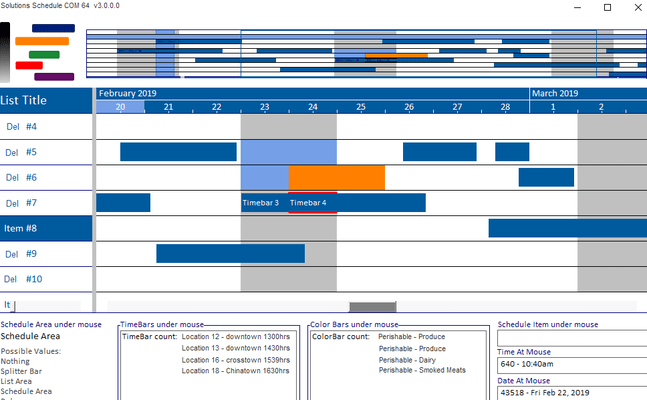
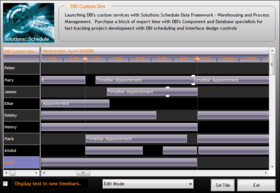
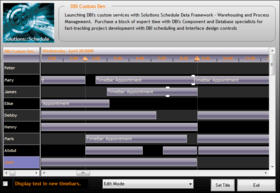
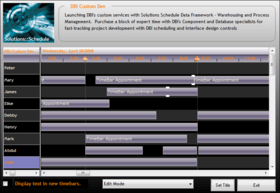
Captura de pantalla Solutions::Schedule - ActiveX  - V8.0Manage resource scheduling and planning. Solutions::Schedule is designed to provide Windows Developers with an enhanced drag and drop resource scheduling user interface for their applications. The package includes sample applications (complete with Visual Basic source code) that illustrate the use and interactivity of the component in a working application. Like all DBI COM components, Solutions::Schedule adheres to Microsoft’s OLE standards allowing perfect implementation in Web applications and ASP.NET solutions, maintaining the rich user interface and full drag and drop capabilities we have come to depend on.

Opinión media:  Opinión Media para Solutions::Schedule - ActiveX  - V8.0 basada en: 2 opiniones.

Desde
1,217,400₩
Precio en

Nuestros precios Standard están indicados abajo. Inicia una sesión para ver sus precios con descuento.

Solutions::Schedule V8.0

Añadir a la Cesta ₩ 1,217,400 1 Developer License
Ref. Fabricante: SS0701
Descarga (19.7 MB)
Añadir a la Cesta ₩ 730,400 1 Developer Upgrade License from V7.0 Verificar Descarga (19.7 MB)
Añadir a la Cesta ₩ 4,819,800 5 Developer License
Ref. Fabricante: SS0705
Descarga (19.7 MB)
Añadir a la Cesta ₩ 7,832,200 1 Site Wide License (Allows Unlimited Developers at a Single Physical Address)
Ref. Fabricante: SS07site
Descarga (19.7 MB)

Solutions::Schedule

Añadir a la Cesta ₩ 777,400 Source Code Escrow Annual Subscription - (An Escrow Agreement will be sent to you for signature - please read Licensing section below) Verificar Descarga (43 KB)

Este producto esta disponible con precios reservados al GSA Schedule.Nuestros precios incluyen servicio técnico de ComponentSource y, para la mayoría de los productos disponibles para descarga, una copia de seguridad en línea y una actualización GRATUITA a la nueva versión si ésta se publica en un período de 30 días después de la compra.  Todas las ventas están sujetas a nuestros Términos y condiciones standard y a nuestra Política de devolución. Por favor, póngase en contacto con nosotros si necesita alguna opción de licencia no incluida en la lista anterior, incluida la compra por volumen de licencias y versiones anteriores.

Nuestros precios Standard están indicados arriba. Inicia una sesión para ver sus precios con descuento.

What's New in Solutions::Schedule V8?

  • Time Bar Linking: Display visible relationships between time bars. Time Bar Link lines can be displayed with different colors, thicknesses, and one of three link types
  • Map View: compressed view of all defined schedules directly above the schedule view (gantt) area. From within the Map Area, "point & click" support provides quick navigation to that segment of a loaded schedule
  • Dead Zones: Create areas in the schedule into which time bars cannot be created, sized, moved
  • List Header Styles: Set line items to display and behave as headers. Enhance presentation with discrete formatting of header items
  • Time Lines: Improved support for the placement, color, and thickness of vertical time division lines of the Time Scale Ruler / Gantt area in the scheduler
  • Time Bar Overlap : Use built-in methods and custom events to quickly locate conflicts between time bars throughout the entire schedule
  • Edit Modes: New persistent edit modes for erasing, linking and un-linking time bars
  • Undo / Redo: Use built-in Undo and Redo methods for any user-activity with time bars (adding, moving, sizing, deleting, linking, and unlinking time bars). The Developer has full control over the Undo / Redo limits


New in V7.0:

  • XML Import & Export Support: Read and Write to/from XML data and optionally include presentation detail
  • Remote XML File Support: Read XML files from local, LAN, WAN resources or web servers
  • JPEG Support: Publish schedules to the web and add images to reports
  • Time Lines: ctSchedule now handles increments from minutes to years. Additional functionality allows developer definition of time-line presentations (i.e. text and colors for weeks, months, quarters, week number)
  • List Header & Ruler Options: Enhance time line presentations with full control of captions and color bars

Improved in Solutions::Schedule V7.0:

  • Drag and Drop: The control now accepts drag and drop operations into the list part of the control, the schedule, and the time bars. (Only in IDE's that support drag and drop in an ActiveX control)
  • Color Bars: Add areas of color to enhance readability
  • Built-in Printing: Now supports options for page footers, title fonts, title alignment, and masked bitmaps
  • General Features: Insert schedule items, Manipulate vertical scroll, Minimum time bar width, XP Style fill patterns for the list headers and ruler

The ctSchedule object is a full-featured scheduling system control. ctSchedule allows you to quickly add employee or resource scheduling to your applications. This ActiveX component gives you the ability to print schedules, assign time lines or bars to a resource, change the viewing granularity (zoom in and zoom out), and create a wide variety of time bar styles.


The ctSchedule control contains the following sections:

  • Title: The title section contains the titles for the list column. The Title section can contain up to 100 columns
  • Ruler: The ruler section is to the right of the Title section and is the same height as the Title section. It contains the time data used to make up the schedule
  • List: The list section resides under the Title section. It contains the list of all items. (ie. employees, resources, etc. ) The list can contain up to 32,000 items and up to 100 columns
  • Schedule: The schedule section contains the time bars or schedules for each item. Each item can have up to 32,000 time bars

Búsqueda de productos

Escriba palabras de búsqueda:

Award