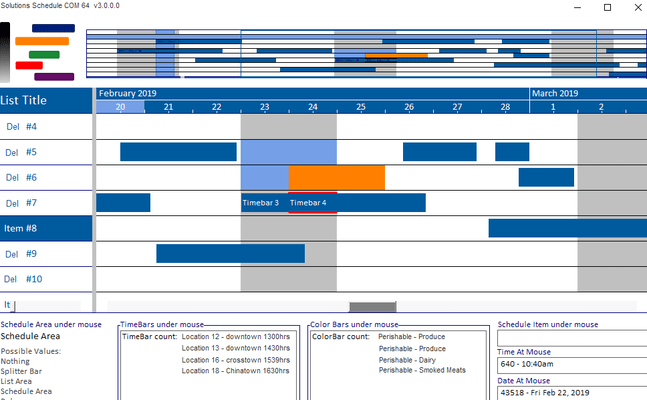
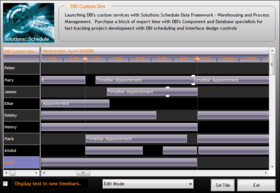
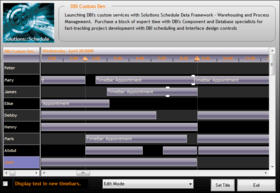
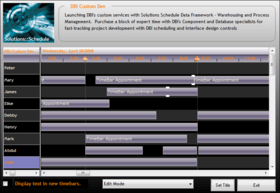
Screenshot Preview

Solutions Schedule for COM

by DBI Technologies - 상품타입: Component / ActiveX OCX

주의 : 별도의 안내가 없는 경우에는 영어제품 입니다.

*

Manage resource scheduling and planning. Solutions Schedule for COM is a leading asset management and multi-resource scheduling component software for COM based IDE's. Solutions Schedule for COM includes built-in Gantt style drag-n-drop scheduling, Guide Line accuracy, TimeBar linking, conflict management, presentation styles like silverlight and more. Solutions Schedule for COM includes royalty-free distribution, sample applications in Visual Basic and Visual FoxPro, compiled executables with direct double click access to the property inspector at run-time. Solutions Schedule for COM includes one year of technical support.


평균    2 리뷰(s).
$1,703.24
통화 선택

일반 적인 소비자 가격은 하기에 표시되어 있습니다. 고객님의 할인가격은 표시 하시려면 로그인 해주시기 바랍니다.

Studio Controls for COM v1.2 and Solutions Schedule for COM v11 Special Offer Bundle - Ends 31st January 2012   *

주문 $ 1,703.24 1 Developer Subscription License (Includes support for one year.)  *
메이커 제품 번호: SSCOM + SCCOM
다운로드 (40.7 MB)
주문 $ 6,812.96 5 Developer Subscription License (Includes support for one year.)  *
메이커 제품 번호: SSCOM-5 + SCCOM-5
다운로드 (40.7 MB)

Solutions Schedule for COM v11 - Subscription License   *

주문 $ 969.22 1 Developer Subscription License (Includes support for one year.)  *
메이커 제품 번호: SSCOM
다운로드 (4.2 MB)
주문 $ 3,876.88 5 Developer Subscription License (Includes support for one year.)  *
메이커 제품 번호: SSCOM-5
다운로드 (4.2 MB)
주문 $ 6,299.93 1 Site Wide Subscription License (Includes support for one year.)  *
메이커 제품 번호: SSCOM-S
다운로드 (4.2 MB)

Solutions Schedule for COM v11 - Subscription Renewal (Requires valid subscription license)   *

주문 $ 484.61 1 Developer Subscription Renewal License (Includes support for one year.)  * 확인 다운로드 (4.2 MB)
주문 $ 1,938.44 5 Developer Subscription Renewal License (Includes support for one year.)  * 확인 다운로드 (4.2 MB)
주문 $ 3,149.97 1 Site Wide Subscription Renewal License (Includes support for one year.)  * 확인 다운로드 (4.2 MB)

Solutions Schedule for COM v11 - New Subscription (for product owners who have a lapsed subscription)   *

주문 $ 872.30 1 Developer New Subscription License (Includes support for one year.)  * 확인 다운로드 (4.2 MB)
주문 $ 3,489.19 5 Developer New Subscription License (Includes support for one year.)  * 확인 다운로드 (4.2 MB)
주문 $ 5,669.94 1 Site Wide New Subscription License (Includes support for one year.)  * 확인 다운로드 (4.2 MB)

Solutions Schedule for COM   *

주문 $ 500.00 Source Code Escrow Annual Subscription - (An Escrow Agreement will be sent to you for signature - please read Licensing section below)  * 확인 다운로드 (43 KB)

가격에는 ComponentSource의 기술지원 요금이 포함되어 있습니다. 또한 다운로드 판매를 하고 있는 상품의 대부분은 온라인 백업요금이 포함되어 있어서 구입날로부터 30일 이내에 새로운 버전이 발매된 경우 무료로 업그레이드해 드리고 있습니다.  모든 주문에 대해서 당사표준 계약조건 반품조건 의 내용이 적용됩니다. 다음의 경우,고객 서비스로연락하시기 바랍니다. (상기의 리스트에 게재되지 않은 대량의 라이센스나 구 버전 등의 라이센스 옵션이 필요한 경우)

일반 적인 소비자 가격은 상기에 표시되어 있습니다. 고객님의 할인가격은 표시 하시려면 로그인 해주시기 바랍니다.

 *

What’s New in Solutions Schedule for COM v11:

  • Schedule Area Notes - set specific notes and representative note images within the Gantt scheduling area. Customize Note image, text presentation and location of the Note.
  • Tips on Schedule Area Notes - to present the text of the note to the user when the mouse hovers over a note.
  • Line Arrows - arrow images to denote that more time bars are out of the current view; in a previous view or in the next view forward.
  • Line Arrow Events - fire when a user clicks on an arrow allowing the developer to present and/or programmatically scroll to the next or previous time bar, or a time bar selected from a list, not visible in the schedule area within a schedule item. A great addition when wanting to indicate that there are other schedule commitments set in a schedule plan that are not in view. (similar to the more time bars functionality in Solutions Schedule for .NET)
  • Time Bar height definition - gets the height of the time bars in a schedule. Developers can cast a standard time bar height definition for an entire schedule plan.
  • Line height definition - gets the default line height of the resource list and schedule areas. Another tool in the scheduling toolbox for enhancing presentations of the Resource List and Gantt Schedule areas.
  • Time Bar Linking / Unlinking enhanced - a set of before linking events and enhanced unlinking methods have been added providing developers increased programmatic control when time bars are being linked or unlinked.

What's New in Solutions Schedule for COM 10?

  • User Drawn TimeBars : an advanced feature allowing application developers to create their own custom OLEPicture timebars.
  • HitTest Method : Hittest methods can be used to position custom dialogs, tooltips and whiteboard solutions for example. Also, the Hittest Methods are an excellent resource for creating custom drag and drop features with specific Date and Time At - X and/or Y coordinates.
  • TimeBar shadows : a new TimeBar Shadows Property has been added providing additional time bar differentiation and presentation appeal. 
  • Resource List Header Styles : individual List Items can be set as Header Items. Header items have their own background color properties, style properties, text color and font properties.

What's New in Solutions Schedule for COM 9.0?

Guide Lines : Increase scheduling accuracy and timebar viewing with the new Guide Lines feature. Guide Lines are vertical lines used to represent specific times in a schedule offering users discrete "snap-to" functionality for easier time bar positioning and viewing.

Advanced Presentation Styles : Keeping in line with Microsoft's Windows standards, new presentation style capabilities are offered for developers to advance their application styling and presentations.

What's New in Solutions Schedule for COM 8.0?

  • Time Bar Linking: Display visible relationships between time bars. Time Bar Link lines can be displayed with different colors, thicknesses, and one of three link types
  • Map View: compressed view of all defined schedules directly above the schedule view (gantt) area. From within the Map Area, "point & click" support provides quick navigation to that segment of a loaded schedule
  • Dead Zones: Create areas in the schedule into which time bars cannot be created, sized, moved
  • List Header Styles: Set line items to display and behave as headers. Enhance presentation with discrete formatting of header items
  • Time Lines: Improved support for the placement, color, and thickness of vertical time division lines of the Time Scale Ruler / Gantt area in the scheduler
  • Time Bar Overlap : Use built-in methods and custom events to quickly locate conflicts between time bars throughout the entire schedule
  • Edit Modes: New persistent edit modes for erasing, linking and un-linking time bars
  • Undo / Redo: Use built-in Undo and Redo methods for any user-activity with time bars (adding, moving, sizing, deleting, linking, and unlinking time bars). The Developer has full control over the Undo / Redo limits

What's New in Solutions Schedule for COM 7?:

  • XML Import & Export Support: Read and Write to/from XML data and optionally include presentation detail
  • Remote XML File Support: Read XML files from local, LAN, WAN resources or web servers
  • JPEG Support: Publish schedules to the web and add images to reports
  • Time Lines: ctSchedule now handles increments from minutes to years. Additional functionality allows developer definition of time-line presentations (i.e. text and colors for weeks, months, quarters, week number)
  • List Header & Ruler Options: Enhance time line presentations with full control of captions and color bars

 *

ctSchedule is a full-featured scheduling system control. ctSchedule allows you to quickly add employee or resource scheduling to your applications. This ActiveX component gives you the ability to print schedules, assign time lines or bars to a resource, change the viewing granularity (zoom in and zoom out), and create a wide variety of time bar styles.


 *

Solutions Schedule for COM includes royalty-free distribution, sample applications in Visual Basic and Visual FoxPro plus compiled executables with direct double click access to the property inspector at run-time. This premier scheduling product includes one year of technical support and annual product updates and upgrades.

Solutions Schedule for COM possible uses include:

  • Team / Project Management
  • Resource Optimization
  • Manufacturing
  • Event management
  • Production
  • Facilities Management
  • Call centre management
  • Reservation systems
  • Healthcare
  • Process control

The ctSchedule control contains the following sections:

  • Title: The title section contains the titles for the list column. The Title section can contain up to 100 columns
  • Ruler: The ruler section is to the right of the Title section and is the same height as the Title section. It contains the time data used to make up the schedule
  • List: The list section resides under the Title section. It contains the list of all items. (ie. employees, resources, etc. ) The list can contain up to 32,000 items and up to 100 columns
  • Schedule: The schedule section contains the time bars or schedules for each item. Each item can have up to 32,000 time bars

주의

제품 리뷰의 한국어 번역이 완료되지 않는 제품은 Google통역 서비스와 연동되어 표시되어 있습니다.통역 기계에 의한 자동 번역인 관계로 한국어 표기가 조금 부자연 스러운 점 양해 바랍니다.
에서 제공
FireFox와 Opera에서는 Flash가 필요합니다.

상품검색

검색어를 입력해주세요:

ComponentSource에서 구입하는 이유?

ComponentSource는 세계 1,000,000명 이상의 개발자에게 각종 글로벌 서비스를 제공합니다.

상세 | About Us

Award