by DBI Technologies - Product Type: Component / .NET WinForms / .NET Class / 100% Managed Code
Solutions Schedule for .NET by DBI Technologies
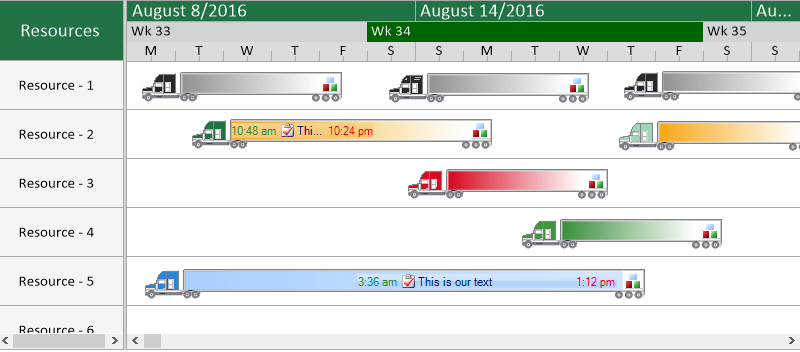
Intuitive Visual Resource Planning and Scheduling. Solutions Schedule for .NET provides Windows developers with an advanced set of features for creating enterprise Asset Management and Multi-resource scheduling applications. Solutions Schedule can be used in care, natural resources, manufacturing, robotics, corporate Asset Management, fleet optimization, ERP, CRM and many other enterprise applications. Solutions Schedule .NET delivers intuitive mouse driven scheduling and planning with Gantt-style project management features. Solutions Schedule .NET also includes map and scroll-to-date features to easily manage schedules of any size. DBI's Solutions Schedule for .NET comes complete with Smart Client demonstrations, sample applications and sample source code in C# and VB.NET. Solutions Schedule for .NET is Visual Studio 2005 compliant and fully compatible with Visual Studio 2008. Solutions Schedule .NET includes 12 months of updates, both minor and major and 12 months of direct access to technical support.
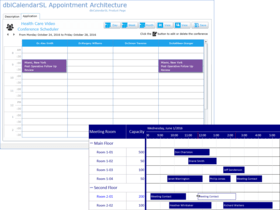
DBI's Solutions Schedule for .NET component software provides intuitive mouse driven scheduling & planning capabilities with Gantt-style project management features. Developers are able to present multi-dimensional schedules logically and intuitively over multiple periods of time in a single view. With map and scroll-to-date features, managing schedules of any size becomes effortless. Solutions::Schedule for .NET 3 is available in 3 different editions with different Licensing and Features.
Solutions::Schedule for .NET Licensing
Standard Edition - Standard Development Product License - The Standard Edition License is offered on a per developer, per computer license activation basis incorporating a royalty-free runtime distribution agreement.
Corporate Edition - Corporate Development License - this license is offered with the full set of product features, structured for corporate development with a normal “Internal only” distribution requirement. Distribution of the component as part of an application internally in the corporation is royalty-free. Distribution of the component external to the corporation requires a commercial distribution royalty agreement covering those products incorporating DBI's intellectual property in commercially distributed software. Please contact sales@componentsource.com for more information.
Enterprise Edition - Enterprise Development License - this license is offered with the full set of product features, structured for Enterprise commercial development with traditional commercial software distribution requirements. The Enterprise Development License carries a commercial distribution royalty-free agreement covering all products incorporating DBI's intellectual property in commercially distributed software. The Enterprise Development License covers an unlimited number of developers per named location.
Solutions Schedule for .NET Features
Solutions Schedule for .NET Enterprise & Corporate Editions Features:
Guide Lines - snap TimeBars to a guide line for quick, accurate alignment of scheduled entities. Set guide line color and images for easy placement of scheduled items and visual review.
Copy TimeBar - which when invoked provides a keyboard short-cut with a click and drag action to copy one or more TimeBars simultaneously.
Fixed User-Drawn Header and Footer Areas - are ideal for summarizing the activity of all the schedule items as whole, independent of list item headers, items, and time bar detail.
Undo | Redo - Supporting the multi-level Undo and Redo capability there are two History Collections which log actions ( creating, moving, sizing, erasing, linking, unlinking) associated with TimeBars and the Undo/ and Redo events.
Multiple Schedules - dbiSchedule - Enterprise Edition has built-in support for hosting, presenting and managing Multiple Schedules simultaneously. Each schedule object is defined by its own start date/ time and end date/ time including time scale ruler. (found in the enterprise edition only)
The Tag Property - (Tags are typically of type Object) can be an ideal candidate for persisting relationships between an object and its record.
Map Area - The Enterprise edition of dbiSchedule offers a Map area assisting users to navigate large schedules. A map area is a representation of all defined schedules within the control and displayed in a compressed format.
Scroll to Date Time method - is an effective means for programmatically navigating to specific points in time on a schedule.
Selected TimeBar Collection - a collection representing the currently selected TimeBars in the dbiSchedule control.
TimeBar Activity display - a timebar within a timebar ideally suited for visually presenting the percentage of completion of an activity.
TimeBar Linking styles - One to many linking TimeBars in any combination of: Start to Start, Start to End, End to Start and End to End with Standard, Reciprocal or Direct Links. Link lines can also be given unique colours enhancing visual presentation of TimeBar relationships.
TimeBar Split Edit - indicated by the scissors mouse cursor, this edit mode effectively splits a TimeBar into two sections at the cursor position.
User-Drawn TimeBars - provide developers an opportunity to take over the painting of any or all time bars in the dbiSchedule control. User Drawn Time Bars behave the same as standard time bars and scroll with the movement of the vertical and horizontal scroll bars.
Plus all of the features found in Solutions::Schedule 3.0 for .NET - Standard Edition
Solutions Schedule Standard Edition Features:
Guide Lines - snap TimeBars to a guide line for quick, accurate alignment of scheduled entities. Set guide line color and images for easy placement of scheduled items and visual review.
Independent Cell Formatting - features include font, foreground colour and background colour, alignment, fill types and image.
List View format Types - List view columns can incorporate different format types including Text, Check Boxes, Images in any combination.
List view Column Data Types include - Text, DateTime, Boolean and Image.
Column Designer - In the List View area, one or more columns can be added to the list through the Columns Collection editor (available from the property inspector) at design time, or through code at runtime.
Copy TimeBar - which when invoked provides a keyboard short-cut with a click and drag action to copy one or more TimeBars simultaneously.
Customer Ruler Title Text - The ruler presentation is split into two areas, typically the top section describing the date and the lower section describing the incremental time scale. The top section textual presentation can be customized with a text string using the ruler title property.
Ruler Time Division - The lower section of the Ruler is an incremental Time Scale represented by Major and Minor divisions. Custom time values can be implemented in a schedule by manipulating the Ruler Value Points represented by the Major and Minor divisions.
Dates in TimeBars - Displaying the starting date and ending Date in time bars offers scheduling professionals a quick visual reference reducing potential risks for schedule conflicts.
Dead zones - are custom areas of the schedule defined as areas where an appointment cannot be created, moved or sized into. Custom areas are discrete segments of the schedule which can coloured offering quick visual presentation of reserved areas.
Current Date - Adding a visual reference point for the current date and time in a schedule is simple by using the Current Time Line feature. Colour settings for the Current Time line give developers added flexibility in the overall presentation.
Header Items - are ideal for adding category definitions to a list of resources or incorporating special notes and the like. Full formatting features are available to List Header items.
List view Line Items - can be formatted with unique and alternating line colour.
Multi-Select - The List view and Schedule area (TimeBars) support standard Multi-Select operations - click and drag to select a group, shift click and control click selections.
Pre-Column - List items can incorporate the use of a Pre-Column, wich can be identified with an arrow, zero or one-based numbers or an image for a selected item.
TimeBar Selectd Colour - Enhancing edit functions, a selected time bar may be identified by a unique colour.
The Tag Property - (Tags are typically of type Object) can be an ideal candidate for persisting relationships between an object and its record.
TimeBar Activity - displays a time bar within a timebar ideally suited for visually presenting the percentage of completion of an activity.
TimeBar Collection - the dbiSchedule controls maintains a collection logging actions attributed to: Creating a Time Bar, Moving a Time Bar, Sizing a Time Bar, Erasing a Time Bar, Linking a Time Bar, Unlinking a Time Bar. The Standard Edition maintains the last action performed. (the Enterprise Edition records as many actions as the control's history size has been set to)
TimeBar Fill Styles - offer many variations for branding and setting unique visual time bar category settings.
TimeBar Linking Styles - One to One TimeBar linking in any combination of: Start to Start, Start to End, End to Start and End to End with Standard, Reciprocal or Direct Links. Link lines can also be given unique colours enhancing visual presentation of TimeBar relationships.
TimeBar Overlap - Managing schedule conflicts is an important element in resource scheduling and the dbiSchedule TimeBar Overlap feature assists with visual identifying potential conflicts.
TimeBar Split Edit - indicated by the scissors mouse cursor, this edit mode effectively splits a TimeBar into two sections at the cursor position.
TimeBar Text - Each time bar may contain two unique text fields aligned to either side of a time bar. Time bars aslo support word wrapping and Text into View ensuring time bar descriptions are visible even when a whole time bar is not.
Time Lines - are a subtle way to give a schedule presentation definition allowing the eye to follow through the schedule on a particular point. Time lines extend vertically through the schedule area and are drawn along the major time segments.
ListView & TreeView in ONe - The list object in the dbiSchedule control acts as both a List View and a Tree View.
Zoom - Developers can effectively add Zoom-in / Zoom-out capabilities in their software by programmatically changing the value of the TimeDistance property of the dbiSchedule control.
Please, visit the 'Evals and Downloads' Section of this product page for a complete feature comparison document for all three editions.
What's New in Solutions Schedule for .NET v3.1?
Compiled and Licensed to AnyCPU
Window 7 certified
Default design settings for : line item alternating color, scheduling area line color, header color, ruler - alignment, formatting and fill types, timeline color
Vista Blue Styles
Snap to Grid - Enhanced
Snap To Divisions - impose finite TimeBar placement on the gantt schedule. Set pre-defined snap-to Time Division behaviour for TimeBars on a schedule
TimeBar Shadows – add greater definition for TimeBar elements
Custom Edit Cursors - use your own custom cursor icons for specific edit functions
LineHeight Method - returns row height of the Schedule Item
Node Item Level Sorting - sort the hierarchical tree node items based on: parent, child, or any sub-node.
User Drawn TimeBar Custom Area AfterEvent - allows for adding custom images and text within the TimeBar area (Enterprise Edition only)
Write XML - all, data and properties
Intuitive Visual Resource Planning and Scheduling.
PartNumbers: PC-516412-275694 516412-275694 PC-516412-275750 516412-275750 PC-516412-275698 516412-275698 PC-516412-275702 516412-275702 PC-516412-275710 516412-275710 PC-516412-275738 516412-275738 PC-516412-275742 516412-275742 PC-516412-275746 516412-275746 PC-516412-275714 516412-275714 PC-516412-275751 516412-275751 PC-516412-275718 516412-275718 PC-516412-275706 516412-275706 PC-516412-275722 516412-275722 PC-516412-275726 516412-275726 PC-516412-275752 516412-275752 PC-516412-275730 516412-275730
PurchaseOptions: Solutions Schedule for .NET Standard Edition 3.1 1 Developer \ Computer Subscription License , Solutions Schedule for .NET Standard Edition 3.1 1 Developer \ Computer Subscription Renewal License (Current Solutions Schedule for .NET Standard Subscription Required), Solutions Schedule for .NET Standard Edition 3.1 5 Developer \ Computer Subscription License, Solutions Schedule for .NET Standard Edition 3.1 1 Site Wide Subscription License (Allows Unlimited Developers at a Single Physical Address) , Solutions Schedule for .NET Standard Edition 3.1 1 Developer Upgrade Subscription License from Solutions::Schedule for .NET Standard Edition V2.0, Solutions Schedule for .NET Standard Edition 3.1 1 Developer Upgrade Subscription License from Solutions::Schedule 1.0 for .NET, Solutions Schedule for .NET Standard Edition 3.1 1 Developer Upgrade Subscription License from Solutions::Schedule COM Version, Solutions Schedule for .NET Standard Edition 3.1 1 Developer License Upgrade from any Competitive Scheduling product, Solutions Schedule for .NET Corporate Edition 3.1 1 Developer \ Computer Subscription License, Solutions Schedule for .NET Corporate Edition 3.1 1 Developer \ Computer Subscription Renewal License (Current Solutions Schedule for .NET Corporate Subscription Required), Solutions Schedule for .NET Corporate Edition 3.1 5 Developer \ Computer Subscription License, Solutions Schedule for .NET Corporate Edition 3.1 1 Site Wide Subscription License (Allows Unlimited Developers at a Single Physical Address) , Solutions Schedule for .NET Corporate Edition 3.1 1 Developer Upgrade Subscription License from Solutions::Schedule for .NET Corporate Edition V2.0, Solutions Schedule for .NET Enterprise Edition 3.1 1 Site Wide Subscription License (Allows Unlimited Developers at a Single Physical Address) , Solutions Schedule for .NET Enterprise Edition 3.1 1 Developer \ Computer Subscription Renewal License (Current Solutions Schedule for .NET Enterprise Subscription Required), Solutions Schedule for .NET Enterprise Edition 3.1 1 Site Wide Upgrade Subscription License from Solutions::Schedule for .NET Enterprise Edition V2.0 (Allows Unlimited Developers at a Single Physical Address)
Resources: Read the Solutions Schedule .NET Help File, Solutions::Schedule for .NET Feature Comparison, Download the Solutions::Schedule for .NET Corporate and Enterprise Edition 3.1 evaluation on to your computer - Expires after 30 days, Download the Solutions::Schedule for .NET Standard Edition 3.1 evaluation on to your computer - Expires after 30 days
Operating System for Deployment: Windows 7, Windows Vista, Windows XP, Windows 2000
Architecture of Product: 32Bit, 64Bit
Product Type: Component
Component Type: .NET WinForms, .NET Class, 100% Managed Code
Compatible Containers: Microsoft Visual Studio 2008, Microsoft Visual Studio 2005, Microsoft Visual Basic 2008, Microsoft Visual Basic 2005, Microsoft Visual C++ 2008, Microsoft Visual C++ 2005, Microsoft Visual C# 2008, Microsoft Visual C# 2005, Microsoft SQL Server 2005, Microsoft SQL Server 2000, Microsoft SQL Server 7.0, Microsoft Internet Information Server 5.0, Microsoft Internet Explorer 7.0, Microsoft Internet Explorer 6.0, Microsoft Internet Explorer 5.5, .NET Framework 3.5, .NET Framework 3.0, .NET Framework 2.0
Keywords: Calendar calendaring calendars Scheduling Schedule Schedules planning plan scheduling schedule schedules scheduler DBI Technologies date dates pickers pick Professional Partner solutions schedule for .net, solutions:schedule, solutions schedule standard, solutions schedule corporate, solutions schedule enterprise
Publisher
Primary Category
Related Products
Related Categories