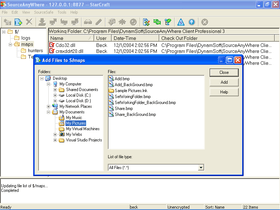
by Dynamsoft Corporation - Product Type: Application
SourceAnywhere for VSS by Dynamsoft Corporation
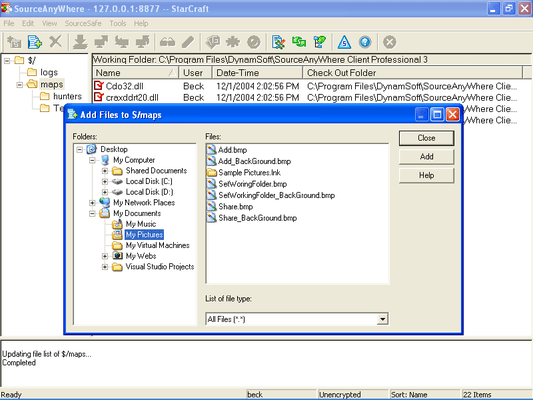
Remote access to Visual SourceSafe. SourceAnywhere for VSS is a VSS remote/internet access (SourceSafe remote/internet access) tool. It enables you to use Visual SourceSafe easily over the Internet. With SourceAnywhere for VSS, you can perform most SourceSafe operations from any remote location using standard TCP/IP access. SourceAnywhere for VSS consists of a Server and a Client. They can communicate over any standard TCP/IP connection, including a PPP connection over a modem, an ISDN line, or an Ethernet connection on the same LAN as the Server.

Overview
Dynamsoft SourceAnywhere for VSS is a Visual SourceSafe remote access solution. As an add-on tool for SourceSafe, SourceAnywhere for VSS provides fast, reliable and secure remote access for users of SourceSafe 6.0 and SourceSafe 2005.
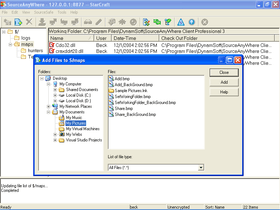
High performance SourceSafe remote/internet access
Cache server for your geographically distributed teams
Java client for cross platform
128-bit SSL and Blowfish encryption
Password policy to protect your password
Eclipse plug-in
Visual Studio plug-in
Macromedia Dreamweaver and Flash plug-in
Delta transfer technology for high performance
Java SDK and COM SDK
Features and Benefits
High Performance Remote Access
100+ times faster than VSS Explorer over internet
Delta Transfer (Professional Edition Only)
The data is compressed (zipped) before transfer
Compresses multiple files together to increase compression ratio and reduce the number of file transfer round trip
Multi-thread file transfer
Distributed Development
Client-server architecture. No file system access overheads
Cache Server. Requested server files are cached on the cache server to speed client access
Time zone offset management
Secure
128-bit Blowfish is used to protect your data
SSL is used to protect your data
Password Policy. Protect your password with strong passwords
Client-server architecture. No need to expose the VSS database folder
Cross Platform (Professional Edition Only)
With a Java client, in addition to the standard Windows client, SourceAnywhere for VSS can run on any platform where a Java Virtual Machine can run, including Windows, Linux, Mac, Solaris, AIX, HP-UX, SCO Unix, FreeBSD and so on.
IDE Integration
Supports Eclipse IDE Integration/Eclipse plug-in (Professional Edition Only)
Supports Macromedia DreamWeaver MX 2004 Integration (Professional Edition Only)
Supports Microsoft Visual Studio 6.0 and .NET IDE Integration
Supports IBM Rational Rapid Developer 2003 IDE Integration
Supports Borland Delphi 8.0 IDE Integration
Supports the Microsoft Source Code Control Interface (MSSCCI)
Can be integrated with any MSSCCI compatible IDEs
SDK
Includes a Java SDK to build your own cross-platform SourceSafe remote access solution (Professional Edition Only)
Includes a COM SDK to build your own SourceSafe remote access solution on Windows platform (Professional Edition Only)
Operations
Almost all the VSS operations are supported: add files, create project, delete files or projects, get latest version, check out, check in, undo check out, move, deploy, share, branch, view, edit, show difference, set working folder, refresh file list, refresh project tree, stop current operation, show properties, show history, label, pin, rename, change password, cloak project, status search and wildcard search.
Broad Connectivity
Supports all TCP/IP connections, such as PPP, ISDN, ADSL, etc.
Supports SOCKS 4, SOCKS 5 and HTTP proxies
Miscellaneous Features
Similar GUI as Visual Source Safe VSS
Easy to deploy. Built from scratch in C++, SourceAnyWhere for VSS needs no additional components or frameworks
All operations are cancelable. The application never hangs up due to a network problem
Easy server management with the included Server Manager and Cache Server Manager
For information on the differences between the Standard and Professional version please see the "SourceAnyWhere for VSS Standard and Professional Feature Matrix" in the "Evals & Downloads" section.
What’s new in SourceAnywhere for VSS V5.3?
Added Remote Version, Local Version, Status columns in the file list. Providing version number and one-word descriptions of the state (Normal, Edited, Renegade, Needs Merge, Old, Missing, Unknown, More Recent) of the working copy of the file
MergeHero interface greatly improved. More like Microsoft Visual SourceSafe Visual Merge. More friendly to use
Added Changed Text marker to designate conflicting changes to a file
Added optional way to apply/remove changes - by left clicking the button-like lines in the top two panes
For File Diff, added display options for Ignore Tabstop and Ignore White Space
For Project Diff, added display options for showing only the files exist in the left/right side, or only the identical/different ones in both places. (Show Left-Only Files, Show Right-Only Files, Show Identical Files, Show Different Files)
Added support for Eclipse 3.3.x
What’s new in SourceAnywhere for VSS V5.2?
Performance greatly improved. For most operations, SourceAnywhere for VSS 5.2 can be 1.2 to 5 times faster than SourceAnywhere for VSS 5.1. For large teams or teams with big projects, the performance improvement can be greater
Performance improved when SAW server is installed on a different machine from the one hosting VSS database
SSL root certificate is exported and imported automatically when using SSL encryption
Precision of "Server-based time zone offset" option improved to minutes
Added "Remember Password" option in Login dialog box of GUI Client
Added "Select all" and "Invert selection" option on the Edit menu of GUI client
Added a prompt dialog box when adding file(s) without working folder
Added "Comment" column on both File History and Project History dialog boxes
Allows users to view an old file version directly by adding "View" option in File History dialog box
Added "Refresh Option" for the View tab of Windows Client options
Added Status Search functionality in Java GUI client
Added "Get" button in project history dialog box of Java GUI client
Added View tab for Java Client options
Allows users to check in items using drag and drop from working folder to Dynamsoft SourceAnywhere for VSS Java Explorer
Added Share command in Visual Studio IDE
Macromedia studio plug-in improved to support Dreamweaver CS3
Allows users to get project from Dynamsoft SourceAnywhere for VSS in Eclipse Plug-in
Added "Dir" and "GetProjectHistory" commands in Command Line Client
Allows users to get the Check Out Status of a file by using GetFileInfo command in Command Line Client
Added Support page in both Server Manager and Cache Server Manager, which helps users maximize the benefits in Dynamsoft SourceAnywhere for VSS
Removed login dialogue box of Server Manager, which allows administrators to access Server Manager more conveniently
Pin process optimized. There is no need to configure "Project with Pinned" in Server Manager anymore
What’s new in V5.1?
Product name changed from "SourceAnyWhere" to "SourceAnywhere for VSS"
Added Project With Pinned functionality in Server Manager. Excluding pinned status of VSS files in SourceAnywhere for VSS will mainly improve the performance of refreshing
Added "Duration for file status caching" option for the General tab of Visual Studio IDE Client options. Checking this option may improve the performance of IDE client when there are a large number of files in the solution
Removed limit on the maximum number of files that can be cached on the cache server. And added File Cache option in the Memory Cache Settings window of Cache Server Manager, which allows you to specify the amount of disk space used for file cache
Capabilities of Get operation improved when getting a project through labels.
Fixed bug where memory leak occurs when using SSL encryption
Fixed bug where the IDE client hangs when opening "Pending Checkins" tab in Visual Studio 2005 IDE
Fixed bug where source control bindings of projects may lose when re-opening a solution that contains multiple projects in Visual Studio IDE Client
What's new in SourceAnywhere for VSS V5.0?
Cache Server Added
SourceAnywhere for VSS provides a caching solution for distributed development. SourceAnywhere for VSS Cache Server is an optional caching system. It is used to cache copies of requested server files, thereby improving the clients responsiveness.
Eclipse Plug-in Added
SourceAnyWhere for VSS Eclipse plug-in is a team provider plug-in for the Eclipse IDE. It enables users to perform SourceAnywhere for VSS operations within the Eclipse IDE.
Macromedia Studio Plug-in Added
SourceAnyWhere Macromedia Studio plug-in enables Dreamweaver or Flash users to access their VSS databases remotely.
COM SDK & Java SDK Added
The Software Development Kit (SDK) for SourceAnywhere for VSS enables developers to integrate SourceAnywhere for VSS functionality with their projects. COM SDK and Java SDK are provided.
128-bit SSL Encryption Added
Besides the Blowfish encryption, SourceAnywhere for VSS 5.0 adds support for 128-bit SSL encryption to protect the data.
Server Manager Improvements
Added support for SSL encryption. SSL configuration items are added to the general settings section
Memory Cache Setting section added. Allows you to configure the amount of virtual memory to use for server caching
RootC Asection added. Allows you to generate, view, export and delete Root CA certificate
User Access section added. Allows you to specify which users are allowed to access a VSS database
User's access to databases can now be specified in Add Users dialog box
Fixed bug where the Rename action is not logged completely in the log file
Windows GUI Client Improvements
Improved performance when refreshing file list
Refresh File List and Refresh Project Tree commands combine to be Refresh command
Added support for SSL encryption
Added socket validity check functionality. Enables SourceAnywhere for VSS to check if the socket is valid before network operation
Added Wildcard Search functionality. Allows you to search for files with a specific filename
Arguments can be specified for the external editor application in View Or Edit dialog box
Label command is available from the menu by right-clicking a file or a project
Changed behavior of Show File Difference dialog. If the local copy of the file exists in the working folder, the Show File Difference dialog will be skipped when you compare the master copy of the file to the local copy
Deleted (but not permanently destroyed) items in a project can now be retrieved through history of the project
Status Windows can now display 50000 lines of messages
Search results of Status Search can now be exported
Added help link for checking in an unchanged file and undoing checkout of a file
Fixed bug where performing Get Latest Version on a checked-out file in Search Result dialog box will enable the Check Out button
Fixed bug where when searching checkout status of a project that contains two subprojects with the same length of project name, only Undo Check Out and Check In commands are available on the checked-out files of these two subprojects in Search Results dialog box
Fixed bug where "Version not found" error occurs when getting or checking out a file when VSS 8.0 is used as the backend of SourceAnyWhere for VSS
Fixed bug where some special folders can not be shared
Fixed bug where the error information is incorrect when the length of the label name exceeds the maximum allowed length
Fixed bug where no error is returned when inputting an integer that is not in the base range of the integer type in the 'Include Past' item of History Option dialog box
Command Line Client Improvements
Added EOL parameter for AddFolder and AddFile commands
Added comment parameter for CheckoutProject and CheckoutFile commands
Added support for SSL encryption
Java Client Improvements
Added merge functionality when checking in, checking out or getting files
Added Wildcard Search functionality
Added support for drag-and-drop
Added support for SSL encryption
Added tooltip for commands on the toolbar
Added SAW editor for editing and viewing files
Added keyboard shortcuts for commands under the main menu
Added keyboard shortcuts for some dialog boxes
Added creating new folders functionality when setting working folder of a project
Added Java-style Help file
Improved performance when refreshing file list and refreshing project tree
Improved Java GUI
The sizes and positions of several windows can now be saved. These windows are Add dialog box, Share dialog box and the main window
The path of the selected folder can now be saved when adding a file or folder
The widths of the columns in the file list can now be remembered
The file lists can now be sorted on columns
Arguments can be now specified for the external editor application in View Or Edit dialog box
Fixed bug where the error information is incorrect when the length of the label name exceeds the maximum allowed length
Visual Studio IDE Client Improvements
Added support for the latest MSSCCI
Can now switch freely between VSS and SourceAnywhere for VSS for Web projects in Visual Studio.NET
MergeHero Improvements
Can now merge line differences between two versions in a three-way merge
PartNumbers: PC-515626-143881 515626-143881 PC-515626-143906 515626-143906 PC-515626-143883 515626-143883 PC-515626-143885 515626-143885 PC-515626-143887 515626-143887 PC-515626-143889 515626-143889 PC-515626-143891 515626-143891 PC-515626-143893 515626-143893 PC-515626-143905 515626-143905 PC-515626-143895 515626-143895 PC-515626-143897 515626-143897 PC-515626-143899 515626-143899 PC-515626-143901 515626-143901 PC-515626-143903 515626-143903
Publisher PartNumbers: DSSAWP5001 DSSAWP5005 DSSAWP5010 DSSAWP5025 DSSAWP5050 DSSAWP5100 DSSAWS5001 DSSAWS5005 DSSAWS5010 DSSAWS5025 DSSAWS5050 DSSAWS5100 DSSAWVUPP DSSAWVUSS
PurchaseOptions: SourceAnywhere for VSS V5.3.2 - Standard Edition 1 User License , SourceAnywhere for VSS V5.3.2 - Standard Edition 1 User License upgrade from any previous version of SourceAnyWhere for VSS Standard Edition , SourceAnywhere for VSS V5.3.2 - Standard Edition 5 Users License , SourceAnywhere for VSS V5.3.2 - Standard Edition 10 Users License , SourceAnywhere for VSS V5.3.2 - Standard Edition 25 Users License , SourceAnywhere for VSS V5.3.2 - Standard Edition 50 Users License , SourceAnywhere for VSS V5.3.2 - Standard Edition 100 Users License , SourceAnywhere for VSS V5.3.2 - Professional Edition 1 User License , SourceAnywhere for VSS V5.3.2 - Professional Edition 1 User License upgrade from any previous version of SourceAnyWhere for VSS Professional Edition , SourceAnywhere for VSS V5.3.2 - Professional Edition 5 Users License , SourceAnywhere for VSS V5.3.2 - Professional Edition 10 Users License , SourceAnywhere for VSS V5.3.2 - Professional Edition 25 Users License , SourceAnywhere for VSS V5.3.2 - Professional Edition 50 Users License , SourceAnywhere for VSS V5.3.2 - Professional Edition 100 Users License
Resources: Read the SourceAnywhere for VSS help file, Browse SourceAnywhere for VSS Standard and Professional Feature Matrix, Read the Dynamsoft License Agreement, Download the SourceAnywhere for VSS Professional V5.3.2 evaluation on to your computer - Expires After 30 Days, Download the SourceAnywhere for VSS Standard V5.3.2 evaluation on to your computer - Expires After 30 Days
Operating System for Deployment: Windows XP, Windows Server 2003, Windows ME, Windows 2000, Windows 98, Windows NT 4.0, Windows 95
Architecture of Product: 16Bit, 32Bit
Product Type: Application
Compatible Containers: Eclipse V3.3, Eclipse V3.1.2
Product Class: Component Development Tools
Search Items: New Product Jan 05, New Product Apr 05
Keywords: Version versioning versions Professional Partner saw anywhere any where Source code VSS repository remote for